
An organizer wants to publish photographs from a community repair fair. Some attendees chose not to appear in promotional material, and volunteers need a reliable way to locate possible faces for manual review. Google Cloud Vision Face Detection can provide face annotations and location information. It does not recognize specific individuals, does not verify consent and does not determine whether publication is appropriate. Every scene here is an original illustrative drawing, not a real attendee photograph or face-detection result.
Start with a publication policy, not an API response
Before uploading photos for analysis, document who may access the originals, whether event notices covered photography, how requests to opt out are handled and how long image copies will be retained. Faces are only one privacy concern: a name badge, school logo, address or distinctive object may also identify an attendee. A detected rectangle cannot authorize the use of a portrait.
Separate internal documentation images from promotional images. Photos taken for safety records or volunteer operations may have different purposes and permissions from social-media posts. If the organization lacks a suitable basis for processing a picture, do not upload it merely to see whether the detector finds anything. Use an approved privacy workflow for your jurisdiction and event context.
Understand the Face Detection output
Google Cloud Vision can detect multiple faces and return face-related attributes and coordinates. Its documentation explicitly states that identifying specific individuals by facial recognition is not supported. A face annotation is therefore an approximate region for review, not an identity match, attendance record or evidence that a person agreed to be photographed.

Annotations can include bounding information and likelihood-style attributes. Avoid treating an expression label as a reliable conclusion about mood, age, permission or wellbeing. Even a geometrically convincing face box can point to a poster, painting or a person visible on a monitor. Preserve the original image and compare annotated regions visually before taking editorial action.
Build a minimal, permission-aware review queue
Select only photographs that the publication team is allowed to process. Assign a local image ID, original capture date, proposed use and consent-review status. Send images to an authorized processing environment under documented storage and retention controls. Avoid placing full names or private event attendee lists in the model request. If automated annotation fails, record a manual-review status.
The workflow diagram shows four stages: select permitted images, locate face regions, mark crops needing attention, and make a separate publishing decision. The arrows are not a claim that the service performs consent analysis. They show where a person must inspect the scene, consult available permissions and decide whether to crop, obscure, seek agreement or withhold an image.
Review faces the model might not locate
Face detectors may miss profiles, small faces, occluded people or reflections. A publication reviewer should scan the entire frame at useful zoom, not only the rectangles returned by an API. Check mirrors, background screens and faces on printed materials. A photograph with no detected faces is not necessarily free of personal information.
Keep a consistent human review checklist for both annotated and unannotated images. If faces are tiny in a wide group scene, zoom and decide whether someone could still be recognizable. Do not infer that absence of a box means absence of a person. Avoid using automatically assigned labels to decide who should be visible in a community gallery.
Compare detection, editorial review and final use
The comparison illustration distinguishes an untouched group scene, face regions identified for inspection and an editorial decision in which one section is withheld. The visuals are schematic, not a sample of measured API predictions. A crop or blur may be an appropriate response in some contexts, but neither operation substitutes for a documented permission review or removes every identifying detail.
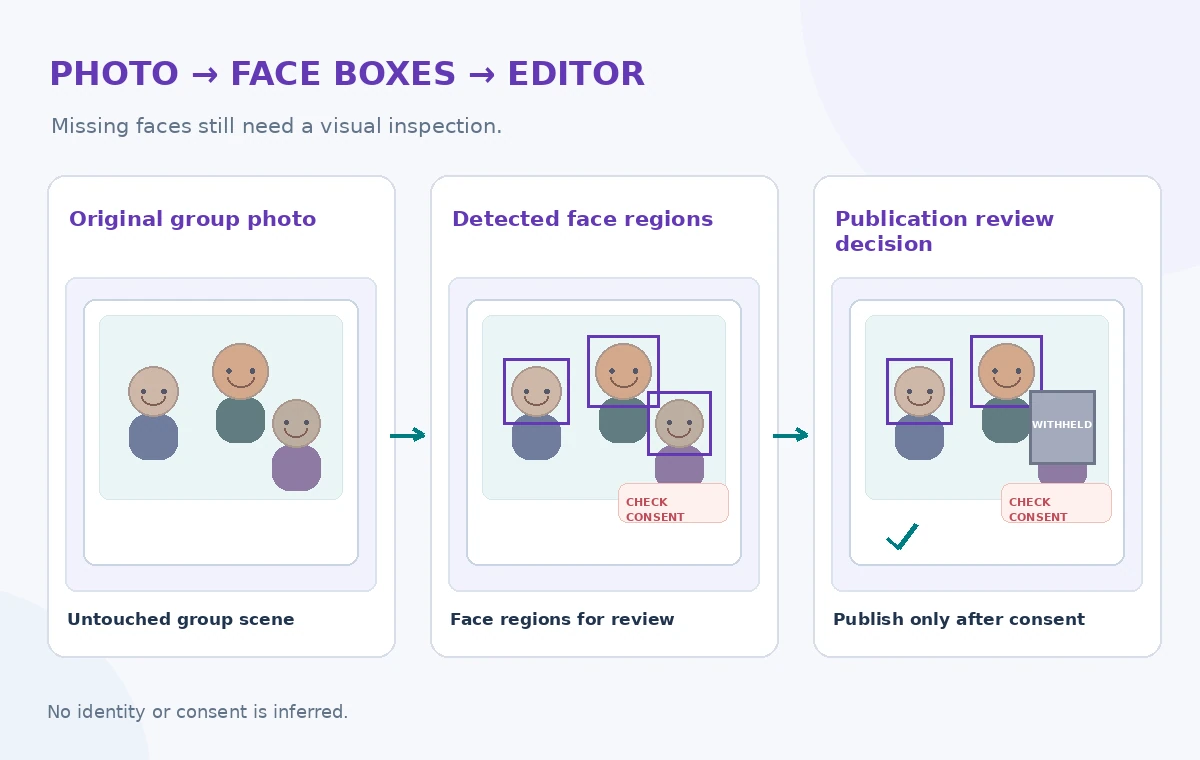
For a hypothetical repair-fair image, a review could find a visible badge beside a face. Cropping the face while leaving the badge may be inadequate; conversely, blurring everyone may remove the event’s useful context. Give staff alternatives such as selecting a different approved image. Retain the original only under authorized access and storage rules.
Keep identity and emotion out of the decision engine
Do not build a pipeline that tries to associate Vision face annotations with a volunteer roster or social-media photos. This would create an identification workflow the Face Detection feature does not provide and may raise separate privacy obligations. Likewise, do not score a community participant as happy, angry or willing based on expression-related annotations.
The safe purpose here is locating regions that may warrant closer inspection. If a publication needs named attribution, collect it through an independent, consent-based process and verify spelling directly. Staff should be able to correct or withdraw a caption without making claims about a model’s ability to recognize a particular person.
Check the final crop at publication dimensions
The verification diagram calls out the source permission, missed faces, identity assumptions and final crop. Review the picture after resizing for a website thumbnail, event poster and social post. A face that looks obscured at full resolution could remain identifiable through a badge or a distinctive piece of clothing in a smaller crop.
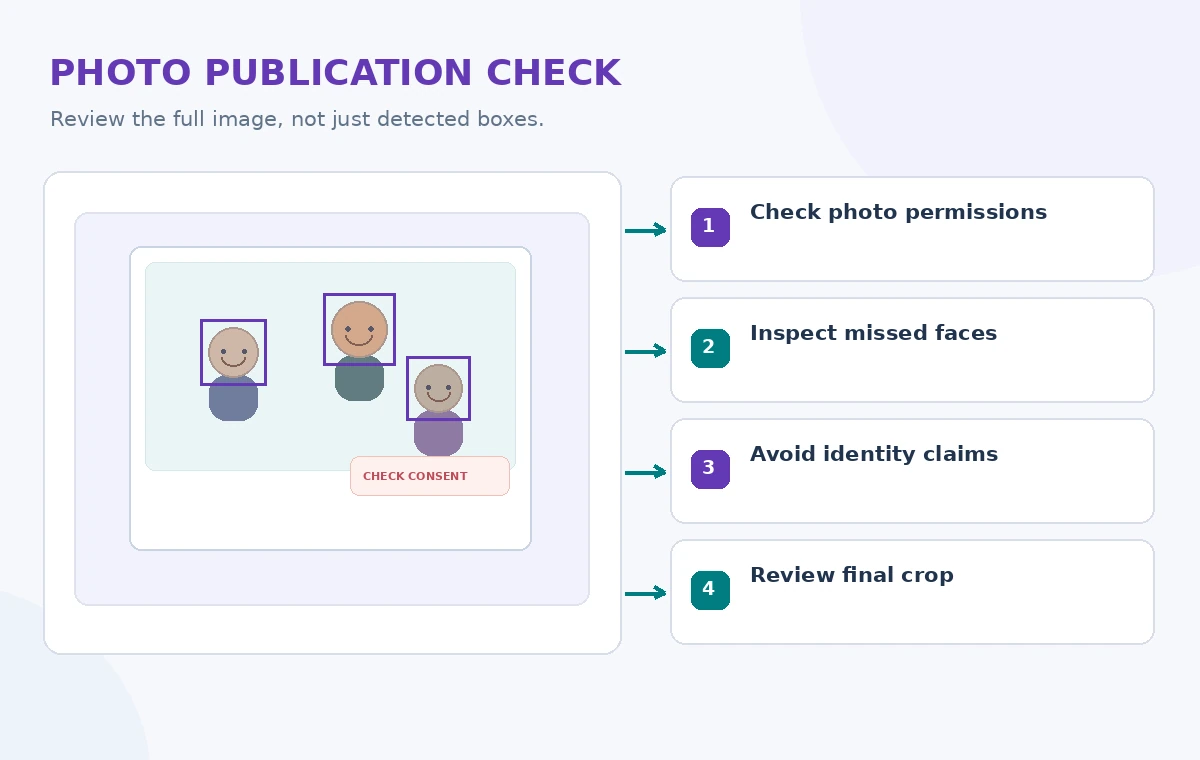
Inspect captions and metadata along with pixels. Filenames, alt text, EXIF details and page copy can disclose information that the visible image does not. Write accessible alt text about the authorized public scene, not an inferred identity or emotion. Provide a clear, accessible takedown or correction contact for community members.
Publish only after an independent human sign-off
Record the reviewer, image version, approved use and any edit made for privacy. A later request to remove a photo should be traceable to all live placements. Restrict model outputs and temporary derivatives to personnel who need them. Recheck provider processing terms and regional options before operational deployment.
Face Detection can help a small team focus its visual review, but it is not a substitute for consent, privacy analysis or editorial judgment. A robust gallery system is the one that can explain why each image was published and can correct a mistake quickly, even if the API never found a face at all.
How We Research
For this November 2026 editorial review, we consulted official vendor references: Google Cloud Vision detect faces; Google Cloud Vision feature overview; Google Vision annotation reference. We mapped feature scope, input/output rules, failure conditions and developer guidance to a hypothetical community-service scenario. We did not execute paid API requests, upload private personal data, publish a real catalog record, run a security attack or measure service performance. The diagrams show original educational examples, not screenshots or recorded service results. Documentation, permissions, regional availability and service configuration can change; verify them in the current official reference and an authorized test before deployment.
Frequently Asked Questions
No. The Google Cloud Face Detection feature does not support identifying specific individuals.
No. Location annotations have no authority to grant or verify a person’s publishing permission.
No. The detector can miss faces, and other visual or metadata details may identify people.
Do not rely on expression-related annotations to make claims about feelings or willingness to be photographed.
No. The graphics are original conceptual illustrations, not uploaded attendee photographs or measured results.