
A children’s museum wants a short animated robot mascot to introduce a new exhibit. The character points right toward the discovery room while a real wall sign directs visitors the same way. If motion transfer turns the gesture into a leftward point, the animation becomes misleading even if the character looks charming. Directional accuracy, not smoothness alone, determines whether the clip is suitable.
Runway documents Kling 3.0 Motion Control as a third-party model that animates a still character image from a reference performance video. This is a hypothetical storyboard, not an account test or a measurement of generated motion accuracy. The article explains how to prepare inputs, control orientation, and review a specific hand gesture before a wayfinding video is approved.
Prepare a character and a performance with the same task
Kling 3.0 Motion Control takes a performance video and a character image, with an optional text prompt. The video supplies motion, while the image supplies the character’s appearance. Design a simple fictional robot guide with a visible right arm, clear hand shape, and consistent body proportions. Keep any directional signage as a separately verified design element.
For the motion reference, film a consenting performer in one uninterrupted shot, facing a similar direction to the illustrated mascot. Show the entire pointing arm, the beginning of the gesture, and the return to a neutral pose. Avoid clipped elbows or camera cuts that leave the system to infer which limb moved.
Choose input framing that preserves the hand
Runway recommends a clear upper- or full-body subject with minimal occlusion, stable camera movement, and proportions close to the character image. A photo cropped above the wrist makes a precise pointing action difficult to inspect. Use a well-lit reference with enough space around the hand and the final direction.
If the original performance includes a real person’s face or voice, document permission to use that performance and control access to the file. A fictional illustrated robot does not automatically erase rights or privacy questions about the movement reference. Avoid using a recognizable third party without authorization.
Understand orientation before generation
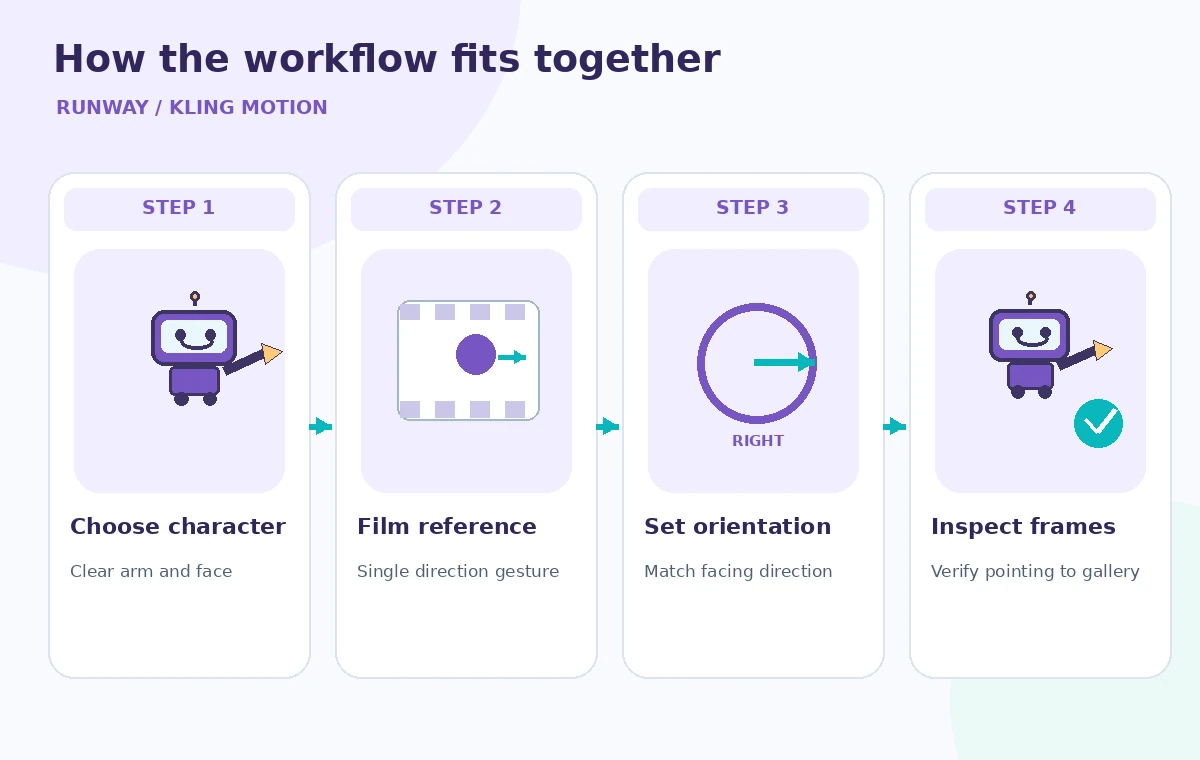
Runway describes separate Character Orientation choices: Video follows the performance’s facing direction, while Image emphasizes the still character’s original facing. The options have different duration ceilings. An animator should choose intentionally, record the choice in production notes, and avoid treating a setting as a guaranteed fix for mirrored motion.
For a character already drawn looking right, compare the setting choices in a short draft before planning a longer edit. A camera-facing performer and a profile mascot can create ambiguous movement. Keep the right-pointing requirement as a separately inspectable acceptance criterion rather than a vague prompt like “make it friendly.”
Respect documented limits and audio controls
The official Kling 3.0 Motion Control guide lists an image-orientation duration limit of ten seconds and a video-orientation limit of thirty seconds, with output and input requirements that may change. It documents 720p or 1080p choices, minimum clip duration, and supported aspect ratios. Check the current Runway interface before committing to a specific production length or credit budget.
Original Sound determines whether the performance audio is retained. For a museum wayfinding clip, decide whether spoken directions should be recorded separately and checked by a staff member. The visual pointing gesture and the spoken “turn right” must agree; matching one channel is not enough if the other contradicts it.
Build a test with one unambiguous gesture
The process graphic depicts a single action: neutral pose, right arm extension, rightward point, and return. Start with that short sequence instead of a full montage. A short, continuous performance makes it easier to determine whether the key gesture was transferred in the right direction or unintentionally mirrored.
If text prompting is used, reserve it for background or camera movement the source video does not capture, as Runway suggests. Do not assume that adding “point right” to a prompt will override inconsistent reference motion. The best input is a reference that physically performs the intended action.
Inspect incorrect and corrected direction visually
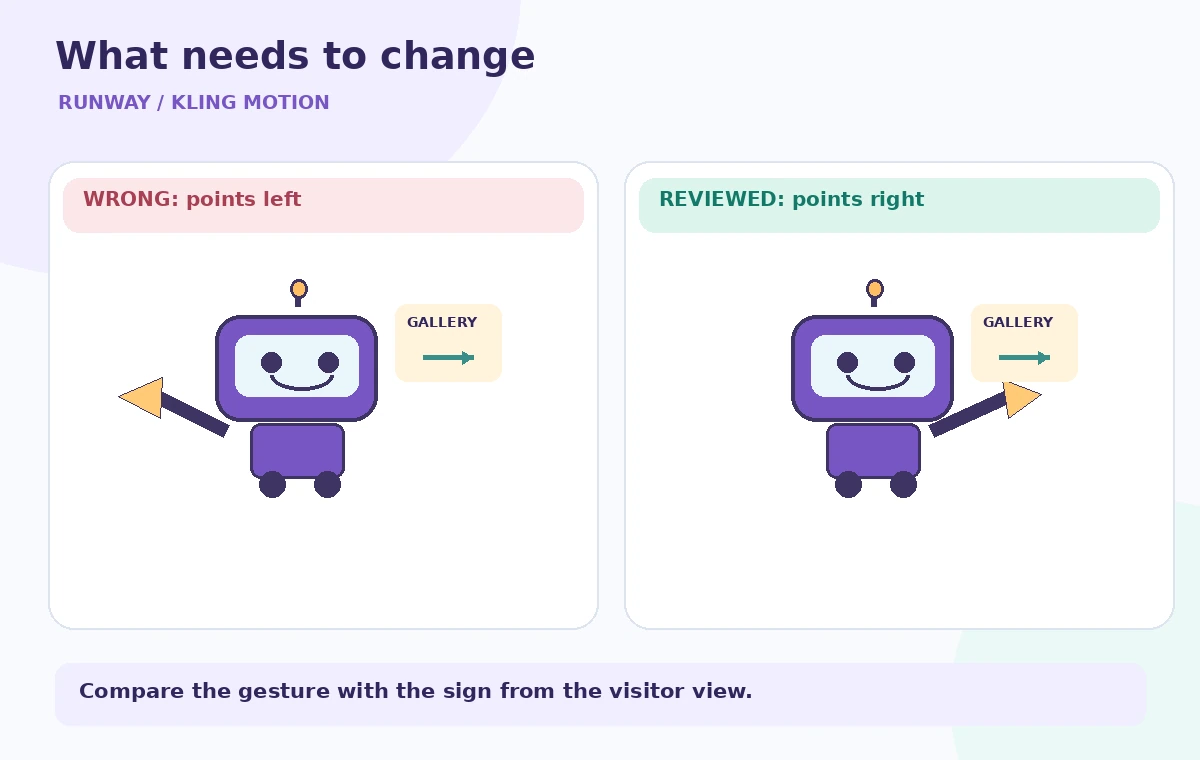
In the instructional comparison, the bad mascot points left while the room sign indicates right. In the acceptable conceptual frame, the arm, gaze, arrow, and caption all refer to the same rightward direction. These are illustrations for checking, not exported frames from Runway or proof of a successful generation.
Watch the clip at normal speed, then inspect the key frames around maximum arm extension. A brief arm crossover, shifted thumb, or mirrored symbol may only be visible during a few frames. Check whether directional signs contain legible real text; AI-generated lettering must not be trusted as an authoritative wayfinding label.
Add a human signoff on the actual route
Walk the real museum route with the approved signage plan. The robot’s rightward direction is correct only relative to the camera location and the visitor’s viewpoint. A right-facing screen installed on the opposite wall may need different staging. A video can be anatomically plausible while still sending a visitor toward the wrong doorway.
Ask accessibility reviewers whether the clip also conveys the information without relying solely on gestures or color. Include a readable caption, maintain visual contrast, and provide an equivalent spoken or static route description as appropriate. Do not let a generated animation overrule current on-site accessibility directions.
Archive the evidence and disclose synthetic footage
Keep the source character image, permission record for the performance, generation settings, selected review frames, and final approved clip together. If the room layout changes, flag the robot clip for re-review; a once-accurate pointing gesture can become inaccurate after a corridor closes.
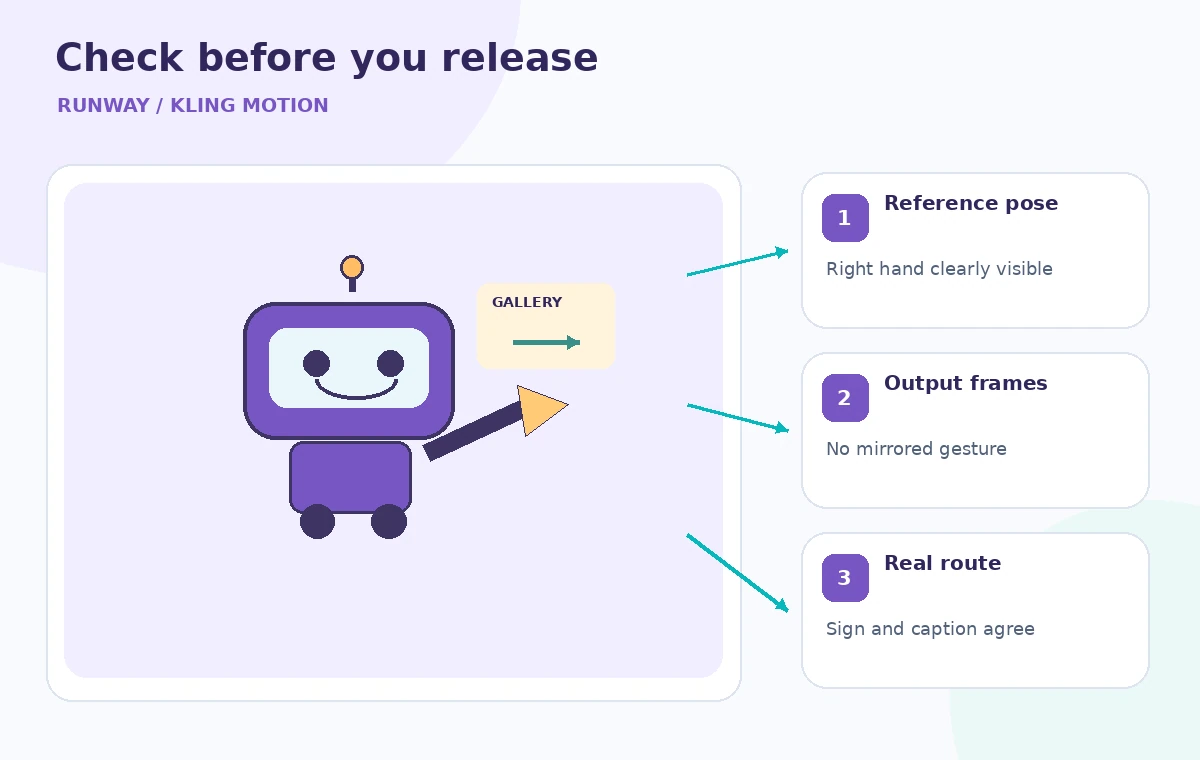
The last checklist marks the performer’s pose, the delivered frames, and the real sign. Treat synthetic media as a designed illustration and identify it appropriately in the project’s editorial context. Publish only after a human verifies the real route. This workflow prioritizes truthful guidance over impressive motion transfer.
How We Research
For this November 5, 2026 editorial review, we read the following official primary references: Runway Help: Kling 3.0 Motion Control, Runway Help: Performance Capture with Act-Two (comparison of approach). We compared documented entry points, input requirements, privacy or permission boundaries, and stated limitations against the hypothetical workflow above. We did not access a paid account, process real museum or customer data, generate output in the named service, or measure error rates. Diagrams show designed teaching examples, not product screenshots or empirical performance. Availability and UI details should be rechecked in the actual account before operational use.
Frequently Asked Questions
No. The documented workflow requires a performance video and a character image; a text prompt is optional and mainly supplements elements not provided by the inputs.
Differences between the performer’s orientation, the character image, and the generation settings can make direction ambiguous. Review actual frames; do not assume the settings guarantee a correct rightward point.
The official guide says Image orientation follows the character image more closely and supports clips up to ten seconds, while Video orientation follows performance orientation and supports up to thirty seconds.
Obtain appropriate permission and check usage rights before using identifiable performance footage. A fictional animated character does not by itself provide consent for the source performer.
Compare the hand, gaze, arrow, captions, and spoken directions with the actual installed route from the viewer’s perspective. Provide accessible static alternatives where necessary.