
A community arts venue receives two tickets that mention the east entrance ramp. Last month a faded wayfinding sign was replaced. Today someone reports that boxes physically block the ramp. An AI triage system might flag the new ticket as a duplicate of the old one because both mention the same ramp, even though the earlier issue is closed and the new hazard is unresolved.
Linear Triage Intelligence evaluates incoming issues and suggests properties, assignments, and likely related issues; admins can configure whether suggestions are shown or applied automatically on eligible Business and Enterprise workspaces. The example and pictures here are instructional fiction, not a record of a Linear workspace or a reported accessibility incident.
Write the ticket so the actual condition is identifiable
Create a new report that distinguishes location, time, observable condition, and impact. “East ramp blocked by stacked boxes at 3 p.m.” carries different meaning than “ramp sign difficult to read last month.” Include the reporter’s approved evidence and any safe temporary mitigation already authorized. Avoid copying a sensitive individual’s account into a broadly visible project when a restricted channel is more appropriate.
Set the status to needing review until an authorized person verifies the condition. A model cannot independently confirm that an obstruction has been removed, that a ramp meets legal standards, or that facilities completed a repair. Keep incident severity decisions within the organization’s defined response protocol.
Confirm plan and administrative permissions
Linear documents Triage Intelligence on Business and Enterprise plans. Admins enable the capability from AI settings, with team-level controls available for scope and suggested properties. Before adoption, verify the current workspace plan, data handling agreement, and organization policy governing potentially sensitive accessibility reports.
Quick suggestions visible on other plans are not necessarily the same capability as Triage Intelligence’s deeper analysis. Write the actual feature name and scope in the configuration record. Do not claim that a team received an automated recommendation if the workspace has only a basic search-based suggestion.
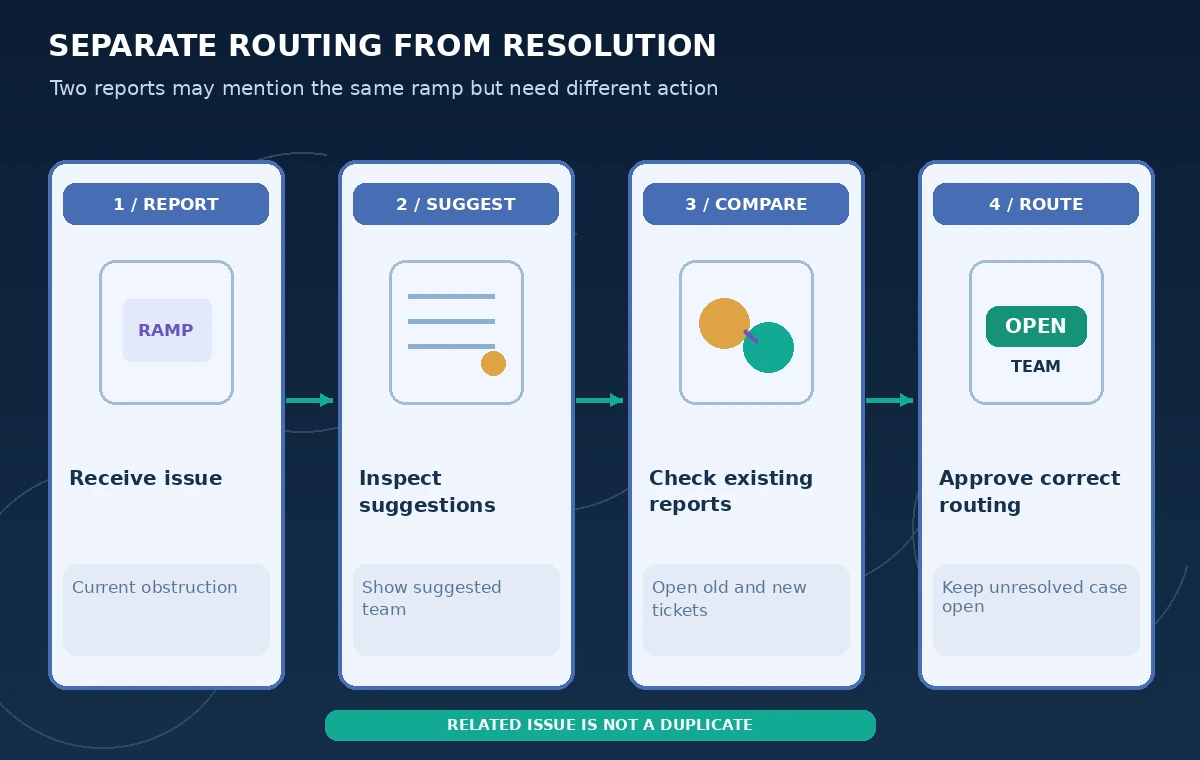
Start with visible suggestions rather than auto-apply
In the initial pilot, make team, project, assignee, and label suggestions visible for a human reviewer. Linear supports show, hide, or auto-apply behaviors, but automation can transfer an urgent complaint into the wrong queue before anyone reads it. Where safety-sensitive categories exist, set a documented rule requiring manual confirmation or prompt escalation.
Keep a list of known high-risk examples: physical access blocked, website accessibility bug, expired permit, and resolved signage issue. These share vocabulary but not operational ownership. A suggestion based on historical labels is a lead worth examining, not an independent verification of present conditions.
Inspect duplicate and related issue suggestions
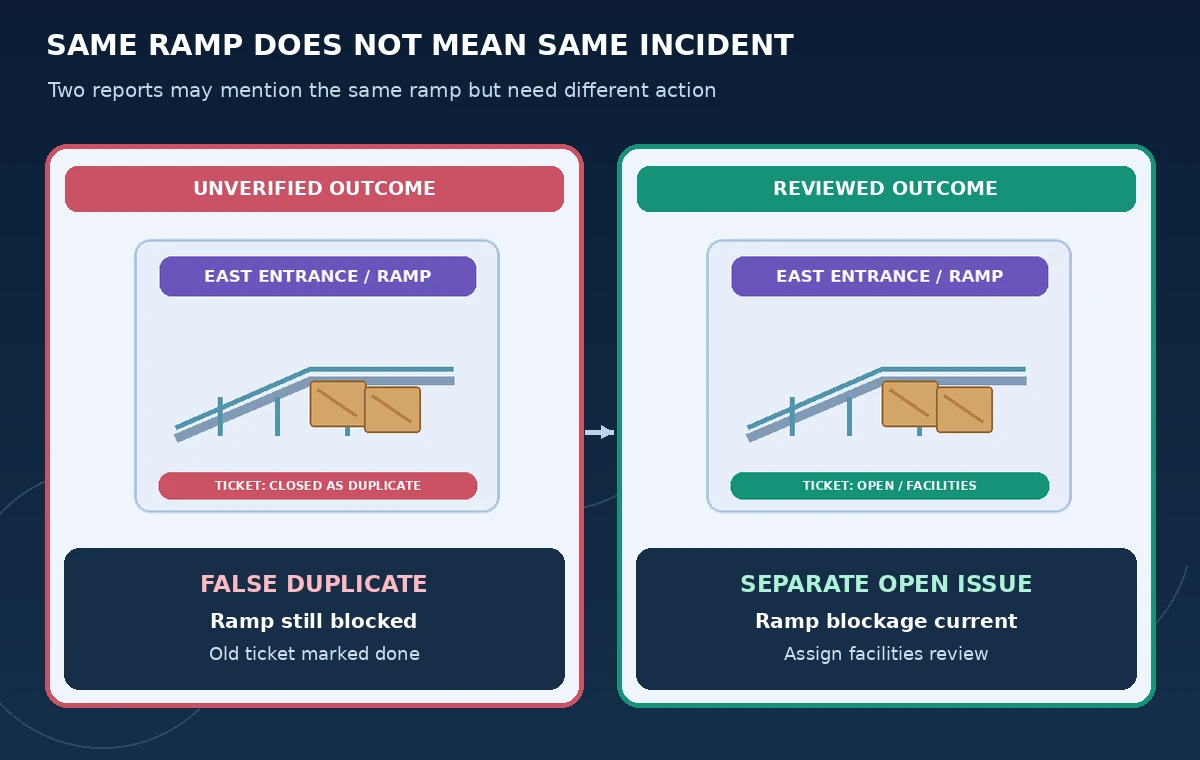
Triage Intelligence can surface semantic relationships and potential duplicates. Open the suggested existing issue before accepting the relation. Compare date, physical location, observed condition, completion evidence, and current status. The old sign ticket may be related background but cannot close today’s blocked-ramp incident.
Use a related-issue link for shared context without merging two distinct obligations. A duplicate should only be accepted when both tickets describe the same outstanding occurrence. The side-by-side diagram contrasts an incorrectly closed report with a reviewed, separately open facilities ticket. It is deliberately not a screenshot or vendor accuracy measurement.
Match ownership to the action, not to words alone
Facilities may own a physical obstruction, while the web team owns a map label. Compare the suggested assignee with the actual duty roster and current escalation arrangement. A historical assignee may be unavailable or lack authority to address the condition. Ask a responsible coordinator to approve the team and owner before notifying a visitor that action has been taken.
If triage rules and AI suggestions both operate, audit their order and possible conflicts. Linear documents condition-based rules separate from the intelligence layer. Record whether a deterministic rule moved the issue before a model suggested a team; otherwise a reviewer may attribute a routing decision to the wrong mechanism.
Test misrouting before enabling automatic properties
Build a small fixture set of past sanitized tickets including false duplicates, genuine duplicates, and ambiguous multi-team reports. Record the expected team and the evidence required for a resolution status. For each example, collect the AI suggestion and the reviewer’s accepted or rejected decision. Do not publish a numerical accuracy score without running a defined evaluation and counting the results.
The practical quality threshold is behavior around dangerous false positives. A suggestion that incorrectly links a current barrier to a closed historical case deserves investigation even if many ordinary tasks were correctly categorized. Keep automatic closing actions separate from suggested labels, and never design a shortcut that conflates routing with fixing the reported hazard.
Add guidance only when a pattern is clear
Linear allows additional guidance at workspace and team levels to improve suggestion behavior. Use this reactively when a recurring misclassification pattern appears, such as physical-access reports being routed to web content. Keep guidance concise and check for conflicts between local team rules and global instructions.
Re-run the same fixture examples after changing guidance. Note which examples improved, regressed, or remained ambiguous. If the behavior cannot be made dependable for a category, disable auto-apply and keep manual review. An AI feature is optional; timely, correct handling of an accessible entrance is not.
Close tickets only with source-backed verification
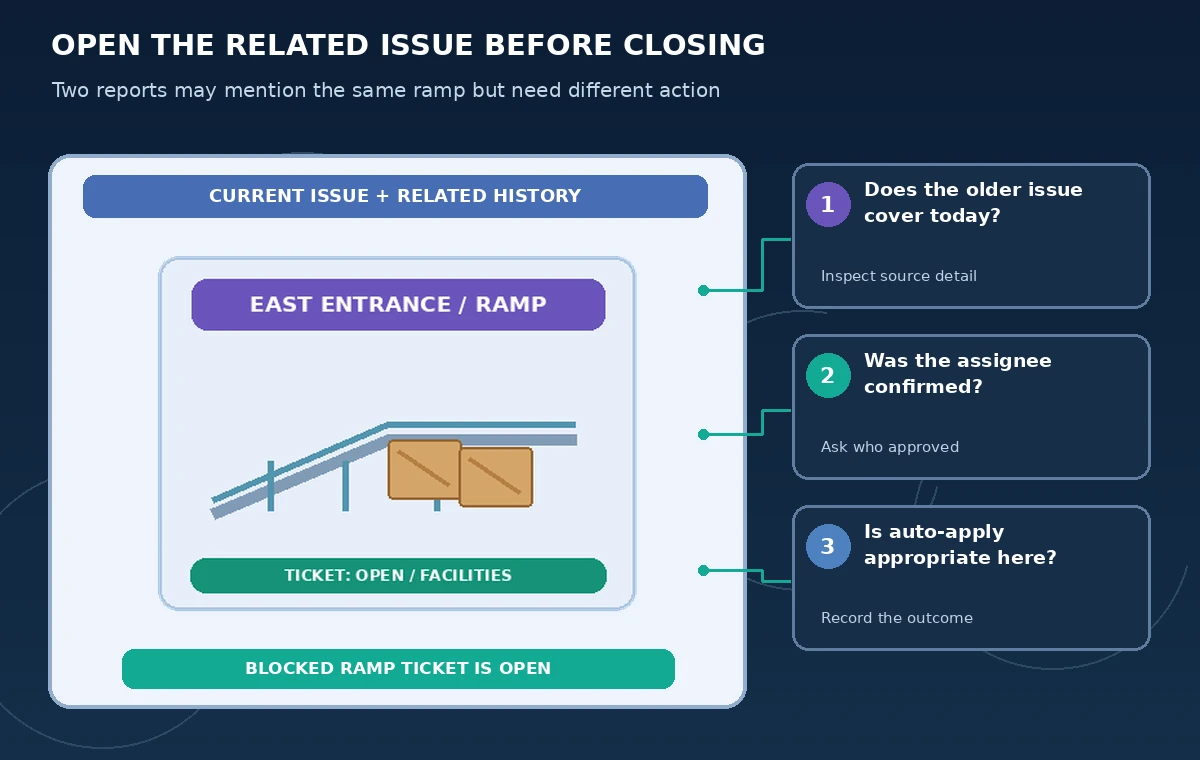
A routed issue is not a resolved issue. Record an on-site check, approved work order, or other organization-defined proof before closing a physical-access report. If the issue concerns a temporary obstruction, note the removal time and who confirmed the route was open. Do not place a green completed badge in a public status page solely because the AI suggestion found a similar closed ticket.
Keep a narrow audit trail: original report, suggested relationship, decision to accept or reject it, responsible team, and verification of completion. Periodically review misrouted cases to improve settings and staff training. The release checklist diagram tells editors which supporting record to inspect at each handoff.
How We Research
For our November 5, 2026 documentation review we consulted these named official sources: Linear Docs: Triage Intelligence; Linear Docs: Triage; Linear: AI workflows and issue management. We mapped documented access requirements and controls to a narrowly defined hypothetical workflow, then wrote independent checkpoints that an editor or operator could verify. We did not purchase a subscription, use customer records, operate equipment, execute production code, or measure tool accuracy for this article. The diagrams are original instructional artwork, not screenshots or proof of vendor output. Plans, availability, legal rules, and organizational procedures may change; confirm current documentation and authorized source materials before acting.
Frequently Asked Questions
Its documentation describes suggestions and configurable property behavior, not proof that a suggested duplicate is resolved; review relationships and statuses.
Linear lists Business and Enterprise workspaces for this feature; verify current plan and admin availability.
Yes, Linear documents show, hide, and auto-apply settings for supported property types; use human review for risky categories.
No. Compare current observed condition and dates before declaring a duplicate or a resolution.
No. The tickets and comparison drawings are fictional and were not imported into Linear.