
An arts center is producing a short, fictional puppet demonstration about pausing a craft activity when a supervisor raises one open hand. The actor’s driving video contains the gesture, but the generated puppet moment looks attractive while its hand slips out of frame. In a decorative clip that might be harmless; in a training sequence it makes a key instruction disappear. A reliable workflow must check the signal rather than assume motion transfer preserved it.
Runway documents Act-Two as a performance-capture feature that transfers expressions, motion, speech, and—under supported conditions—gestures from a driving video to a character reference. This guide treats the puppet, actor, and sequence as a hypothetical original production. It does not claim a measured Act-Two output or guarantee gesture fidelity.
Separate the performance from the character design
Plan two inputs before generating: a driving video of a performer acting the scene, and a character image or video of the fictional puppet. Runway describes different behavior for these choices. With a character image, the tool can transfer bodily gestures when the gesture option is used. With character video input, gesture control is not available in the same way; the source character video influences body and camera motion.
Choose a wholly original character with no real person’s likeness or copyrighted character design borrowed without permission. Obtain the performer’s informed agreement to use their performance as a driving input, and follow local recording and privacy requirements. Keep the driving footage as an authorized production asset, not as a public record of a real safety demonstration.
Storyboard the stop cue before generating
Create a four-beat sequence: puppet explains the activity, actor lifts an open palm, the craft motion stops, and a static card repeats the pause instruction. Specify how long the raised palm must remain visible, its orientation, and where it should appear inside both landscape and vertical crops. A prompt about an energetic puppet is not specific enough to preserve an instructional gesture.
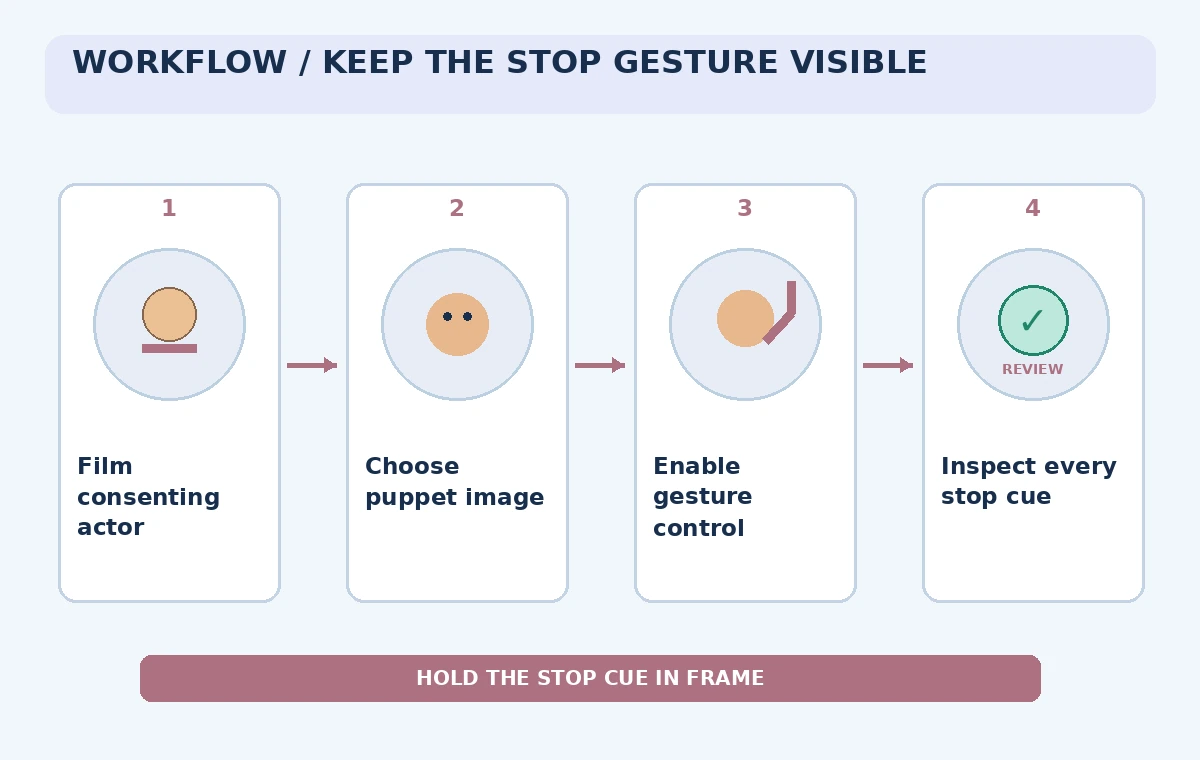
Draw an overlay safe zone around the puppet’s upper body and hands. The signal must not be covered by subtitles, decorative effects, or an automatic crop. Consider supporting the gesture with a clear on-screen word or icon that is added during editing rather than depending solely on the generated hand pose. The visual diagram is schematic, not a mock screenshot of Runway.
Record a clean driving performance
Runway recommends one subject, a visible face, lighting that separates facial features, no interrupted cuts, and hands within frame when working with gestures. Ask the performer to start from a pose similar to the puppet image. Move slowly through the open-palm stop signal and hold it long enough for an editor to inspect the moment across multiple frames.
Keep music and background props from distracting from the signal. Record an original script in a quiet environment where the speech is intelligible; if using separate narration, plan for sync checks afterward. The performance should demonstrate the agreed training concept, not imply that a specific safety authority endorsed the produced animation.
Choose image input when bodily gestures matter
Within the Runway app, provide the driving video and a suitable character reference. For a single-character illustration, inspect whether gesture control is available and enabled. Runway explains that character images can use gesture control, while character videos behave differently. Do not assume a toggle will appear with every reference type, plan, account, or release.
Keep the puppet’s hands visible in the source artwork and match its initial body pose to the driving performance. A puppet illustration whose arms are cropped off gives the model little clear visual structure for a raised hand. Test the output at the intended final aspect ratio, because a gesture that is visible on a wide preview may disappear when adapted for a phone.
Compare the generated gesture with the cue sheet
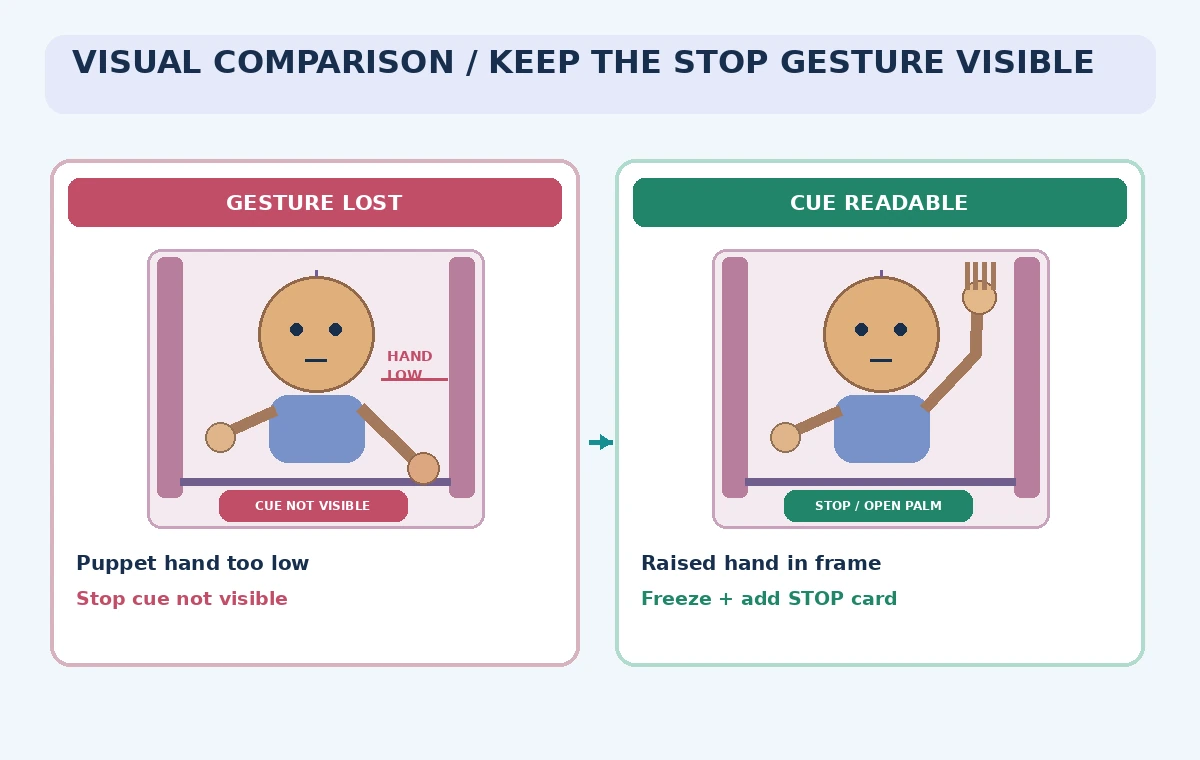
Place the driving footage and generated result side by side at the stop moment. Check the timing, palm shape, direction of movement, and whether the character’s hand is distinguishable from clothing or background shapes. If the raised hand is missing, do not label the clip complete solely because the face and dialogue look convincing.
The comparison illustration shows an invented failure with an off-frame hand and a reviewable frame with the signal visible. These are not Runway outputs or a claim about typical error rates. When the tool cannot preserve the signal reliably, use a still frame, editorial cut, or separate instructional title card rather than repeatedly presenting a distorted gesture as correct.
Review visual continuity and accessibility
Check every frame around the gesture for extra fingers, abrupt limb changes, facial drift, and a background movement that competes with the cue. Runway notes that adding environmental motion can occur with image-based character inputs. That effect may be attractive, but it can also shift visual attention away from the hand. Keep the message legible without relying on subtle motion alone.
Add captions from an approved script and check timing against narration. Use a clear static visual explanation of what the stop cue means for viewers who cannot follow the spoken instruction or infer the puppet’s pose. Do not claim a generated animation is a faithful recording of a real classroom moment; identify it as synthetic instructional content where appropriate.
Set a human approval boundary
Have a reviewer who knows the actual curriculum inspect the cut and sign off on wording, timing, and movement. The approval should cover whether students are likely to understand when to stop, not whether the output feels charming. If the activity involves real physical hazards, the responsible instructor must supply the approved procedure and decide whether an animation is a suitable teaching medium.
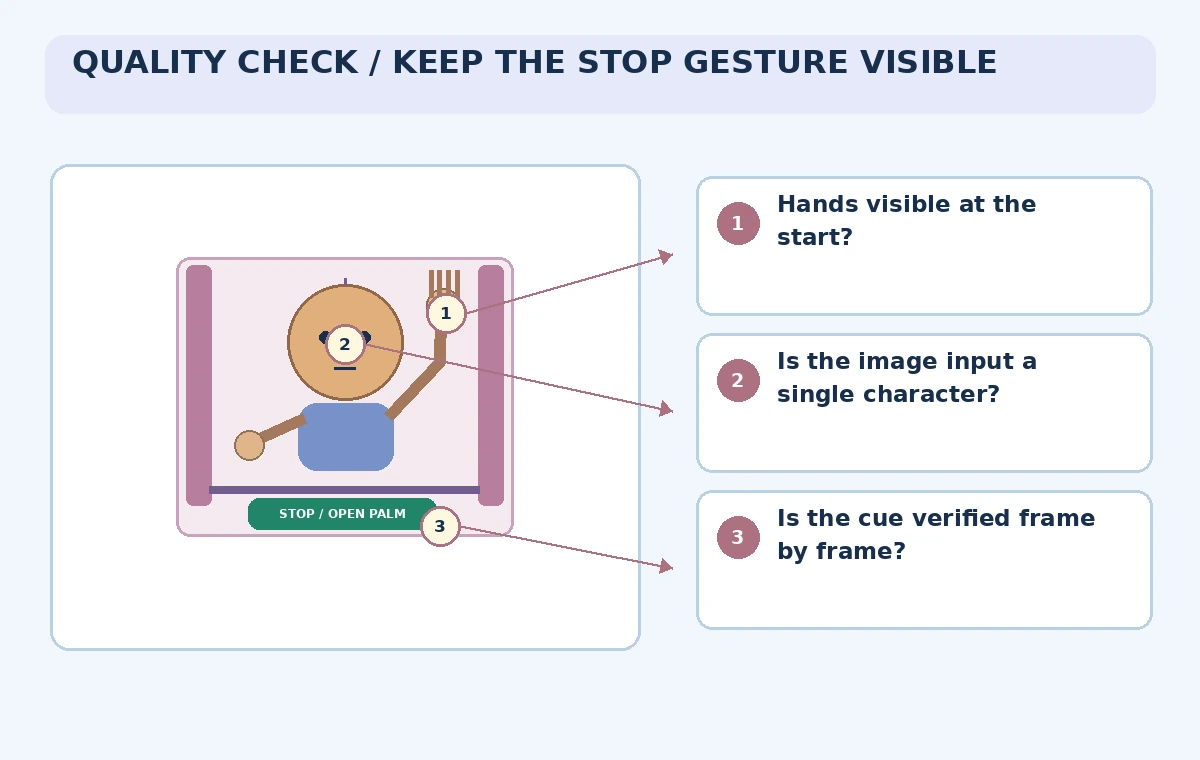
The verification scheme marks the start pose, signal timing, framing, caption placement, and the handoff to a nonanimated safety reminder. Do not base an operational safety decision on generative video alone. A training film can introduce a concept, but a person supervising the activity remains responsible for the real task and any mandated instruction.
Preserve sources and production revisions
Archive the authorized performer recording, the original puppet illustration, the approved cue sheet, the version of each generated clip, and the final edit notes. Label what was synthesized. When a later change alters the puppet’s gesture, compare it against the same cue sheet rather than relying on a reviewer’s memory of the previous export.
Runway’s supported plans, duration, and controls may change. Consult its current Act-Two help article before budgeting or promising a format. This example gives an editorial testing procedure, not a benchmark of model accuracy or a representation that the feature has been tested for instructional safety. A missing hand signal is a reason to revise or reject the cut.
How We Research
For our November 5, 2026 documentation review we consulted the following named official sources: Runway Help: Performance Capture with Act-Two; Runway Help Center. We checked vendor-described product capabilities and known limitations, then mapped them to a fictional use case with explicit human review gates. We did not sign in to a paid account, send real documents or audio, run generated code, publish a live website, generate video through the vendor, or measure results. All images are original explanatory art rather than screenshots or test evidence. Version availability, access conditions, data terms, and legal responsibilities can change; check the latest official docs and your organization’s approved source materials before using this workflow.
Frequently Asked Questions
The documented workflow uses a driving performance video plus a character image or character video.
No. Runway describes gesture control for image-based character inputs, with different behavior for character video inputs.
No guarantee is given. Compare the output frame by frame with the approved cue sheet.
Use properly authorized performances and likenesses, and comply with applicable permissions and laws.
No. The puppet scenario and every visual are hypothetical instructional illustrations.