
A fictional town of Pinebrook is preparing a one-minute recycling explainer. A generic video generator might show glass jars entering a blue curbside bin while the narration says that all glass is collected weekly. In the town’s imaginary rules, glass must be dropped at a separate depot. Visually plausible footage would then deliver the wrong instruction, even though the editing and narration are polished.
Invideo’s official product materials describe prompt-based AI video creation, script generation, visuals, voiceover, subtitles, and natural-language editing. Its help also describes credit-based AI usage and free manual editing options. This guide uses a fictional municipality so no generated image, bin color, or collection practice is presented as an actual public-service rule.
Start with the municipality’s actual source, not an AI script
Before requesting a video, assemble an approved list of materials for the target location and exact program date: curbside, depot-only, prohibited, and special handling. Record a URL for each rule and identify who is authorized to approve public instructions. Real municipal programs vary by jurisdiction and can change across calendar years.
For the fictional Pinebrook scenario, paper and clean cans are curbside while glass belongs at a depot. That invented split exists only to demonstrate the review. Never apply it to a real neighborhood. Keep an explicit line in the brief that all bins, signage, collection frequencies, and facility names must be checked against the correct local program.
Write a constrained prompt for an editable storyboard
Invideo says its AI video workflow can generate scripts and visuals from a prompt, with settings such as length, platform, and voiceover. Ask for a 60-second educational draft that includes four beats: introduction, curbside items, depot-only items, and where viewers should verify current rules.
Do not let the assistant invent a phone number or municipal logo. Write the permitted claims into the prompt and label every unknown detail as a placeholder pending review. If the product proposes a catchy statistic about landfill savings, omit it unless the team has an authoritative source for that jurisdiction and period.
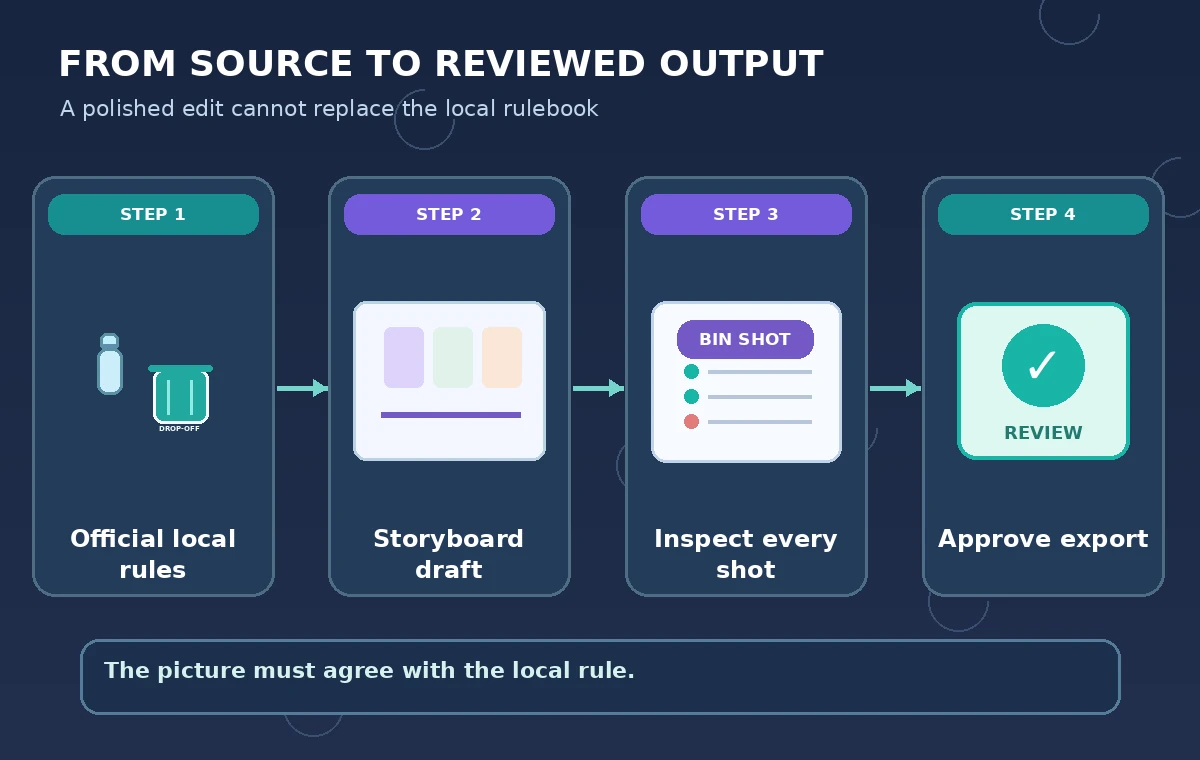
Keep visual examples tied to the narration
For every storyboard beat, create a three-column review sheet: spoken claim, pictured action, and authoritative source. A caption reading “glass: depot only” is not enough if the video simultaneously shows a bottle entering a curbside bin. Viewers may remember the action more strongly than the fine print.
Inspect generated and stock footage for logos, signage, and bins that resemble real local assets. Use simple illustrations or close shots with neutral labels when footage might falsely imply a town-specific policy. Label any synthetic reconstruction appropriately if the audience could mistake it for a filmed demonstration of a real facility.
Use text prompts for revisions, then preview the actual cut
Invideo describes using an editing command interface to change scenes, scripts, and voiceover. Request a targeted correction, such as “replace the glass curbside shot with a neutral depot illustration, and keep the narration consistent.” Do not assume the change updated captions, B-roll, and voiceover together.
After each correction, scrub the sequence and record the timestamp of every compliance-sensitive instruction. Verify that the removed shot is truly gone and that the replacement does not introduce a new error. This is a human editorial procedure; the article does not claim to have operated invideo or observed a specific failure.
Compare attractive misinformation with a verified story beat
The unsafe comparison in the original illustration shows a glass jar dropped into a curbside bin under a generic “recycle here” message. The guarded comparison shows a separate depot drop-off card and an instruction to check the local program. Both are fictional instructional drawings, not screenshots or product results.
Even when a rule is true, avoid implying it is universal. Collection systems can distinguish broken glass, batteries, food-soiled materials, and deposit containers in different ways. Narrow claims to their cited jurisdiction, and place a visible source or update date on the final informational page that accompanies the video.

Proof captions, pronunciation, and accessibility
Read each subtitle against the approved script, paying special attention to negative instructions: “Do not place glass in the bin” must not become “Place glass in the bin.” Check that labels are legible at mobile viewing size and are not communicated by color alone. Keep a text version of the rules linked near the player.
If a voice says the name of a depot or program, verify spelling and pronunciation with an authorized local source. Music and quick transitions should not mask crucial instructions. Avoid calling a video accessible simply because it has auto-generated captions; review timing, accuracy, contrast, and reading order.
Review credits, rights, and the publication boundary
Invideo help describes credits for AI assistance and generated media, while manual timeline editing does not necessarily consume credits. Models and plans can change, so review current limits in the active account before deciding how many iterations a project can afford. Do not place a fixed cost estimate in a public tutorial without current account-level confirmation.
Check rights to any uploaded logos, voice samples, photos, or stock elements. Keep AI-generated depictions distinct from documentary evidence. Publish only after a municipal communications reviewer checks the claims and provides an approved source link; the software’s Export button is a technical action, not a policy approval.

Explain the hypothetical method and required field checks
This tutorial uses invideo’s official feature and billing descriptions to design a workflow. We did not generate a video, measure script accuracy, test export formats, or review any real municipal policy. The town, bins, and rules are deliberately fabricated. The illustrations show what a reviewer should contrast, not a benchmark of AI generation.
To apply the method, start with one real current municipality, obtain written source approval, build a shot-by-shot compliance checklist, and test the exported video with that checklist. If the local rule changes, revise the video and its date immediately rather than letting an old explainer circulate as evergreen guidance.
How We Research
On November 5, 2026, we consulted Invideo: AI Video Generator and Invideo Help: Plans and credits. We matched named functionality, settings, and restrictions to this narrow hypothetical scenario, compared factual claims with vendor text, and reviewed each diagram for misleading certainty. We did not access a paid vendor account, test accuracy, collect real interviews or records, or independently measure outcomes. Interface, pricing and availability can change; verify the current documentation before following these steps.
Frequently Asked Questions
Invideo describes prompt-based generation of scripts, visuals, narration, and subtitles, subject to the current product workflow.
No. Verify accepted materials and collection methods using the local program’s current official instructions.
Because the pictured action may contradict it. Review narration, images, text, and timing together.
No. Invideo help distinguishes free manual timeline editing from credit-consuming AI assistance; current plan terms can vary.
No. Pinebrook and its collection rules are fictional teaching examples, and no video was rendered for this guide.