
A cheerful hand-drawn badge can be perfect for a volunteer event but painfully blurry on a large sign. Recraft’s vectorization tool offers a route from a raster image to an SVG, where shapes can scale without pixelated edges. Imagine a fictional garden club badge with a watering can, leaf and sun. The illustrations below deliberately show a simplified drawing and possible vector cleanup decisions; they are not a vectorization performed through Recraft. The goal is not to promise flawless conversion. It is to help a designer spot where a closed contour, a tiny gap or an accidental hole could become a visible production defect.
Choose artwork that is worth vectorizing
Start with a high-contrast sketch or a clean flattened graphic rather than a photograph containing thousands of tonal details. Recraft describes vectorizing JPEG, PNG and WebP images, with a web upload flow for simple conversions. For our hypothetical badge, keep the watering can silhouette, one leaf and one sun separated by visible space. If the original drawing includes texture, decide whether that texture is essential or whether a clean two-color symbol will communicate the idea better. Secure the right to reuse the illustration; uploading a found logo does not grant ownership. Preserve the raster source in case the vector interpretation changes a recognizable shape.
Prepare the source before uploading
Crop excessive empty margins, inspect whether the white paper background is intentional, and remove stray dust marks from a copy if you have the right to edit it. Make sure the spout and handle are not merged by compression artifacts. Transparent backgrounds can help, but check how the specific import handles alpha rather than assuming every white pixel will disappear. Recraft’s converter page lists JPEG, JPG, PNG and WebP as accepted inputs; its separate product pages describe different upload limits, so verify the current interface instead of repeating a universal size promise. Use ordinary RGB artwork for the first pass, and retain a reference image of the intended shape.

Vectorize in Recraft and inspect the first result
Upload the graphic to Recraft’s converter or import it onto a Recraft Studio canvas and choose the Vectorize image action. Follow the current interface to create editable vector artwork, then compare the output at the same viewing size as the source. Recraft advertises SVG export and a vector editor where anchor points, curves and colors can be refined. The first diagram shows an input sketch, traced contour and editable path points as different stages, not product screenshots. If the traced can loses its spout or the sun fuses with a leaf, pause before exporting. More anchors are not automatically more accurate.
Look for missing holes and doubled outlines
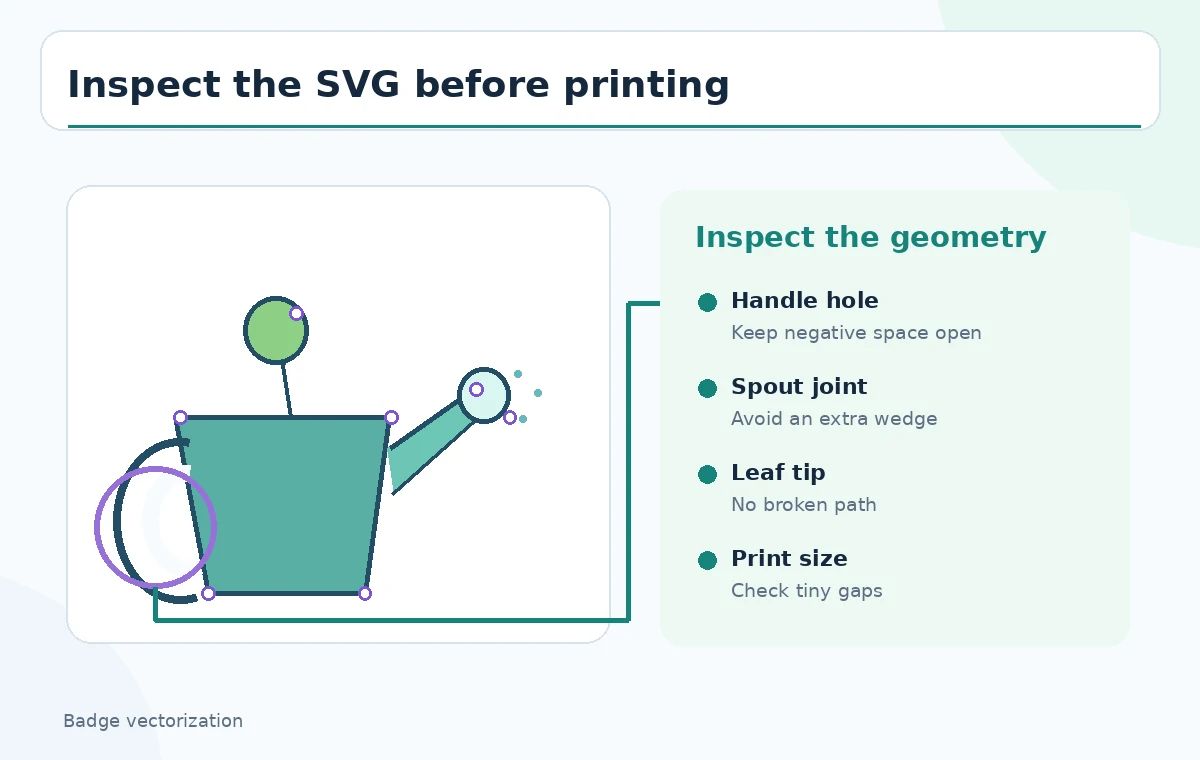
A watering-can handle should have a clearly preserved interior opening. A traced shape can accidentally fill that negative space, create a detached fragment or produce two adjacent contours that look thick at small sizes. Use the before-and-after comparison to inspect the handle hole, leaf tip and sun rays. Work with the SVG editor or another capable vector tool to simplify overlapping geometry, but keep the original intended silhouette as the standard. It is often better to redraw one primitive curve manually than to accept a complicated automatically traced knot of points. Avoid calling a cleaned outline identical unless its shape has been visually checked.

Protect small features at the intended print size
Zooming in can make a tiny ray or vein look elegant when that detail will vanish on a sticker. View the SVG at approximately its planned output size and compare with an enlarged version. Adjust minimum stroke widths, gaps and corner roundness for the printer’s process rather than inventing precise universal specifications. A two-color badge needs contrast even on an imperfect surface; convert the design to grayscale for a quick hierarchy review. If the symbol will be cut as a decal, ask the fabricator whether compound paths and enclosed holes are acceptable. The third diagram marks practical risk regions on the watering can itself.
Edit curves deliberately instead of accepting clutter
Recraft’s vector editing material describes double-clicking shapes, moving anchor points, changing curves and recoloring individual elements. Use those controls to repair a genuinely wrong contour, not to polish every node by habit. For a round handle, inspect the inner and outer boundaries together. For the leaf, keep a recognizable tip and an uncluttered stem. Make only one category of correction at a time and compare again with the raster reference. If a shape contains an inexplicable stack of overlapping paths, delete or rebuild it rather than hiding it beneath another fill. The SVG should remain understandable to the next designer.
Verify colors and transparency separately
Vector artwork that looks fine on a white canvas can disappear when placed over a darker background. Test the badge on white, dark and mid-tone backgrounds and ensure a transparent area has not become a white rectangle. Check each element’s fill and stroke as separate properties. The site describes editing color per shape, but an automatically converted illustration may still need human color normalization. If the print job requires Pantone, CMYK, or spot-color cutting instructions, ask the production supplier for requirements. SVG is a scalable graphics format, not a guarantee of a particular ink appearance or an approved commercial license.
Export SVG and inspect the file after leaving the editor
Export the finished artwork as SVG and reopen it in a second compatible viewer or design application. Confirm that holes remain holes, curves did not turn into unexpected sharp corners, and nothing is clipped outside the viewBox. Make an accessible PNG preview for reviewers who cannot open vectors, but keep the vector as the editable source. Inspect the same badge on a mock sign and small label before sending files to a vendor. Recraft’s pages describe downloadable SVG output; they do not guarantee every print workflow will interpret your file identically. An extra view in a second renderer is a practical defense.
Keep rights and provenance attached to the asset
Recraft’s published pages distinguish free and paid usage rights; do not infer commercial permission from the presence of an Export button. Check the current plan terms and your rights in the input sketch before distributing the badge for merchandise. Preserve the original drawing, versioned SVG, proof image and any designer approval. If the badge represents an organization, confirm that the words and imagery match its actual identity. Avoid adding invented registration marks or certification seals. The example artwork is fictional and illustrates shape QA only. A successful vectorization is one that survives honest inspection and the intended production workflow, not merely one that looks smooth in a preview.
How We Research
We used Recraft’s image vectorizer instructions for import, vectorization and SVG export, its PNG-to-SVG overview for editable vector paths, and its vector editor reference for path-level refinement. We did not upload a drawing, execute Recraft, examine a real SVG or verify a specific plan’s licensing. All badge views are original conceptual teaching illustrations; actual print output requires an independent production proof.
Frequently Asked Questions
No. Vectorizing converts shapes into editable paths; unclear outlines and accidental gaps can still require manual corrections.
Recraft describes SVG output after vectorization, subject to the current product interface and applicable account conditions.
Small enclosed holes, such as a handle opening, and narrow gaps can fill in or become separate fragments during tracing.
No. Check path construction, legibility at print size, background transparency and the supplier’s production specifications.
Only if you have rights to the source artwork and the applicable Recraft usage rights permit your intended commercial use.