
DeviantArt DreamUp combines AI image generation with a community publishing system, so an image that looks ready to share still needs an attribution and disclosure review. DeviantArt says DreamUp submissions receive AI-art labeling; its special rules also address prompts that reference real artists. This guide follows a fictional woodland illustration from brief to public submission, showing what belongs in the prompt record, what a visible post should say, and where a rights claim needs caution. It does not establish individual copyright ownership.
Write a creative brief you can safely disclose
Before generation, specify the intended subject, color palette, composition, and use. For example: “small watercolor-style woodland scene, amber leaves, one deer, soft morning light, no lettering, no logo.” Keep the description of the scene separate from references to named artists, identifiable people, or copyrighted characters. This makes the resulting post easier to explain and reduces the need for later permissions research.
DeviantArt’s DreamUp prompt help recommends starting with a subject, specifying genre, and refining mood. A concise brief also provides a useful review checklist: deer count, lighting direction, empty text space, and coherence of the background. Treat each image as a draft. Do not describe a fictional scene as a documentary photograph or invent a story about where it was captured.
Check DreamUp generation and draft visibility
DreamUp’s official visibility guidance explains that generations can be kept in Sta.sh before being submitted publicly as deviations. Draft storage and public publishing are distinct states. Do not assume a generated image is a public community post merely because it has been created. Review how sharing and privacy options currently appear in your account before uploading confidential reference art.
Retain the prompt and a copy of the selected draft; never upload another person’s private face or commissioned image without permission. A draft folder is not the same as a zero-retention, offline processing guarantee. If the material contains customer files or confidential sketches, seek approval for sending them to a hosted service before starting. The safest reference is one you created and can document.
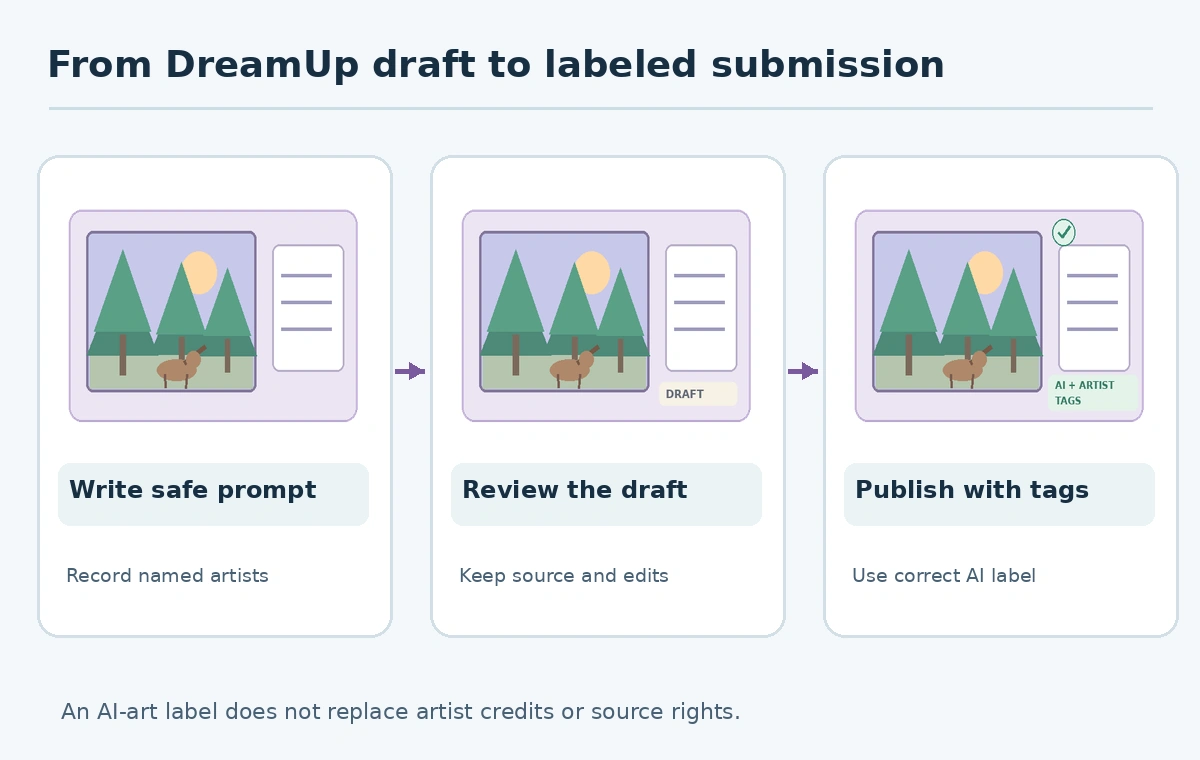
Understand automatic AI labeling versus your own disclosure
DeviantArt states in its AI tagging answer that published DreamUp images are labeled and tagged #AIart. That handles a platform-level disclosure, but it does not explain the full artistic process to a reader. If you later paint over the result, composite photos, or typeset a headline, describe those steps rather than letting a single badge imply the image was untouched.
A helpful caption might say, “AI-generated woodland concept; final colors adjusted manually; uploaded to DreamUp with the required platform label.” Do not claim the model output was entirely hand-drawn. Conversely, do not represent a human artist’s commissioned work as model-generated when it was not. The purpose of disclosure is to give viewers reliable context for how the artifact was made.
Record required artist references before posting
DeviantArt’s artist-reference policy says artists mentioned as style references in a DreamUp prompt must be tagged when the generated work is submitted. An artist-name prompt can therefore create a concrete attribution requirement, not just an aesthetic preference. Keep a separate list of names used in the prompt and check the final tags before posting.
For the example woodland image, avoid artist-name prompting entirely unless it is necessary and appropriate. Describe a medium, brush behavior, color scheme, and composition rather than saying the image is “in the exact style of” a living creator. Artist credit and underlying use rights are separate: tagging a name does not grant a license to copy a protected work or remove the need for a permission review.

Separate platform permissions from copyright ownership
The DreamUp rights FAQ explicitly warns that copyright for AI-generated art changes across jurisdictions and recommends appropriate legal advice. Do not turn that conditional language into “you own everything you generated.” Rights can also be affected by a source image, logo, likeness, licensed stock assets, or manually added design elements.
Before a paid commission or merchandise release, prepare a simple rights ledger: source sketches owned by whom, any artist named in prompt, third-party photos uploaded, any purchased decorative elements, and the intended distribution. Publish only claims you can support with the applicable terms. Do not imply that DreamUp’s platform-level AI label provides a commercial license or protects against resemblance to existing characters.

Create an auditable publishing checklist
Review the selected artwork at native resolution for malformed anatomy, unreadable symbols, accidental embedded text, and misleading context. Read the prompt one final time to identify required tags. Check the post title, description, AI label, visibility, and any third-party rights; then save the approved public URL and a screenshot or record of the submission settings. This is a publishing log, not an assertion that a platform moderator has vetted the work.
If you revise the art after publication, record what changed and whether the caption needs updating. Maintain two copies: the raw generated asset and the edited release version. When cross-posting to another site, do not assume that DeviantArt’s automatic #AIart tag travels with the file. Apply the other site’s disclosure and licensing rules independently.
How We Research
We reviewed the DeviantArt DreamUp Help Center, its automatic AI-label explanation, artist-credit policy, and rights FAQ on October 27, 2026. Our sample publishing ledger is editorial; no DreamUp generations, moderation outcomes, or legal rights were independently tested.
Frequently Asked Questions
DeviantArt says DreamUp submissions carry a visible AI label and #AIart tag.
DeviantArt says you must tag artists you reference when submitting generated artwork.
No. Attribution requirements and underlying intellectual-property rights are separate issues.
DeviantArt distinguishes saved drafts in Sta.sh from publicly submitted deviations.
No universal guarantee is provided; the vendor says legal treatment varies by jurisdiction.