
An AI unblur text tool can make a blurry screenshot or photographed note easier to view. It cannot guarantee that a reconstructed letter was present in the original scene. This difference matters when the text is a contract clause, dosage instruction, serial number, receipt total or historical record. This guide shows how to improve a working copy and verify the resulting transcription against the source, with a clear stopping rule for unreadable details rather than an imaginary “perfect recovery” claim.
Identify why the text is blurred before editing
Blur can come from missed focus, camera shake, low resolution, compression, glare or movement. These defects require different responses. Glare hides information; heavy resampling has already discarded detail; motion blur smears characters in a direction. A tool may produce a crisp-looking result without actually recovering the missing strokes. Start by documenting the original image dimensions, compression and available source format.
When possible, take a new photograph or rescan the note under even lighting with the device stabilized. Re-capture is generally better than forcing a generative model to guess the shape of a letter. Keep a source copy separate from every edit. For documents involving legal, medical or financial consequences, do not treat an AI guess as primary evidence.
Try non-generative corrections before AI reconstruction
Apply limited exposure adjustment, contrast, perspective correction and standard sharpening to a duplicate. These methods may improve visibility without inventing whole words, although aggressive sharpening can create ringing. Crop a small comparison area for inspection but preserve the complete page in the archive; contextual lines may help independent reading.
Use a side-by-side viewer to keep the original, corrected and candidate output visible at the same zoom. Do not change page order or crop away footnotes to improve a recognition score. If the text remains illegible after modest corrections, mark the uncertainty rather than claiming reconstruction. Record every transform so another editor can reproduce the presentation.

Understand what a marketed unblur feature actually does
Google’s Pixel Photo Unblur help says the feature can improve blurry photos and documents device and software requirements for its use. That statement describes photo enhancement, not certified forensic recovery or guaranteed text recognition. Product support and eligibility can change, so check the current version and the individual device before promising the same controls to every reader.
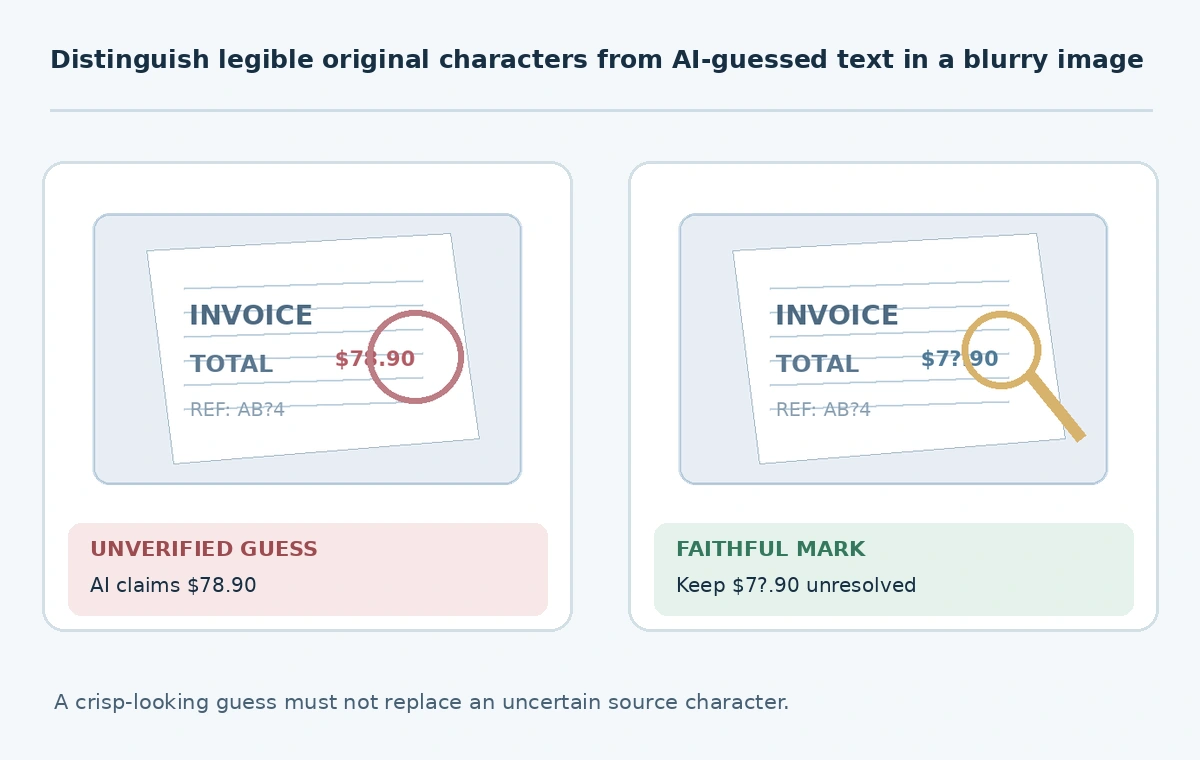
AI image restoration tools may optimize appearance by adding plausible edges. This is valuable for a personal photograph but dangerous if a single letter changes “15” to “75.” Run an enhancement only on the derivative and explicitly label it. Never replace the original screenshot, evidence photograph or receipt scan with an enhanced file.
Use OCR as a draft, never as the sole authority
An optical character recognition engine can suggest a transcript, and an AI language model may help locate plausible phrase boundaries. Neither should be allowed to silently substitute common words for unknown characters. When the source reads “AB?4,” a coherent-looking “AB74” is not proof. Capture line and bounding-box references so a reviewer can revisit the corresponding pixels.
Create a two-column transcription: “visible characters” and “unresolved characters.” Add a third confidence note written by a human, without fabricated numerical confidence percentages. For names, identifiers, dates and amounts, verify against an independent original such as a digital statement or a second photograph. Do not let contextual probability masquerade as visual evidence.
Add a high-stakes stop rule for uncertain characters
For a receipt total, prescription, ID number or contract term, stop when any required character cannot be confirmed from the original or a trusted second source. Obtain a replacement document or contact the issuing party. A guessed figure may create an expensive operational error even when the image looks visually improved. Treat the final transcript as provisional until a designated reviewer resolves critical uncertainty.
For a harmless personal note, the reader may choose an interpretation with an uncertainty marker. For public historical materials, preserve unknown symbols and identify the method used to create the derivative. Different uses justify different thresholds; the tool does not decide the stakes. A reviewer should approve both the visible improvement and what may be asserted about the content.

Protect document privacy before cloud uploads
Receipts, identity paperwork, client contracts and lab reports may contain personal information that should not be sent to a public image enhancement service. Check retention, training, access and deletion provisions before upload, and remove data where lawful without altering the critical evidence. Prefer approved local methods when confidentiality prevents using a hosted model.
Document the handling route: where the source is stored, which provider processed a working copy, who can access it and when the derivative will be deleted. Do not place sensitive images into arbitrary online “free AI unblur” services simply because they accept drag-and-drop uploads. Access policy matters as much as sharpness. When possible, obtain a clean digital copy from the original sender instead.
Deliver images with verifiable transcriptions and limits
Handoff should contain the untouched original, a reversible enhanced derivative, transcription with uncertainty marks, independent verification references and editor approval. If letters remain ambiguous, explicitly say so. An enhancement can aid comprehension while still being insufficient to authenticate a document. Preserve the exact output pixels rather than embedding the “corrected” transcript invisibly into the photo.
Test final readability at normal size as well as a zoomed view. The person receiving the image should be able to distinguish restored appearance, confidently readable source marks and contextual guesses. This is the crucial practical difference from broad AI photo sharpening: the goal is not aesthetic crispness but accurate, defensible communication of written information.
How We Research
We consulted Google Photos Help on Pixel Photo Unblur for the documented enhancement feature, and Library of Congress digitization guidance for capture and preservation principles, on October 27, 2026. The character-level examples are illustrative; no recovery benchmark or forensic validation was performed. Our distinction between appearance and evidence is editorial risk guidance.
Frequently Asked Questions
No. It may improve appearance but can invent plausible characters; check the original or an independent source.
No. One alters image appearance; OCR proposes a transcription that needs separate verification.
Do not rely on it. Request a clear original or ask the responsible medical professional to confirm the details.
Only when the provider and your organization permit the data handling; otherwise use an approved alternative.
Keep ambiguous characters explicit, cite the image region and do not silently fill them from context.