
A community library wants three seasonal posters featuring the same fictional owl mascot: at a reading desk, beneath a rainy awning and beside a book-return cart. A single AI prompt can make three nice owls that do not look like the same character. Runway Gen-4 Image References provides a way to feed a reference image into new image generations and guide recurring subjects or scenes. Consistency is a goal rather than a guarantee. This hypothetical project uses an original made-up character, avoids real people’s likenesses and treats every generated image as artwork needing careful inspection before it appears on a public library sign.
Build a clean, owned reference image first
Create or commission a simple front-facing drawing of an owl with clear approved traits: a rounded teal body, two short ear tufts, a gold scarf and a small book-shaped badge. Confirm that your library has rights to use the original art and that it does not imitate an existing mascot. Save a high-quality image with even lighting and enough whitespace to separate the silhouette from the background. Runway’s guidance favors clean references and describes reusing them for consistent characters and scenes. A messy composite of three styles makes it difficult to tell whether later differences come from the reference, prompt or generation. Document the four nonnegotiable traits before producing any variations.
Choose a reference workflow for still posters
The official Runway Gen-4 References documentation describes generating new images from one or more references, with up to three references in a single generation. It supports saving tagged references for later use. Keep this project in the image workflow rather than promising frame-perfect animation: a poster does not need video editing, and image consistency claims do not automatically extend to motion. Name the saved reference so the art director can distinguish the approved mascot from experimental variants. Work from an authorized account and confirm available credits and exports in the current interface. Sharing a reference within a workspace should be an intentional choice, not an automatic assumption about access permissions.
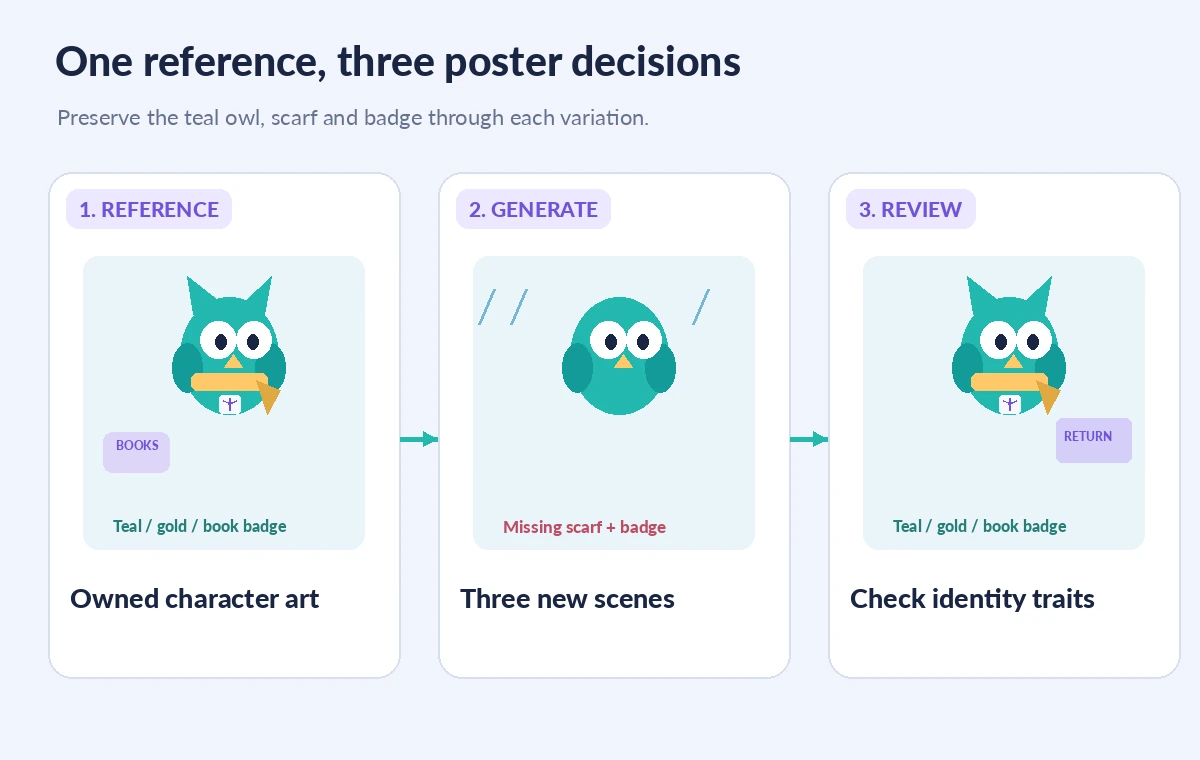
Write three narrow scene prompts that preserve identity cues
For the reading poster, ask for the approved owl next to a pile of books inside a bright library; for the rainy-day poster, use the same owl under an awning; for the returns poster, place it beside a clearly labeled book cart. Refer to the saved mascot and repeat the critical details: teal body, gold scarf, book badge and two tufts. Avoid adding extra costumes or camera distortions before the base identity is stable. Runway recommends iterative prompting and targeted references; generate one composition at a time, then compare it with the original image. Keep marketing copy and event dates out of the generation prompt when accuracy matters; overlay approved text later in a design editor.
Compare successful styling with hidden character drift
A first attempt may look appealing but swap the scarf color, replace the badge with a star or change the wing count. A second attempt might preserve the colors but stretch the ears into horns. These are not minor defects if the owl is an established library identifier. Use a side-by-side review of source reference, candidate variation and corrected target. Circle the specific mismatch rather than asking only whether the picture ‘looks right.’ The illustrations here are concept diagrams and do not depict actual Runway outputs. Reject versions that introduce unapproved logos, illegible text or unrelated branded merchandise. A charming image is not a sufficiently faithful image for a recurring public-facing character.

Use a review grid rather than a single favorite image
For each poster, record a yes/no decision for silhouette, palette, scarf shape, badge, number of wings, eye placement and background relevance. Add a separate accessibility check: is the owl distinguishable against the rainy background, and does the poster still work at phone size? Ask a colleague to compare all three together as a set. A design can be internally consistent within one image while visibly inconsistent across the series. If you must change a reference after seeing a better candidate, archive the old reference name and explain why the new one is authoritative. Avoid mixing reference generations in a single campaign without a clear version change.
Keep official information out of uncontrolled image text
AI-generated drawings can create plausible book spines, badges or signs whose letters are invented. In a library poster, that problem becomes serious when viewers rely on opening dates, event hours or directional signs. Leave those text areas blank and add exact approved information in the final layout. Verify dates against the library calendar and contact details against the public website. A mascot illustration can be a creative element while logistical facts remain controlled typography. If a generation includes a fictional phone number or a distorted safety icon, replace it rather than relying on viewers to ignore it. A sign should never imply a service or accessibility feature the venue does not actually provide.
Plan consent, licensing and storage for the image set
Because the reference here is wholly fictional, the project avoids using a visitor’s photo or a real employee’s appearance. For any future human reference, secure explicit permission and assess whether uploading it is appropriate. Examine Runway’s current terms for commercial output use, asset storage and collaboration before distributing a campaign. Keep the commissioned source art and final approved exports in the library’s own controlled folder. Do not describe the resulting character as copyright-cleared merely because an AI system produced it; third-party designs, fonts and elements may still matter. Use a rights register for background stock assets and any contributed illustrations. Document the review process without inventing legal certainty.

Prepare final print files and a correction path
Once all three images pass review, add typography in a conventional layout tool, check contrast and margins, and export the exact print or digital sizes requested. Inspect edges for clipped wings or badges and compare the three posters as a single branded family. Have an authorized staff member approve the release dates and artwork versions. Preserve prompts, references and rejected options only as permitted by the organization’s retention rules; they can help explain a future correction. If an event changes, revise the editorial text layer rather than regenerating the whole illustration and risking mascot drift. Gen-4 References helps guide a creative starting point, but final visual identity remains an art-direction responsibility.
How We Research
This guide was developed from Runway’s official Gen-4 Image References documentation on repeated characters, prompt iteration and up to three image references, plus its reference media guide on saving and sharing references. We did not run image generations, obtain licenses or test visual consistency. The owl, captions and comparisons are original illustrative examples, not Runway screenshots.
Frequently Asked Questions
Yes. Runway documents character consistency from a reference image, but every output still needs inspection for trait changes.
Runway documentation describes using up to three image references in a generation.
No. Compare the approved silhouette, palette, accessories and other identity cues across all variants.
No. Add exact dates and contact details with controlled typography so they can be verified and corrected.
Only after addressing permission, privacy, rights and the platform terms. An original fictional mascot avoids that complication.