
A neighborhood seed exchange has an approved how-to article for starting vegetable seedlings in reusable trays. Volunteers want a 40-second recap for a social post, with clear footage and captions. The original text deliberately tells readers to label each tray before adding seed and water, so varieties do not get mixed up. A generated recap that moves labeling to the end would be shorter but less useful.
Pictory’s Blog to Video page says an editor can provide a public article URL, inspect the AI-written script, then assemble scenes with visuals, voiceover and captions. It also describes choosing platform, duration and brand options. These are documented capabilities, not a guarantee of faithful paraphrase or the correct visuals for a particular crop. This article is a hypothetical production method; no Pictory generation or live video was tested.
Choose a source article that has been approved
Before importing a URL, check that the article is publicly accessible and actually represents the current workshop instructions. Preserve a copy with the publication date and revision number. If the web page was recently edited, confirm which version the editor wants to summarize. The instructional sequence must come from the author-approved copy, not an unrelated search snippet or a remembered version of the process.
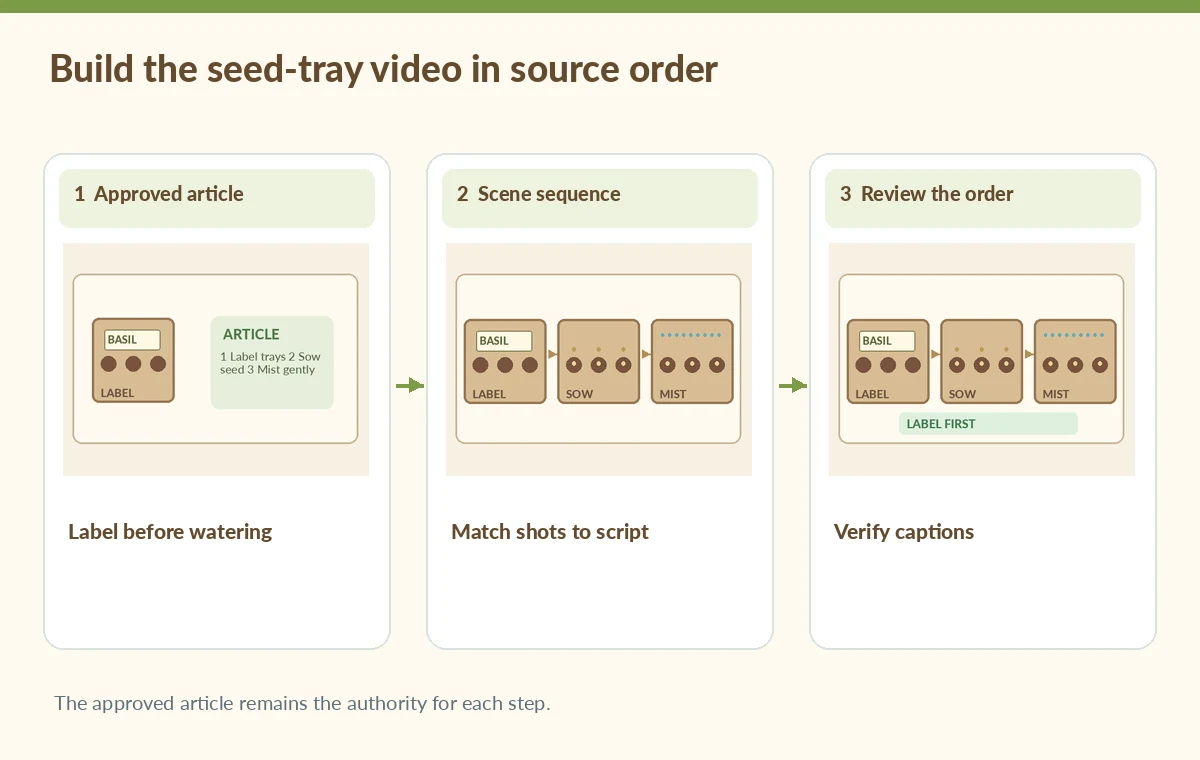
Write a short nonnegotiable script card: prepare the cleaned tray, label each compartment, sow the chosen seeds, and mist according to the article’s crop-specific guidance. This card is an editorial checklist, not a claim that every seed type shares the same planting depth or watering schedule. Where the original article is species-specific, keep the species name and its exact advice intact.
Reduce the article without dropping prerequisites
Paste the article link into the Pictory Blog to Video workflow and choose a concise audience-appropriate format. Review the generated script before asking the software to create scenes, as the product’s own page recommends. Compare each retained sentence to the article. If the summary says ‘Add water, then label your tray,’ reject it for reversing the relevant sequence; a natural-sounding narration is not proof of accuracy.
Remove secondary anecdotes before removing safety or labeling prerequisites. The recap may mention that planting depths vary and direct viewers back to the full guide, rather than forcing a list of contradictory rules into a single sentence. Do not supply unsupported germination rates, exact dates or claims of universal success. Each shot should have an identifiable source sentence and an agreed intended takeaway.
Create a shot list with explicit visual evidence
Plan a sequence of separate shots: empty tray and clean work surface; hand attaching a variety label; seed placed in its labeled compartment; gentle misting. Ask the editor to use real permitted footage of the workshop when it matters what hands or tools do. Stock visuals can illustrate a generic pot, but they may show a different tray configuration or an incompatible variety label.
Record which images are original, licensed stock or synthetic. Do not assume a clip of lush seedlings proves that the specific process worked. To prevent a visual contradiction, place captions and footage in the same step order. If footage of labeling is missing, a simple illustrated label card is more truthful than stock video of someone watering without labels.
Inspect the proposed scenes for a misleading sequence
Review Pictory’s proposed scenes one by one against the script card. A hypothetical bad edit might place a misting shot under the words ‘label the trays first.’ That juxtaposition can teach the opposite action even when the voiceover is correct. Reject it or replace the clip with a correctly ordered illustration. Check that a generated transition does not imply a real event happened between two unrelated images.
Use a side-by-side review sheet showing the ordered article steps and the storyboard. Mark omitted instructions, invented details, duplicated steps and mismatched close-ups. A short montage may be intentionally non-instructional, but then the text should not call itself a complete demonstration. The essential editorial distinction is between a promotional teaser and a reproducible how-to sequence.

Fix captions, voiceover and crop for the destination
Preview the chosen aspect ratio, such as a vertical short, before finalizing overlays. A full-width variety label that reads correctly in a landscape cut may disappear in a phone crop. Keep captions away from interface controls and confirm that quantities, negative words and crop names are transcribed properly. If the synthetic voice has uncertain pronunciation, revise or replace the audio rather than letting the error stand.
Watch the export with sound and also muted. When muted, the onscreen steps still need to make sense. Provide a link to the full approved article and descriptive context for images that cannot convey fine details. Do not imply that automated captions meet every accessibility requirement without reviewing timing, contrast, placement and the exported media in its intended player.
Handle rights and product claims in the video
Verify permission to reuse photographs, stock assets, music, labels and any recognizable participants. Pictory’s marketing material explains that its library assets may be available for commercial video use under its terms, but that does not automatically grant permission for a third-party blog’s photographs or a volunteer’s appearance. Confirm the specific export and license conditions that apply to the account.
Do not invent a product sponsor, seed brand or guaranteed planting outcome to make the recap seem more polished. If the article includes a donation invitation, copy the current event instructions from an approved source; hours and stock may change. Keep commercial or affiliate claims out of a teaching cut unless they are documented and approved by the organizer.
Approve the finished video against the written source
Perform a final playback at normal speed and at reduced speed. Check that the tray label appears before watering, that seed placement matches the script, and that all captions refer to the right action. Archive the source URL, copied article, generated draft script, chosen footage sources, corrections and version of the approved export. Keep the review independent of whether the AI-generated edit looks attractive.
A second reviewer should be able to reproduce the step order from the video without guessing. If any essential instruction depends on the full article, include a clear referral rather than calling the short a complete guide. The diagrams here depict editorial possibilities and should not be taken as actual frames produced by Pictory or measurements from a controlled trial.

How We Research
This guide was researched on November 4, 2026 using these named official product sources: Pictory: Blog to Video AI Generator; Pictory Help Center: how to turn URLs into video; Pictory Help Center: supported links. We inspected the vendors’ published workflows and limitations, and designed a hypothetical editorial scenario with checks appropriate to the source material. No vendor account was accessed, no media was uploaded or generated in the service, and we did not measure sound quality, image restoration, accessibility, rights clearance, or factual performance. All illustrations are original educational diagrams, not product screenshots or records of real tests. Features, interfaces, account access and usage limits may change. Editors must independently confirm the original facts, permissions, platform conditions, accessibility, export behavior and human approval before public release.
Frequently Asked Questions
Its Blog to Video product page describes entering a public article link. If a page is private, work from approved text through a supported alternative.
No. Check the AI script and every scene against the approved article before publishing instructional video.
Build the storyboard around authorized original footage when exact tools, crops or procedures matter; review the available media controls in your account.
Only when an authoritative source gives them for the identified variety and context. Otherwise keep the short general and link to the detailed guide.
Review the finished export in its actual viewing format, especially labels, quantities, timing and mobile cropping.