
Why an image format decision is an editorial decision
A museum may use generated diagrams to explain archival handling, but the image that looks attractive in a design preview can lose tiny captions when exported for a public web page. The Images API allows compatible GPT Image models to return images as PNG, WebP, or JPEG, with additional format options on supported models. This guide examines `output_format` and `output_compression` as delivery settings, not as measures of factual correctness. A smaller file may display faster, yet illegible accession labels defeat the purpose of the illustration. The examples describe an invented exhibit diagram and are not the results of a live image-generation experiment.
Confirm model support and the exact API you are calling
First confirm that the request uses the Images generation endpoint and a currently supported GPT Image model. OpenAI documents related image generation through the Responses API too, but its tool wrapper and conversational flow differ from a direct image request. Pin the model and version in your production configuration rather than pasting a code sample for a retired model. Record the requested image size, quality, background, output format, and any compression value beside the editorial brief. Do not assume every output format or quality tier works with every model. Treat unsupported combinations as explicit validation failures rather than silently saving a different file.

Choose PNG, WebP, or JPEG for the actual artwork
A diagram containing narrow text and colored outlines typically deserves a lossless reference copy, while a photographic background may tolerate more compression. PNG is a sensible reference for transparent or label-heavy compositions; WebP often suits a delivery asset, and JPEG suits opaque photographs when an editor approves the tradeoff. The API guide documents transparent backgrounds with PNG or WebP, not JPEG. A change in file extension alone does not convert pixels or preserve transparency. Decode the returned base64, check the image signature and color mode, and save the reviewed output under a deliberate asset name rather than trusting a filename supplied by a workflow.
Understand what output_compression actually controls
For supported GPT Image models, OpenAI documents `output_compression` as a value from 0 to 100 for JPEG and WebP output, with 100 as the default. That setting controls export compression, not the model’s reasoning, the truth of visible facts, or the quality of its handwritten-looking letters. Do not present an arbitrary value as a universal optimum: small text, photographic texture, transparency, and target screen size respond differently. Use a controlled comparison that fixes the same input design and dimensions, records the requested settings, and checks final decoded assets. If a particular image model generates a different composition on another call, do not attribute all visual differences to compression.
Keep the copy used for comparison stable
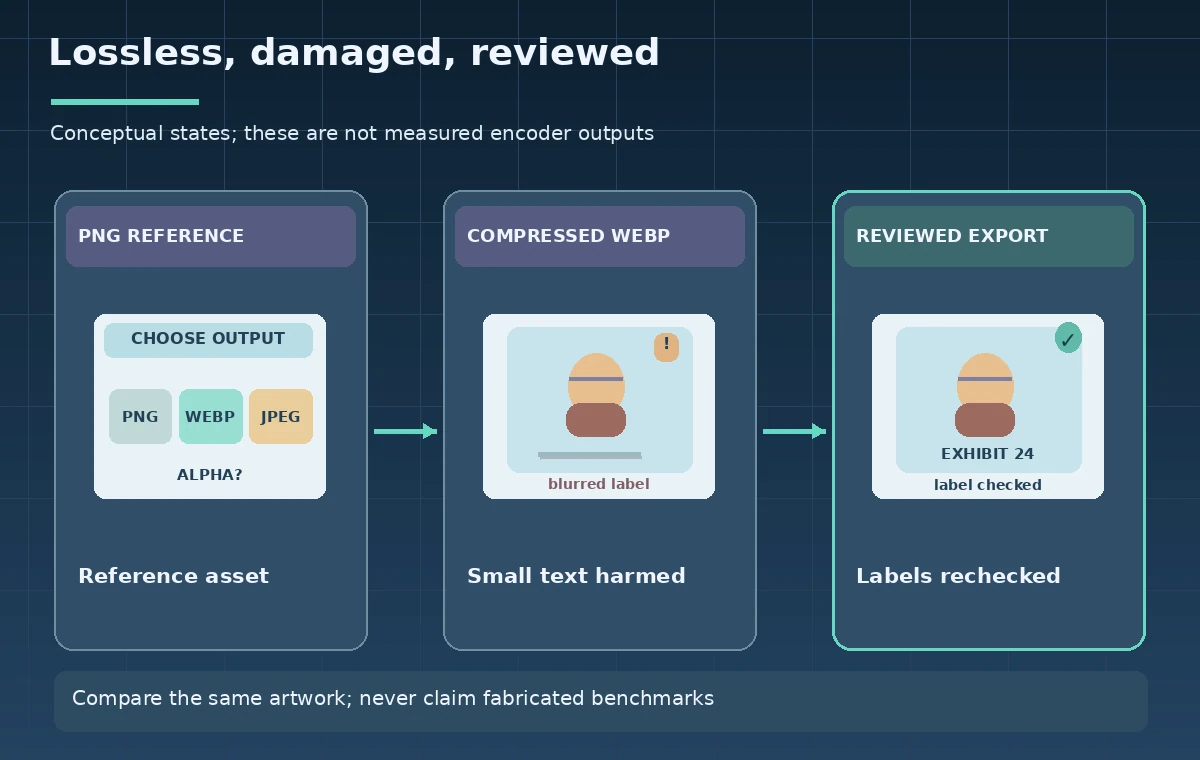
To compare formats fairly, prefer taking one authorized image result and creating reviewed derivative exports in an ordinary image pipeline. If you separately generate three images, composition drift can dwarf compression artifacts, making the test misleading. Save the original decoded output, then inspect a lossless export and candidate WebP or JPEG derivatives at exactly the same pixel dimensions. Log the encoder and version if compression occurs outside the Images API. The instructional figure shows clean labels, softened labels, and a corrected reviewed export only to explain what to inspect; it does not claim measured file sizes, visual scores, or performance results.
Inspect the smallest important annotation
Zoom to 100% on a typical desktop display and check every accession number, date, and arrow label. Thin line art can acquire ringing, stair-step edges, or blurry text at aggressive compression, while saturated purple and teal adjacent to white text may lose contrast. Compare the image against the approved script, not against what the model appears to have drawn. If a label is wrong, edit or recreate the image and rerun editorial review; compression settings cannot repair fabricated labels. When a critical phrase must be exact, consider rendering it in the web page as accessible HTML rather than embedding it exclusively in a bitmap.
Retain a meaningful fallback and accessible text
Readers using magnification or a screen reader should not depend on a compressed infographic to learn the entire process. Write alt text that identifies the diagram’s action, relevant objects, and the conclusion a reader should draw. If the figure contains complex comparisons, explain them in adjacent prose. Store a versioned, reviewed reference and keep export settings in the asset register so a later redesign can reproduce the derivative. Never imply that the Images API verified a museum’s collection permissions or copyright position. Those decisions require the institution’s own records, approvals, and licensing checks.
Check file delivery separately from generation
After the image is decoded, inspect MIME type, alpha channel, dimensions, and the CMS upload result. A generated WebP may be recompressed by a media plugin, resized to a thumbnail, or served through a CDN with different encoding. Examine the browser-delivered asset as well as the local source. Verify that lazy loading does not hide an important instructional step and that responsive sizes do not clip captions. Record where the approved image is used and a content hash for its final file. Do not confuse a successful API response with a successful page deployment; they are different checkpoints with separate possible failures.
Publish only after the editorial and accessibility gate
A useful release decision records the model used, output format, compression value when applicable, human review of every caption, and an accessible text equivalent. Check the public page on mobile and desktop before making a final approval. If WebP blurs accession labels, a larger file or alternative format may be the appropriate choice; if the artwork is too complex to read at small sizes, simplify the drawing. This process makes an asset defensible without inventing benchmark measurements or promising that any compression setting yields a specific load-time improvement. The objective is clear, accurate instructions for the reader.

How We Research
Official technical sources consulted November 11, 2026: OpenAI Image API generation reference; OpenAI image generation guide; OpenAI Images API overview. We read OpenAI’s current Images API generation reference and image-generation guide, including output-format, output-compression, transparency, and model-support caveats. We then designed a hypothetical museum label export and a visual inspection protocol. No generation call, encoder benchmark, browser performance measurement, or test of a real museum asset was performed. Diagrams are original teaching illustrations rather than screenshots or real measurements. Product availability, API versions, access roles, model support, costs, and organizational rules can change; verify the current official contract in the target account before deployment.
Frequently Asked Questions
OpenAI documents output_compression for JPEG and WebP with supported GPT Image models; do not treat it as a universal PNG control.
Not in the documented transparent-background workflow. Use a supported PNG or WebP output when the alpha channel matters.
No. Compression controls file encoding, not the accuracy of text drawn by a model. Review labels against an approved source.
For a clean format comparison, use the same approved image content and derive comparable encodings when possible.
Inspect the public delivered asset, responsive resizing, alt text, label legibility, and any CDN or plugin transformations.