
A neighborhood arts committee meets online to plan a winter market. Members discuss booth fees, ask for a fire-safety check and propose possible volunteers for setup. None of those statements automatically authorizes a budget or assigns a person’s time. Microsoft Teams Facilitator can draft real-time notes and highlight decisions or open questions, but those notes still require a human chair’s approval. In this fictional meeting, the objective is not a faster transcript: it is a transparent distinction between what was suggested, what was actually decided and who explicitly accepted responsibility.
Define authority before the call starts
Write an agenda that separates decisions requiring a vote from informational discussion and delegated actions. For each decision, list the person or group with approval authority and any required quorum. For each proposed task, specify that an owner is not confirmed until that person accepts it. Communicate the note-taking plan, its data access and retention policy to participants before enabling an AI assistant. Keep sensitive personnel details and unrelated confidential information out of the discussion where possible. Ask a participant to serve as the human decision recorder. A tool’s generated summary cannot satisfy bylaws, voting procedures or an organization’s documented approval rules merely by labeling a phrase a decision.
Confirm that Facilitator can join this specific meeting
Microsoft says a Microsoft Copilot license is required to turn on Facilitator or add it to a meeting, and its standard meeting integration applies to scheduled Teams meetings rather than instant calls, channel meetings or Teams calls. While scheduling, check Options, Copilot and other AI, then the Facilitator setting. Organizer and presenter controls can differ from what participants on mobile see. If the institution restricts transcription or AI processing, those policies come first. Do not assume all internal or external invitees will see the same generated notes. Test the setup with an authorized non-sensitive meeting rather than changing a production committee’s recording preferences without notice.
Anchor the agent to an agenda and precise questions
Put the approved agenda into the meeting description or Loop notes before the call, then verify that Facilitator picks it up after participants join. Microsoft notes that certain protected or encrypted information cannot be read and that an organizer alone may not expose the agenda to the agent because of privacy handling. State each vote and outcome aloud: for example, “The motion to postpone the booth-fee change passed by the required vote.” Avoid casual agreement such as “sounds fine” when the group’s rules call for formal approval. Ask the human recorder to log the exact wording and any conditions. An AI-suggested label of ‘approved’ must be challenged when the underlying audio reflects only a proposal.
Separate three kinds of note from the beginning
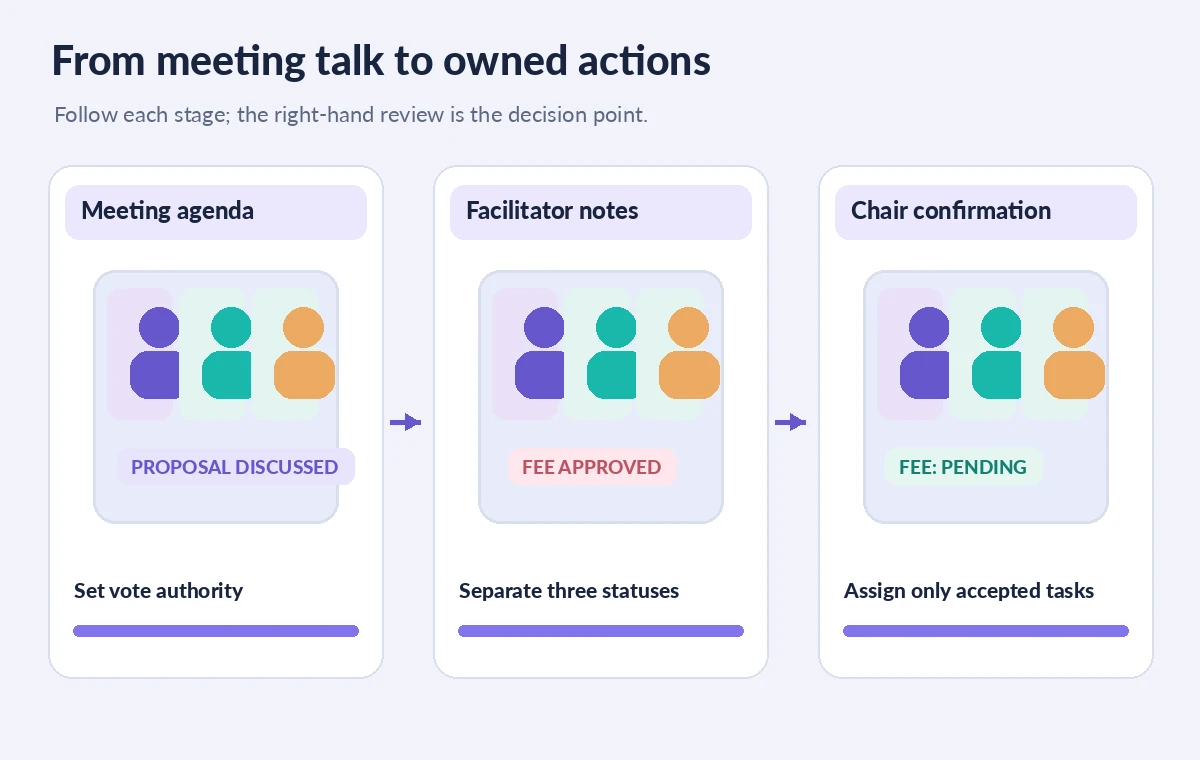
Maintain three visibly distinct buckets: confirmed decisions, tentative ideas and open questions. A fourth bucket can hold tasks that have an accepted owner and a dated next step. If members brainstorm the cost of extra tables, place the idea under proposals rather than approved purchases. If the safety officer must check an electrical plan, record it as a question until someone agrees to investigate. In the comparison illustration, an ambiguous statement initially appears as a completed decision and is moved to a pending review state; it is a conceptual teaching example, not a measured product result. Do not hide disagreement or minority objections behind smooth prose.

Review live notes without letting them steer a vote
Facilitator can generate notes during the conversation and lets meeting participants collaborate in shared notes, but note text may lag speech and can omit qualifiers. Assign one participant to watch for wrong names, missing negations, misheard amounts and statements copied into the wrong category. Correct an error in the collaborative note with a reason instead of quietly rewriting meeting history. If a high-stakes budget number is unclear, ask the chair to restate it rather than inferring the amount. Do not rely on after-meeting AI recall where transcription was disabled; Microsoft says enabling transcription matters for post-meeting questions. Treat the audio or authenticated minute-taking record as stronger evidence than a generated paraphrase.
Handle proposed Planner tasks as drafts
Microsoft’s Facilitator help describes task workflows, with some options still in public preview. Follow-up tasks in Notes may offer an Accept to sync action to Planner; additional agent-driven task functions can vary by availability. Do not bulk-accept an action list unless each task has an explicit assignee, deliverable and due date. A member mentioned in discussion is not the same as a member who agreed to do the work. For a task to inspect stall power cables, name the authorized inspector and define where the finding will be recorded. If nobody accepts it, leave the task unassigned and bring it to the next meeting instead of inventing accountability.
Conduct a short chair-led reconciliation after the meeting
Use the meeting Recap and Notes to produce a review table: original claim, approved wording, evidence and responsible reviewer. Check decisions against formal motions, committee rules and any supporting written documents. Ask attendees to correct factual mistakes within a clearly specified window. If the organization must preserve minutes, store an approved version with version history and identify where corrections will be recorded. A polished AI summary should never be the only archive when an objection, date or vote count may matter later. External guests may have different visibility from internal participants, so check permissions before distributing a Loop page or linked document.

Send a follow-up that preserves uncertainty
Write to members with a short ‘approved decisions’ section, a separate ‘needs confirmation’ section and a list of accepted tasks. For an unresolved booth fee, say “fee change deferred” rather than inserting a plausible new price. Link back to the approved minutes and ask owners to acknowledge tasks. Avoid passing meeting notes to an outside mailing list just because the export is convenient. Establish which documents are private, who can revise them and how long they should be retained. The key quality measure is agreement between the recorded discussion and the authorized follow-up, not the number of tasks Facilitator can automatically suggest.
How We Research
We checked Microsoft’s official Facilitator in Microsoft Teams meetings guide and its meeting options documentation for licenses, scheduled meetings, live notes, transcript dependencies, and preview task features. This example does not represent a recorded or tested committee meeting. We have not audited an organization’s Microsoft tenant, governance rules or actual meeting permissions.
Frequently Asked Questions
Microsoft says a Copilot license is required to add or activate Facilitator; participant visibility and tenant policies differ.
Microsoft documents the standard Facilitator integration for scheduled meetings, not instant meetings or regular Teams calls.
No. Confirm the owner and deliverable in the discussion or through explicit follow-up before treating it as assigned.
No. The organization’s meeting rules determine the official record. Reconcile AI notes against motions, votes and approved wording.
No. Microsoft’s documentation describes some task features as public preview. Check the tenant and the available interface before depending on them.