
A fictional parks department is preparing a trailhead sign with a short description of an accessible route. The sign must fit a narrow column, but it also names a 250-meter distance, the direction of travel, and an assistance contact. Illustrator’s Rewrite feature can rephrase, proofread, translate, and fit selected text. It does not know the actual park route or automatically understand surrounding artwork. This workflow uses its language tools without allowing a fluent suggestion to change a real-world instruction.
Separate immutable facts from editable prose
Before using Rewrite, record the approved destination name, route distance, direction, surface condition, and assistance number in an external source sheet. In the illustrative example, the distance is 250 m; this is invented for training, not an actual trail recommendation. Mark numeric values and directional labels as protected elements. Keep them in independent text objects where practical so a generated rewrite has less opportunity to alter them.
Decide which prose can safely change. ‘Follow the wide paved path to the overlook’ might be shortened for space, while a specific accessibility claim needs verification by the park authority. An editor should not assume that shorter text is clearer if it removes exceptions or landmark details. Preserve the original Illustrator file and obtain approval before any rewritten sign replaces the public copy.
Use Rewrite on a selected text object
Adobe documents Rewrite under Type > Rewrite, with options to rephrase, proofread, translate, and fit text. Select the intended text box, review the available command, and submit a short, constrained request. For example: ‘Shorten this descriptive sentence for a sign. Preserve all distances, named destinations, directions, and safety qualifiers.’ Avoid selecting unrelated text objects containing the route number and emergency contact.
The official feature guide notes that Rewrite does not use surrounding artwork as context. That is a critical limit for maps and arrows: the assistant cannot be relied upon to infer where a path actually leads from the drawing. Compare each returned variation against the approved source, not the visible arrow arrangement alone. If a variant is ambiguous, reject it and edit the sentence manually.
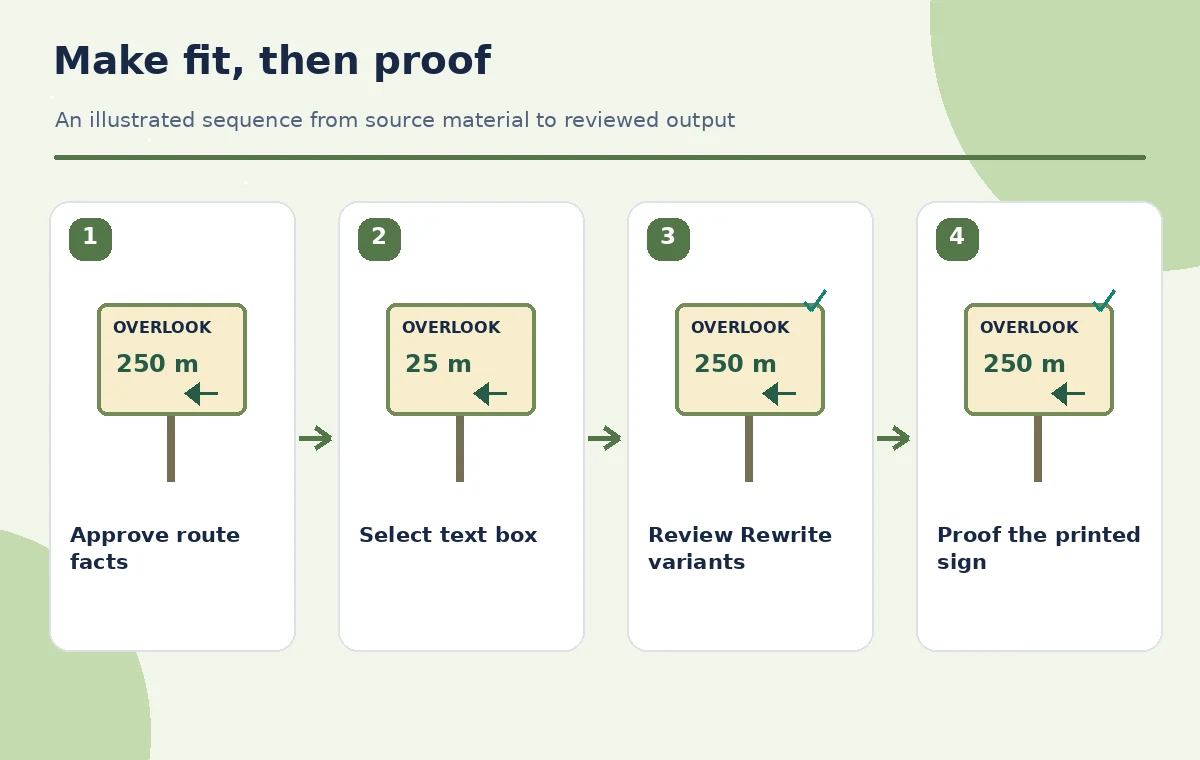
Review the distance character by character
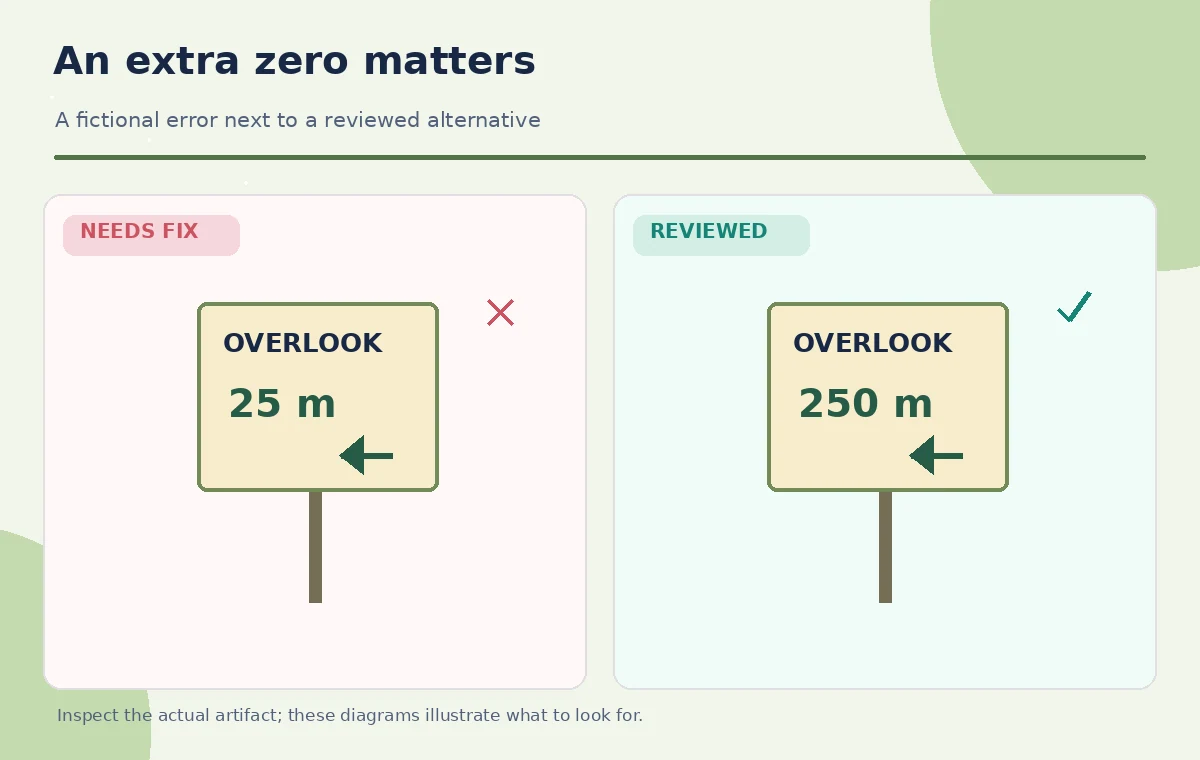
Examine a hypothetical flawed rewrite where ‘250 m to overlook’ becomes ’25 m to overlook.’ This is a teaching illustration, not observed output from Illustrator. A single missing zero materially changes the sign. Check every numeral, unit, arrow direction, and proper noun in the selected candidate. Keep numerals and units together in the text layout so line breaks cannot visually separate them.
A valid review compares original and proposed copy side by side with protected facts highlighted. Do not accept a near-match simply because it looks less crowded. If changing from ‘meters’ to ‘m’ is approved, use a consistent unit style across all signs. If a word like ‘accessible’ appears, ask the authorized accessibility reviewer whether the described route meets the relevant site policy.
Fit text without compressing meaning
The Fit Text option can shorten or expand copy to fit the selected box. Adobe’s current documentation notes that this particular operation consumes a generative credit, unlike some other Rewrite tasks. Treat fitting as a draft, not as a substitute for typography. Before generating, try sensible line breaks, spacing, and box sizing that preserve the full approved sentence.
Read the result aloud and inspect what was dropped. ‘Accessible entrance via east ramp after gate’ cannot become ‘Entrance via ramp’ if the location and gate condition matter. When text must be shorter, prioritize route name and direction over decorative adjectives. Keep symbols and arrows consistent with the copy and check that no new claim was inserted simply to fill a line.
Translate only with bilingual review
Rewrite can also translate selected text while preserving general styling, but Adobe notes that the result can use a language’s default font. That can change line breaks and visual width. If a park requires a second language, prepare an approved terminology sheet for destination names, unit conventions, and facility labels. A machine-generated version is a draft that needs a qualified human reviewer before public installation.
Verify that characters render in the selected font, that accented names survive export, and that text still aligns with the correct arrow. Do not assume the same word order works inside the same narrow box. For dense signs, use separate language blocks with clear hierarchy rather than relying on a short translation that silently removes accessibility conditions.
Inspect output at actual sign scale
Zooming into a digital canvas can hide legibility problems that appear on the printed sign. Print a proof at intended scale, or inspect a correctly sized mockup at the expected viewing distance. Check contrast, font size, word spacing, and the relationship between labels and map elements. An elegant rewritten sentence is not useful if a visitor cannot distinguish the destination name from a decorative caption.
Watch for overflow and collisions after changing copy. A longer destination name may push a distance onto a second line or into an arrowhead. Move the artwork or expand the layout rather than automatically rephrasing the route into something factually different. Proofread the rendered export as well as the editable Illustrator text because fonts and wrapping can change at handoff.
Maintain a traceable sign-review record
Keep a before-and-after text table listing the original approved phrase, the chosen variant, the reason for change, and the person who accepted it. Flag any edit affecting a numeral, direction, or access statement for a separate review. Even when a copyeditor approves the grammar, the route owner still must approve the instruction. Date the source map and ensure it has not been superseded by trail work.
Do not post an AI-generated sign version to visitors while asking for approval in the background. Changes to an installed sign can be operationally consequential; a wrong turn could direct people away from an accessible route. If the authoritative source is missing or the source owner cannot verify a detail, leave that text unchanged or hold the print. Visual clarity is not evidence of geographical accuracy.
Release the shortest accurate version
Perform a final manual comparison for distance, route name, direction, accessibility statement, and assistance contact. Check the proof at actual size and ask a person unfamiliar with the design to interpret where the sign directs them. Confirm that the supporting arrows and map agree with the approved copy. Save the editable source, reviewed PDF, and sign-off record together.
We have not used an actual park map or tested Illustrator’s model outputs in this example. The images compare invented textual states to show the sort of error worth catching. The usable outcome is a readable sign that preserves every approved fact, not a maximally short phrase. If fitting the required text would make the sign unreadable, redesign the panel rather than allowing the tool to discard important directions.

How We Research
We reviewed the developer and product-owner documentation: Adobe Help: Generate, rewrite, proofread, and translate text, Adobe Help: What is new in Illustrator. These primary sources establish the available features, relevant steps, and important access limitations as checked for the November 2026 editorial draft. We compared documented behavior with the practical decision points in this hypothetical scenario. This article does not report a live trial, real customer records, measured system accuracy, or a verified production outcome. The illustrations are explanatory artwork rather than actual vendor screenshots or test results. Before using the steps with real people or sensitive material, verify the latest interface, current plan permissions, rights, accessibility requirements, and your organization’s approved source documents. Human reviewers—not AI-generated output—must authorize consequential claims, directions, and publishing decisions.
Frequently Asked Questions
Adobe says Rewrite does not use surrounding artwork as context; route facts need separate verification.
Yes. Fit Text can shorten or expand copy for a selected box, but the result must be reviewed.
Adobe says most Rewrite workflows do not, while Fit Text consumes a credit per generation.
Not without qualified review of destination names, units, font rendering, and directions.
Reject the suggestion and restore the authoritative number before sign-off.