
A Better OCR Model Can Still Break a Trusted Workflow
An archive may use Document AI to read dates, names and permit numbers from scanned workshop permission forms. When a newer processor version becomes available, it may recognize more handwriting but change how a field is represented. A script that expects one particular date format can then import a wrong value. The new model may be better overall and still require migration testing for a critical field.
The safe task is to compare extraction behavior while preserving the scanned original as the authority. In a hypothetical permit packet, an issue date and an expiration date appear near each other, with a handwritten correction. A successful upgrade is not just more extracted text; it is the correct association of fields with their labels and evidence locations.
Understand Stable, Release Candidate and Custom Versions
Google Cloud documents stable processor versions, release candidates and customized versions with their own IDs and lifecycle considerations. Release candidates are experimental rather than production-quality defaults. An endpoint that does not explicitly specify a version uses the processor’s configured default; a version-specific endpoint targets a named version. These distinctions determine whether an integration changes behavior after a default is updated.
Google also documents deprecation behavior and migration paths for old versions. Some customized versions depend on a base model that eventually becomes unavailable. Do not promise a permanent pin without examining the current lifecycle guidance. Keep the actual processor, location, version and request method in the internal change record, and confirm supported features for the type of document being processed.

Freeze a Representative Permit Test Set
Prepare an authorized set of clear and difficult examples: multi-page permits, faint stamps, two adjacent dates, blank signature areas, crossed-out values and a form whose layout changed midyear. Preserve the image hash and ground-truth values for each document. The testing collection should have synthetic or redacted personal information whenever possible, with access limited to authorized staff.
A test set should not consist only of neat single-page forms; that hides the failure modes that cause downstream mistakes. A blank checkbox must remain blank rather than being inferred from nearby printed text. Likewise, a visually detected signature is not proof that the signer had legal authority. Agree on field-specific acceptance criteria before seeing the candidate model’s outputs.
Compare the Default and Candidate Deliberately
Use the console or supported API to view available versions. Where feasible, run the same approved test files through the current production version and candidate, retaining both version IDs and the exact original scans. Compare labels, normalized values, page numbers and bounding areas rather than counting extracted words. Look carefully for a correct number attached to the wrong field.
Google’s documentation describes setting a default processor version and the fact that a request already in progress continues with its selected version during a change. Plan the migration to avoid mixing untracked outputs across batches. Do not interpret a successful API response as approval to replace the source record; downstream business rules and human validation are separate controls.

Show Three Migration States Honestly
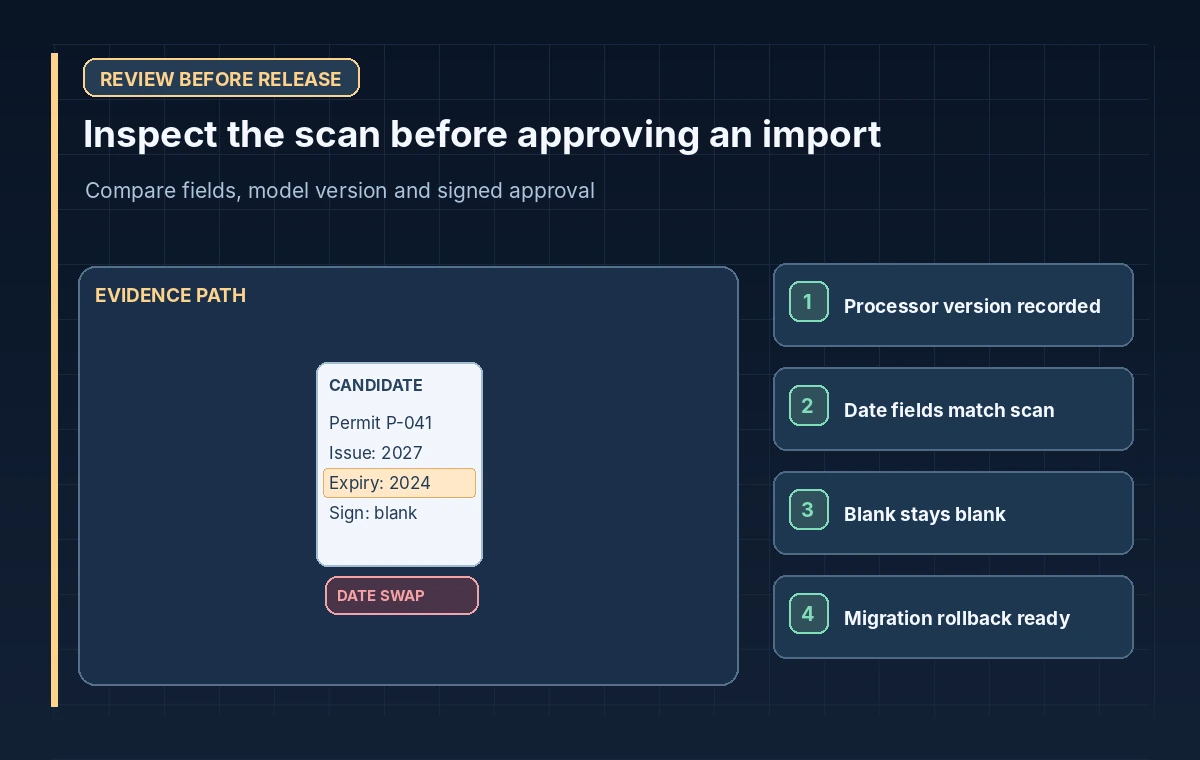
In a training comparison, the first panel shows the established extraction, the second shows a candidate with a changed date association, and the third shows a reviewer-approved mapping after checking the scanned permit. This is a hypothetical difference between versions, not a claim that a named Google model made the error. The purpose is to show how a change can be plausible but wrong.
Avoid adding invented confidence percentages to these diagrams. A score can be useful only when it is actually returned and understood in context. For a legally important date or consent field, verify the source image even when a confidence value is high. When the original image cannot resolve the field, record it as unclear and escalate rather than guessing.
Plan Deployment and Rollback Together
Record the baseline default, candidate version, approval decision and date for a possible change. Route a small authorized sample through the updated path and review the downstream catalog imports. If a candidate changes important fields, keep the old approved workflow while investigating the discrepancy. Google provides mechanisms for managing processor versions, but a rollback must also consider records already written downstream.
Separate processor configuration from application mapping code so a model change does not silently alter database schema expectations. Version the transform rules and preserve a link from imported values to the source document and extraction run. If a deprecated version is involved, review the documented migration deadline rather than assuming the old endpoint will remain available indefinitely.
Check the Fields That Matter Most
Make a release matrix for the most consequential columns: permit number, organization, issue date, expiration date, signature status and any special restrictions. Mark expected values from the scan, candidate output and reviewer decision. Include a rule that absent information stays absent; OCR should not turn a missing approval into consent. If a document page is cropped or illegible, request a better scan.
Check the human review interface as well as the API. Staff must be able to see the exact crop behind a suspicious result and correct it without losing provenance. Add regression tests for date parsing, duplicate form import and record access. Model version selection does not replace controls for storing personal information, managing retention or granting permission to use a document.
Release a Documented Version, Not a Surprise Change
Only update the default after the test packet meets field-specific criteria and the owning editor approves the workflow. Announce a change window, keep processing records with version metadata and monitor corrections after deployment. Periodically compare new production samples with source scans. If an issue is found, pause the affected imports and identify exactly which records passed through the candidate version.
The responsible measure of success is a dependable, traceable permit workflow. A newer processor may offer useful capabilities, but the historical source image, applicable policy and authorized reviewer remain the final authorities. That principle continues to hold through future stable releases and deprecations.
How We Research
We reviewed the following official developer documentation on November 8, 2026: Google Cloud: Managing processor versions; Google Cloud: Evaluate processor versions; Google Cloud: Document AI deprecations. We compared the documented parameters, data flow and stated limitations with this hypothetical editorial scenario. The diagrams are original instructional illustrations, not real vendor screenshots or outputs. We did not submit private archive material, run a production API evaluation, measure tool accuracy, obtain legal consent, or test a live service configuration. Product behavior, access rules, quotas and supported settings may change; confirm the latest documentation and your organization’s policies before deployment.
Frequently Asked Questions
Document AI uses the processor’s configured default version. Record that default before and after a migration.
Google describes them as experimental. Evaluate their behavior and current availability before choosing a production path.
Yes, output behavior can change. Compare critical values, page associations and normalization against the original document.
No. Extraction and legal or organizational approval are distinct tasks requiring human validation.
No. Processor versions have documented lifecycle and deprecation rules. Plan migration before a required version stops serving requests.