
GitHub Copilot Free is a reasonable way to learn AI-assisted coding, but the useful question is not whether it costs zero dollars. It is whether its limited allowances cover the specific work you do. A completion in an editor and a multi-step agent session have different costs and failure modes, so treating all Copilot activity as one unlimited bucket leads to disappointment.
As of October 26, 2026, GitHub lists 2,000 code completions a month for its Free plan, with limited chat and agent usage tracked through AI credits. GitHub also lists a Copilot app and CLI access on Free. This guide focuses on turning those allowances into a safe practice routine; it does not repeat LabFin’s broad Copilot review or paid-plan pricing roundup.
Know which allowance a feature spends
Inline completion predicts code while you type, whereas chat, agent mode and command-based help can process much more context. GitHub’s current plan comparison explicitly separates the 2,000 monthly completion allowance from limited AI-credit access. Check the usage screen available in your account rather than converting one chat prompt into a made-up number of completions. A long agent run is not comparable to accepting a short function signature.
Keep a small log of tasks completed and interruptions caused by a limit. Write down the action, the tool used and whether the answer was usable. That evidence identifies which allowance matters to you. If you only need suggestions for repetitive tests, completion limits may be enough; if you delegate debugging across a repository, agent and chat usage will likely be the practical constraint.
Start with an intentionally small repository task
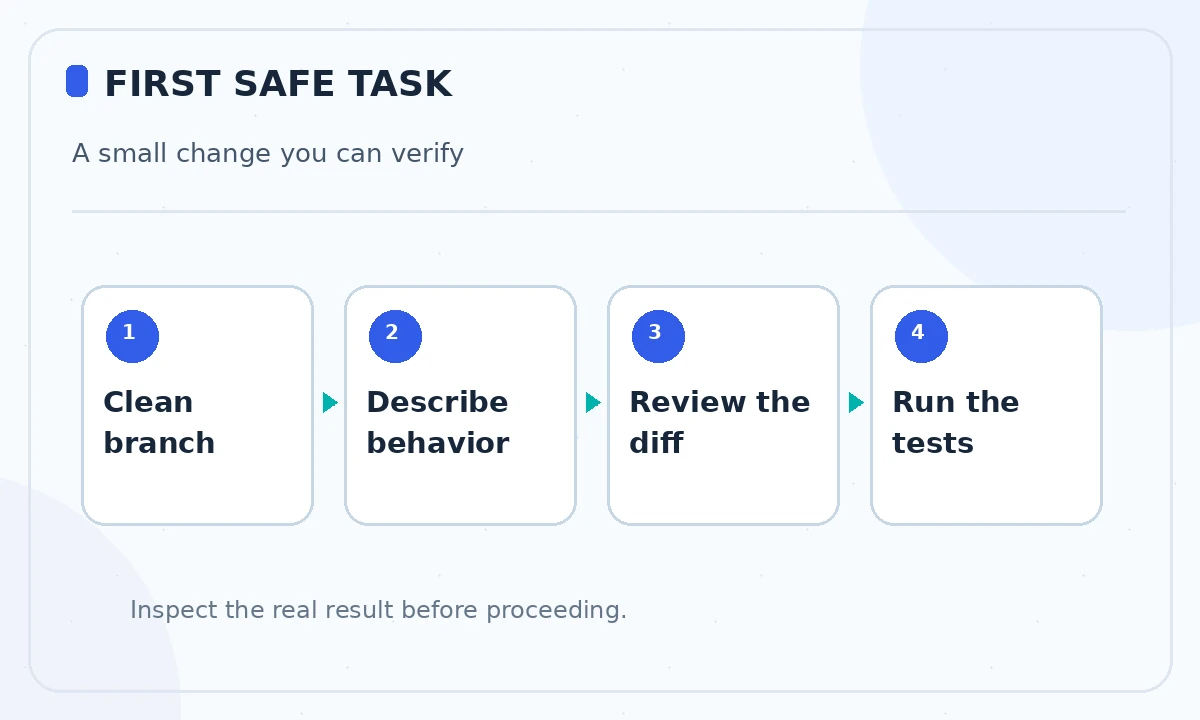
Choose a public tutorial repository or your own non-sensitive practice project. Put it under version control, establish a clean Git baseline and run its test command before using Copilot. Do not use a production repository with customer data for a first experiment. A suitable task is adding a validation error for an empty form field, where correct behavior is easy to write down independently.
Tell Copilot what must remain unchanged. For example: “Add a required-field error to the newsletter form. Do not change the API endpoint or install dependencies. Show tests for empty and valid inputs.” Review suggested edits before accepting them. A system that writes plausible code is still capable of changing behavior outside the request.

Spend completions on routine, verifiable code
Good first uses include a simple unit test skeleton, documentation for a public function or a predictable mapping from API data to a view model. These have small, inspectable outputs. Bad first uses are authentication refactors, data-deletion scripts and security-policy edits where mistakes are expensive and the assistant lacks organizational context.
When Copilot suggests an entire block, read it for off-by-one logic, accessibility, error handling and unsupported library methods. Accepting a suggestion is not a correctness test. Run the project formatter and tests yourself, and check that generated assertions fail for deliberately invalid input. Recording the time spent reviewing is more informative than counting how many lines the assistant typed.
Use limited chat for questions with a clear answer
Ask targeted questions like “Which existing function validates this email address? Link the file and explain the caller.” Then open that file. Broad questions such as “Improve everything” consume context and produce changes you cannot assess. For learning, ask for two implementation choices and their trade-offs before asking for a patch. This lets you compare suggestions with actual repository conventions.
For a single bug, provide the smallest reproducible input, observed behavior, expected behavior and a relevant stack trace with secrets removed. Do not paste API keys, real customer records or private incident logs. Model suggestions may omit the environment-specific cause, so rerun the reproduction after a change rather than accepting “fixed” at face value.
Understand what Free does not promise
GitHub’s current comparison places cloud-agent delegation and pull-request review outside Copilot Free, while editor agent mode and CLI access can be available with limited AI credits. Feature access changes, so verify the current plan matrix when choosing a workflow. Free is not a promise of unrestricted background issue handling, premium model choice or organizational administration.
If a feature is unavailable, first ask whether the task can be done with editor suggestions and ordinary Git commands. Avoid upgrading merely to bypass a poorly scoped request. The ability to review the resulting diff, run tests and understand the code remains your responsibility on every plan.
Decide when Pro pays for itself
GitHub currently lists Pro at $10 per month for individuals and a larger credit allowance than Free; plan details can change. An upgrade is sensible if limits repeatedly stop useful work, if a paid-only capability directly matches your task, and if your review process is reliable. Otherwise, a paid subscription may simply allow more unverified output.
Use a two-week decision worksheet: count stopped sessions, useful accepted changes, correction time and whether any paid-only step is essential. Compare the subscription with the cost of switching tools or continuing manually. For occasional learning and small code edits, staying Free can remain rational even if larger tiers advertise additional models.

Protect quality and privacy as usage grows
Treat autocomplete, chat and agents as assistants working under the same software-development controls. Do not ask them to bypass code review or security gates. Prefer isolated branches, least-privilege credentials, redacted examples and narrow scopes. Verify third-party snippets for licenses and ensure the project’s security and privacy policies permit use of the service.
Keep a short evidence trail: original requirement, changed files, test results and the reviewer who approved the change. That trail matters more than a speed claim based on one impressive demo. If your organization needs seat management, centralized policies or indemnity terms, compare the business plans rather than attempting to force an individual Free account into a team deployment.
Follow a practical first-week learning plan
On day one, inspect the plan limits and configure the supported editor. On day two, ask for explanations of existing code. On days three and four, complete one bounded edit and one test improvement in separate branches. On day five, review all suggestions you rejected and why. You will learn the assistant’s limits as well as its strengths.
At the end of the week, choose between staying Free, trying Pro or using no AI for the next task. The right decision is the one supported by observed usefulness and acceptable review cost. There are no invented benchmark percentages here: your repository, skills and tasks determine the result.
How We Research
We reviewed the current primary-source documentation as of October 26, 2026: GitHub Copilot plans; GitHub Copilot individual billing. We distinguished documented plan features and limits from editorial workflow suggestions, and we compared the intended reader task with the previously published LabFin material. We did not purchase plans, perform product benchmarks, run code or verify an individual account’s entitlements. Where product pages conflict or terms may change, we have identified the uncertainty and recommend confirming checkout or live account details.
Frequently Asked Questions
GitHub currently markets Copilot Free as requiring no credit card. Confirm eligibility and any current account conditions on the official signup page.
No. The published 2,000 figure refers to code completions. Chat and agent usage have separately limited AI credits and varying model costs.
GitHub lists limited editor agent and CLI access on Free. Cloud delegation and some review capabilities are paid-only; check the current feature table.
No. Read the diff, review dependencies and security implications, run tests and compare the result with independent acceptance criteria.
Upgrade when you repeatedly hit a relevant limit or need a paid-only workflow, and when the additional value exceeds the subscription and review costs.