
A small Python CSV importer looks simple until a new developer must explain why a row is accepted, rejected, or written to storage. It is tempting to ask GitHub Copilot to fix the file immediately, but an unreviewed edit can weaken validation and alter business rules. Ask Mode is designed for questions and code explanations rather than automatic edits, making it a useful starting point for understanding the importer. The illustrative example accepts a sample row with an item code and nonnegative quantity and rejects negative values or missing codes. These rules are fictional requirements, not behavior observed in a real repository.
Define what the importer is supposed to accept
Write down a concise, human-approved contract before analyzing the code. For the sample task, a CSV row has a nonempty SKU and a whole-number quantity of zero or more. The importer should reject a negative number, a blank SKU, and malformed numeric text, and it must not write an invalid row. Distinguish these invented requirements from what a repository currently does: legacy code may intentionally allow a different behavior. If an acceptance rule is uncertain, ask the code owner or inspect existing tests rather than asking an AI model to infer a product policy from one function name.
Locate the function and select focused context
Open the relevant import module in an IDE with GitHub Copilot Chat and select the parser, validation function, and nearby call sites. GitHub documents Ask Mode as a way to discuss code and request explanations without autonomously editing files. Include enough context for the explanation to cover what happens before and after validation, but avoid unrelated files or secrets. If the repository is large, ask for one path at a time: file read, row parse, validation decision, then storage write. A narrow question is easier to verify against actual source lines than a request to explain the entire application.

Ask for a branch-by-branch explanation
A useful prompt is: ‘Explain every branch that can reject or accept a CSV row; identify the exact conditions and which function performs the database write. Do not modify code.’ Ask the assistant to distinguish confirmed code paths from assumptions and to point to relevant file locations. Copilot can provide a helpful map but may misunderstand variable lifetimes, exception handling, or the order of validation. Read the source alongside the answer and verify each condition. If the code normalizes values before the check, determine whether the validation sees the original input or a converted representation.
Follow data from text to integer conversion
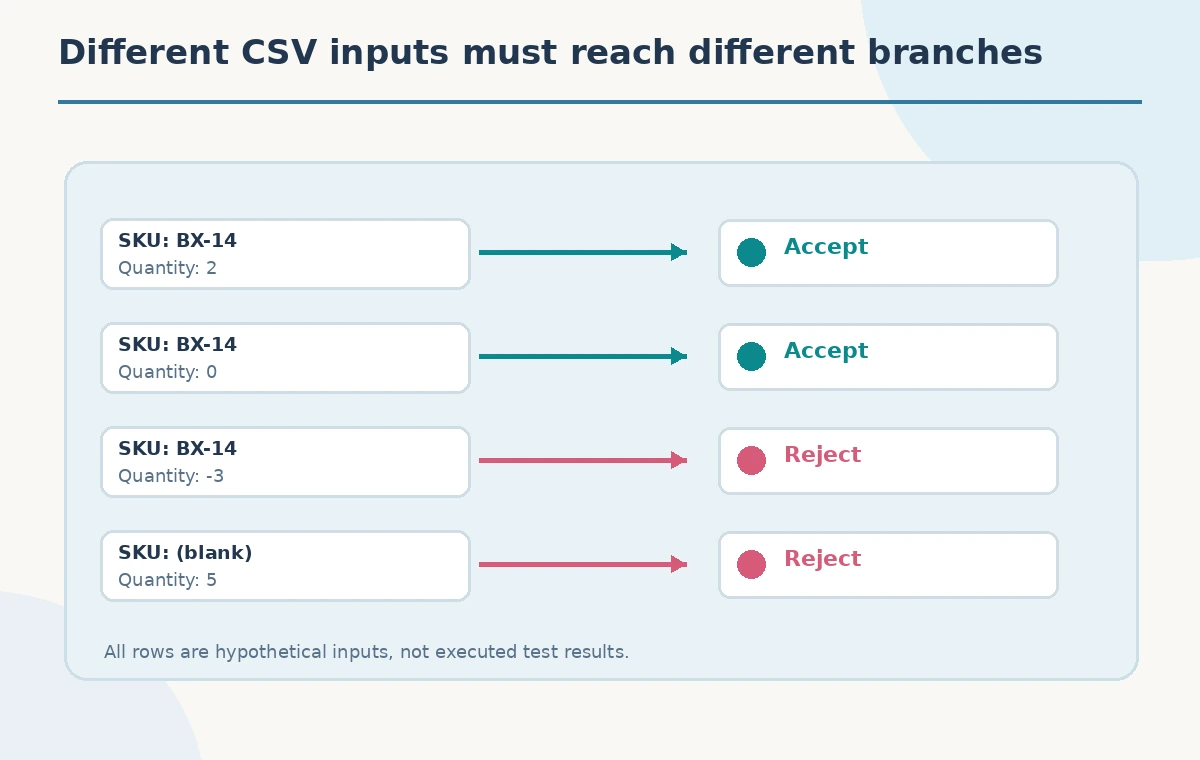
CSV cells arrive as strings. The string ‘0’ can be a valid nonnegative quantity, while ‘-3’ should fail under this example’s contract. A blank string, whitespace, ‘2.5’, and an overflow-sized value require explicit handling choices. Check whether conversion failures are caught and whether a partial row can reach storage after an exception. The central diagram follows a fictional row through a parser, a numeric check, and a write or reject branch. It is not a screenshot of Copilot’s reasoning. The reader should replicate the trace with the actual project’s functions and error behavior.
Separate a proposed change from the existing rule
When Copilot suggests that a condition should be rewritten, ask which current behavior would change and request a concrete input that demonstrates the difference. For example, changing a comparison from quantity < 0 to quantity <= 0 would reject zero, which violates the illustrative requirements. Another seemingly harmless refactor could strip leading zeros from an SKU and change identifiers unexpectedly. Ask Mode is best treated as an explanatory collaborator; code ownership, approval, and tests remain human responsibilities. Do not merge a change just because the generated explanation sounds confident.
Build a compact test matrix with boundary values
Create a table of cases before writing or modifying tests: a valid positive quantity, zero, a negative quantity, a missing SKU, a non-integer value, and a duplicate SKU if duplicates matter for the application. For each case specify expected acceptance, rejection, and persistence behavior. Do not assign expected results simply by asking Copilot for a convenient answer. Derive them from the approved contract and existing tests. Make storage effects observable: a rejected row should neither create a record nor modify an unrelated entry. The illustrated test cases use made-up item codes and quantities, not measured test outcomes.
Inspect side effects and error reporting
A validator can reject a row correctly but still leave a transaction partially committed or obscure the error in logs. Trace whether the importer validates the entire batch first or writes each row as it arrives. Check what happens if a later row fails, whether a useful error reaches the operator, and whether the importer retries without duplicating accepted records. These questions often lie outside a single function, so follow the callers and storage boundaries. An AI chat answer cannot certify transaction safety or the absence of data loss. Only repository-specific review and executed tests can establish those properties.

Make the smallest reviewed code change
After the team agrees on the intended rules, move from explanation to an explicit, reviewable patch through your normal development process. Keep the change narrow and add regression tests for zero, negatives, missing fields, and rejected-row persistence. Run the project’s test suite and inspect the diff; this article does not claim that any tests were executed. Document why a branch exists so the next developer does not reverse it during cleanup. If the organization disables Copilot Chat or restricts repository content, follow those controls and use manual reading instead. Understanding first is the main productivity gain.
How We Research
We read GitHub’s Copilot IDE chat documentation for Ask Mode’s question-and-answer scope versus autonomous modes, and its codebase exploration tutorial for source-oriented investigation. We did not open a private repository, ask Copilot a live question, edit files, or execute unit tests. The CSV data, SKU names, and acceptance rules are fictional teaching examples, and actual repository behavior must be independently verified.
Frequently Asked Questions
No. GitHub describes Ask Mode as question-answering and explanation, not autonomous project editing.
No. The application owner must define the rule; Copilot can help trace how existing code handles zero.
Verify every claimed path against the repository and its tests, especially where parsing and writes are separated.
Include zero, a positive integer, a negative integer, missing text, malformed text and persistence behavior.
No. The code flow and rows are conceptual examples, not results from a live repository.