
A local history organization generates a public archive index from its repository. Automated tests can catch malformed JSON, but the final export may contain a description that was never approved for public release. GitHub Actions environments can require a reviewer before a job referencing a protected environment runs. The illustrated workflow is hypothetical; it is not a screenshot or proof that a particular repository has enabled these rules.
Separate building a file from publishing it
A build job can validate schema, check broken links and produce an artifact without using production credentials. Publishing is a different action: it can expose catalogue descriptions and overwrite files seen by visitors. Put a deliberate boundary between the two jobs. Never make the approval step merely a checkbox in a README that an automated workflow ignores. Make the state-changing job the one that references the protected environment.
The artifact manifest should contain a source commit, file count and checksum so a reviewer knows which exact export is being released. Produce a diff showing newly public records, revised visibility flags and deleted entries. If a draft donor address appears in the export, stop the job even if every JSON field is syntactically valid. A test pass establishes a technical property, not authority to disclose content.
Configure the environment and review rules
GitHub permits environments with deployment protection rules, including required reviewers, wait timers and branch restrictions. A job referencing the environment must satisfy its enabled rules before execution and before receiving that environment’s secrets. The availability of required reviewers depends on repository visibility and plan: on Free, Pro and Team, GitHub documents this rule as available for public repositories, not all private repository configurations.
When configuring required reviewers, GitHub permits up to six users or teams, but only one qualifying approval is required to proceed. That is not the same as requiring six separate approvals. If policy requires two independent sign-offs, add a separate auditable organizational review or another controlled gate. Enable prevent-self-review where appropriate so the person triggering the release cannot authorize their own job. Confirm that configured reviewers can access the repository.
Keep secrets on the protected side of the gate
Environment secrets should not be copied into a general build job. Give the publishing job only the permissions and credentials needed to write its approved destination; use short-lived identities where possible. Log enough metadata to support incident review without exposing a token, private record or signed credential. Do not rely on a secret’s name to prevent misuse: test the job permissions as an unprivileged contributor.
Branch and tag restrictions limit which ref may deploy, but they are not a substitute for checking the generated artifact. Pull requests, forks and manually dispatched workflows deserve special attention. Review the effective YAML for both the environment reference and permissions. A job that publishes before the protected job would bypass the intended control, so the entire workflow dependency graph must be checked.
Build a four-stage release with a human pause
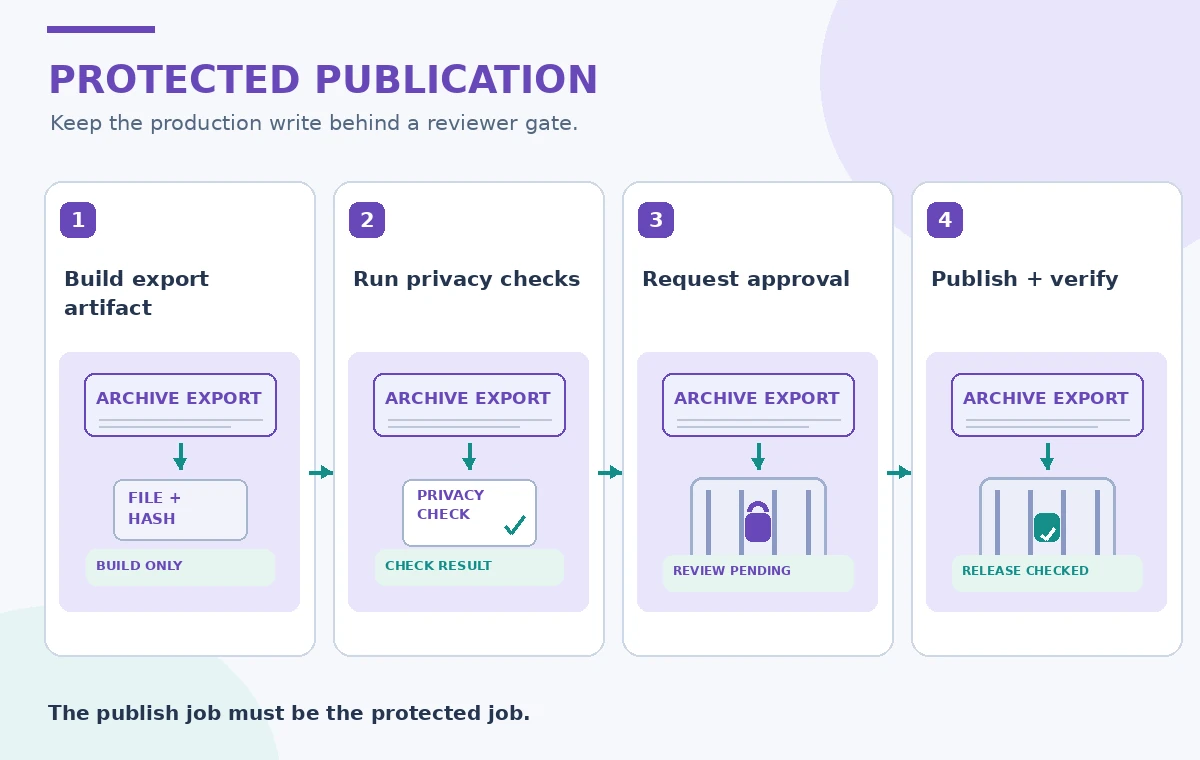
The process illustration shows artifact creation, automatic privacy checks, a pending approval, and final publication with verification. The reviewer should receive the exact commit and artifact digest, a summary of changed public records, and the destination. Approval should reference that immutable build, not a moving branch whose contents can change between review and execution.
Reject a job if unexpected files or restricted fields appear. An approved job still needs protection against repeated writes after network failure. Use idempotent file names or destination reconciliation so re-running a step does not create duplicate public records. The human review controls authorization, while transaction and retry controls protect integrity. Neither mechanism replaces the other.
Compare ungated, pending and approved workflows
An ungated diagram shows the export moving directly from a successful build to a public destination. The protected state shows a pending job that has not received environment secrets or published content. The released state shows an explicit approval followed by destination verification. These are illustrative operational states, not captured GitHub runs or evidence of any real deployment.

Reviewers need visibility into the content being released, not just a green status badge. Include a report with the number of new records, objects changing from private to public and unresolved warnings. In an archive, a “public” flag can be more consequential than a code change. If a validation report is unavailable, the approval should not proceed simply because the workflow timer elapsed.
Handle denied, canceled and bypassed approvals
GitHub provides a review interface to approve or reject jobs awaiting review. A rejection prevents that pending deployment from continuing. Administrators may have bypass options depending on settings, so evaluate those settings against institutional governance and document who can use them. A protected environment is a control whose security depends on repository policy and permissions, not a guarantee in isolation.
If a job is canceled, preserve the build manifest and outcome without marking a public release complete. In a network timeout after upload, inspect the destination and hash before retrying. Approval is not evidence that the remote write succeeded; conversely, an uncertain API response is not evidence that it failed. Keep a durable release log that separates the reviewer’s decision from upload and verification results.
Inspect the four release checks before sign-off
The verification diagram calls out reviewer identity, secret availability, branch restrictions and what is actually on the public server. An approver should confirm that the workflow’s environment is the intended protected one and that no alternative job has production write access. A maintainer should compare approved and deployed file hashes and verify the server serves the new revision.

Include a deliberately failing fixture in a nonproduction repository to confirm that publishing remains blocked when a reviewer has not approved. Test that the job cannot read protected environment secrets before approval and that an unauthorized branch does not reach the destination. Do not run these experiments on a live archive as a disguised release. The checks should be observable and repeatable without disclosing real restricted data.
Retain a release record and recovery path
For each export, record the commit SHA, artifact hash, test report, approver, environment, destination revision and rollback reference. Keep a previous public version if policy and infrastructure allow. Should a record be withdrawn, follow the institution’s disclosure and cache-removal process; simply reverting a Git commit may not remove copies from downstream caches or mirrors.
GitHub environment protection adds a useful human decision point to an automated workflow. It cannot decide whether the catalogue’s historical assertions are true, and it does not prevent publication through an unrelated unprotected system. Audit all paths that can modify the public destination. Choose the controls actually available on the repository’s plan and verify them before relying on the workflow.
How We Research
For our November 2026 source review, we consulted these named official developer references: GitHub deployments and environments reference; GitHub managing deployment environments; GitHub reviewing deployments. We compared published feature scope, technical parameters, product restrictions and operational caveats with a fictional museum, archive or community-service example. We did not run paid API calls, test a live deployment, measure recognition quality, upload private documents or capture actual vendor screenshots. The 20 illustrations in this batch are original schematic teaching drawings, not measured model output. Service availability, terms, model versions and prices may change; verify the latest official documentation, permissions and an authorized local test before public deployment.
Frequently Asked Questions
No. GitHub allows up to six reviewer users or teams but a single qualifying approval can let the job proceed.
No. GitHub documents availability limits for required reviewers on Free, Pro and Team private repositories; verify the current plan and visibility.
Environment protection rules must be satisfied before a job using the environment runs and accesses its secrets.
No. Compare the remote result with the approved artifact and reconcile uncertain upload outcomes.
No. Concurrency limits overlapping jobs; a protected environment controls who may authorize a state-changing release.