
A neighborhood arts nonprofit stores a signed equipment-rental agreement, a later price amendment and an email discussing next year’s renewal in a Google Drive folder. A staff member asks Gemini which renewal date applies. A plausible answer could be dangerously incomplete if it reads the first contract but misses the amendment. Gemini in Google Drive can analyze selected documents and show sources, but a citation is a doorway to evidence, not a legal conclusion. This hypothetical workflow treats AI as a locator and comparison assistant; no real agreement was analyzed and no contract outcome is implied.
Define the question and the decision boundary
Start with a narrow business question: “Which signed documents specify the renewal notice deadline, and which later documents change that requirement?” Avoid asking Gemini simply whether a contract is “safe to renew.” Only authorized colleagues should review vendor materials. Establish who owns the legal interpretation and who can approve a decision before opening the assistant. Record the contract identifier, vendor, original effective date, agreed documents in scope and cutoff date for the review. This is particularly important when the folder contains both unsigned drafts and executed versions. An apparently confident comparison is not a substitute for reading operative language or seeking qualified advice.
Build a clean, version-aware source folder
Put the signed agreement and every executed amendment into one dedicated review folder. Preserve original filenames or rename copies with explicit identifiers such as Agreement_signed, Amendment_1_executed and Notice_email_reference. Separately mark unsigned drafts, meeting notes and unconfirmed proposals as supporting context, not controlling terms. Google Drive permits document and folder-focused questions, but not every available file is necessarily considered in a response. Keep a manual inventory with filename, date, status and signing authority. Note which attachments are images or scans that might have weak text recognition, and open them for direct inspection.

Ask Gemini to compare documents by named fields
Open Drive and use Ask Gemini with the intended folder or selected files as sources. The current Google documentation describes a full-screen research workspace and direct citations to supporting files; available surfaces and plans vary. Ask for a structured comparison of “renewal date,” “notice period,” “fee change,” “termination route” and “superseding clause,” requesting a document name and quoted location for each value. Tell the assistant to write “not found” rather than infer missing terms. Check source settings: a conversation started without bounded sources may include a wider Workspace context. A folder name in the prompt alone is not proof of complete coverage.
Find the omission that could change the answer
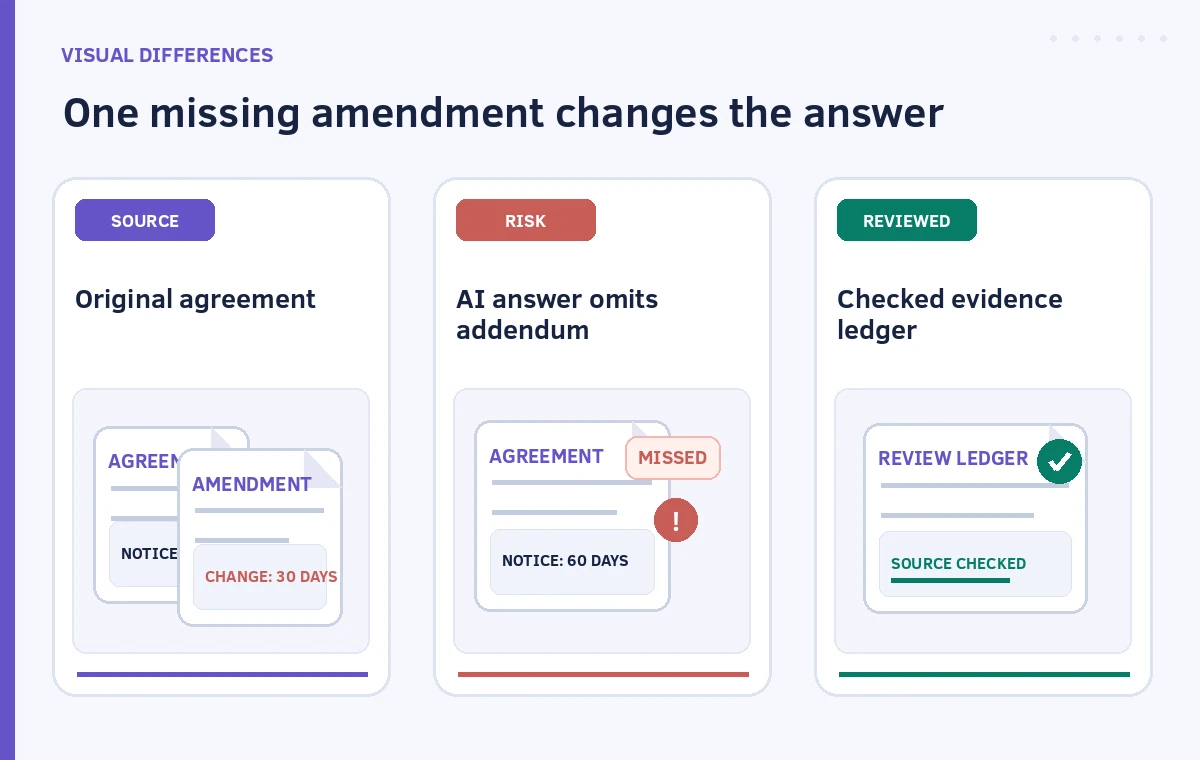
Imagine the signed base agreement requires notice sixty days before renewal but a later executed amendment replaces that deadline. An answer based on the original alone is not a correct version comparison, even if its quotation is exact. Create a comparison matrix with one row for each contested term and columns for original text, amendment text, current interpretation requested and reviewer status. Mark unresolved conflicts visibly. Never generate an authoritative “final terms” memo by smoothing two clauses together. If the assistant summarizes an email as a signed amendment, stop and distinguish informal correspondence from executed documents.
Open citations and inspect the exact clause
Follow each cited source to the original file. Verify section numbers, page boundaries, defined terms, cross-references and the document’s execution status. When a sentence says “unless otherwise agreed in writing,” find the writing before treating the default rule as binding. Compare any reproduced wording against the original; scanned signatures, handwritten additions and embedded appendices need extra scrutiny. Verify that the source belongs to this vendor and not a similarly named project folder. If a citation does not contain the claim, label the claim unsupported rather than inventing a more plausible citation. Preserve links in a review ledger that colleagues can reopen.
Handle permissions and confidential information
Contract files may contain negotiated rates, addresses, contact information or business-sensitive terms. Confirm the organization’s approved Workspace settings and access permissions before selecting them as AI sources. Do not broaden sharing merely to make a research answer more convenient. Keep the ledger in a restricted project folder and share extracts only with people who need them. If outside counsel must review the agreement, use the organization’s authorized transfer procedure. A generated summary may be easier to circulate than the contract itself, but it can expose equally sensitive facts and can omit important caveats.
Write a decision memo that leaves ambiguity intact
The finished memo should state the precise question, every document considered, the relevant clause wording, any conflicting interpretation and a proposed follow-up. Distinguish “located in document” from “legally controls.” Include a clearly marked unresolved box when amendments conflict or an attachment is missing. Ask the contract owner to confirm effective terms, notice requirements and approval path. Add an explicit instruction that no renewal or cancellation notice goes out solely on Gemini’s answer. If there is a hard deadline, route the issue to the accountable human promptly rather than allowing the drafting workflow to consume the decision window.

Set acceptance checks before closing the review
A useful review is complete only when the inventory matches the signed-file set, every material conclusion has a verified original passage, and unresolved differences are assigned an owner. Record the version and date of the evidence ledger. For a later re-review, rerun the search on the updated file set and compare the new response with the previous checked memo; do not assume saved AI context automatically represents the latest agreement. No illustration here depicts a tested Google Drive response, a real vendor, or legal advice. The purpose is to show a repeatable way to catch source omissions before they turn into operational mistakes.
How We Research
We checked Google’s official Use Gemini in Drive for research and analysis guidance and summaries of Drive files and folders help for source selection, citations, eligible plans and the warning that not every file in a folder is necessarily included. We did not access an organizational Drive or conduct a legal review. The contract example and all diagrams are hypothetical. Interface availability and permissions depend on an organization’s current Workspace configuration.
Frequently Asked Questions
Google documents multi-file and folder-based analysis in Drive. You still need to list the intended files and verify which sources support each part of the answer.
A citation lets you open evidence. It does not prove which version controls or replace a qualified reviewer’s interpretation.
Open it directly, add the exact clause to the ledger and re-scope the comparison. Do not accept the older agreement as definitive.
Only if your organization authorizes the service and its data handling, access settings and sharing workflow for those documents.
A document inventory, exact located clauses, version conflicts, open questions, assigned reviewers and a recorded approval decision.