
A neighborhood association records a public discussion about a proposed community garden. Three participants speak quickly, one interrupts another, and a moderator repeats a person’s name. A speech-to-text system may capture most words while still attaching a critical opinion to the wrong speaker. ElevenLabs Scribe v2 supports transcription, speaker diarization and word-level timestamps, but those features require editorial verification before a transcript can be shared as a reliable public record. This scenario is invented; no participants were recorded and no ElevenLabs account was used for an accuracy trial.
Confirm recording consent and public-use scope
A transcript is not automatically cleared for publication because a meeting was recorded. Identify the organizer’s approved purpose, participants’ notice, applicable recording rules and whether the result will be private minutes, an accessibility aid or a public quotation source. Use only the original audio that the team is authorized to process. Keep any sensitive off-topic remarks, personal contact details or requests to speak off the record out of the upload workflow until a responsible editor has determined how to handle them. Record the file’s provenance, date, duration and custody. AI speaker identification is not a substitute for permission or consent.
Prepare the audio without changing the evidence
Make a copy of the accepted recording for processing. Preserve the unedited master and its time base. If the clip begins with long silence or contains an unrelated setup conversation, note any trim offset so timestamps still map to the source. Avoid aggressive denoising that may erase quiet interruptions or create apparent words. A forum recording may have one room microphone rather than separate tracks, and overlapping voices will be harder to separate. Write down the expected number of speakers only if reliably known; an uncertain participant count should remain a review note, not a forced fact.

Upload through the documented transcription workflow
ElevenLabs’ Speech to Text product guide describes opening the Speech to Text page, choosing Transcribe files and uploading audio or video. Choose a primary language when known or allow automatic detection when it is uncertain. The guide also describes audio-event tags and keyterm prompting to help with unusual names or terminology. Keyterms are hints, not a guarantee that a name will be correct. If project confidentiality makes online processing unsuitable, choose an approved alternative before uploading. Avoid making promises about exact pricing or file caps without consulting the current product page and plan.
Read diarization as a draft assignment
Diarization groups speech by speaker, but “Speaker 1” does not establish anyone’s real identity. Compare the first several turns with the recording, then listen to every handoff where interruptions, laughter, microphone movement or similar voices may confuse attribution. Assign names only with independent support from the event roster and recognizable spoken introduction. If the identity is uncertain, preserve a neutral identifier such as “Unverified speaker.” Be especially cautious when a moderator repeats someone else’s view; a summary may mistakenly turn a quotation into the moderator’s own position. Maintain explicit evidence for name changes.
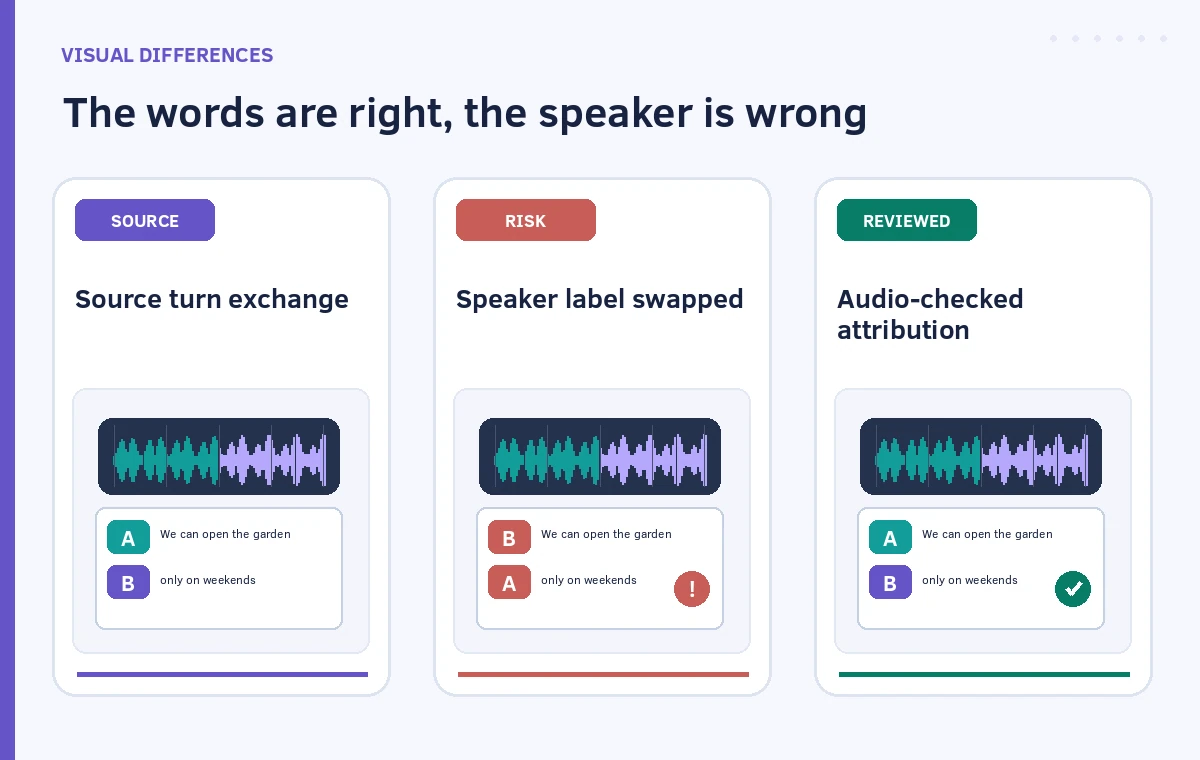
Use timestamps to verify contested words
ElevenLabs describes word-level timestamps and a playback-oriented transcript view. Jump to an ambiguous word, listen before and after the timestamp, and check whether a sentence was clipped at the turn boundary. Pay extra attention to negation, numbers, names, votes, conditional phrases and words like “not,” “unless” and “only.” A transcription can sound plausible while reversing a speaker’s position with one missing word. Keep corrections distinct from paraphrases; a public transcript should not silently improve grammar in ways that alter intent. Mark inaudible segments as such rather than supplying a contextually likely answer.
Separate non-speech tags from spoken statements
Laughter, applause, coughs and overlapping chatter can be important context but should not become invented quotations. Scribe’s speech-to-text workflow supports audio-event tagging. Review whether an audio label is justified and choose a consistent notation for the editorial product, such as “[applause]” or “[inaudible].” Don’t label emotion, motive or identity from sound alone. Where two people speak simultaneously, use a notation that explains overlap rather than forcing both sentences into one neat chronological line. The goal is a useful record of what can be heard, including its limitations.
Apply a documented correction pass
Keep a revision ledger with source timestamp, original generated text, corrected wording, reason and reviewer. Test several different portions of the meeting instead of only the clean opening remarks. The second pass should examine all speaker handoffs and high-impact claims, not merely spelling. Have an editor who knows the meeting context check names against approved materials, without overruling what the audio actually says. Avoid posting a polished transcript directly from the dashboard. A sound final process includes a visible label describing whether it is verbatim, lightly edited for accessibility or a separately prepared summary.

Export with an audit trail and a clear status
The official product guide describes exporting the transcript in multiple formats. Choose one that fits the organization’s publishing workflow while retaining speaker labels, timing where needed, and revision history in a separate retained copy. Check that captions or text do not imply who spoke when the identity remains unclear. Inform readers of unresolved audible gaps and whether the content was edited for readability. If a quote may affect a public decision, replay the source before approving it. This method measures editorial completeness through checked evidence; it does not claim a particular word-error rate for Scribe v2.
How We Research
We reviewed ElevenLabs’ official Speech to Text product guide for upload steps, keyterm hints, playback and export, and its transcription documentation for Scribe v2, word timestamps and diarization. The community forum, names and transcript fragments are fictional. No recording was uploaded or benchmark performed; speaker identity and publication permission require human verification. UI options can differ from API capabilities.
Frequently Asked Questions
Diarization distinguishes voices but does not independently verify a real identity. Confirm names against the recording and approved event information.
ElevenLabs documents both audio and video file upload through Speech to Text, subject to current service limits.
No. Timestamps make targeted listening easier; check the words and speaker attribution in the source recording.
Where the current interface supports keyterm prompting, approved spellings can help; still verify every name and its context.
Not responsibly. Confirm consent and intended use, audit critical quotes and uncertain speaker turns, then have an authorized reviewer approve it.