
Multi-reference image editing promises to combine elements of separate photos in one cohesive scene. For a small outdoor apparel campaign, the source materials might be a licensed hiking jacket photograph, a backpack packshot, and a mountain path reference. The difficult part is preserving product identity while creating a believable composition. This walkthrough designs a reference register, an edit prompt and an inspection procedure for FLUX.2. The scenes shown are conceptual diagrams, not results from live model tests.
Choose FLUX.2 rather than assuming Kontext is the newest model
Black Forest Labs identifies FLUX.2 as its current image model family and refers to FLUX.1 Kontext as a previous generation still available for editing. FLUX.2 adds multi-reference editing and supports larger outputs, but the limits vary by variant and interface. For this tutorial, a licensed jacket photo, backpack photo and outdoor landscape serve as three separate source inputs. That makes the use case distinct from simple text-to-image generation, where no existing product details need to survive. Decide whether exact SKU accuracy is mission-critical; if so, preserving original packshot pixels in a conventional compositing application may be more reliable than synthesizing a product anew. Check the source-specific FLUX.2 overview before assigning your team a model.
Select a model with the right input limits
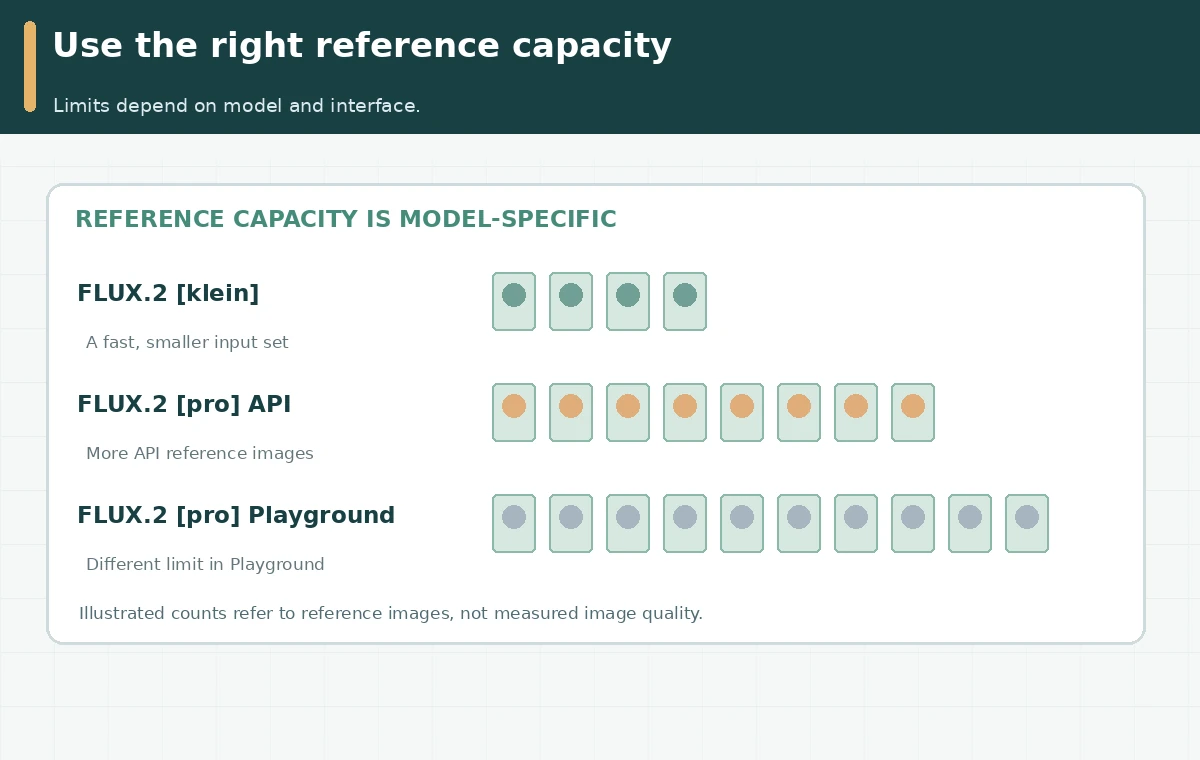
According to Black Forest Labs, FLUX.2 [pro] accepts up to eight reference images through its API and up to ten in the Playground; [klein] supports up to four. The limits are not permission to send ten needlessly large files. Work with three clean references, each labeled by subject, rights and purpose. Do not mix up a reference image cap with a memory or megapixel budget: BFL documents separate image-processing limits. Likewise, marketing claims such as “best consistency” are vendor statements, not independent benchmark results. For this three-image editorial example, a basic variant with three-image support is sufficient in principle, but output quality, latency and usage terms still require an account-level check. The reference matrix can be reused with other models that support explicit source images.

Build a register so an edit prompt can identify assets
Name the approved sources in a human-readable way: image 1, navy jacket packshot; image 2, canvas backpack packshot; image 3, rocky path at sunrise. Keep a high-resolution original and an annotated proof showing the invariant details: zipper placement, jacket seams, backpack buckles, color swatches and any real printed label. Black Forest Labs documents referring to indexed inputs in natural language, such as “the object from image 1 beside the object from image 2.” Write a prompt requesting a hiker wearing the jacket and carrying the backpack, walking along a path with an unobstructed product silhouette. Avoid promising exact logo reproduction, because a generative system can distort text or manufacture stitching. Hold the number and order of references fixed while reviewing variants.
Create a change budget instead of asking for everything at once
Separate permitted changes from forbidden ones. Permitted: weather, camera crop, natural shadow, model pose and landscape mood. Forbidden: jacket zipper redesign, fake brand logos, changed backpack pocket count, invented certifications or people shown as endorsing the brand. Request the first composition as a neutral scene. Then change just one permitted variable, such as afternoon instead of sunrise, while keeping the references and wording stable. Save the generated result and prompt before the next edit. If a source photograph includes a person, ensure permission for the intended transformation, not merely possession of the image. Do not describe generated photos as photos of real customers. For product catalog use, show authentic packshots alongside any clearly labeled illustrative lifestyle scene.
Run a three-level asset proof
At thumbnail scale, check whether the hiker and gear are identifiable and whether the scene reads as plausible. At full resolution, compare seams, buckles, pockets and text against the original packshots. In the final crop, check whether the product is obscured by email headlines, mobile-safe areas, buttons or overlays. A plausible backpack strap might attach in the wrong place; the generative scene should fail the product-accuracy gate even if the composition is attractive. Maintain a simple approval table with columns for feature, source reference, result, defect, decision and owner. Never use a vendor-generated visualization as evidence that a physical garment has a performance rating or sustainability claim. Those require independent product documentation.

Document model choice, provenance and commercial approval
Record the exact FLUX.2 variant, workflow (API or Playground), number and order of references, prompt, output size, source licenses and review decision. Black Forest Labs currently lists several variants with different licenses and production purposes, including distinctions between hosted commercial use and some local open-weight models. Do not assume that downloading any model weights confers identical commercial rights. When planning costs, consult the live pricing page and identify whether the provider charges for processed input references as well as output resolution. This article deliberately avoids a static dollar-per-image claim, because model pricing and input-size treatment can change. The lasting value is a proofable asset register and a repeatable audit before creative goes to customers.
How We Research
We checked the official FLUX.2 overview, multi-reference input limits and model family listing on October 28, 2026. The hiking apparel composite is conceptual, not a BFL-generated sample or hands-on quality measurement. The illustrations are original conceptual diagrams. Screens, claims of tested effectiveness, and measured product outcomes are not represented.
Frequently Asked Questions
Yes, BFL lists it as an available previous-generation option, while recommending FLUX.2 for new projects.
No. The provider documents different caps depending on the variant and whether you use API or Playground.
They may not. Compare generated details with licensed originals and retain authentic product photographs for factual listings.
It means referring to separate uploaded inputs explicitly, such as “jacket from image 1” and “trail from image 3.”
Original sources, licenses, model variant, prompt, reference order, pixel output and reviewer’s product-accuracy decision.