
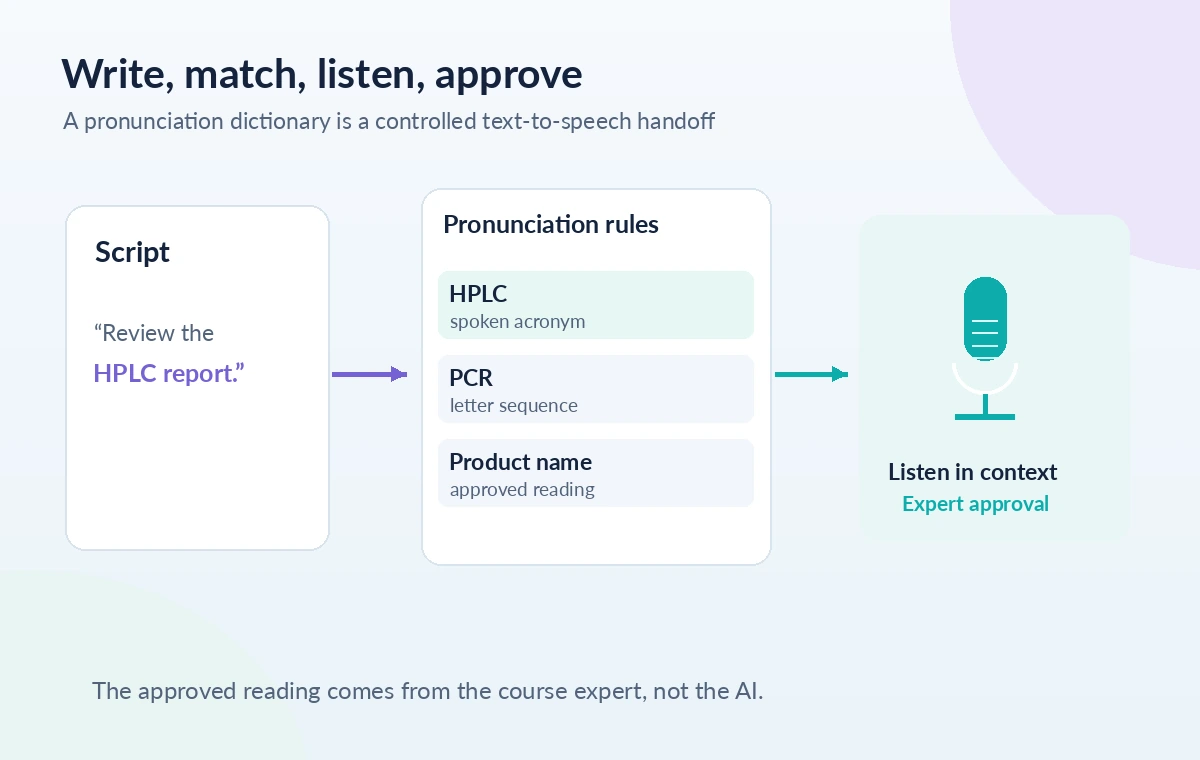
An instructional video teaches laboratory technicians how to interpret a quality-control report. Its script contains common words alongside HPLC, a product name and two chemical terms. A text-to-speech voice may read the abbreviation as an unfamiliar word, while pronouncing the same term differently in separate chapters. ElevenLabs provides pronunciation dictionaries to control some readings, including alias and phoneme rules. But a dictionary is not a scientific fact-checker, and compatibility differs across models and product surfaces. This hypothetical workflow focuses on accurate script preparation, repeatable pronunciation choices and listening review—not on audio generated by us.
Build a verified glossary before changing the voice
Collect every acronym, brand, unit and specialist term in the training script. For each, record the exact printed form, the intended spoken form, the person who approved it and the chapters where it appears. Verify disputed pronunciations with the organization’s subject-matter expert or a reliable field reference. A seemingly obvious expansion can be wrong in a particular laboratory; HPLC usually refers to high-performance liquid chromatography, but the production glossary should follow the actual course language. Preserve capitalization because ElevenLabs documents case-sensitive rule matching. If the script alternates between ‘HPLC’ and ‘hplc,’ decide explicitly whether both need entries instead of assuming one rule will catch everything.
Understand alias rules versus phoneme rules
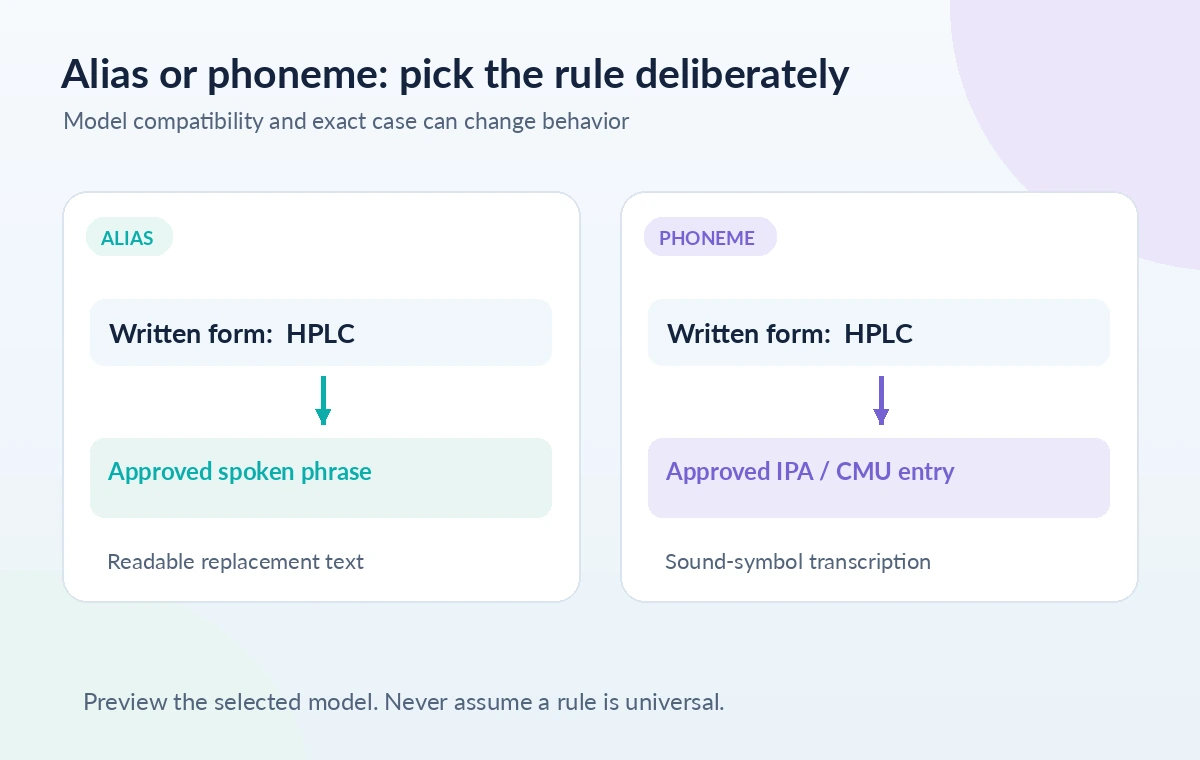
ElevenLabs describes two broad rule styles. An alias substitutes a word or phrase that the speech system can read, making it useful when an acronym needs to be spoken as a sequence of words. A phoneme entry uses a notation such as IPA or CMU to specify sound units more precisely. An IPA rule is not a guarantee that a scientific term will sound correct in every voice, accent or model. Choose the simplest representation that preserves the course’s approved language. For an unfamiliar chemical name, do not invent a phonetic transcription merely because it looks technical. Ask the expert for a spoken reference and compare the model’s result against it.
Confirm model and product compatibility first
The ElevenLabs documentation makes an important distinction between pronunciation dictionary support for different model families and editors. Some model versions handle phoneme tags while other paths may require alias rules or expose a narrower set of options. The Studio pronunciations editor has its own documented compatibility guidance, which should not be blended carelessly with the general API guide. Identify whether the deliverable is made in Studio, Text to Speech or via an API call; record the exact model selected. If the chosen model ignores a phoneme entry, that is a compatibility issue to diagnose, not evidence that the word’s pronunciation itself is impossible.
Create a small lexicon and avoid conflicting entries
Start with a handful of the highest-risk terms and place them in a dedicated dictionary. The official guides describe a pronunciation lexicon file format and ways to add a dictionary through supported interfaces or code. Keep each entry unambiguous: the written target should match the narration script, and the replacement should reflect a spoken form approved for the project. The same product name with and without capitalization may need separate entries. Do not include secrets or personal identifiers as glossary keys if the course can be made without them. Version the lexicon with the script so a producer can tell which rules were active for an exported chapter.
Listen to a controlled sentence, not an isolated label
Preview each difficult term inside a complete sentence. The same pronunciation can sound acceptable on its own but awkward next to an article, plural ending or number. Listen to a sentence before and after adding the rule at a matched volume, using the same voice and model. Note any change in stress, vowel quality or rhythm around the target. A dictionary can alter how a word is pronounced; it cannot verify whether the instructor used the correct terminology or a safe procedure. If a chapter switches speakers or accents, repeat the review with the voice actually assigned to that section rather than inferring one successful preview applies universally.
Check case, inflections and nearby abbreviations
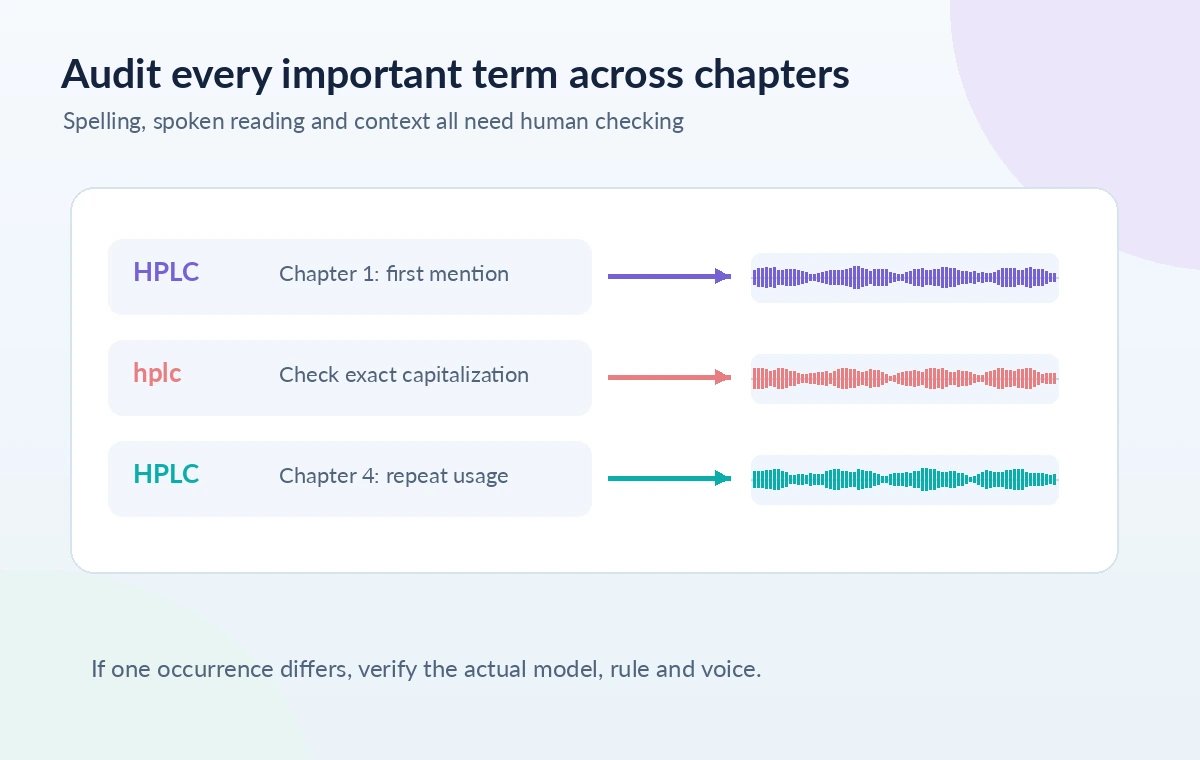
Look for near-matches that an editor might miss: lowercase spelling, possessive endings, plurals, abbreviations followed by periods and terms split across captions. ElevenLabs notes that dictionary matching can be case-sensitive and depends on defined rules. A specific word may require more than one entry to cover the exact script variants. Build a short audit table outside the published audio: printed term, approved reading, example sentence and review status. Do not put that table into the listener-facing illustrations as if it were a product screenshot; the article diagrams instead show a script flowing through a dictionary rule to an audible phrase requiring human approval.
Review the whole training lesson for consistency
After individual checks, listen to the first occurrence of each term and then sample later chapters. Confirm that an acronym is not expanded in one paragraph and pronounced as a single word in another without an editorial reason. Pay special attention to units, concentrations and safety steps: a mistaken decimal or abbreviation is a content error that pronunciation tooling cannot repair. Compare narration to on-screen labels and captions. If the audio sounds right but the slide says the wrong unit, the lesson is still inaccurate. Escalate technical disagreements to the qualified course reviewer; the model and the dictionary are delivery tools, not scientific authorities.
Document the release conditions and keep a reversible source
Before export, save the script, approved glossary, selected model, lexicon version and a list of sentences checked by the reviewer. Document any words that remain unresolved rather than silently accepting a guess. Recheck the product’s current model-support and credit policies, because documentation and capabilities can change. Confirm the permitted use of voices and source materials separately from pronunciation quality. Keep the editable text so a future correction can regenerate only the affected material if the workflow supports it. This is an editorial specification for safe pronunciation review, not a claim that the pictured audio was synthesized or that every model will honor the same rules.
How We Research
We compared ElevenLabs’ API dictionary guide, the separate Studio pronunciation-editor help and its text-to-speech best-practices documentation. These sources differ in scope, so the article warns users to verify model support in the exact workflow instead of promising universal phoneme behavior. We did not create a dictionary, run synthesis, consume credits or verify real pronunciation changes. The glossary and wave diagrams are instructional abstractions, and scientific terms require expert confirmation. Official documentation reviewed: ElevenLabs: Pronunciation dictionaries guide; ElevenLabs: Pronunciation editor in Studio; ElevenLabs: TTS best practices for dictionaries. Recheck the live docs before proceeding because interfaces, availability and model support can change.
Frequently Asked Questions
No. Phoneme and alias support depends on the model and product surface. Confirm current compatibility for the actual generation path.
Aliases substitute a readable spelling or phrase; phoneme rules specify sounds with IPA or CMU-style notation where supported.
Dictionary rules can be case-sensitive. Check that the script and lexicon use the same exact capitalization and spelling.
No. It changes how text is spoken, not whether the text is correct. A qualified subject-matter reviewer should approve technical content and terms.
Listen in context and then review later occurrences. Stress, adjacent sounds, speaker choice and inflections can reveal problems that an isolated label hides.