
A library wants a friendly search box that helps visitors finish book titles after typing a few letters. The same search index may contain restricted oral-history descriptions or staff-only acquisition records. Azure AI Search supports suggesters for autocomplete and document suggestions, but its typeahead interface does not decide which records a visitor may view. This article outlines a fictional public catalog implementation with access controls and manual relevance review.
Separate query completion from document suggestions
Autocomplete extends a partial query into a possible word or phrase; suggestions return matching documents that a person can select. They serve different user needs. A visitor typing “micro” might want the term “microfilm,” while a suggestion panel should show a distinct book title, record ID and context. Do not treat every completed phrase as a confirmed holding or a live availability statement.
Choose the interface behavior deliberately. Autocomplete can remain a lightweight text aid, while suggested records should navigate to an authorized detail page. If the catalog has multiple editions with identical names, include a differentiating subtitle, publication year or accession reference. Avoid displaying an internal staff note merely because it appears in the indexed document payload.
Design source fields when creating the index
Microsoft documents a suggester configuration inside the index definition that names eligible string source fields. Those fields receive extra indexing for prefixes; adding a suggester to an already indexed field may require rebuilding the index. The supported analyzer choices have constraints, including restrictions on custom analyzers for suggester source fields. Review that rule before investing in a part-code tokenizer or multilingual schema.

Create a public display title field separate from exact inventory codes and staff-only fields. If a title needs an analyzer incompatible with suggesters elsewhere, use a second appropriate field rather than weakening identifier search. Make a reproducible index schema review part of deployment; modifying an index in place without a rebuild plan can leave a public interface inconsistent with its own documentation.
Constrain suggestions by access and data purpose
A filter is essential when the underlying index contains both public and protected records. The application must enforce access permissions before rendering a suggestion or returning a detail, not rely on the browser hiding the extra results. Use only safe retrievable fields and a small `top` value. Re-evaluate authorization when a visitor opens a result because the underlying record may have changed since the typeahead response.
Never expose internal descriptions, donor restrictions or unpublished titles in suggesters to unauthorized visitors. Testing should include a private record with a distinctive prefix that would otherwise be easy to discover. The expected result is no unauthorized matching suggestion. Review search endpoint configuration and service keys; even excellent front-end filtering is ineffective if a public client can call the index using privileged credentials.
Choose a useful minimum input and rate strategy
Azure documentation describes autocomplete and suggestion requests that depend on indexed prefixes, with matching behavior beginning after sufficient input characters. Make the UI tolerant of visitors who type slowly, use assistive technology or paste a complete title. Debounce network requests, cancel obsolete responses and preserve the typed query when the service returns no suggestions.
A dropdown should not jump its selected item under the keyboard as late requests arrive. Offer a normal search submission path for visitors who do not want suggestions. Do not treat absence of a suggestion as evidence that the library lacks the item; indexing schedules, prefixes, alternate titles and access rules can all explain why a match did not appear.
Compare broad hints with safe catalog results
The comparison illustration traces a fictional partial title across three states: a broad suggestion panel, a panel constrained to public titles, and a detail page that checks the actual record. It deliberately changes the results rather than using identical cards with new headings. The pictures are teaching artifacts, not Azure screenshots or measured search logs.

Build test cases for common titles, ambiguous spellings, punctuation and unpublished records. Examine whether suggestions from generic category fields crowd out actual names. Use public display labels that are specific enough to disambiguate editions. A successful test shows the right *authorized* destination, not merely a visually appealing autocomplete string.
Keep exact identifiers outside fuzzy completions
Barcode strings and accession codes should remain searchable through appropriate exact-match fields. A typeahead index designed for normal language may split punctuation and mislead users about whether a code identifies a particular artifact. Consider linking an exact-code result from a separate query path. Review custom analyzer limitations and compare tokenization with the Analyze API if you maintain both search modes.
For example, “AB-20/B” and “AB-20/D” may be distinct inventory parts even if a prefix-oriented suggestion experience treats them similarly. Do not convert an approximate suggestion into a confirmed equipment match. The verified detail record, not the string in the dropdown, should determine whether a specific object can be requested.
Verify the suggestion and destination boundaries
The verification diagram highlights four obligations: exclude private titles, inspect prefix behavior, minimize returned fields and re-authorize the clicked detail. Have a reviewer test both normal and edge-case queries with a visitor identity and a staff identity. Check what the service returns over the network, not just the titles shown by the interface.
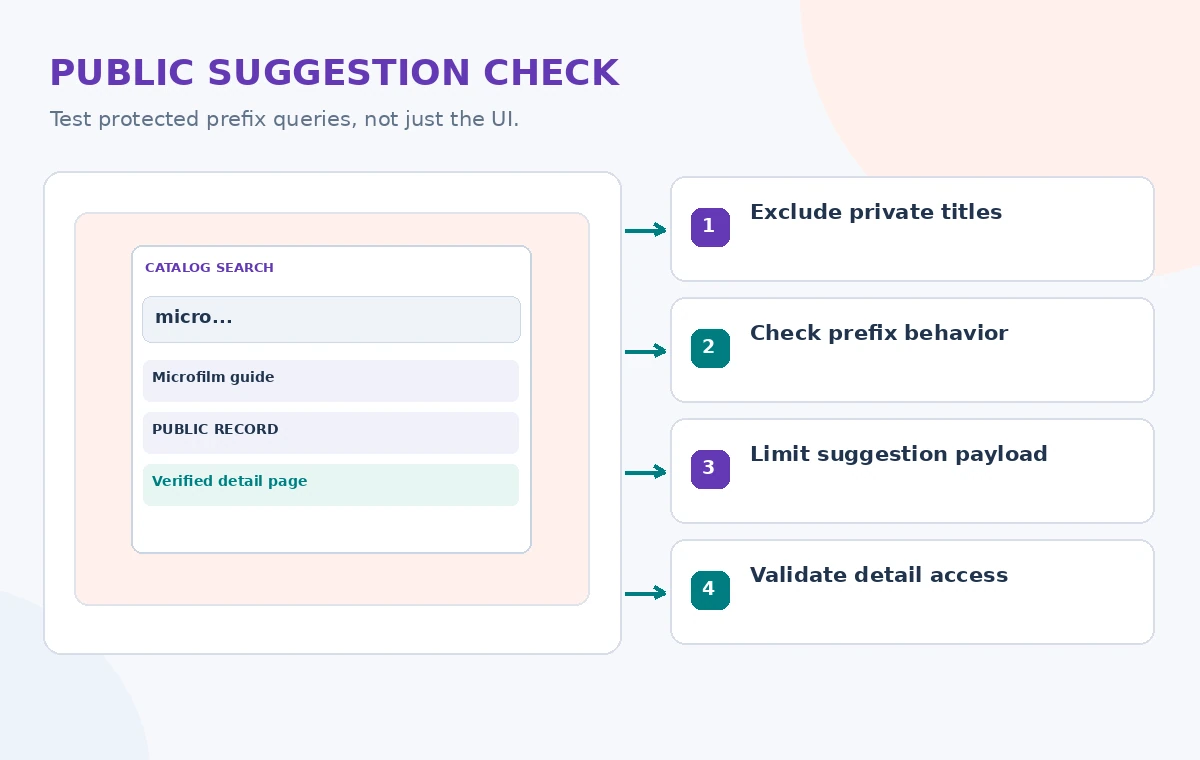
Monitor whether users follow a suggestion that leads to an outdated or duplicate record. If restricted access changes, invalidate relevant cached suggestions and verify the filter immediately. Keep query telemetry minimal and respect the institution’s retention policy. A search box should not quietly store identifiable research interests unless such collection is disclosed and genuinely needed.
Launch with a reversible index deployment
Use a staging index and a list of approved catalog examples before replacing public typeahead. Test screen-reader announcements, keyboard focus and empty-state behavior alongside relevance. Record the indexed fields and query options so unexpected results can be traced to configuration rather than guessed at from a screenshot.
Suggesters can make a catalog easier to browse, but they do not verify circulation status or solve authorization. A durable architecture keeps public identifiers, indexed titles, protected metadata and record-level checks distinct. The best outcome is a visitor who reaches the correct, permitted record quickly without accidentally discovering anything the library promised to keep private.
How We Research
For this November 2026 editorial review, we consulted official vendor references: Azure AI Search configure a suggester; Azure autocomplete and suggestions; Azure search filters. We mapped feature scope, input/output rules, failure conditions and developer guidance to a hypothetical community-service scenario. We did not execute paid API requests, upload private personal data, publish a real catalog record, run a security attack or measure service performance. The diagrams show original educational examples, not screenshots or recorded service results. Documentation, permissions, regional availability and service configuration can change; verify them in the current official reference and an authorized test before deployment.
Frequently Asked Questions
No. Autocomplete proposes query text; suggestions return matching indexed documents and identifiers.
No. Microsoft restricts analyzer choices for suggester source fields; check schema rules and plan a rebuild when needed.
Not without correctly enforced filters and underlying authorization. Protect both the response and destination.
No. It reflects matching indexed content, not necessarily current circulation or access status.
No. The examples are original teaching illustrations, not live search responses.