
A municipal library rescinds a temporary entrance-closure notice but its search assistant keeps quoting that old notice from a retrieval index. The underlying PDF might already be gone from storage, yet its vectorized search document can remain. Azure AI Search supports deletion detection policies for some indexer data sources, including native blob soft deletion. This guide uses a fictitious library bulletin to explain the necessary order of operations and how to prove the index has caught up.
Treat removal as an indexed-data lifecycle event
Document retirement needs its own workflow, not just a file-system delete button. Give every public bulletin a stable document key, source blob path, revision status, effective date and intended audience. An emergency closure notice may change within hours, and an assistant serving yesterday’s text can cause a visitor to take the wrong entrance. Decide who can mark a notice withdrawn and how that action becomes visible to the search index.
Write an expected end state: the retired bulletin is absent from eligible public search results, its replacement is findable and audit records retain the retirement decision. A cached response and a separate vector store may need their own invalidation. The example library and dates shown in this guide are hypothetical, not a live Azure environment or an observed indexing result.
Understand automatic change detection versus deletion
According to Microsoft’s blob indexer documentation, Azure Storage modification timestamps support incremental change detection. Deletion is different: physically removing a source blob does not guarantee that its indexed document will disappear. A deleted file no longer provides a state the indexer can read. For supported blob sources, native blob soft delete and custom metadata-based soft deletion are alternative approaches.
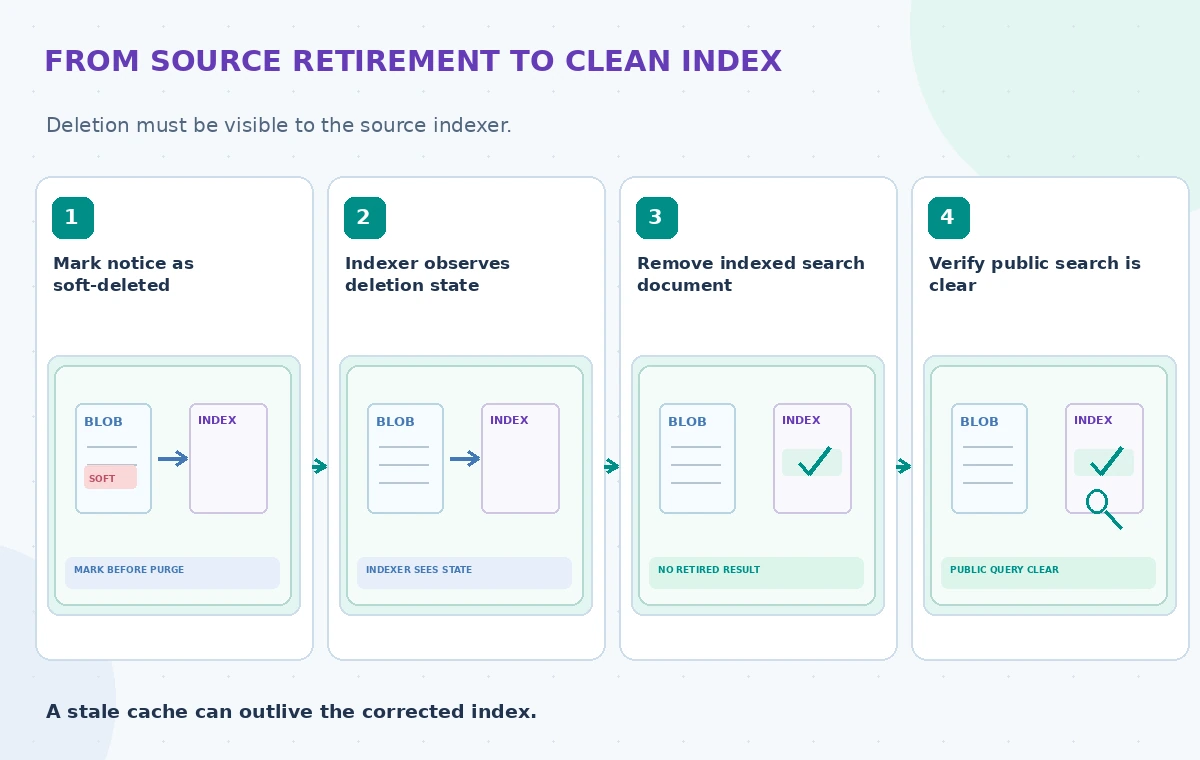
Choose a compatible source and indexer configuration; do not assume a policy on one data source applies to all search indexes. Note the specific indexer schedule, retention window and deletion policy in an operations record. If the indexer is delayed past the period in which a soft-deleted blob remains observable, it may miss the signal. Decide on a manual delete procedure for emergency cases.
Configure the policy before initial indexing
Microsoft explicitly recommends applying the deletion detection strategy from the first indexer run. If records were already hard-deleted before any deletion policy existed, adding a policy later will not retroactively reveal those missing source objects. In such cases Microsoft’s guidance suggests creating a new index with a fresh indexer configured correctly, or repairing orphan documents through controlled deletion operations.
For native blob soft delete, attach the appropriate dataDeletionDetectionPolicy to the data source and enable the compatible storage soft-delete behavior. Do not fabricate a universal JSON payload for every service or API version. Validate the current REST schema, account configuration and supported source type first. Record the time of the change and confirm that the indexer actually read the new configuration.
Use the sequence soft-delete, index, then purge
A safe conceptual sequence is to soft-delete the retired blob, run or await the indexer, verify the matching search document has been deleted, and only then consider physical removal according to storage retention rules. The critical checkpoint lies between the source deletion state and the purge. An indexer that never sees the soft-delete marker cannot remove the associated search result automatically.
Keep an asset-level reconciliation table with source key, target index key, expected status and observed verification date. If your team manages both public and internal indexes, inspect both rather than assuming they update together. A preview of an indexer job or a success banner is not enough: query the actual search index for the retired key and record the absence of the document.
Illustrate an orphan hit versus a verified removal
In the first state, a person hard-deletes a PDF from storage but forgets its search representation. The index still returns the retired closure date. In the second, a scheduled indexer has no deletion marker to observe; search can look freshly indexed while still carrying the orphan. In the reviewed state, a soft-delete policy was present and the indexer processed the marker before the blob was purged.

These are three instructional states, not screenshots of a test run. Show the search record’s ID and status rather than an invented quality score. A search query returning no results can also result from filters or index errors, so verify the exact document key and compare against a known approved replacement. Record failures rather than treating silence as confirmation.
Plan for restores, revisions and other consumers
Microsoft notes a special restore behavior: undeleting a soft-deleted blob may not update its LastModified timestamp, so the indexer may not automatically reindex it. A metadata resave or another documented method that advances the timestamp may be needed. Test restore with a dummy bulletin and make sure a withdrawn notice cannot accidentally reappear as approved content after recovery.
Other search layers create additional risk. A chat cache, content-delivery network or copied index may still serve old text after Azure AI Search removes the original document. Each consumer needs its own invalidation rule. Do not use an LLM prompt saying ‘ignore old notices’ as a substitute for correct source and index lifecycle management; enforce the status at retrieval and display.
Build a retirement regression checklist
Prepare a small nonproduction set with an active notice, a revised notice, a soft-deleted notice, a physically deleted source and a restored source. For each, predefine the expected search record by stable key. Run the indexer on a controlled schedule and inspect operations logs for timeouts, permission errors and skipped files. Test both normal retirement and a delayed indexer run.

Check the scenario where a custom metadata deletion marker is set but the indexer never refreshes that blob. Confirm that the pipeline sees a modified timestamp, not merely a changed administrative spreadsheet. Maintain an exception report of orphan keys. No benchmark or measured Azure latency is claimed here; the diagrams teach a sequence, and operators must test it in their own tenancy.
Make the final public answer depend on current status
A library assistant should cite the active hours page or verified notice revision and say when the source was checked. If the retrieval index and authoritative website disagree, suppress the disputed response until staff resolve it; do not average the two descriptions. The data owner should approve removal and restoration as separate events. Keep the public interface free of drafts and revoked emergency instructions.
Before implementation, recheck Microsoft’s latest guidance for blob sources, deletion strategies, storage retention and API versions. Document the indexer configuration beside the site’s publishing process. Correct deletion handling makes retrieval trustworthy in a way that better prompting cannot, but it does not by itself verify the truth or completeness of the replacement notice.
How We Research
We researched this November 2026 article from named official documentation: Microsoft: Changed and deleted blobs in Azure AI Search; Microsoft: Delete documents in Azure AI Search; Microsoft: Azure AI Search indexer overview. We compared documented request parameters and operational limitations with a hypothetical community organization use case, then designed independent human review and regression checks. Images are original fictional educational diagrams, not product screenshots, actual measured benchmark charts or verified customer cases. We did not submit live API requests, upload personal files, process museum assets or measure vendor accuracy. Implementers must verify current endpoint versions, access controls, region support, pricing and retention before deployment. Factual and rights-sensitive results require review of primary sources.
Frequently Asked Questions
Not necessarily. Configure and test a supported deletion-detection policy or delete orphan documents manually.
Ideally before the first indexer run, because earlier hard deletions cannot be inferred later.
First ensure the indexer has processed the deletion state and verified the indexed document is gone.
A restore may not update LastModified; follow Microsoft guidance to trigger reindexing.
No. Independently expire or invalidate caches and other retrieval copies.