
A neighborhood group is building raised garden beds with a volunteer crew. The wood delivery is scheduled, a permit is still pending, and the irrigation test has not happened. A polished weekly report that says the project is “on track” could hide the very decisions volunteers need to make. Asana Smart Status can draft project status updates from project context, but that draft still requires a responsible owner. This example uses a fictional garden build to show how to report finished work, unresolved blockers, and decisions needed without mistaking activity for completion.
Set an honest status baseline before using AI
Open the project and verify the task list before starting a report. The status color is not a decorative choice; it tells stakeholders whether the delivery date is at risk. Distinguish work actually finished, work in progress, and tasks blocked by permits, supplies, or unavailable volunteers. For each major item, record the responsible owner, due date, evidence of completion, and next decision. A checkbox marked done by mistake is still misleading if Asana drafts beautifully around it. Update the source tasks first so the summary is not built from stale project data.
Find Smart Status in the project overview
Asana’s help center documents Smart Status for projects, portfolios, and goals, with plan-dependent availability. For a single garden build, navigate to the project Overview and start a new status update. Choose Draft with AI, select the project status and the dates to include, and use Add guidance if a specific report structure is needed. If the option is absent, confirm your plan and organization settings instead of inventing an alternative menu. The steps here apply to the project feature; portfolio and goal workflows have different availability and entry points.

Define the reporting window and decision owner
Use a weekly date range that includes the last materials meeting and delivery update. Add guidance such as “Separate completed work, blocked tasks, decisions requested, and next-week commitments. Cite task names and avoid declaring a permit approved unless the permit record confirms it.” This improves the chance of a useful draft but does not guarantee a particular result. Make the project lead—not the language model—the named owner of the eventual status. Specify whether the report will be read by volunteers, donors, or a venue partner because each audience needs different operational details.
Audit the completion claims task by task
After generating the draft, highlight every phrase that implies an event occurred: “beds installed,” “materials received,” “water connected,” or “inspection passed.” Click back into the related Asana task or supporting record and look for completion evidence. A comment saying someone expects lumber on Friday does not mean delivery occurred. Replace “all beds finished” with “frames assembled; fill soil is pending” when that matches the record. This simple evidence check is more valuable than rewriting the tone. Avoid inventing percentages or effort-hours when your task data cannot support them.
Preserve blockers in the headline and body
A delayed permit should not be hidden beneath four optimistic highlights. If the permit controls whether volunteers can begin digging, label it as a blocker and name the decision owner and follow-up date. A blocked delivery and a delayed decorative sign are different levels of risk. Asana Smart Status is designed to help identify roadblocks and blind spots, so use the report to communicate what is preventing the next milestone. Describe the consequence plainly: “Irrigation test cannot begin until the hose connection is approved.” Avoid assigning blame or promising an approval date.

Compare the draft with the previous update
Open last week’s status and create a short change log. Which milestones moved forward? Which deadlines slipped? Which risks were retired, and which are still open? If last week said “permit pending” and this week also says “permit pending,” the report should not manufacture a dramatic improvement. You can retain a consistent structure using guidance or the previous report format, but the content must reflect this week’s evidence. Write the next update so a stakeholder can tell whether an item changed, not merely whether the words sound fresher.
Include a clear request instead of a vague risk
A useful status update names the next responsible action. For the hypothetical garden, “Site lead to confirm permit decision before Saturday work session” is more actionable than “We are monitoring permitting.” Ask the materials lead to verify quantities and the accessibility coordinator to confirm path clearance. Keep requests separate from confirmed outcomes. If the site may need an alternate volunteer task list, say who will prepare it and by when. These are organizational commitments that a human lead must approve; the tool should not assign them by inference.
Edit the AI draft before posting
Asana’s Smart Status guide explicitly places a review step between draft generation and Post. Use Edit to repair facts, revise vague wording, add source links, and align the status with project policy. Inspect the date range, status category, due dates, names, and partner-facing statements. Share potentially sensitive personnel issues only with the appropriate project audience. If the draft is unusable, discard it and start from a manual report rather than trying to rescue unsupported claims. Posting makes the message part of the project record and can affect downstream decisions.
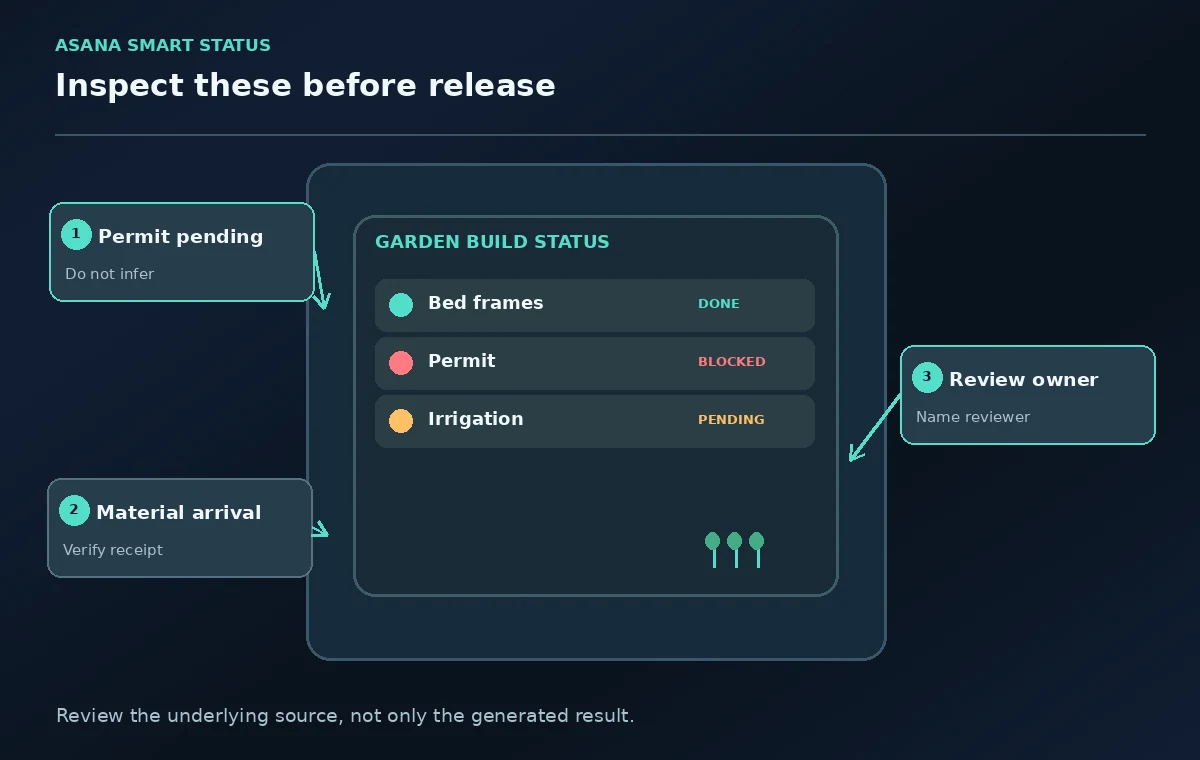
Use a final reviewer and a short archive trail
Have a second organizer compare the report against a handful of decisive tasks: materials delivery, permit, bed construction, accessible path, and irrigation test. Keep the dated status update, supporting task links, and named owners so the next week’s reporter understands the prior decision. Mark any unresolved status prominently and avoid publishing an optimistic summary to donors until the risk framing is approved. A good weekly report makes blockers visible early enough for the group to change course, not after the deadline has already failed.
How We Research
This guide was prepared by reading the named official documentation—Asana Help Center, Smart status and Asana Help Center, AI features and admin controls—and cross-checking the described feature, its workflow, platform or plan restrictions, and the point at which a person must review the result. The scenario, illustrations, example inputs, approvals, and sample outputs are hypothetical editorial teaching aids; we did not access a customer account, run a live product test, measure model accuracy, or verify an actual organizational policy. Screens, plan rules, and labels can change after this documentation review. Always confirm the currently available feature and the authoritative source documents before acting on any AI-generated wording.
Frequently Asked Questions
The documented project workflow generates a draft that you can discard or edit. A person reviews it and chooses Post, so the AI draft should not be treated as a published update by default.
Asana lists the feature on qualifying paid tiers, including Starter and above for project Smart Status. Portfolio and goal Smart Status have stricter tier requirements; check current plan details.
Not by itself. A project comment or task title may be incomplete or outdated. Confirm the decision from the actual permit record and the person responsible before describing it as approved.
Not necessarily. A single critical blocker can put a project at risk even when many minor tasks are complete. Evaluate the effect on milestones and deadlines instead of counting completed checkboxes.
Include verified changes since the last update, completed deliverables, unresolved blockers, a realistic status, decisions needed, owners, dates, and links to supporting tasks.