
Customer support email writing is different from marketing copy. A sentence that sounds friendly can still be harmful when it promises a refund the customer is not eligible for, exposes another person’s account details, or invents the status of a shipment. The best use of AI here is to organize an authorized answer, not to decide a policy exception on its own.
This guide provides a safe drafting structure for a human support team. Zendesk documents AI-suggested first replies based on macros and help center articles; Intercom documents teammate-facing Copilot answers with source links and editing before sending. Those are product-described workflows, not evidence that every generated reply is correct. The final response still needs an accountable owner.
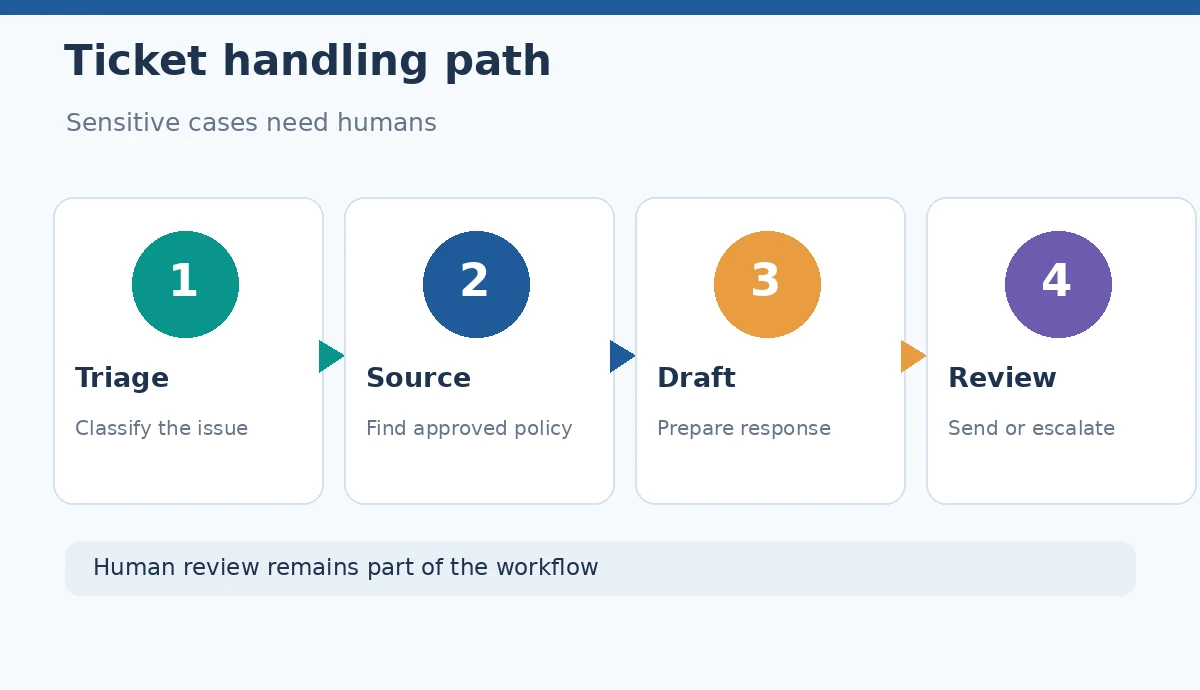
Sort the ticket before drafting a reply
Identify the customer’s main request, whether identity verification is necessary, the account or product involved, and the decision authority required. A basic shipping question is not the same as a disputed charge or suspected account compromise. Route sensitive or high-stakes cases to an authorized process before allowing an assistant to propose a resolution.
Create a small intake checklist: issue category, known facts, approved sources, missing facts, urgency and escalation destination. Do not paste more personal information than your approved system needs. If the necessary evidence is not present, a transparent acknowledgment and a next step are more useful than a plausible fabricated solution.
Ground suggested replies in your help content
Zendesk’s official guidance describes suggested first replies built from existing macros and help center articles. Intercom Copilot can surface referenced sources and let an agent inspect them before adding an answer to the composer. In either case, content quality is bounded by the accuracy and applicability of the underlying guidance. Stale return policies produce stale replies even when the prose reads well.
Each drafted statement about eligibility, account status or troubleshooting should correspond to an approved internal article, confirmed transaction record or authorized decision. When a source applies only to a product tier or region, include that condition. A model’s confidence or fluent phrasing cannot substitute for a verified customer-specific fact.

Use an empathetic structure without making promises
A useful reply has four parts: acknowledge the concrete concern, state only confirmed facts, explain a feasible next step, and give an honest expectation about what happens next. For example: “I understand the duplicate charge is concerning. We are reviewing the transaction details. Please use the secure verification link our team provided; we will update you through your support ticket.” This is an illustrative template, not a real company policy.
Avoid “Your refund has been processed” unless a transaction system confirms it. Do not promise deadlines that your team has not approved. If an SLA is unknown, say when the customer should expect the next communication only if that interval is documented. Empathy does not require inventing a resolution.
Flag cases for human escalation
Define non-negotiable handoffs: suspected fraud, sensitive personal information, legal threats, serious accessibility failures, safety incidents and requests for discretionary policy exceptions. Add rules for repeated unresolved attempts and angry customers who request a supervisor. A workflow can ask AI to detect possible escalation signals, but a human-defined policy determines the action.
When escalated, the proposed email should explain the next authorized step and preserve the ticket history; it must not falsely announce that a specialist already approved a decision. Record which reviewer made the exception, if any. This creates continuity when the next support agent opens the case and limits the chance that a confident draft becomes an unauthorized commitment.
Preserve privacy and role-based access
Only send ticket details to systems approved for those data categories. Hide passwords, full payment numbers and unrelated customer records from prompts. The safest prompt is often an abstracted summary and the approved policy excerpt, not a complete pasted inbox conversation. Product names such as “Copilot” do not by themselves guarantee permission to process confidential data.
Check provider retention settings, workspace administration and actual access controls with your organization’s policies. If a tool uses internal knowledge articles, verify who may access them. Intercom warns agents about certain internal-source suggestions before insertion; that is a reminder to evaluate access boundaries, not a universal safety certification.
Review the final email against five failure modes
Before sending, check the recipient and account, the facts quoted, the applicable policy, the exact next step, and any privacy exposure. Pay special attention to negation and conditional statements. “May be eligible” must not silently become “is eligible.” Make sure the signature and escalation contact point are genuine and belong to the correct support organization.
Keep a visible approval decision. The support agent may accept, edit or reject a suggestion. Zendesk explicitly documents these choices for first replies. This workflow is a coaching aid; we have not measured its accuracy or average handling time. If you cannot reliably trace a statement to a source, remove it or ask for the missing fact.

Measure quality beyond speed
If you pilot AI drafting, sample responses and classify errors: incorrect entitlement, missing context, misleading assurance, tone mismatch and privacy risk. Track escalations and customer clarification requests alongside any handling-time data you can legitimately collect. An apparent speed improvement can be offset by more repeat contacts when emails sound definitive but do not answer the problem.
Train reviewers on real anonymized failure examples, refresh help-center sources and restrict high-risk intents until the process is demonstrably reliable. The win condition is a useful, authorized response that the team can defend—not simply a greater number of messages sent per hour.
How We Research
We checked Zendesk’s suggested-first-reply documentation and Intercom’s source-checking and composer workflow on October 26, 2026. The example email and escalation checklist are editorial illustrations, not a tested ticket automation or a claim about any merchant’s actual refund policy.
Frequently Asked Questions
Only when a separately authorized system and policy genuinely permit that action. A drafted sentence is not proof of transaction approval.
Current approved macros, help-center articles and validated customer records, with the relevant account, region and product conditions.
Reject it when it invents a status, contradicts policy, exposes data, misidentifies the customer or adds an unauthorized promise.
No. The response must also be accurate, authorized, privacy-conscious and actionable.
Review a representative sample for factual and policy errors, escalations, repeat contacts and privacy handling, not just drafting speed.