
Why encryption preflight matters for an archive
A museum transfers digitized oral-history recordings into an Amazon S3 destination owned by an archival team. The transfer succeeds, yet the archive later discovers that its recovery role cannot decrypt files encrypted under an unexpected KMS key. Encryption at rest was enabled, but the ownership and accessibility requirements were not checked. `GetBucketEncryption` can reveal the bucket’s default server-side encryption configuration before an upload begins. It is a useful preflight signal, not a complete account of object-level encryption, key access, or archival retention. The practical task is to read the default, verify the correct owner and key policy, and then confirm the uploaded object.
Know the automatic SSE-S3 baseline
AWS has automatically encrypted new S3 object uploads using SSE-S3 as a baseline since January 2023. A bucket may also be configured for SSE-KMS or dual-layer DSSE-KMS, with different key-management responsibilities. Do not treat the presence of encryption as proof that an archive meets a requirement for a specific customer-managed KMS key. Conversely, a bucket using SSE-S3 is not unencrypted. A realistic intake checklist must distinguish general encryption-at-rest compliance from a contract that mandates a named KMS key, key rotation and access governance, or an approved account. Write the required standard down before comparing the API response.
Read the current configuration with a minimal permission
AWS CLI supports `aws s3api get-bucket-encryption –bucket BUCKET_NAME` for this read-only check. General-purpose buckets require `s3:GetEncryptionConfiguration` permission. The command returns the default encryption rules, which can include an algorithm such as `AES256`, `aws:kms`, or `aws:kms:dsse`, KMS key details, and an S3 Bucket Key setting when relevant. Use the correct AWS account profile and region for the target bucket, and prefer an approved role with only the access needed for inspection. Do not paste real access keys or private bucket names into shared documentation. The command neither changes the bucket nor uploads an object.

Treat KMS identity as a dependency, not a label
If the rule specifies SSE-KMS, examine the approved key identifier or ARN, the owning account, and the location of the KMS key. A name or alias alone is a weak cross-account control because aliases and permissions can change. Work with the security team to determine who can encrypt, decrypt, and manage that key, including the archive’s recovery service and authorized disaster-recovery roles. A bucket default can select a key that an uploader can use but an independent recovery team cannot. Key policy, IAM, relevant KMS grants, and any key rotation arrangements therefore belong in the preflight. Never assume that bucket ownership conveys all required KMS permissions.
Understand default settings versus explicit request encryption
Default bucket encryption applies when an upload does not specify a different server-side encryption configuration. A client may explicitly request a supported type and key; bucket policies can also enforce restrictions. An archive concerned about one mandatory key must validate both the bucket default and the actual upload path, including any application headers or SDK parameters. If the request overrides the default, simply reading GetBucketEncryption will not demonstrate what happened to that object. A bucket inspection is a configuration check at a point in time, not a signed receipt for the bytes that were stored. Record the application version and the policy conditions used for intake.
Check Bucket Key use without confusing it with permission
For SSE-KMS configurations, an S3 Bucket Key can reduce requests to AWS KMS in supported workflows. `GetBucketEncryption` exposes whether the bucket configuration enables Bucket Keys, and an object-level `HeadObject` response can provide object-related Bucket Key information. The flag is useful for operational and cost planning but is not a substitute for verifying actual KMS permissions. Do not infer that all historic objects have identical settings just because the current bucket default shows one flag. Key selection, encryption algorithm, and bucket-key behavior can vary across time and object versions. Keep cost claims qualitative unless the team measures its own authorized workload.
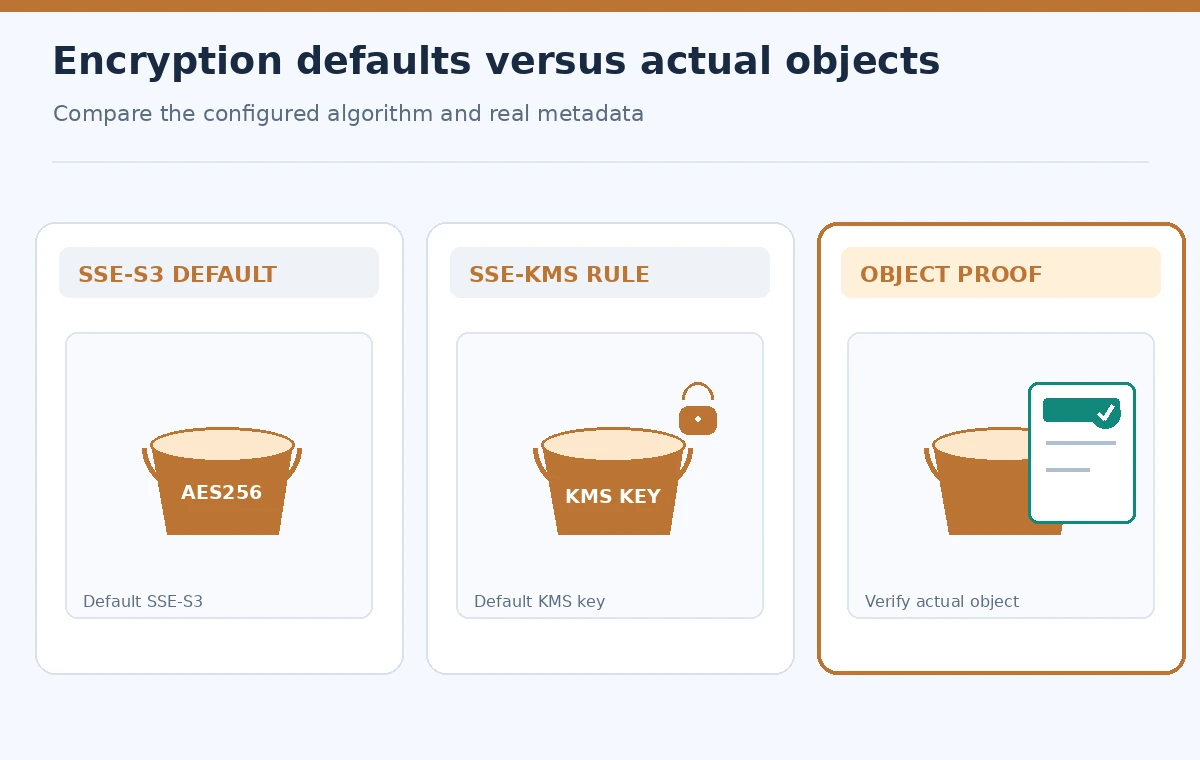
Compare expected versus observed encryption states
Create a conceptual side-by-side worksheet for three cases: baseline SSE-S3, a bucket with a mandated customer-managed KMS key, and a newly written object whose encryption metadata has been inspected. Mark what each state demonstrates and what remains unknown. The SSE-S3 case proves automatic at-rest encryption but not compliance with a customer-key mandate. The SSE-KMS rule identifies a configured default but not successful recovery access. The object check reports actual settings for a particular key and version; it does not generalize to every file. Avoid percentages or green score badges unless tied to actual authorized test evidence.
Guard against wrong-bucket and cross-account mistakes
When appropriate for a general-purpose bucket, supply the expected owner as an additional check. A wrong-account destination creates a custody problem that encryption alone cannot correct. Verify the region, full bucket name, archival owner, prefix plan, and permissions for both ingestion and later retrieval. S3 directory buckets have different encryption and authorization limitations, so do not copy a general-purpose-bucket checklist without checking that the resource type matches. Keep write credentials separate from auditing credentials. A successful read of bucket encryption should never automatically authorize a bulk archival transfer.

Perform a controlled object-level acceptance check
After the change window is approved, upload a non-sensitive sample through the same production client path or inspect an existing authorized sample; this article does not claim to perform either. Read the object’s encryption metadata, version identifier when versioning is active, and a known checksum or integrity record. Confirm that the designated recovery role can read the sample under an authorized controlled test, then document the key configuration and retention controls. Treat a failure to decrypt as a stop condition for intake and investigate before retries. Distinguish a metadata inspection from an actual recovery exercise, and do not test confidential recordings through an unsecured environment.
How We Research
We checked the AWS GetBucketEncryption CLI reference, default bucket encryption guide, and Bucket Key inspection guide. These identify the permissions, supported encryption types, and distinction between bucket and object settings. No AWS account, KMS key, or real museum asset was tested.
Frequently Asked Questions
No. AWS documents automatic SSE-S3 encryption for new uploads as the default baseline.
No. It reads the current bucket default, not every object or version.
Yes. The designated principal also needs appropriate KMS and S3 permissions.
No. The setting concerns S3 Bucket Key behavior, not an authorization guarantee.
Check object-level encryption metadata, integrity evidence, and approved recovery access.