
A Deleted Image May Still Be Recoverable
An exhibit editor notices that a large, licensed photograph is missing from a collection folder after a routine cleanup. The original catalog record references a specific scan and attribution line, but the storage path now has a different file. Google Cloud Storage soft delete can preserve deleted or overwritten objects during the bucket’s configured recovery period. This is a safety net for storage accidents, not a content approval tool. The task is to recover the correct bytes while avoiding a new mistake: restoring an old image over an already approved replacement. Begin by freezing publication changes to the affected catalog item and recording the expected object name, known generation, dimensions and rights record.
Check the Bucket Policy and Recovery Window
Cloud Storage enables soft delete by default for compatible new buckets and documents a seven-day default retention period. A bucket policy can use a different supported retention duration, and a disabled policy offers no equivalent safety net. Confirm the specific bucket’s configuration rather than assuming the default applies. Changing the retention duration does not retroactively extend an already deleted object’s window. Soft-deleted objects remain billable while retained. For a large archive, the storage cost matters, especially when temporary rendering directories hold duplicates. Record when the suspected deletion occurred, which policy was active then, and the hard-delete deadline that applies to that object.

Find the Correct Deleted Object and Generation
Soft-deleted objects do not appear in ordinary live object listings. Use the documented soft-deleted object listing interface or tool options and inspect the full object path, generation number, deletion time and storage metadata. The same file name can represent multiple historical uploads, especially if staff regenerated crops or corrected a scan. An object’s descriptive title is not enough to identify the correct pixels. Compare the deleted candidate with acquisition paperwork, a catalog identifier and any previously recorded checksum. If the deleted bucket itself needs recovery, Google documents a separate bucket-restore path; restoring the container and restoring all of its objects are not always a single operation.
Understand Why a Restore Can Replace a Live File
Google documents that restoring a soft-deleted object creates a new live copy with a new generation number. Critically, if an object with that same name is currently live, the restored copy can overwrite it, causing that formerly live version to become soft-deleted. That makes an apparently harmless recovery action capable of changing the material served by the site. Before invoking restore, list the live object and compare its generation, modified timestamp and any release reference. Pause automated sync jobs so a concurrent upload does not undo the review. An approved image may require recovery to a controlled location or a coordinated replacement, depending on the supported workflow.
Keep Soft Delete and Object Versioning Distinct
Object Versioning and soft delete solve related but different problems. Versioning preserves noncurrent object generations according to its configuration; soft delete retains objects that enter a deleted state for a configured period. Neither system tells the editorial team whether a photograph’s color correction, cropping, caption or licensing is approved. Do not use the word backup without defining the exact disaster, retention window and access rules. For preservation masters, combine recovery controls with independent protected copies and a recorded ingest checksum. For website derivatives, a shorter recovery period may be sufficient, but that decision must be made with storage administrators rather than hidden in an editorial checklist.
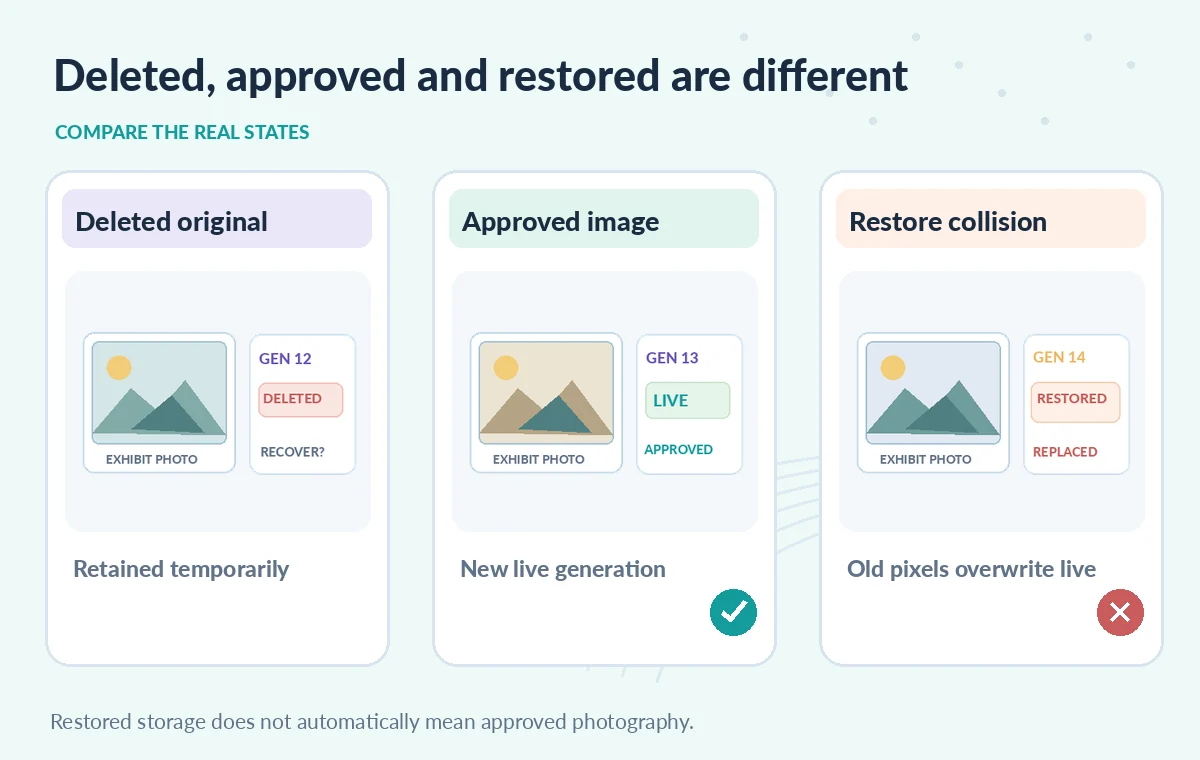
Compare Missing, Live and Restored States
Picture three conceptual states. First, the catalog points at an object that is no longer live, while the soft-deleted candidate exists within retention. Second, a newer live derivative occupies the same path, perhaps with corrected color balance and publication approval. Third, someone restores the older version, creating a new generation and potentially replacing the newer live image. The third state is not automatically the desired outcome; it might be a regression. Illustrations should show different images and version labels, not imply that a restore safely merges the content. Always compare the approved reference with the intended final live version before a public page is refreshed.
Inspect the Recovered Asset Before Publication
After restoration, verify the live generation and compare content against a trusted checksum or manually reviewed reference copy when available. Open the actual full-resolution photograph, inspect crop boundaries, color profiles, visible damage, embedded captions and attribution metadata. Confirm which object generation a CDN or publication pipeline will serve; caches and exported thumbnails may show another version temporarily. An exact binary match does not establish a valid license, and a visually good image does not prove it matches the approved master. Ask a collection editor to check the rights record and any consent restrictions before marking the item ready for release.
Rehearse Recovery Without Risking the Production Bucket
Use synthetic images in a test bucket with a clearly recorded policy. Create an object, record its generation, delete it, then list it in the soft-deleted view and inspect restore prerequisites. Add a separate new live object with the same name to understand why collision prevention matters. Observe the actual supported behavior and log the generated object IDs; do not assume example generation numbers match real results. Test a permission failure and the case where the retention period already elapsed, because no restore command can recover an object that has been permanently deleted. This article reports a review of documentation, not an executed Cloud Storage recovery.

Turn One Recovery Into a Better Archive Procedure
Write a short runbook with an incident owner, source catalog ID, expected generation, recorded deletion date, bucket policy, restoration approver and final publication decision. The administrator restores storage; the editor confirms the correct approved photograph; the publishing system updates the catalog reference only after that check. Revisit lifecycle rules, access controls and temporary-folder soft-delete costs. Where the restoration replaced a legitimate live image, document both generations and why the change was authorized. Recovery is successful only when the correct collection item is back in the intended state, not merely when the cloud API returns success.
How We Research
For this guide, we reviewed the official product documentation on November 8, 2026: Cloud Storage soft delete overview, Use soft-deleted objects, Cloud Storage object versioning. We checked the named setting or feature against its published behavior, mapped the documented constraints to the specific hypothetical scenario, and reviewed whether the topic duplicated titles in the LabFin WordPress inventory or prior B0267–B0275 ZIPs. No authenticated vendor service was run; we did not perform a benchmark, observe real customer data, verify third-party rights or claim operational outcomes. All illustrated records and comparisons are teaching examples. Confirm product documentation and security requirements again before implementing a workflow in a real organization.
Frequently Asked Questions
No. Seven days is a documented default for compatible buckets. Inspect the bucket policy and the period that applied when the object was deleted.
Not necessarily. If the same name is already live, a restore can replace it and soft-delete the previous live version.
Soft-deleted resources are restricted while deleted; documented operations allow listing and restoration, not ordinary reading or editing.
No. They use different preservation mechanisms. Both require separate editorial checks and an independent backup plan for critical masters.
No. Verify the right object generation, image content, catalog attribution, license and any consent restrictions before publishing.