
A community museum wants to share footage of a public workshop. Some visitors signed release forms; others did not. Editors need to locate segments containing visible faces so that each appearance can be reviewed. Google Video Intelligence FACE_DETECTION can identify face tracks and time ranges in a video, with optional bounding boxes and attributes. The result is a visual cue, not recognition of a person’s identity and certainly not proof of consent. This tutorial uses fictional footage and invented participant records.
Collect editorial permissions before analyzing frames
Register the original film, master checksum, edit revision, intended distribution channel and signed consent documentation. Keep a clear distinction between footage captured in a public location and permission to publish identifiable people. Mark uncertain releases as unresolved. A single person can enter and leave several times, while a different visitor may be visible in reflections or background frames.
The example film contains a workbench, two participants and a visitor walking through a doorway. The names and release records used for the diagram are invented. Store real consent data outside the video-analysis service and restrict access to it. Determine which staff can review frames and whether uploading the film for cloud analysis complies with the community’s privacy commitments.
Request FACE_DETECTION and retain the job identity
Google’s Video Intelligence API supports the FACE_DETECTION feature through videos:annotate. A request may reference video in Cloud Storage or submit permitted local content in a supported form. The API handles video analysis asynchronously; track the operation and corresponding source asset instead of treating an accepted request as a completed review. For large footage, preserve the job-to-film mapping and check the operation result before consuming tracks.
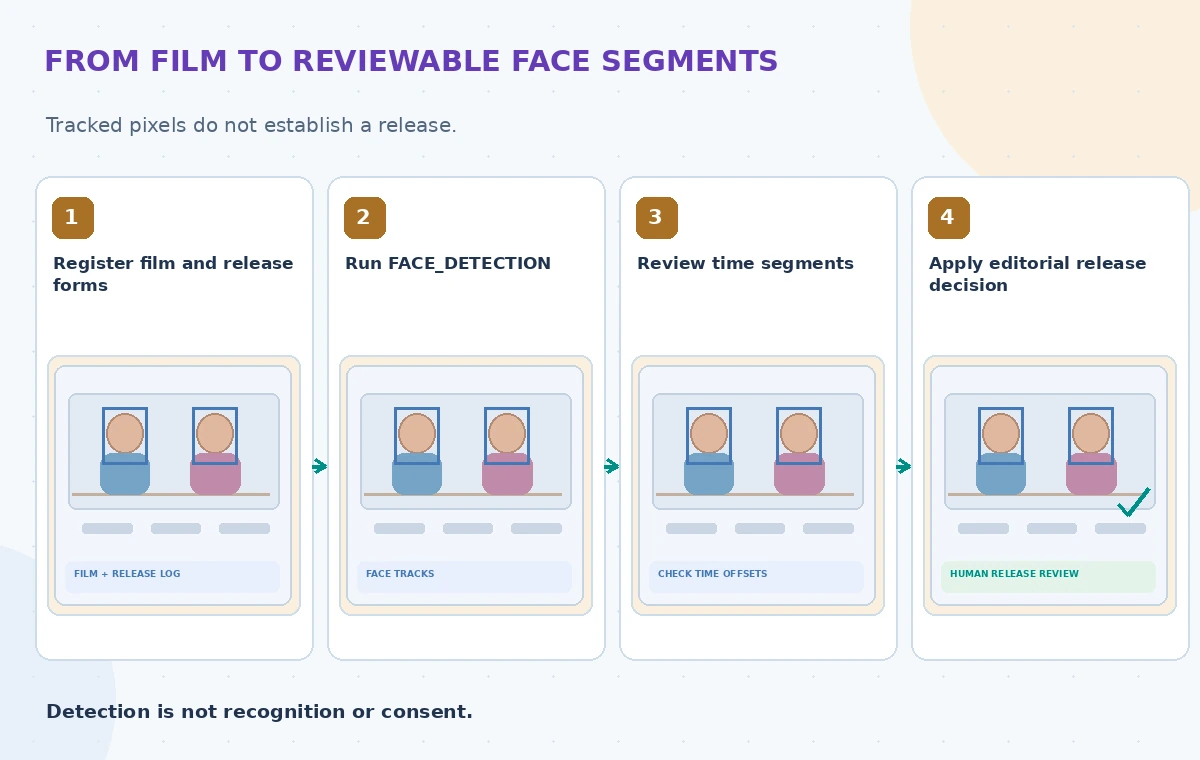
FaceDetectionConfig can enable includeBoundingBoxes. Optional face attributes require their documented settings, and examples of attributes include headwear, glasses and gaze-related flags. None of these attributes identifies a person or their permission status. Avoid recording unnecessary biometric-like attributes in the museum’s review database. Confirm applicable API quotas, file formats, regions, pricing and retention before submitting sensitive footage.
Interpret tracks as regions of video, not personal identities
Face detection returns time ranges in which a face is observed, and timestamped observations can include normalized bounding boxes. A track may be interrupted by occlusion, camera movement, lighting or editing. The application must not assume that every track ID represents one unique human across an entire film, or that the face corresponds to a particular release form. The software identifies a visual pattern, not an authenticated person.
Build a review row containing source film ID, start and end offsets, optional box geometry, editor initials and unresolved status. When a human identifies a participant using legitimate records, keep the evidence and authorization decision separate from raw machine tracking. Do not automatically publish face thumbnails or assign names from visual similarity; such actions would change the task into identity processing.
Create a film timeline that editors can navigate
Show face-track intervals on a timeline alongside scene cuts and the original frames. Provide quick access to a few seconds before and after each interval, so a reviewer can see whether someone enters a shot unexpectedly. When bounding boxes are enabled, overlay them only in the editor’s restricted review tool. Keep the untouched master available; redaction and cropping should be made on derived release versions.
A visitor might appear behind a workshop demonstrator even though the demonstrator has permission to be filmed. Pause near the transition frames, inspect reflections and identify any crowd scenes where tracking could miss a small face. Use neutral status values such as ‘needs human review’ and ‘release evidence checked.’ Never let the annotation service automatically set a person’s consent field to yes.
Compare the three editorial states clearly
The first state shows a workshop frame with no markers, leaving the editor to search a long film manually. The second shows bounding boxes and timed tracks but mistakenly links them to a green permission status, which the API cannot justify. The verified state retains the time markers, attaches independently reviewed release evidence and holds unverified segments out of the public export. These drawings do not depict real API results.

A face box is a finding about pixels, not a legal finding. Count missed appearances and incorrect automated track grouping during local validation rather than declaring that every participant has been found. Different camera distances, masks, lighting and editing cuts can create distinct error cases. A final redaction pass must inspect the whole published sequence, including frames with no detected faces.
Respect identity, privacy and rights boundaries
Store the original media and any consent documents according to the museum’s retention and privacy policy. Give reviewers least-privilege access, and avoid sending frame crops to uncontrolled third-party services. If a release record is missing, treat the appearance as unresolved rather than searching personal social profiles to guess a match. The technical ability to detect a face does not grant a lawful basis to identify or publish it.
A safe public video may use a crop, blur, alternate angle or omission after editor approval. Each option should be checked for unintended disclosure, including name badges and voice recordings that could identify someone even if their face is hidden. Seek institutional or legal advice where applicable. The workflow here is an editorial support method, not a statement about any person’s consent.
Test difficult footage and unexpected track behavior
Create permitted fixture clips that include entrances, overlapping faces, side profiles, an empty room, a poster depicting a face and an edit cut. Label expected review intervals independently before trying the service. Check track start and end times and whether the boxes cover the relevant subject over multiple observations. Verify that timestamp units survive export and do not shift with a transcoded frame rate.

Keep examples where the service misses a face, detects an image of a face on a poster or breaks one appearance into multiple tracks. Measure human review completeness on actual authorized samples rather than inventing success percentages. The article contains no live API calls, consent judgments or benchmark results. Document model behavior and sources so future editors can revisit a release decision when the video is recut.
Publish the approved edit, not the detection report
Before public export, check every visible identifiable person and the relevant release record, including any restrictions by medium, date or project. Freeze the reviewed edit and recheck its final video frames after cropping or blurring. Keep internal detection metadata out of public subtitles, URLs and downloadable annotation files. Provide a route for people to request corrections or removal where policy requires it.
Reconfirm Google’s current feature behavior, access limits and privacy terms before implementation. Face detection is valuable for locating candidate appearances, but an editorial release decision requires human evidence and responsibility. A careful review record is more useful than the illusion of automated permission, and no diagram in this article represents actual people or real consent documentation.
How We Research
We researched this November 2026 article from named official documentation: Google: Detect faces in video; Google: Face detection feature concepts; Google: Video Intelligence overview. We compared documented request parameters and operational limitations with a hypothetical community organization use case, then designed independent human review and regression checks. Images are original fictional educational diagrams, not product screenshots, actual measured benchmark charts or verified customer cases. We did not submit live API requests, upload personal files, process museum assets or measure vendor accuracy. Implementers must verify current endpoint versions, access controls, region support, pricing and retention before deployment. Factual and rights-sensitive results require review of primary sources.
Frequently Asked Questions
No. It detects facial regions and tracks, not verified identities.
Bounding boxes are optional and depend on FaceDetectionConfig settings.
No. Facial attributes have no bearing on consent or legal permission.
Inspect adjacent frames and the full final edit; automated tracks can miss brief appearances.
No. Editors must verify release records and other rights independently.