
A municipal museum has thousands of photographs of pottery fragments, bowls, and trade objects. Staff often know what an item looks like but not the accession number on an old contact sheet. Cohere Embed v4 can turn text and images into vectors for retrieving visually or semantically related records. The difficult step is keeping those candidate results linked to original catalog entries. This article describes a hypothetical multimodal search design; it does not claim to have embedded or matched any real collection photographs.
Define the difference between similarity and catalog identity
Write the user request precisely: find photographs that resemble a blue-glazed bowl with a repaired rim. An embedding search can retrieve similar visual features, but it cannot authenticate an accession record, establish that two photographs show the same object, or grant image reuse rights. Give the result interface a clear ‘candidate match’ label until a registrar checks the original record. The catalog’s accession number, photography date, and provenance remain separate fields managed by the collection system.
Choose a diverse evaluation set: another bowl with the same glaze, a deliberately cropped detail, an object with a similar outline but different inscription, and a photograph with a color cast. Keep the authorized image’s original identifier attached to every derived thumbnail and vector. For staff, false identity matches may be costlier than an extra manual search; plan a reviewer workflow that prioritizes traceability over displaying an apparently precise but unsupported similarity percentage.
Prepare text, images, and paired document pages
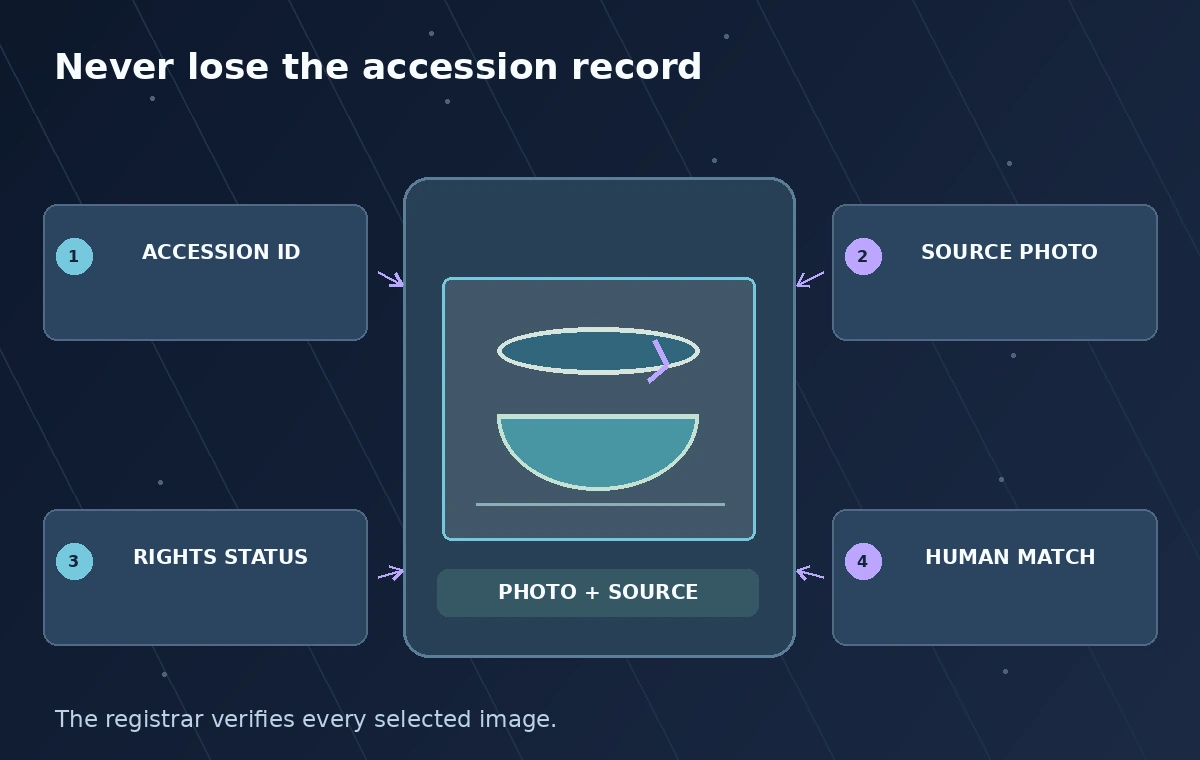
Cohere’s v2 Embed endpoint accepts text, images, and structured inputs for supported embedding models. With Embed v4, inputs can combine text and image components such as a catalog note and the photograph it describes. Make a stable record for every approved image containing accession ID, rights status, source file hash, caption revision, and whether the picture is a full view or detail crop. Do not merge two object records simply because they share a historical label.
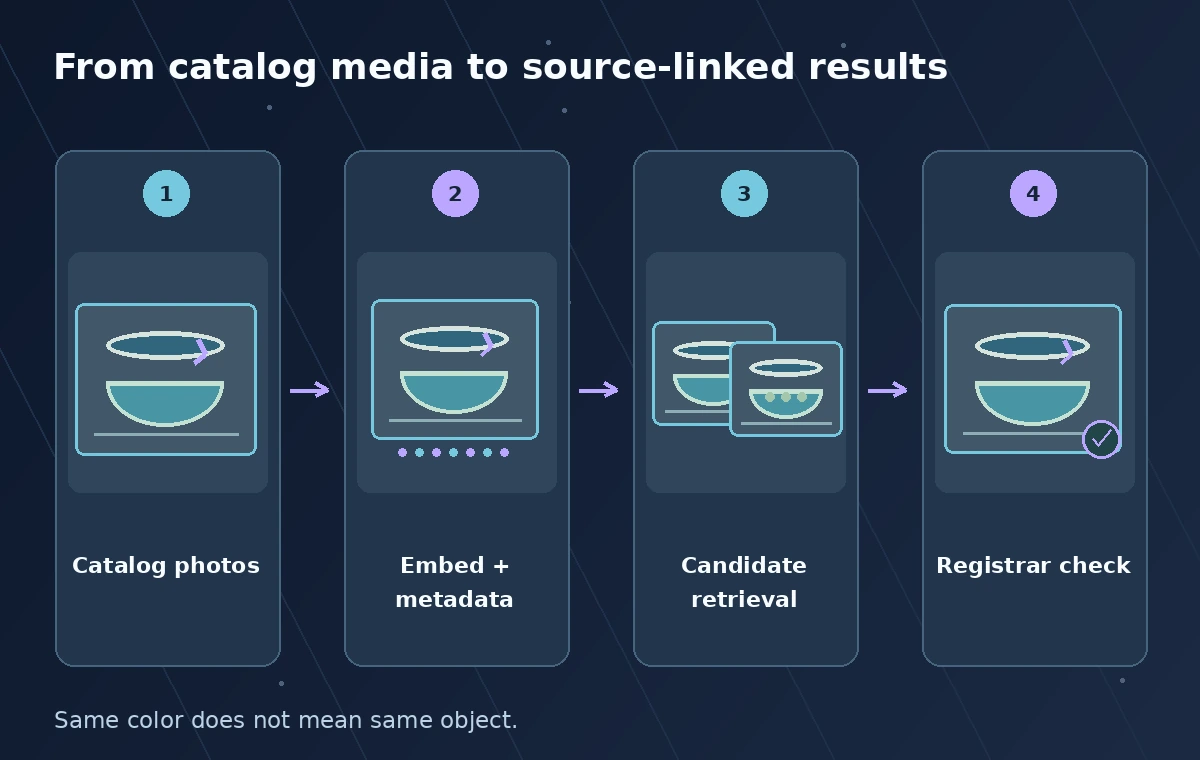
Normalize orientation and generate thumbnails without overwriting photographic masters. Keep a flag for missing color calibration, repairs, and photographed labels that are easy to mistake for object decoration. Source text should identify uncertain attributions as uncertain. Cohere documents image payload handling and model-specific limits; check these against current docs before sending batches. Restricted collection images or records must be screened for permission first, regardless of technical support for an image input.
Use matching embedding modes for retrieval
For search workloads, Cohere documents `input_type=search_document` for stored corpus items and `input_type=search_query` for search queries. Keep the chosen model, vector dimension, embedding type, and preprocessing method recorded for every index generation. The v4 model also supports image-oriented inputs and interleaved content, with usage patterns and limits depending on endpoint and payload shape. Do not mix vectors from unrelated model versions or different dimensions in one search index and assume their scores remain comparable.
A practical proof-of-concept can store a photograph’s vector plus its accession ID in a restricted vector database, then retrieve candidate IDs for a staff query. After retrieval, the application joins candidates back to the source catalog rather than showing orphaned images. Do not invent a field like ‘verified object identity’ from a vector distance. Define what the score means in the chosen index and retain the ability to open the original record before making any factual claim.
Display related objects without hiding mismatches
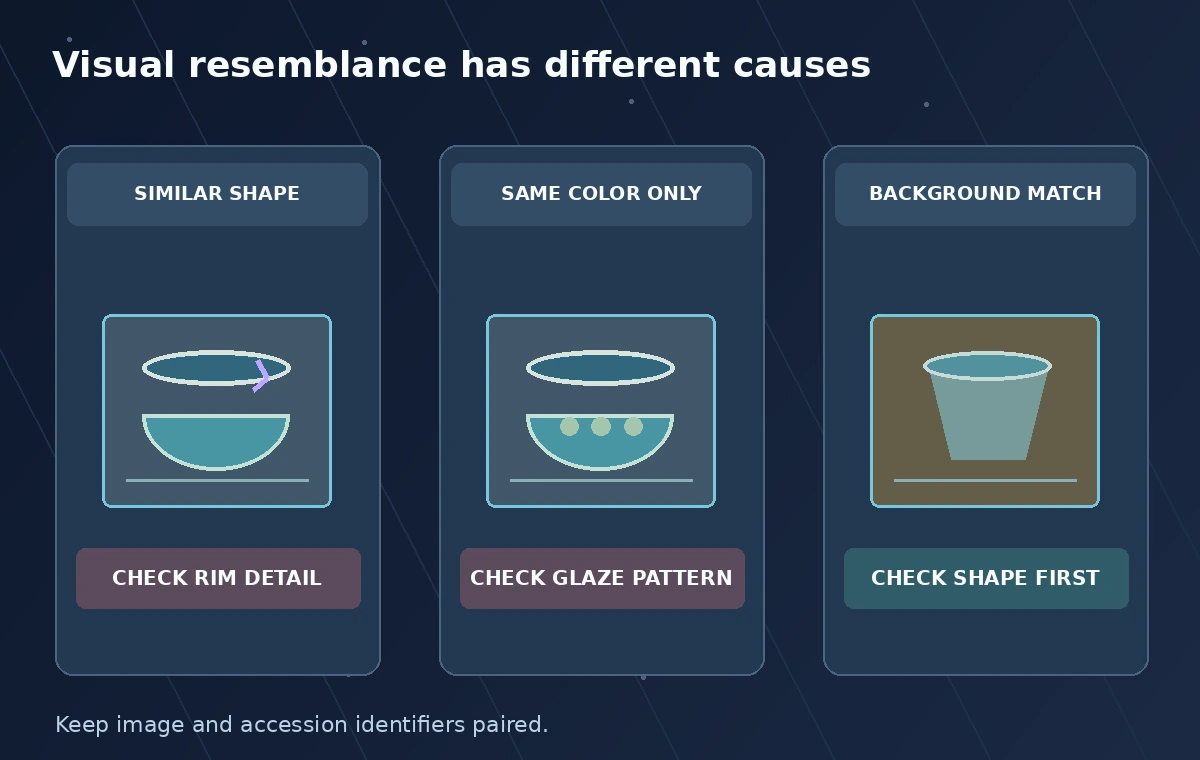
Design three illustrated cases: one image that resembles the query in form and glaze, another sharing color but not the rim, and a third showing a different vessel with a nearly identical background. Their drawn ranking is explanatory, not generated by Cohere. Staff should see a thumbnail, the exact source accession number, the official catalog caption, and a way to open the larger approved image. If metadata is missing, the result must stay labeled unverified rather than being silently filled by a model.
A crop can help a registrar inspect a chip or maker’s mark, but crops can also obscure the vessel’s proportions. Present both the detail and the full object view. Keep object-level records together when multiple images represent one accession, while still preserving image-level rights and camera details. A text query for a specific accession code may be better served by exact matching than by semantic similarity; combine reliable identifier lookup with visual retrieval instead of substituting one for the other.
Evaluate search with known positive and negative examples
Have collection specialists label a small set of queries with relevant candidate records and deliberately confusing negatives. Assess whether the intended accession appears in the reviewed result set, how often a distractor ranks above it, and whether missing metadata is handled honestly. Record the dataset and configuration if you report numbers. Without an actual measured evaluation, do not publish claims that Embed v4 achieves a particular museum accuracy rate or is better than a competing provider for your collection.
Inspect failures by cause: photographic angle, image size, mismatched metadata, glare, object similarity, or a mistaken text caption. A model may be useful for broad discovery yet poor at discerning a tiny maker’s stamp. Add an exact accession lookup and a high-resolution human inspection path for those cases. As the museum adds new photographs, rebuild or update vectors with explicit version tracking so old and new embeddings can be compared within the same documented index policy.
Keep collection rights and retrieval access aligned
A museum may own an image file but still face contractual or cultural restrictions on broad redistribution. Apply record visibility rules before the vector search returns thumbnails or text snippets; don’t rely on a prompt to hide unauthorized records after retrieval. Store only necessary metadata and define retention for embeddings derived from restricted materials. Access logs can note a search ID and authorized user role without copying sensitive queries into a public analytics feed.
Review Cohere’s current API availability, size limits, cost terms, and data-processing commitments for the intended deployment. Record whether each photograph was allowed to leave the museum’s environment before sending bytes to the service. A vector may not look like the original photograph, but it is still a derivative of collection content that requires governance. The rights decision and any request for cultural consultation cannot be replaced by a high similarity rank.
Accept results only after source-record inspection
Before an editor uses an image in an exhibit, require the registrar to open the catalog entry, confirm the object description and accession number, inspect the actual photograph, and verify its usage terms. The search UI should offer clear actions such as compare candidates, open source, and request review; it should not have a one-click ‘same artifact’ decision derived from embedding distance. Record the accepted match and reason outside the vector index for later audit.
Use synthetic sample drawings to explain the design before linking sensitive image records. The figures here depict possible candidate relationships and human checks, not Cohere output or measured rankings. The successful result of multimodal search is a shorter route to inspecting authoritative evidence, not an automated declaration that two visually similar museum objects are historically identical. Keep the source record present all the way to publication.
How We Research
For this November 2026 editorial research, we examined official documentation: Cohere: Embed API v2 reference; Cohere: Embeddings introduction. We checked the named feature, documented inputs, decision boundaries, and workflow constraints against the illustrated use case. All scenarios, sample identifiers, visual comparisons, and diagrams are original hypothetical teaching examples; we did not access a vendor account, run a live model or production API test, or measure recognition accuracy. The graphics are not screenshots, production telemetry, model predictions, or evidence that a particular organization adopted the workflow. We do not claim pricing, operational availability, security certification, factual identification, legal permission, or consent from these drawings. Before use, confirm current supported regions, feature availability, rates, quotas, licensing, data handling, and local institutional policy. An authorized reviewer must compare generated candidates or actions with original records and approve public statements or high-impact changes.
Frequently Asked Questions
It supports multimodal embeddings and search-oriented inputs; the final retrieval system still needs an index, query logic, and catalog joins.
No. Cohere documents distinct input types for corpus records and queries in search use cases.
No. It ranks candidates under a chosen search design; staff must verify the catalog record and the photographed object.
No. Preserve the authorized photographic master and catalog metadata so reviewers can inspect evidence and rights.
Only after data access, processing permission, and retrieval visibility rules are reviewed for the intended deployment.