
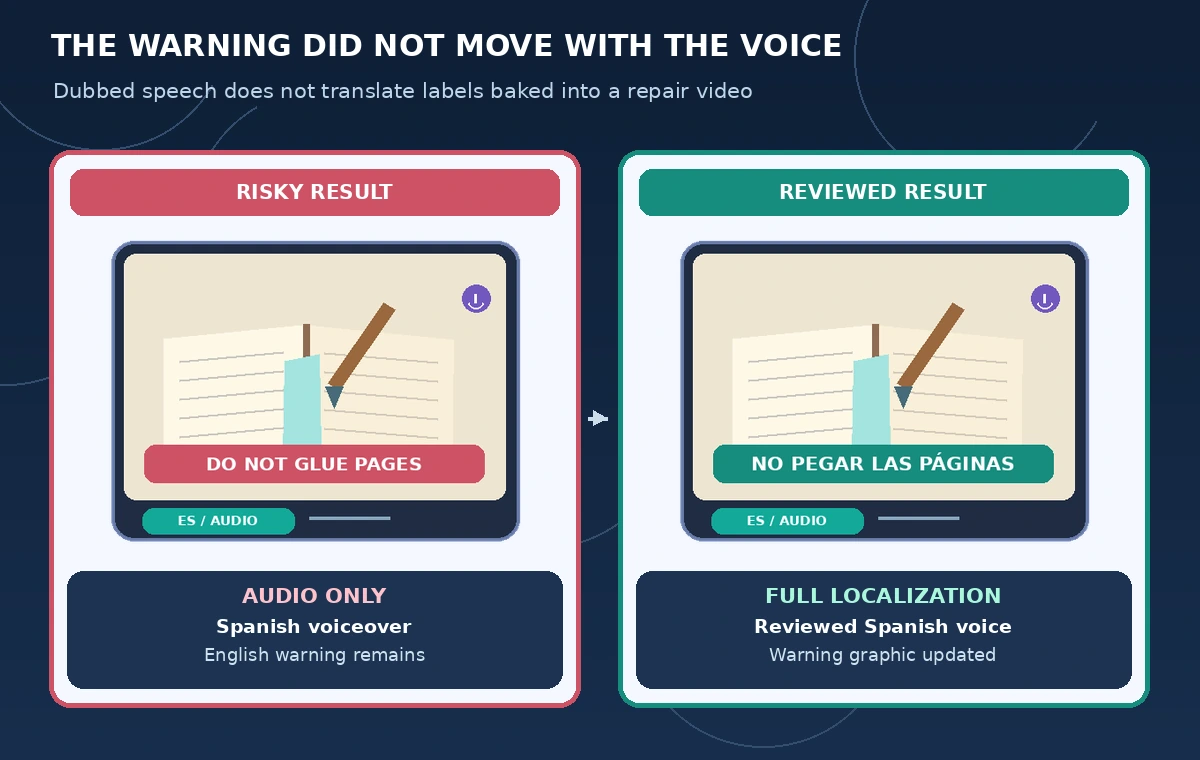
A neighborhood library has a short video demonstrating how to repair a loose book cover. The presenter says to place a protective sheet beneath the hinge before brushing on adhesive; a lower-third warning says “Do not glue the pages.” The library wants a Spanish-language version that preserves both directions. A fluent dubbed voice is not enough if the warning stays in English or the action now starts before the narration reaches the caution.
Synthesia documents a Dub a Video workflow with transcript review, editing, optional lip sync, and a choice between adaptive and original video duration. Its help explicitly says dubbing translates spoken audio, not text already embedded in the picture. This is a hypothetical editing plan, not a demonstration of a video we uploaded or a claim about translation accuracy.
Separate the words viewers hear from the words they see
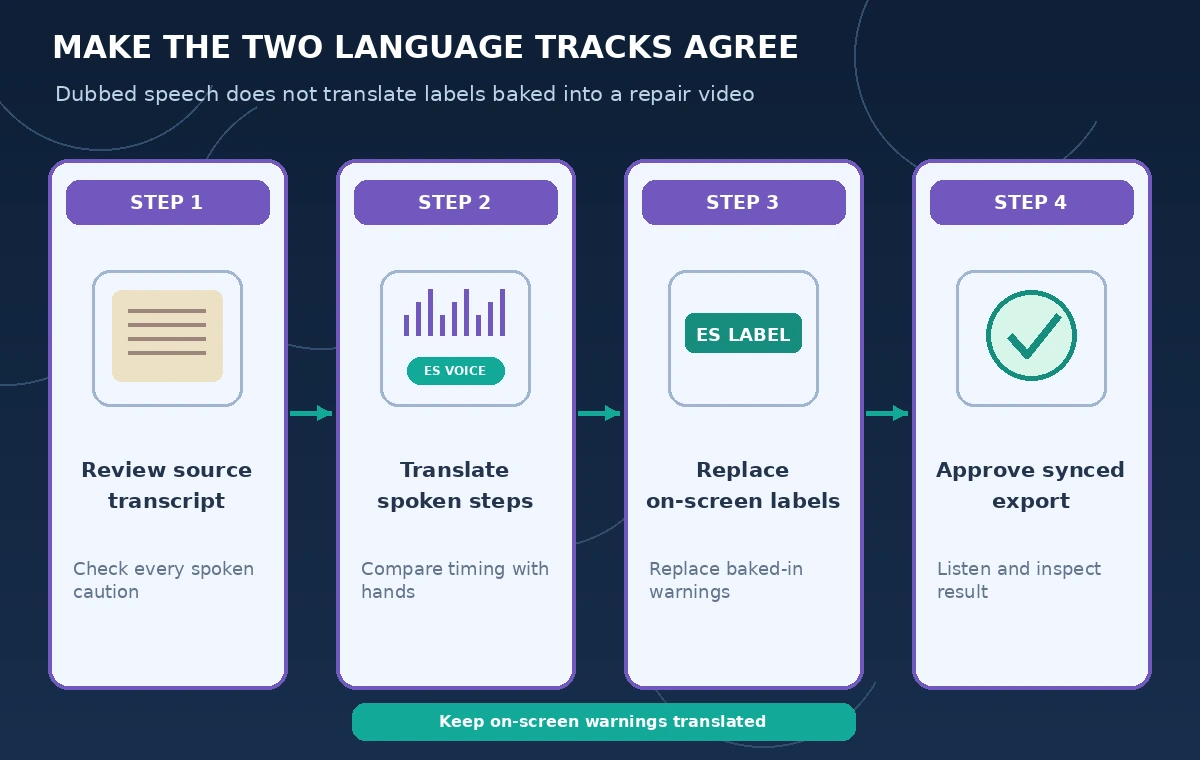
Before uploading anything, make a two-column inventory. The spoken track has the sequence “place a protective sheet, open the cover, apply the adhesive, allow drying.” The picture contains the labels “hinge,” “protective sheet,” and the warning “Do not glue the pages.” These are different localization assets. A voice translation cannot replace a baked-in label, even when the target-language speech sounds convincing.
Mark each on-screen label with its start and end frame and identify the printed handout that establishes the correct book-repair terminology. Decide whether to recreate the source graphic with translated text, use a separate accessible subtitle, or re-edit the source video. Do not publish a partially localized safety warning while presenting the whole lesson as Spanish-language instruction.
Check the rights and original transcript first
Use only a recording the library owns or is authorized to translate. Confirm the presenter permitted dubbing and any voice treatment selected. An invitation to record a tutorial does not automatically authorize a voice clone. Keep an archival copy of the unmodified source clip, its approved transcript, and any signed permissions. Do not upload patron faces, private desk screens, or borrowed footage merely to test a feature.
Synthesia lets users choose Review Transcript instead of immediately dubbing; its documentation says this transcript review does not consume dubbing credits. Correct terms such as “book hinge” and “endpaper” before generating translated versions. When the transcript changes the sequence of the actions, fix the source wording before asking a model to reproduce it in another language.
Choose duration settings for the actual instructional action
The Dub a Video interface describes Adaptive as adjusting playback duration for translated speech, while Original retains video speed and fits the voice to it. A library demonstration has physical hand movements that matter: a protective sheet must be in place before the brush reaches the hinge. Preview the tradeoff using short, cleared source material; no timing mode can guarantee that every translated phrase lands on the right gesture.
Create an event sheet with three visible anchors: the sheet is placed, the brush touches the cover, and the book is closed. Compare these anchors with the equivalent clauses in the reviewed translation. If a target sentence is much longer, shorten the wording with a qualified translator rather than hiding the entire warning through aggressive speech-speed changes.
Review the translated speech line by line
After dubbing, inspect the translated script in the appropriate language version. Synthesia documents editing individual translations and regenerating the edited version. Check negation carefully: “Do not glue the pages” must not become “glue the pages.” Cross-check terms for the hinge, spine, and endpaper with an experienced book-repair instructor and the organization’s approved vocabulary.
Build a small bilingual approval log with source phrase, target phrase, reviewer, and status. A model may paraphrase a warning in grammatical Spanish while losing its intended scope. Correct the ambiguous phrase, review the entire rendered instruction in context, and confirm that the change belongs to the target-language version rather than assuming it silently updates every other language.
Fix signs and labels outside the audio workflow
The comparison illustration shows a wrong draft: the Spanish narration describes the protective sheet, but an English-only “DO NOT GLUE PAGES” banner still appears during the brush movement. The reviewed draft has a translated banner and a visibly preserved operation order. Both panels are conceptual, not product screenshots. A clean audio dub alone does not satisfy this combined language-and-image requirement.
Update the embedded graphics in the original editing project or prepare a carefully reviewed alternate source video for that locale. Recheck any book-part arrows after the layout changes, including left-to-right placement and contrast. If you cannot change the baked-in source, provide an accessible translated text track and clearly disclose the remaining untranslated elements rather than implying they were replaced by Synthesia.
Handle speakers, lip sync, and delivery deliberately
Synthesia documents speaker reassignment and optional lip sync in dubbing, but those controls do not verify who is legally entitled to imitate a voice or whether the translated instructions are accurate. If two people speak, label lines by source speaker and confirm the translated voices do not switch roles. For a hands-only book-repair demonstration, lip sync adds little compared with clear instructional timing.
Keep generated variants in a review folder. The product help distinguishes uploading a file from using a YouTube URL, including publishing restrictions for some YouTube-sourced dubs. Check the actual account’s available languages, credit balance, and publishing rights. Do not promise that a plan, locale, or feature set is identical for every library.
Check the finished video against the repair steps
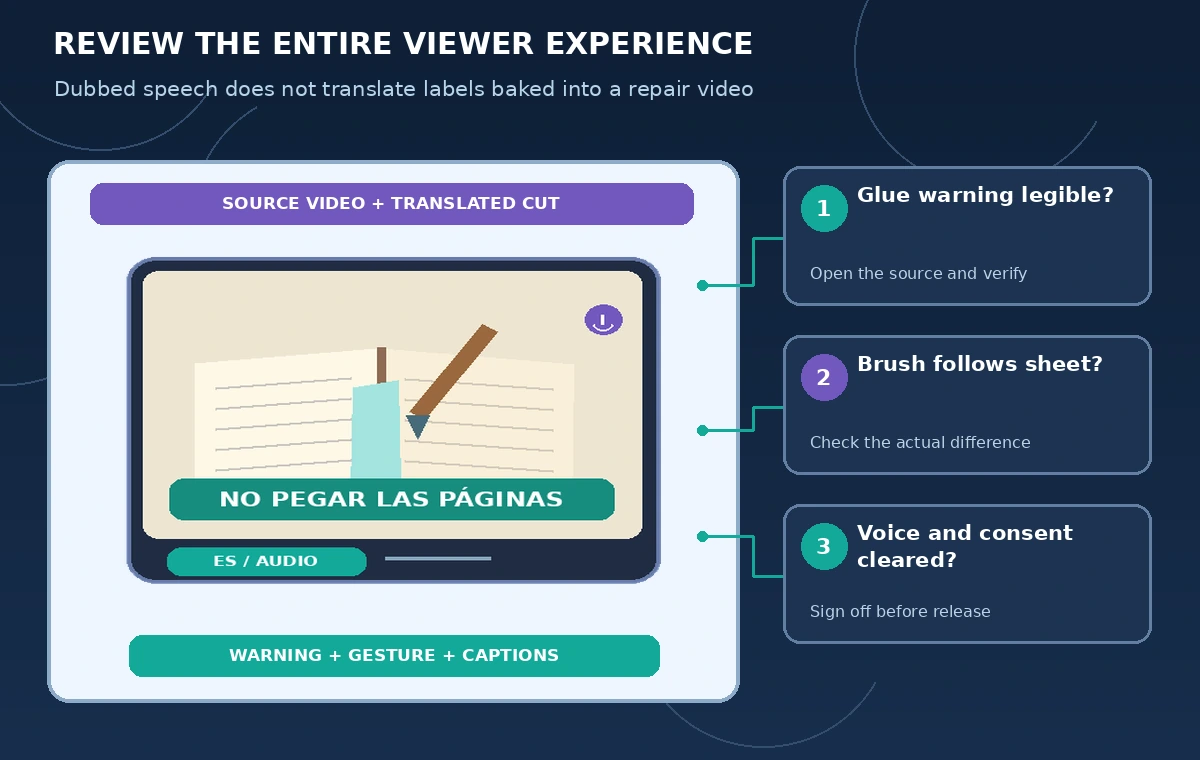
Play the original and translated videos side by side, pausing at the protective-sheet placement, first adhesive stroke, and final closed-cover shot. Ask a bilingual reviewer to follow the target version without watching the source, then compare their interpreted action sequence with the approved handout. The goal is comprehensible instruction and correct warnings, not an invented translation score.
Inspect captions as their own deliverable. Check audible words, punctuation, book-part names, and whether every visual warning has a readable counterpart. Verify that subtitles do not cover the brush tip or the warning panel. If any key instruction remains unclear, put the export on hold and correct the source graphic, script, or sequence.
Archive versions and publish only an approved locale
Save the source recording, approved glossary, corrected transcript, visual-label replacement assets, draft dub, and reviewer notes. Put language codes and version dates in filenames but not as production badges in visitor-facing graphics. If the original tutorial changes, revisit the translated videos: Synthesia documents a workflow for retranslation and regeneration rather than assuming existing published translations refresh on their own.
Use a release sign-off that separates linguistic approval from the library’s technical instruction approval. A bilingual speaker may certify the translation while a conservator certifies the actual repair sequence. Neither approval can be inferred from a generated voice or a successful export. This documented separation makes later corrections easier without rewriting the historical master clip.
How We Research
For the November 5, 2026 documentation review, we consulted named official sources: Synthesia: How do I dub a video?; Synthesia: How do I translate a video?; Synthesia: Update translations after editing a video. We compared stated feature capabilities, plan and permission limits, and user review steps with the hypothetical scenario above. We did not log in to, benchmark, or run the named service on live customer data. All characters, media, outputs, and figures in this guide are illustrations rather than observed results. Recheck vendor documentation, organization policy, and local requirements before using the workflow on a real project.
Frequently Asked Questions
No. Synthesia says Dub a Video translates spoken audio only; baked-in titles and graphics require a separate localization step.
Its official help describes a Review Transcript path before dubbing; check your plan and current credit terms.
Adaptive can adjust playback duration and Original retains footage speed. Preview both around safety-critical hand motions before choosing.
No. Review terminology, voice permissions, speaker assignment, and timing independently.
No. The scenarios and diagrams are hypothetical; the feature description comes from official Synthesia documentation.