
A museum’s exhibition coordinator has a folder with unsigned loan offers, a fully executed loan agreement, draft condition reports, and a final insurance certificate. The filenames are inconsistent. An AI assistant could sort them quickly but might mark every document “approved” because the word “agreement” appears on its cover. That would turn a document-organization convenience into a serious handoff error.
Anthropic documents Claude Cowork as a task-oriented workspace that can interact with connected files, with cloud sessions and local access through the desktop app under stated conditions. It also stresses the risks of write tools and human oversight. The guide below is a controlled hypothetical workflow; we did not connect to a museum folder or run Cowork on actual agreements.
Define output as an index, not an authority to approve
The museum needs an evidence-based inventory with filenames, object names, agreement status, signature evidence, document dates, and uncertainties. It does not need an agent to decide that an unsigned PDF is legally binding. In the task prompt, explicitly forbid changing status fields to Signed unless the document contains signatures from the required parties or an authorized reviewer confirms the official record.
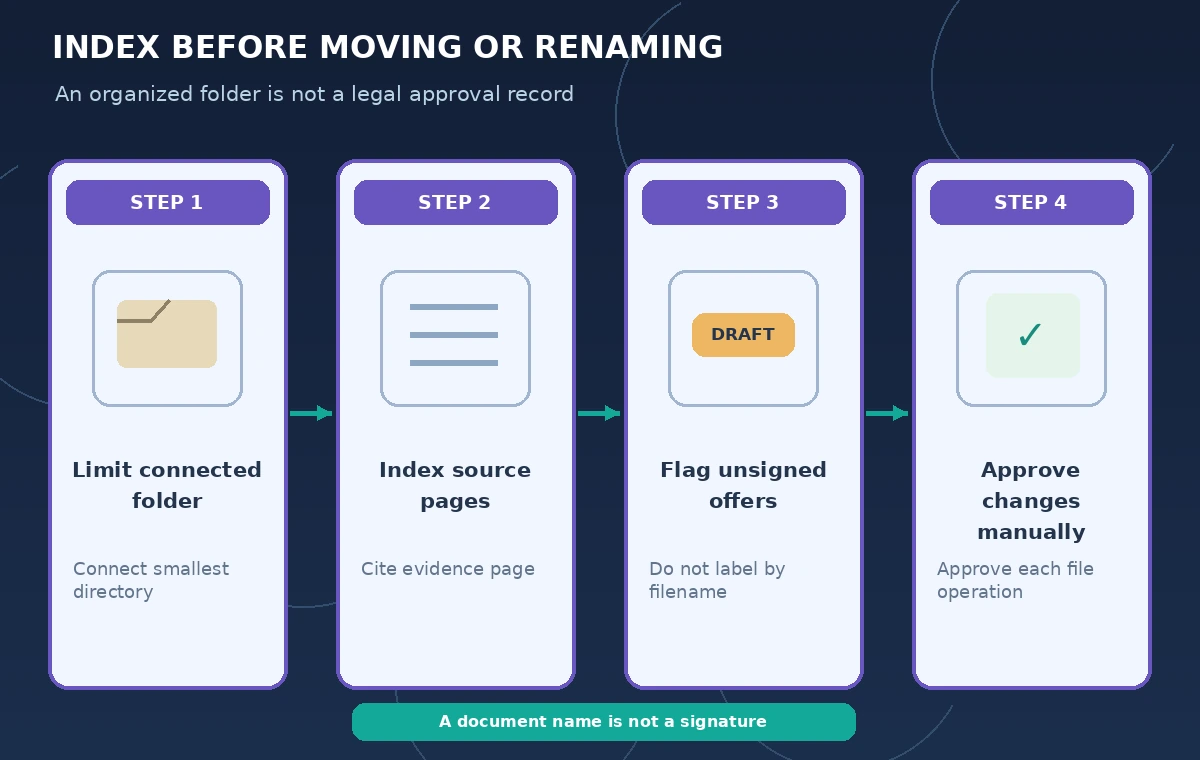
Start with a read-only report describing what the files appear to contain and the source page supporting each label. Treat words such as “final,” “revised,” and “for signature” in filenames as hints, not proof. The master loan register remains the system of record until the coordinator approves any reconciliation.
Understand which files a cloud task can reach
Anthropic’s documentation says new Cowork tasks on certain paid plans run in the cloud, while access to local folders depends on connected folders and an open Claude Desktop app. A cloud session can fetch copies of files needed for the task. Check the current plan, platform, permissions, and retention settings before selecting a confidential folder.
Use an approved test directory containing only non-sensitive sample agreements first. Do not point Cowork at the entire shared drive, donor personal data, insurance credentials, or unrelated department files. The smallest useful directory limits the chance that a broad instruction or tool reaches records outside the exhibition handoff.
Make a protected copy and set a narrow file boundary
Create a dated, access-controlled backup before inviting an automated workflow to inspect or rename files. Specify exactly which folders it can read, which folder is allowed for outputs, and which original files must stay unchanged. If the organization forbids uploading the underlying agreements to cloud processors, do not bypass that restriction by connecting a local folder.
For the pilot, put five fictional loan records in a review folder: two unsigned offers, one signed agreement, one draft condition report, and one insurance letter awaiting confirmation. Ask for a CSV index and a short review note, not new contracts, renames, moves, or deletion. Require citations to filenames and page labels for every status judgment.
Ask Cowork to separate evidence from guesses
Use a task such as: “List each document with its page count, obvious signature fields, date shown, and status confidence. If signatures are missing, say unsigned or needs review. Do not modify source documents.” The result should contain a status and an evidence column. When a PDF has an electronic signature not visible in a thumbnail, ask the coordinator to verify it in the organization’s approved signing system.
Do not let a summary infer approval because another file mentions “loan confirmed.” Approval may have conditions, additional signers, or an effective date. Have the task surface conflicts: a document named final-v3.pdf whose last page still says “DRAFT,” or a condition report with the wrong accession identifier.
Compare file labels against signed-document evidence
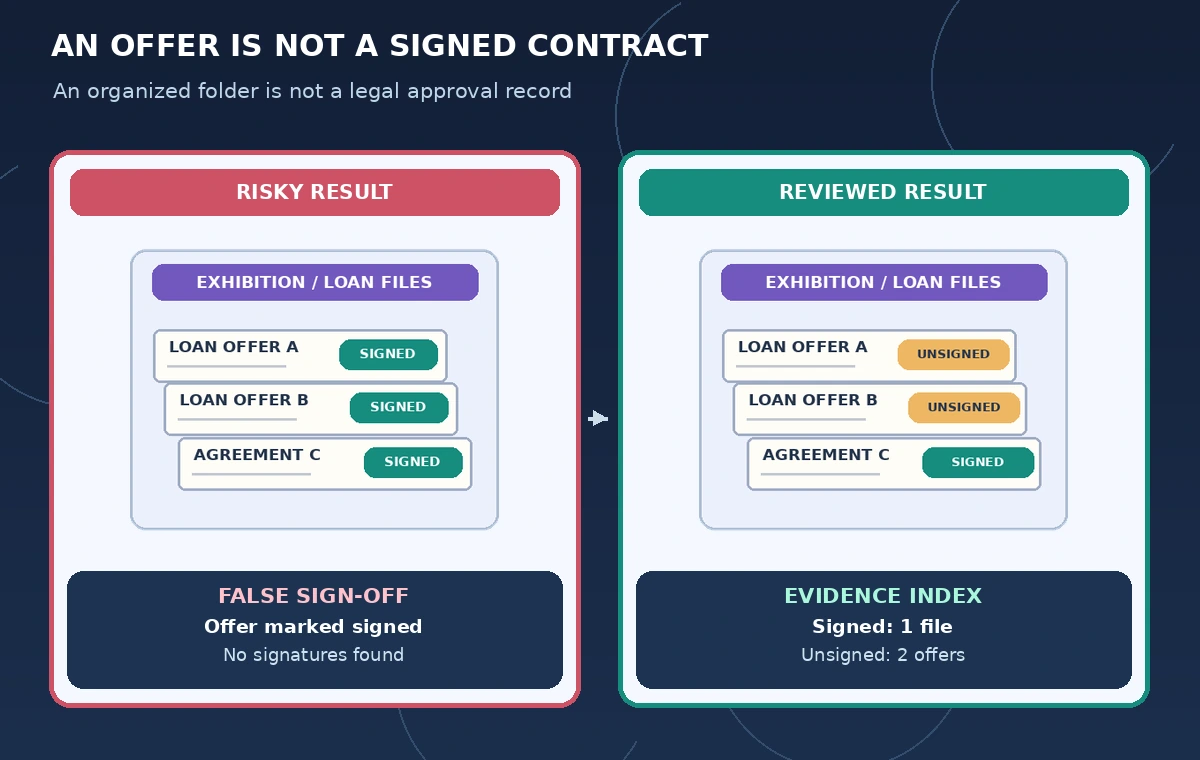
The illustrative comparison shows a misleading index where every file called “agreement” is green and signed, versus a reviewed index with one signed file and two unsigned offers flagged. These are drawn teaching examples, not real extracted data. The important visual difference is status tied to evidence, not file naming style.
Open the original document pages for each questionable item. Compare the accession number, lender name, signing parties, version date, and any attached schedules. Keep blanks as blanks. If an authorizer cannot explain why a file was labeled executed, it should remain pending in the handoff sheet until someone can provide a legitimate source.
Keep write actions gated and reversible
Anthropic distinguishes read tools from write tools and warns that agents can make mistakes. Treat file renames, folder moves, CSV overwrites, and emailing a handoff sheet as write actions requiring an explicit review. Set the initial job to propose a destination tree or rename plan in a separate text file rather than directly mutating the archive.
If the pilot later permits file moves, maintain an original-to-proposed path mapping and test restoration on copies. Check for duplicate filenames, inconsistent object IDs, and inaccessible references from other departments. Do not delete a supposed duplicate because two documents share a title; one may be a signed revision while the other is an unsigned predecessor.
Review privacy, tool access, and task location
Cowork may use connectors, browsers, or computer interaction depending on account and platform. An agent should not automatically browse lender portals, upload private paperwork, or send messages to counterparties simply because a folder contains URLs and contact details. Disable unnecessary tools or run the pilot in a context with minimal permissions.
Document what the session can access and whether files are processed in the cloud. Anthropic’s guidance explains that local access through cloud sessions depends on a desktop connection and that connected file copies may be fetched for tasks. Confirm the museum’s requirements for external processors and retention before any real loan material is included.
Deliver an auditable, human-signed handoff
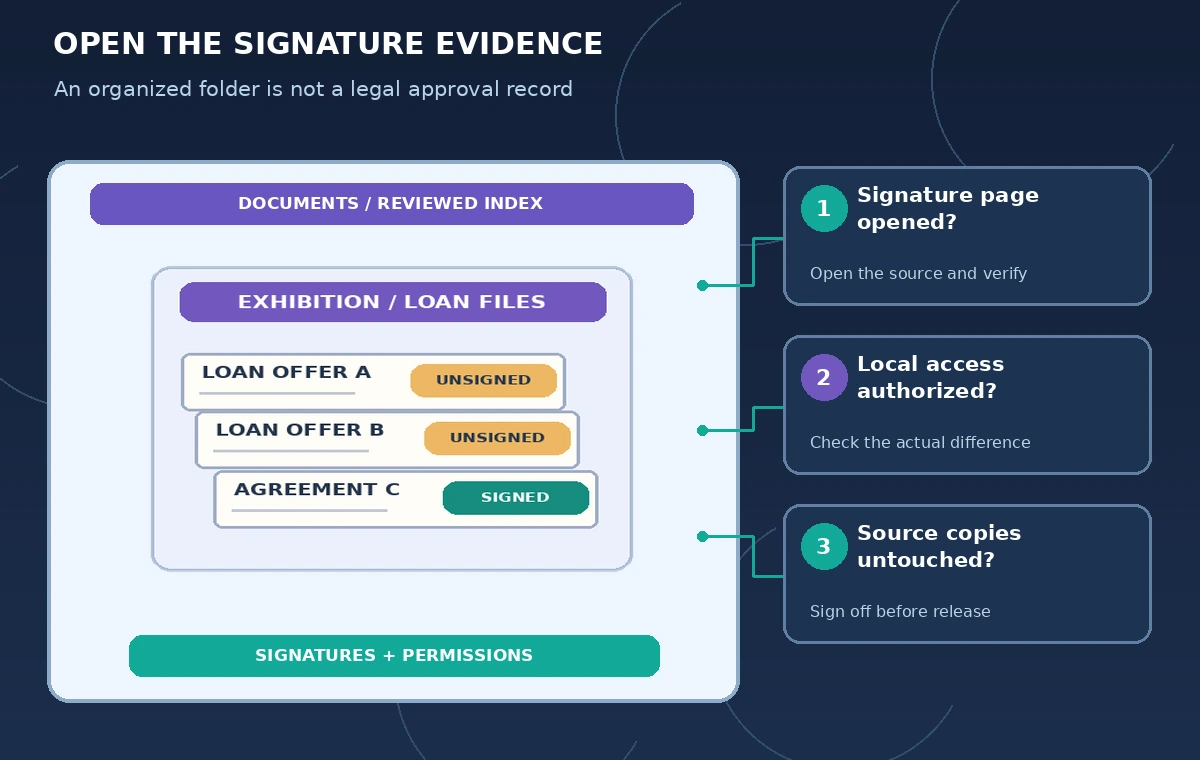
Export a review sheet with document path, status, evidence page, uncertain fields, coordinator decision, and approval date. The coordinator opens each signed record and checks the source of authority, while legal or collections staff resolve cases that the index cannot settle. Put the final approved report in a dedicated folder, keeping source files and drafts unaltered.
The handoff should distinguish “agent proposed” from “human confirmed.” If the same process is repeated next month, start from the newly approved master register and a fresh folder manifest. A faster organization workflow is valuable only when it does not erase the difference between what was offered, what was signed, and what remains disputed.
How We Research
For the November 5, 2026 documentation review, we consulted named official sources: Claude Help: Use Claude Cowork on web, desktop, and mobile; Claude Help: Use Claude Cowork safely; Claude Help: Get started with Claude Cowork; Claude Help: Let Claude use your computer. We compared stated feature capabilities, plan and permission limits, and user review steps with the hypothetical scenario above. We did not log in to, benchmark, or run the named service on live customer data. All characters, media, outputs, and figures in this guide are illustrations rather than observed results. Recheck vendor documentation, organization policy, and local requirements before using the workflow on a real project.
Frequently Asked Questions
No. The agent can organize and summarize; formal approval and signature validity require authorized human verification.
Anthropic describes access to connected local folders via Claude Desktop under specific session and desktop-availability conditions.
Start with a proposed mapping and read-only index. Review paths and keep backups before allowing write operations.
No. Anthropic describes cloud-based sessions and platform-specific local access conditions; review current guidance and account settings.
No. Files, approvals, and comparison images are hypothetical, based on official product guidance.