
A volunteer botanist is recording notes for a community garden survey. Speaking into a laptop is faster than writing beside the flower beds, but similar-sounding species names can turn a useful record into a false identification. The sample notes contain Salvia nemorosa, a specimen code G-041, and an observation that the plant is ‘possibly’ a cultivar rather than definitively one. Wispr Flow can dictate into the active text field and its Dictionary can help with recurring specialized terms. It cannot replace the labeled specimen or a botanist’s uncertainty. This workflow builds a small controlled vocabulary and a strict proofing habit.
Separate observed facts from tentative identifications
Before dictation, prepare an authorized reference sheet with species spelling, specimen identifiers, site labels, and the precise status of each observation. In the fictional example, the G-041 label says ‘Salvia nemorosa’ and the field observation says ‘possibly cultivar; confirm later.’ Those are different kinds of information. A cleaner transcript must retain the tentative qualifier rather than upgrading it to a confirmed cultivar. For species names, use an approved botanical inventory or current taxonomic reference, not whichever spelling the dictation engine produces first.
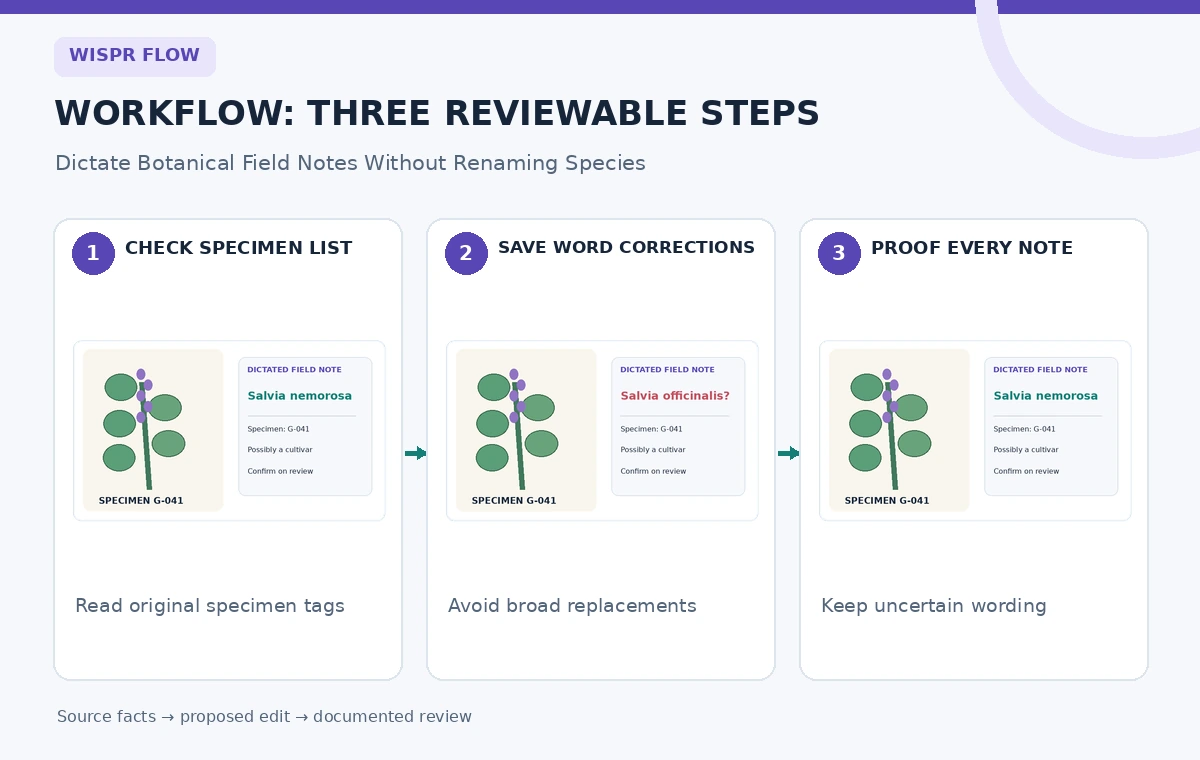
Create a review table with three fields: spoken phrase, expected written form, and evidence source. Add examples that might collide: Salvia nemorosa and Salvia officinalis are both real names, so replacing one globally with the other would silently corrupt valid records. Record specimen codes separately from descriptive prose. When a dictated identifier is uncertain, leave an explicit review marker instead of letting a general language model infer what the label probably says. The same principle applies to collection dates and plot numbers.
Set up Flow and decide what can be shared
Check Wispr Flow’s supported platform instructions and the account’s data policy before recording. The official product help describes dictation on Mac, Windows, iPhone, and Android, while warning that controls differ across devices and an internet connection is used for transcription. Use a short synthetic test note first. Choose a trusted text editor, place the cursor in an empty test document, then speak a specimen line. Stop dictation and review the inserted text; do not treat it as an authoritative record merely because it was placed directly in your editor.
Avoid recording confidential landowner details or private volunteer contact data in the example workflow. Set an explicit organization policy for what can be spoken into a cloud-connected dictation service. Some organizations may restrict cloud sync or data storage settings. If your research data cannot be submitted under those conditions, choose an approved offline transcription process instead. A product’s convenience does not override institutional privacy rules or the consent of people mentioned in field notes.
Build a small, selective Dictionary
Open the Dictionary area in Flow and add uncommon terms that recur, using the documentation for your platform. Wispr describes adding vocabulary and corrections for misspellings, and personal versus shared entries can have different precedence. Start with exact Latin names already verified by the specimen sheet. Keep the list small enough for someone to audit. When the recognizer repeatedly writes an incorrect form, create a correction for that precise wrong form rather than a broad replacement that may match legitimate prose.
Test one term at a time. Say ‘Salvia nemorosa, specimen G-041’ and compare the inserted text to the approved label. If Flow already types the correct name, do not add an unnecessary replacement. The dictionary’s corrections can be literal and case-insensitive, and its longer phrases may win when rules overlap; that means a careless entry can change text beyond the intended context. Never use a blanket ‘Salvia’ replacement, because several species share the genus and each may occur correctly in the same survey.
Read the AI tool selection checklist
Watch exact spelling, capitalization, and abbreviations
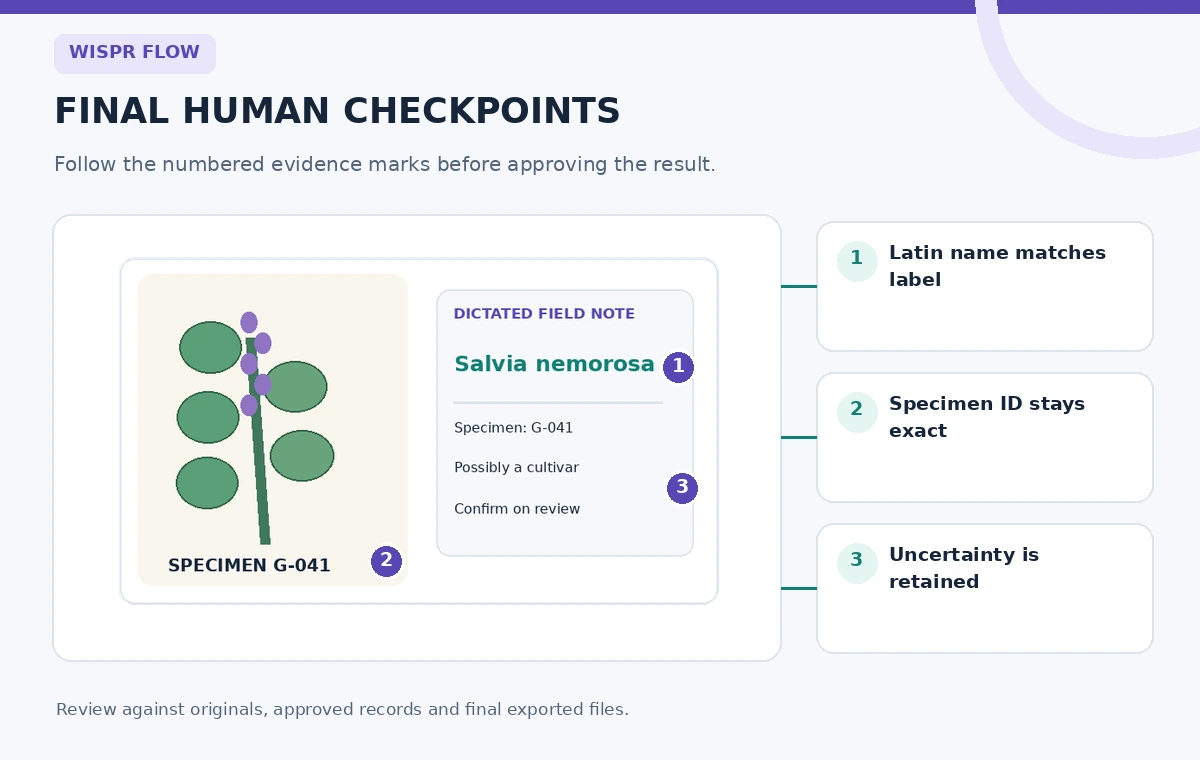
Botanical records contain typographic conventions that ordinary dictation may simplify. Verify the genus capital letter, lower-case species epithet, specimen ID punctuation, plot code, and any quotation marks around an unverified cultivar name. In a field note, ‘G-041’ is not equivalent to ‘G41’ if the database treats those strings differently. Read each generated identifier against the physical label rather than relying on a phonetic approximation. The software cannot know the local accession convention unless the human workflow enforces it.
Wispr’s documentation explains that a saved dictionary correction can preserve its exact spelling and punctuation. This is helpful for a recurring technical term but can be dangerous for a code that varies by specimen. A dictionary word should not automatically fill an entire field note with a fixed sample ID. Keep unique identifiers out of global replacements; dictate them slowly and compare with the label afterward. For large surveys, a separate barcode scan or manual entry may be safer than voice entry for accession codes.

Preserve negations, uncertainty, and observation order
Smart formatting can remove hesitations, reorder punctuation, or normalize numbers. That usually improves everyday prose, but field notes often depend on literal qualifiers. Compare ‘not flowering’ with ‘flowering,’ ‘may be Salvia’ with ‘is Salvia,’ and ‘two to five leaves’ with ‘twenty-five leaves.’ A small formatting change can reverse a conclusion. Use short observations and review them immediately while the plant and label are still visible. If you cannot validate a statement on-site, mark it as uncertain rather than smoothing the language.
Keep a recording-independent scratch log for important field observations, especially measured quantities and negative findings. Repeat a sentence when the recognizer merges two samples into one note. Do not assume a corrected transcript is a verbatim record of the spoken audio; Flow may clean filler words and self-corrections. This can be appropriate for drafting descriptive summaries but not for a legal chain-of-custody transcript or other use that requires exact spoken wording. State the intended use in the survey’s quality rules.
Consider bulk import only after validation
For an established botany program, the team may have dozens of vetted plant names. Wispr documents desktop bulk import of Dictionary items by CSV, subject to plan and interface availability. The documented import format can include vocabulary entries and exact misspelling-to-correction pairs. Do not upload a raw spreadsheet of unverified spellings. Deduplicate terms, remove sensitive data, and inspect every correction for collisions with legitimate species names before importing it into a shared team dictionary.
Try a five-entry test and dictate an adversarial set of phrases that should not change. For example, if your survey has both Salvia officinalis and Salvia nemorosa, confirm that neither is silently rewritten as the other. Check what happens when the name is at the start of a sentence, in the middle, and followed by a specimen identifier. Track who maintains the list, because a shared correction can spread a mistake across many field notebooks before anyone notices.
Run a specimen-by-specimen proofing pass
At the end of a survey session, put the dictated note beside photographs of the original labels and a copy of the approved species list. Check every Latin binomial, sample ID, location description, flowering status, count, and qualifier. Assign each unresolved issue a clear ‘VERIFY’ status. Use a second reviewer for a sample of notes, particularly cases where a spelling mistake would point to a different species. Do not approve an entry simply because the final prose looks fluent.
Keep provenance for corrections. A short annotation such as ‘corrected species spelling from physical tag, reviewed 2026-11-03’ is more informative than silently overwriting an error. Never use a guessed identity from a dictation transcript to relabel a physical specimen. If the source label itself is wrong, the botanist must follow the institution’s identification-change process. The dictation tool provides text, not taxonomic authority.
See our responsible multi-tool workflow
Publish clear notes, not invisible corrections
Before exporting survey data, remove temporary dictation artifacts but preserve scientific uncertainty. Confirm that all field IDs are unique and that a note’s photo attachments belong to the same specimen. If a name cannot be resolved, use a consistent ‘identification pending’ status rather than choosing the nearest dictionary entry. Review whether any species record changed because of a shared correction, and document the approved fix in a revision log. A good transcript is traceable back to the field observation.
Maintain a small test set of troublesome words for future software updates. Flow’s recognition and platform behavior may change, so rerun the tests when the team updates its software or dictionaries. The practical success measure is fewer correctly verified spelling mistakes without new semantic errors. A dictionary should support accurate botanical work, not conceal the underlying distinction between what someone saw, what they said, and what the final written record claims.
How We Research
We reviewed Wispr Flow dictionary documentation and Wispr Flow introduction and limitations and Wispr Flow bulk dictionary import instructions and Wispr Flow smart formatting behavior to confirm the documented feature names, editorial limits, and supported workflows. The people, values, rooms, projects, and visuals in this article are fictional teaching examples, not measured tool output or genuine product screenshots. We did not operate a live customer account, submit private material, conduct a hands-on performance test, or certify any produced result. Source documentation supports what the product is described as doing; the evidence-preservation and human-approval tests are independent editorial recommendations. Confirm current plans, platform support, and interface wording in your own installed version before use.
Frequently Asked Questions
Yes. Wispr documents a Dictionary with vocabulary and exact misspelling corrections; available options and sharing behavior depend on platform and account.
No. A saved spelling helps render words consistently but cannot validate a specimen identification or resolve conflicting field evidence.
Not necessarily. Its formatting can clean filler words and self-corrections. Proofread negations and scientific uncertainty against observations.
Wispr documents a desktop CSV Dictionary import with plan-specific access and validation rules. Review the list for dangerous global replacements first.
Usually not. Unique IDs and numerical labels need record-by-record checks; a fixed auto-correction can silently change valid identifiers.