
A small library web application displays free-text book suggestions. A code scanning alert warns that untrusted input may reach an HTML-rendering path without an appropriate safeguard. A maintainer considers GitHub Copilot Autofix to produce a proposed patch. GitHub documents best-effort Autofix suggestions for eligible backlog alerts on a repository’s default branch, with licensing and feature availability conditions. The example code and illustrated states below are invented teaching material; no vulnerability or patch has been reproduced in a live repository. The goal is a disciplined review in which the generated suggestion is evidence to inspect, never a substitute for an engineering decision.
Read the alert and confirm its context
Open the alert through the repository’s code scanning area and identify the query, severity, affected file, line reference, branch and data flow. Check whether an existing pull request already addresses the finding. A reported path might represent a genuine injection risk, an incomplete scanner model, or a condition that requires a compensating control. Collect the relevant coding standard and tests before generating anything. Do not assume that an AI explanation proves exploitability. This guide intentionally avoids presenting a payload or attack procedure; the engineering focus is protecting untrusted data boundaries and reviewing a safe coding pattern.
Check which Autofix experience is available
GitHub distinguishes suggestions from the agentic mode that can explore a repository, validate changes and open a pull request. The one-step Generate fix option is documented where supported, while agentic autofix requires separate repository enablement. Availability and billing differ; the docs say a Copilot subscription is not required for supported code scanning Autofix, but GitHub Code Security licensing can govern private repositories. The agentic experience can use AI credits and Actions minutes. Do not promise a button or a free fix across every organization. Ask the repository owner which security feature is enabled and who can approve resulting pull requests.
Generate a suggestion without silently merging it
If the alert provides Generate fix, review the suggested change and use Create PR with fix only when an authorized maintainer intends to evaluate it. GitHub documents the resulting draft pull request on a new branch. A suggested code patch may alter several related lines; a visible green check is not enough to understand its effect. Keep CI and branch protection in place. If the feature is unavailable, assign remediation to a developer rather than disabling a scanner or reducing a security policy simply to obtain a cleaner dashboard. Treat all proposed changes as untrusted until code review and testing are complete.

Trace input handling through all relevant paths
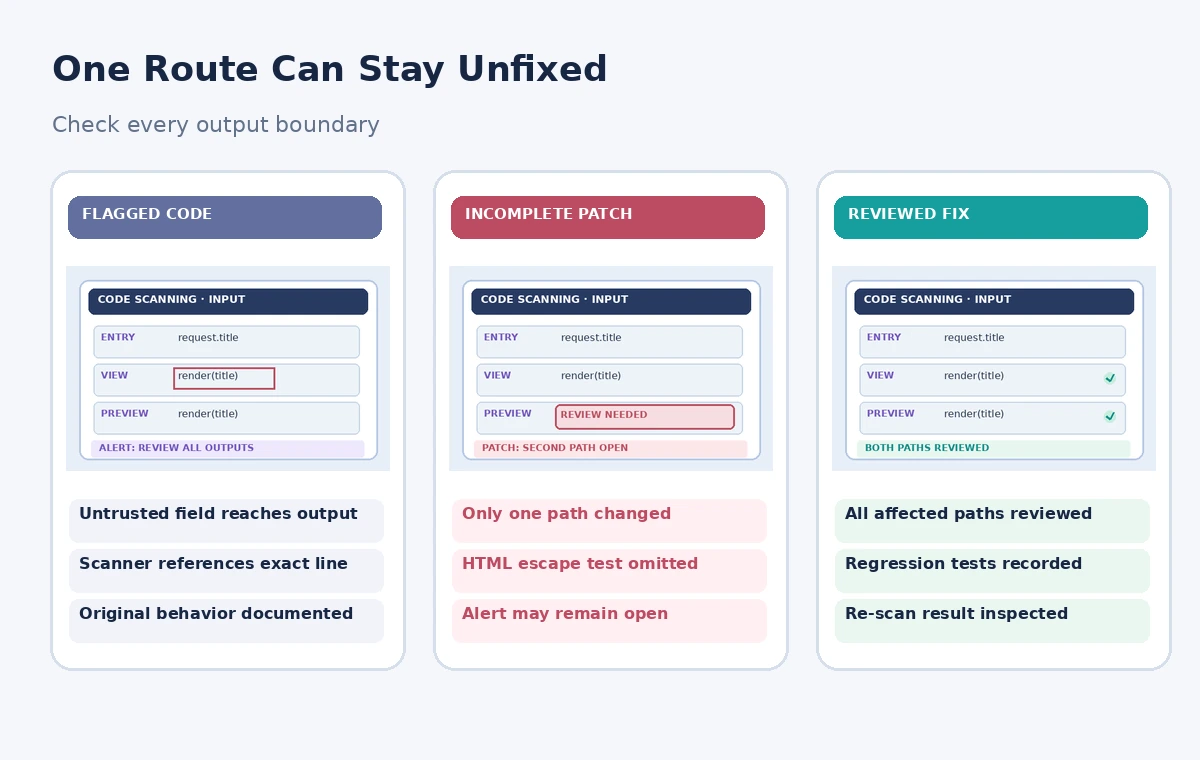
A fictional fix might add safe rendering to one template while leaving a second preview path unchanged. Review every route in the application that handles the same field: forms, API serialization, admin previews, email summaries and rendered reports. Prefer framework-native escaping and context-specific validation to fragile ad hoc string replacements. Document which layer owns the protection, whether the output is HTML, a URL or an attribute, and whether a separate path creates content. The diagram illustrates an incomplete review, not an actual Copilot failure. If multiple sinks exist, a fix to only one of them is not a verified resolution.
Run boundary and regression tests
Add or review tests that exercise ordinary text, punctuation, empty values, Unicode and known benign special characters. Confirm that intended content remains readable while the destination framework handles untrusted strings safely. Test the important user journey, including creating a book suggestion and viewing it in a listing. The actual security team may require specialized tests and static analysis beyond a unit suite. Do not copy an adversarial exploit into publication or a public demo. Record test names and CI results as verifiable artifacts, not a statement that Copilot did the testing merely because it suggested a patch.
Review dependencies, scope and side effects
Inspect the diff for unrelated formatting, permissions, package upgrades, logging changes and test deletions. A narrow fix should not silently loosen input constraints elsewhere or hide a warning by suppressing the finding. Verify that API responses and accessibility labels still work with content containing quotation marks or accented characters. If the change updates sanitization or encoding behavior, consider whether stored historical records render differently. Ask a second maintainer to review data flow and assumptions. Security remediation requires context and owner accountability; an AI-generated explanation can speed navigation but cannot sign the release.
Understand scanning results and residual risk
Code scanning may run on a new commit or pull request before an alert state updates. A local patch alone does not close the alert. GitHub notes that some query types are unsupported, and a suggested fix is not guaranteed for every finding. Confirm that the relevant scanner has rerun on the affected branch and check for fresh findings. Avoid equating an alert’s disappearance with proof that the entire application is secure. Record exceptions honestly and route ambiguous results to a human security reviewer. Do not mark a finding resolved by closing it administratively while leaving the underlying risk unattended.
Protect repository access and provenance
Use the team’s normal permission model: approved maintainers can edit the branch, reviewers can approve, and protected branches require the prescribed checks. Never paste private keys, customer data or vulnerability details into a public demonstration. If a workflow invokes an agent, review what tools it can run and the cost and exposure implications. Preserve the alert link, change request, commit hash, reviewer identity and CI output for the audit trail. These details matter more than how quickly a suggestion was generated. The example assumes a fictional library application and claims neither a real vulnerability nor any completed penetration testing.
Merge only under the existing security process
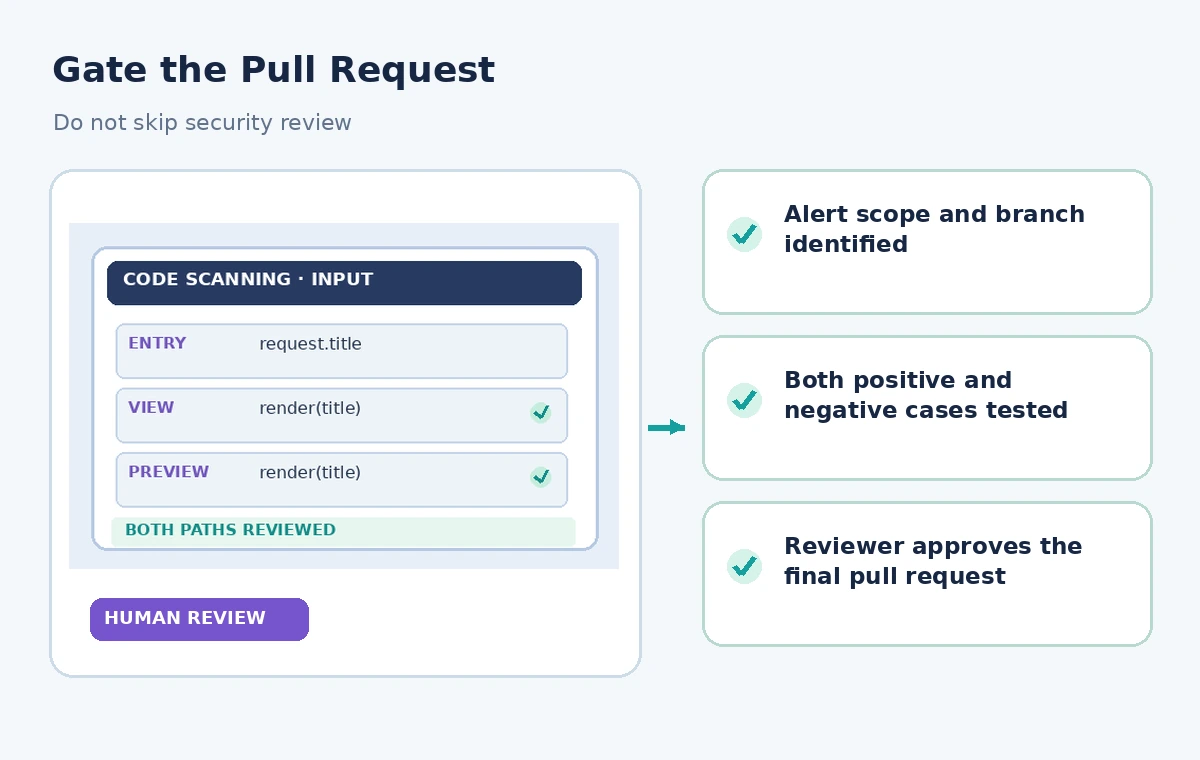
The final decision belongs to the maintainers. Merge only after the relevant tests, peer review and branch protection succeed and after the code scanning report has been interpreted correctly. Monitor the deployment for functional regressions without logging sensitive user inputs. If the fix is incomplete, revise or reject it; the existence of a Copilot-generated draft creates no obligation to accept it. Document the lesson in the team’s coding guidelines, such as consistent safe rendering at every output boundary. Copilot Autofix is a possible remediation assistant, not a security certification or a substitute for ownership.
How We Research
Our research used the following named official vendor documentation: GitHub — Resolving code scanning alerts; GitHub — Triaging code scanning alerts in pull requests; GitHub — Code scanning on pull requests. We checked the existence and intended purpose of each named feature, documented availability or configuration requirements, and explicit limitations. The workflows were then written around a fictional example that exposes common editorial risks, not around an account we operated. No hands-on product benchmark, real output file, recorded participant, measured accuracy score or legal/compliance review is claimed. All diagrams are independently drawn explanatory illustrations; they are not screenshots. A real project must verify live settings, permissions, source documents, relevant policy and human approval before release.
Frequently Asked Questions
Where supported, GitHub documents a Create PR with fix action and a draft pull request on a new branch.
No. GitHub says it supports only certain queries and eligible backlog alerts, and best-effort suggestions may fail.
No. GitHub describes separate availability for code scanning Autofix and Code Security licensing conditions; confirm repository settings.
No. Changes require review and the relevant scanning pipeline; unresolved or reintroduced findings can remain.
Inspect the diff, exercise regression and security tests, confirm a new scan, and follow protected-branch review requirements.