
A small checkout-form change can look harmless in a code diff while breaking an important keyboard path. Imagine a fictional shop changing the delivery-address form so the focus jumps from ZIP Code straight to the Pay button, skipping a required confirmation checkbox. GitHub Copilot code review can comment on pull requests and suggest changes, but it is a reviewer aid, not proof that the page works for all users. This guide walks through a defensible review sequence using a drawn browser form, highlighted lines of code and a keyboard route. The depicted bug and reviewer comments are hypothetical examples, not actual Copilot findings.
Define the expected keyboard journey before requesting AI feedback
Write down the intended sequence of controls in the checkout: delivery address, ZIP Code, consent checkbox and Pay. Test both forward and reverse Tab movement, and confirm that focus is visible on each actionable element. A real checkout also needs error messaging, appropriate labels and an accessible confirmation step, but this article isolates the navigation regression to make it reviewable. Do not assume code comments can replace a browser test. Preserve a known-good version and a small reproducible description of how the bug manifests. Never copy real card numbers or shopper details into a sample issue or a third-party review prompt.
Keep the pull request small enough to inspect
Create a pull request with a narrow diff and a description of intended behavior. Point reviewers to the checkbox component and any JavaScript handling focus after the ZIP Code field. Include the exact steps a human can use to reproduce the issue with a keyboard, but do not fabricate test output. A small patch reduces the risk that security, layout and focus logic become entangled in a wall of unrelated changes. The process diagram shows a code diff, a Copilot review comment, a proposed fix and a human browser test as distinct stages. Those boxes correspond to responsibilities, not automated guarantees.
Request Copilot review through the documented UI
GitHub’s official documentation describes opening a pull request on GitHub.com and clicking Request next to Copilot under Reviewers. Read the comments and any suggested changes. Copilot now assigns severity levels to its comments, but a high label is a prioritization hint, not a confirmed defect report. Review effort options and enterprise settings may affect the depth and availability of the service. Treat AI suggestions as hypotheses, particularly around accessibility semantics that are not fully visible in the diff. The tool may miss a bug entirely; silence is not a passed audit.

Read the proposed change in context
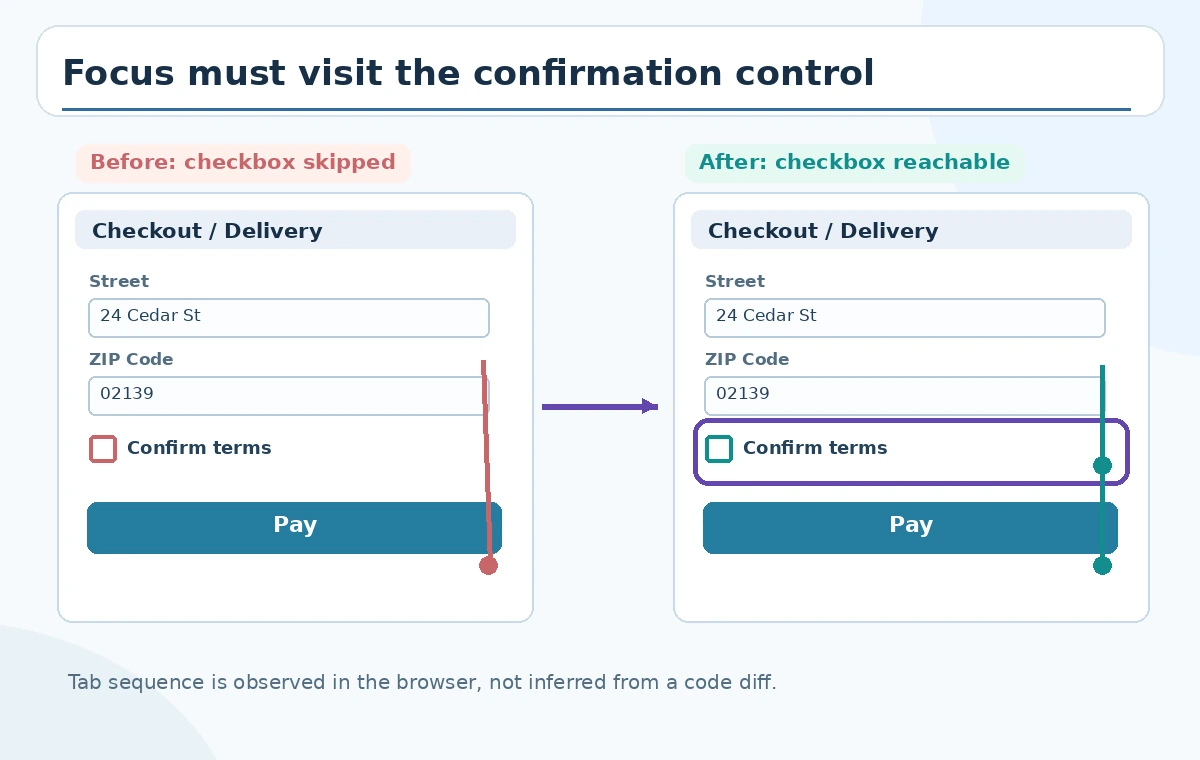
Suppose a comment recommends removing a line that programmatically calls focus() on the Pay button. That might fix the skip, but the same line could have been introduced to handle a different validation state. Inspect surrounding event handlers, rerender behavior, disabled controls and component props before accepting anything. The before/after figure shows an incorrect focus arrow bypassing the checkbox and a corrected path that visits it. The illustration is a model of desired behavior, not a Copilot-generated patch or proof that deletion of any particular code line is safe.
Apply suggestions selectively and commit with a reason
GitHub documents applying single or grouped suggested changes when the reviewer agrees with them. Do not batch-apply suggestions just to make a warning count disappear. If a comment is wrong, explain the evidence in a human review note and resolve it through normal team practice. If you change the focus handler, add or update automated coverage where the project supports it, and commit a message describing the behavior rather than attributing certainty to an AI diagnosis. Run the site’s actual build and tests. A passing unit test that mocks focus without opening a browser may not catch the original navigation problem.
Test focus order in a browser, not a static screenshot
Load the checkout form with a keyboard and begin at the first address field. Press Tab through every step and verify the checkbox receives visible focus before Pay. Reverse with Shift+Tab and check the order is sensible. Trigger an invalid ZIP Code and verify that the error is announced or displayed appropriately without trapping focus. If the UI updates asynchronously, test again after validation messages appear. The third illustration traces real controls in a drawn form and marks the checkbox as the risk area; the drawing does not pretend to be a recorded browser test.
Check semantic controls and labels
A visually square element that looks like a checkbox is not necessarily keyboard-operable or exposed correctly to assistive technology. Use a real checkbox input and an associated label where appropriate, and avoid arbitrary positive tabindex values as a shortcut to reshuffling focus. Confirm that Pay is not activated accidentally by keyboard navigation. Run applicable automated accessibility checks and manual assistive-technology review, recognizing that neither a single checker nor Copilot is exhaustive. A code review can help locate a suspicious handler, but the ultimate usability evidence comes from interaction in the intended environment.

Know what Copilot approval does and does not mean
GitHub documents that Copilot normally leaves comments by default, while optional Copilot approvals are in public preview and can be configured to count toward review rules. Do not simplistically claim it can never approve a pull request. Regardless of repository configuration, an AI approval is not a guarantee of keyboard accessibility, secure checkout behavior or compliance. Obtain required human review and use branch protection and tests as the team requires. After substantial changes, request a re-review if appropriate, since GitHub notes that Copilot does not necessarily re-review new commits automatically.
Close the review with reproducible evidence
Attach a clear, non-sensitive reproduction checklist, relevant test results from your own environment, and the reviewed patch to the pull request. If no browser test was performed, state that plainly; do not mark the focus bug fixed because the diff looks reasonable. Compare the revised form against the expected Tab sequence one final time. The example checkout, code fragment and feedback in this article are invented solely to teach an inspection method. No real repository, customer form or GitHub Copilot review was accessed for this article. The goal is a review trail that colleagues can challenge and repeat.
How We Research
We used GitHub’s Using GitHub Copilot code review documentation for requesting review, comment severity, suggestions, re-review and optional approvals, and its pull request lifecycle tutorial for review timing and workflow guidance. The keyboard-focus investigation is an editorial test design, not a claimed result. We did not submit a pull request, run an automated audit, or receive any Copilot comment.
Frequently Asked Questions
No. GitHub documents comment reviews as the default, with optional configured Copilot approvals in public preview; repository rules can vary.
No. Manually test forward and reverse focus navigation in the running application and verify errors and labels.
Not necessarily. Request a re-review or configure automatic review of new pushes if your repository supports it.
No. Inspect each suggestion in context, run tests, and retain a reason for accepting or rejecting it.
No. The example bug and suggested review sequence are fictional and were not generated by a real Copilot session.