
A client portal is more than a public website with a login button. It presents private projects, documents, invoices or support requests to customers who should not see one another’s records. AI-assisted builders can speed up the first screen, but the operational decision is whether the platform can enforce those boundaries.
This guide narrows the broader app-builder discussion to a single high-stakes use case: a small service company giving each client a safe view of their work. It uses Softr documentation as a concrete reference for user groups and record restrictions, while treating equivalent capabilities in other builders as features to verify rather than assumptions.
Write the smallest portal specification
Define three roles: guest, client and staff administrator. A guest sees only a landing page and sign-in; a client can see their own project status and upload approved files; staff can manage records and review requests. Identify which fields must be visible, such as a project title and due date, and which should never leave the internal team.
Create a plain-language acceptance statement: “A signed-in client can see only their organization’s projects, even after altering a URL.” Add an exit criterion: the system must block direct record access that a user lacks permission to view. This statement is more testable than “make it secure.”
Distinguish visual hiding from data security
Page, block and button visibility can simplify an interface, but security depends on data restrictions too. Softr documents user groups, conditional filters and global data restrictions; the controls operate at different levels. A hidden menu button is not proof that the underlying record cannot be loaded through another route.
Build permissions from the data layer outward. Identify the owner field for every project and file, the relationship to a customer account, and the actions clients can perform. Then make the interface reflect those permissions. Recheck restrictions after connecting an external database or creating a new record type; a default setting may not match your privacy expectations.

Evaluate app builders against portal requirements
Softr is purpose-built for data-driven portals and exposes documented user group and record controls. General prompt-to-app builders such as Lovable or Bolt may offer more flexibility in designing a custom experience, but that flexibility can increase responsibility for authentication, database rules, testing and maintenance. A polished demonstration alone does not resolve those questions.
Compare how each candidate handles client invitations, password resets, account ownership, audit trails, file links and export. Check whether the required security controls are available on your intended subscription tier. Do not imply that a named builder’s AI prompt automatically configures safe row-level authorization; require evidence from its current documentation and your own test account.
Model organizations, people and projects
Use a simple relational structure: organizations, users, projects, updates and documents. Each project belongs to one organization; membership determines which records a user can read. Documents inherit project-level access, but their storage links may need separate authorization. A client role should not be permitted to change the organization ID of a project.
When prototyping, fill records with fictitious companies and files. Create two clients assigned to different organizations, one staff administrator and a guest. Avoid importing real contracts before permissions are verified. If a platform requires an external data source, confirm where connection credentials live and whether public client code can access them.
Run a two-client isolation test
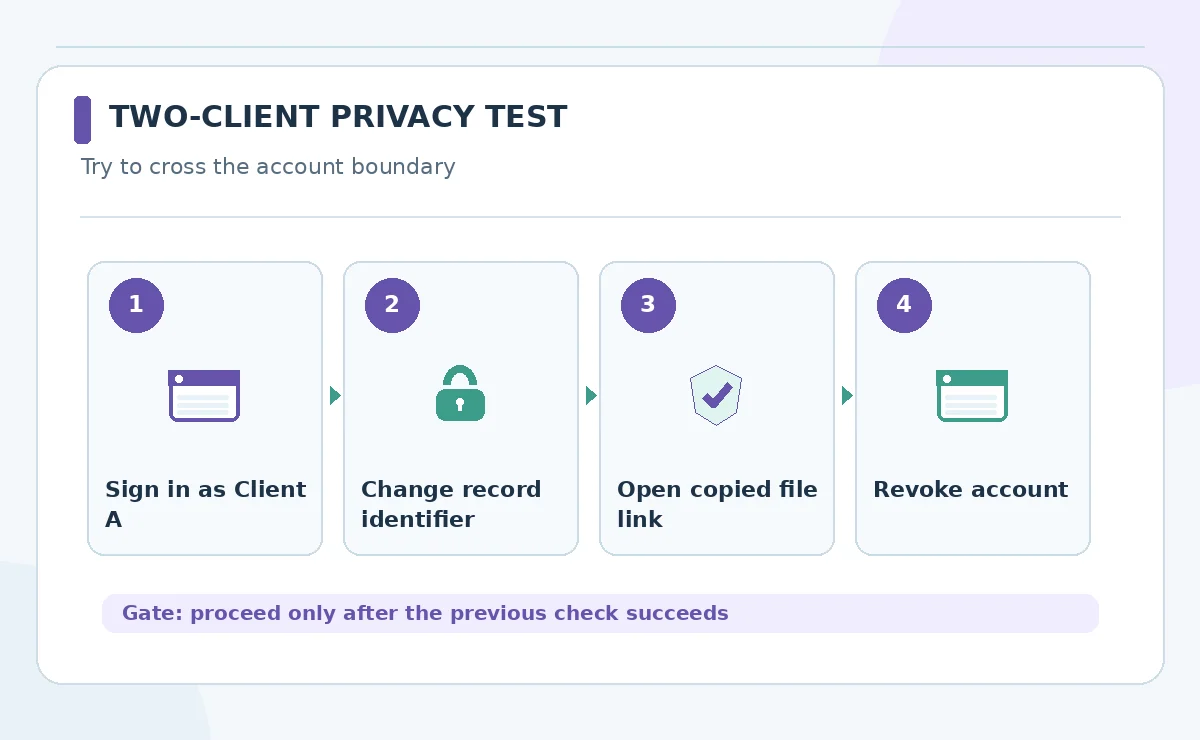
Sign in as Client A and open an authorized project. Then replace its identifier with Client B’s known project ID, visit a copied file link and attempt to call any exposed record endpoint. Repeat the reverse direction. Each disallowed action should fail rather than merely omit a visible navigation link. Record screenshots, inputs and expected results in a test log.
Test different sessions, browser profiles and mobile views, including after a user’s access is revoked. A restricted portal should not leak project names through search, notifications or shared previews. An AI builder can help create test cases, but a human should verify each one and investigate any surprising success.
Keep AI suggestions away from irreversible actions
Useful AI additions include summarizing a project update, suggesting a reply to a client question or classifying an uploaded request. Start with drafts visible to staff. Do not let untrusted client text grant access, change payment instructions, approve deliverables or trigger sensitive messages. The AI model is not an authorization authority.
If a model processes uploaded files, define allowed file types, scanning procedures, data retention and a maximum processing scope. Keep original source text available for review. Label AI-generated status summaries as drafts until someone confirms facts. An efficient interface that spreads an inaccurate invoice or deadline to customers is not a successful automation.
Check plan limitations and administrative handoff
Portal costs can depend on app users, internal editors, database capacity, custom domains and advanced permissions. Softr’s documentation specifies that some custom user group capabilities depend on plan tier; confirm the precise entitlement in checkout. General app builders may add separate hosting, storage or database charges.
Budget for onboarding and offboarding accounts, routine corrections and maintaining integrations. Establish who can remove client access quickly, who owns the DNS/domain connection and where portal data can be exported. If the vendor account belongs to a departing contractor, even a working portal can become difficult to operate.

Launch with a support and rollback process
Pilot with one cooperative internal stakeholder using fictional records before admitting real clients. Add a visible support contact, document how access problems are resolved, and decide how users learn about updates or outages. Keep a backup copy of critical project data and an approved manual update channel.
After launch, review access logs where available, test a revoked account and check that new project templates inherit the proper restrictions. Treat any accidental cross-client exposure as a security incident. The measurable result is reliable access to the correct records, not the speed at which an AI prompt drew the first dashboard.
How We Research
Research checked on October 26, 2026. Our primary references are Softr portal guide; Softr user groups and permissions; Softr security controls. We mapped documented product capabilities to this specific reader task, distinguished provider claims from independent evidence, and checked adjacent LabFin coverage to avoid an overlapping article. The comparison is editorial and does not imply hands-on paid tests, measured output quality, verified account access or permanent pricing. Features, permissions and usage rules can change; confirm relevant terms in the live product before purchase or launch.
Frequently Asked Questions
No. Each client also needs permissions that restrict records and files; authentication alone does not prevent cross-client access.
AI may generate screens and data structures, but authentication, data isolation, uploads and revocation need independent verification before customer use.
Create two fictional client accounts and try to open each other’s records directly, including copied URLs and file links.
Not necessarily. Some portal tools support native or connected data sources. Choose one that can enforce access rules for your actual records.
Keep model-written updates in a review queue until their source, audience and factual claims have been checked by an authorized employee.