
Disclosure: LabFin is reader-supported. If you sign up for a tool through links on this page, we may earn a commission at no extra cost to you. Commissions vary between providers and our ratings do not — here’s our full disclosure.
Is Google’s paid Gemini plan worth it? For people who live in Gmail, Docs and Drive, often yes: Google AI Plus costs $4.99 a month, and AI Pro at $19.99 adds 5 TB of storage. For light chat, however, the free plan already does a lot.
This guide compares the plans, shows who gains most from each, and covers the privacy trade-off that applies to all of them, using the figures in our Gemini review.
Is Google’s Paid Gemini Plan Worth It? The Short Answer
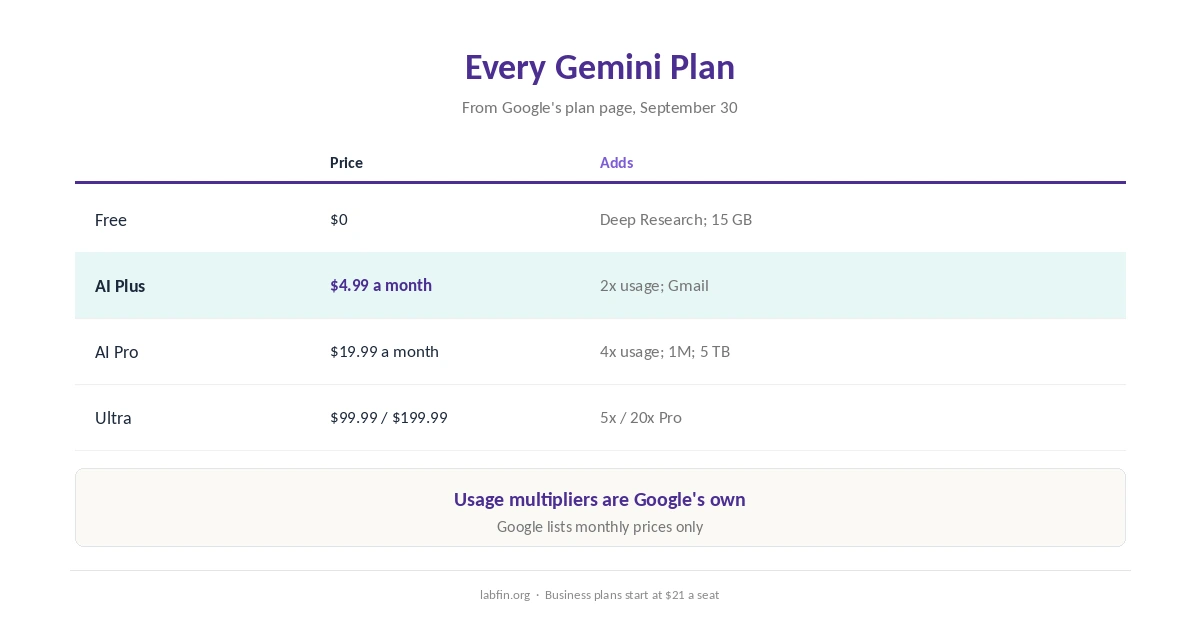
Free, for example, already includes image generation, Deep Research and Gemini Live. AI Plus doubles Free’s usage and adds Gemini in Gmail for $4.99, and AI Pro adds 1M-token context, Gemini in Docs and Chrome, and 5 TB.
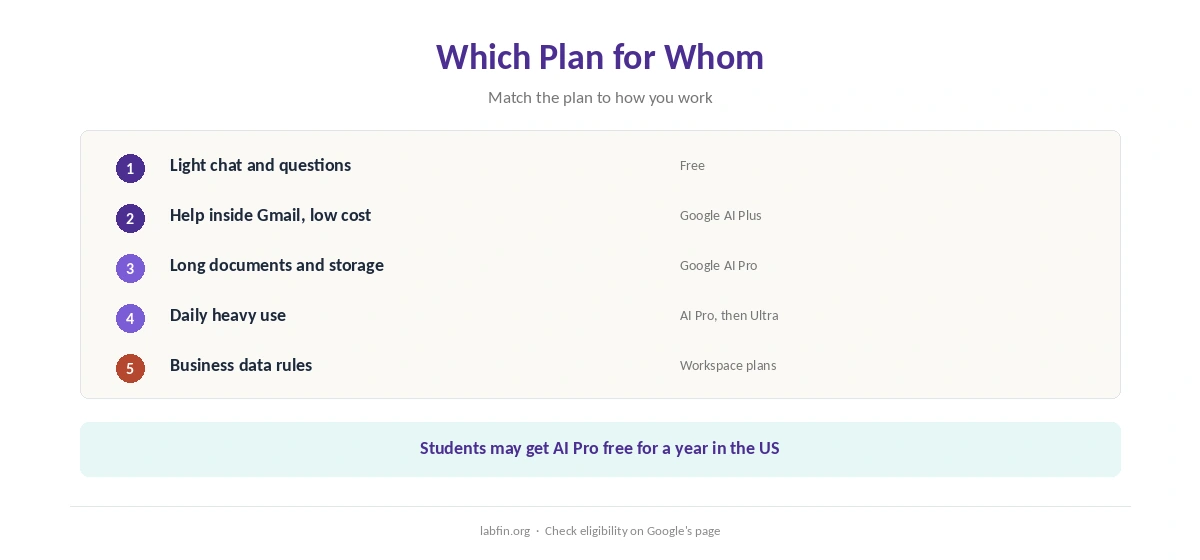
So AI Plus suits Gmail users on a budget, and AI Pro suits heavy users who also need storage. Ultra, at $99.99 or $199.99, suits only the heaviest users.
Every Gemini Plan
| Plan | Price (US) | What it adds |
|---|---|---|
| Free | $0 | Flash models, varying 3.1 Pro access; Deep Research; 15 GB |
| Google AI Plus | $4.99/mo | Twice Free’s usage; 128K context; Gemini in Gmail; 400 GB |
| Google AI Pro | $19.99/mo | Four times Free’s usage; 1M context; Docs and Chrome; 5 TB |
| Google AI Ultra | $99.99 or $199.99/mo | Five or twenty times Pro’s usage; Deep Think |
When AI Plus Pays Off
AI Plus, at $4.99, also costs less than ChatGPT Go at $8 and adds Gemini inside Gmail. If you mainly want help with email and more chats than Free allows, therefore, it is the cheapest useful step. Our list of the best AI for email writing compares inbox tools.
Our guide to Gemini pricing covers every limit, and our comparison of ChatGPT vs Gemini weighs the two.
In addition, our Claude vs Gemini comparison covers another rival.
When AI Pro Pays Off
AI Pro, however, makes sense if you also need storage, since 5 TB alone covers a family’s photos and files. It also adds a 1M-token context for long documents and Gemini in Docs and Chrome.
Eligible US college students, moreover, can get a year of AI Pro free, as our guide to AI tools student discounts explains, and our guide to Gemini for students covers study use.
Researchers, moreover, can weigh AI Pro’s Deep Research in our guide to Gemini for research.
When Ultra Makes Sense
Is Google’s paid Gemini plan worth it at the top tier? Ultra, at $99.99 or $199.99 a month, multiplies Pro’s usage and adds Deep Think. Google’s newest model, Gemini 4 Argon, also reached Ultra subscribers first in late September 2026.
If you rarely hit Pro’s limits, however, Ultra will not pay off. Our guide to understanding AI model tiers explains what top tiers add.
The Privacy Trade-Off
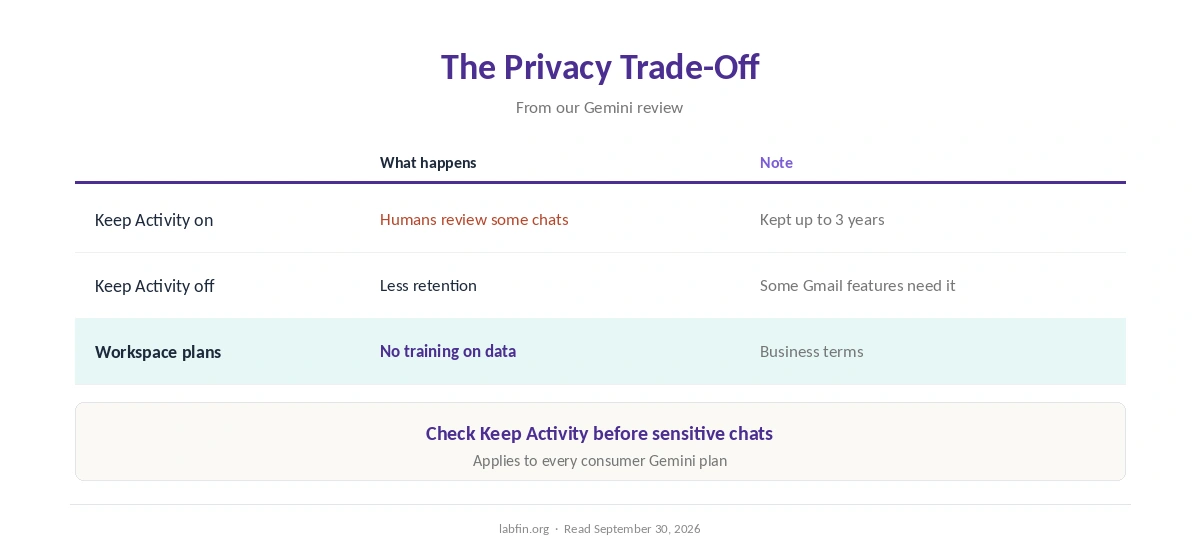
With Keep Activity on, human reviewers read a subset of chats, and Google keeps reviewed chats for up to three years. Turning it off limits that, but some Gmail and Drive features need it on, our review notes.
Workspace business plans, however, exclude customer data from training. Our guide to which AI tools train on your data compares the rules.
How We Research
This guide draws on Google’s plan page and help center as read for our Gemini review on September 30, 2026, including Google’s Gemini subscriptions page.
To judge whether Google’s paid Gemini plan is worth it, note that Google publishes no message counts, so usage claims are its own multipliers. Our about page explains how we research.
Is Google’s Paid Gemini Plan Worth It? FAQ
Google now sells Google AI Plus, AI Pro and Ultra; check the plan page for current names.
For Gmail users who want more than Free’s usage, often yes; it costs less than ChatGPT Go.
Twice Plus’s usage, 1M-token context, Gemini in Docs and Chrome, and 5 TB of storage.
Only for very heavy users; it costs $99.99 or $199.99 a month.
With Keep Activity on, some chats are reviewed by humans; Workspace plans exclude training.
The Verdict
Is Google’s paid Gemini plan worth it? AI Plus is for Gmail users on a budget, and AI Pro for heavy users who need storage. Ultra, however, rarely pays off.
So start free, step to Plus or Pro when limits bind, and check Keep Activity either way. Our list of the cheapest useful AI tools and our guide to reducing AI subscription costs also help.