
Disclosure: LabFin is reader-supported. If you sign up for a tool through links on this page, we may earn a commission at no extra cost to you. Commissions vary between providers and our ratings do not — here’s our full disclosure.
To use AI for learning faster, let it quiz you, explain, and give feedback, but keep the thinking for yourself. Learning sticks when you recall and apply ideas, so an AI that simply hands you answers can slow you down.
This guide, moreover, links well-studied learning techniques to practical AI prompts, sets out a weekly routine, and lists the traps to avoid. It works with ChatGPT, Claude, Gemini or Gemini Notebook.
How to Use AI for Learning Faster: The Short Answer
First, give the AI your own notes or readings and ask it for practice questions, not summaries. Then answer from memory, and ask it to check your answers and explain mistakes.
Next, however, space the reviews over days and weeks, and explain each idea back in your own words. Our list of the best AI for students covers student plans and discounts.
Use Techniques That Work
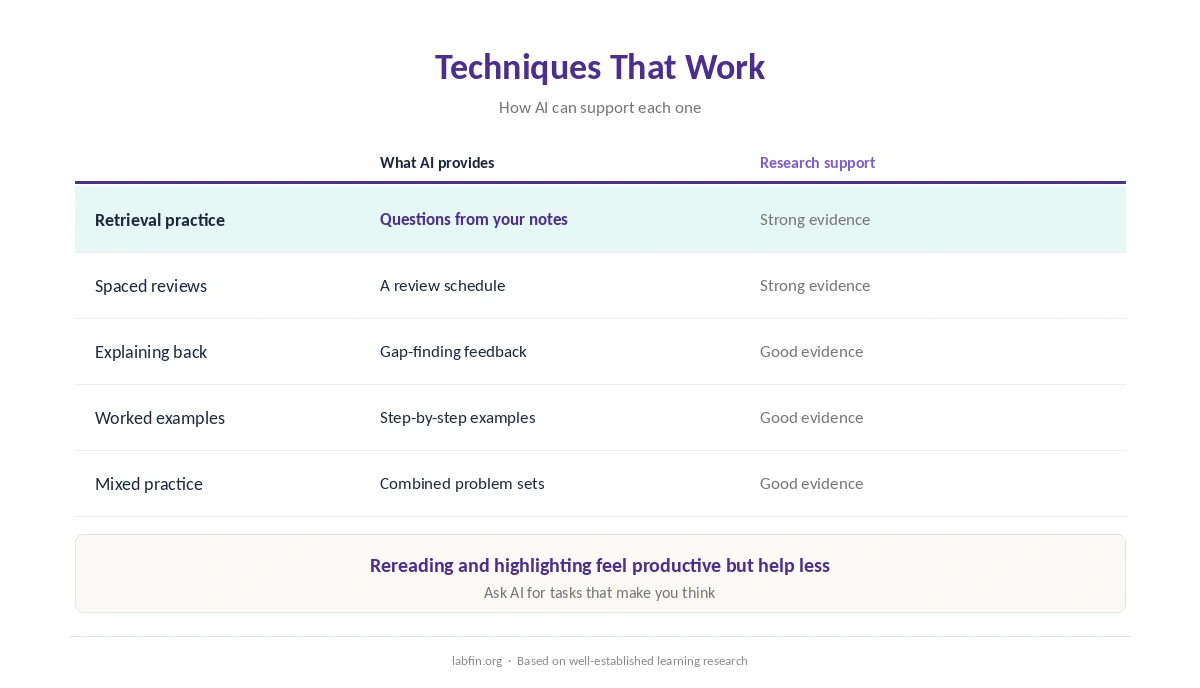
Learning research consistently favors a few techniques: retrieval practice, spacing reviews over time, explaining ideas in your own words, studying worked examples and mixing related topics. AI, for example, can support each one.
Rereading and highlighting, by contrast, feel productive but help less. So ask AI for tasks that make you think, rather than more material to read.
1. Practice Recall
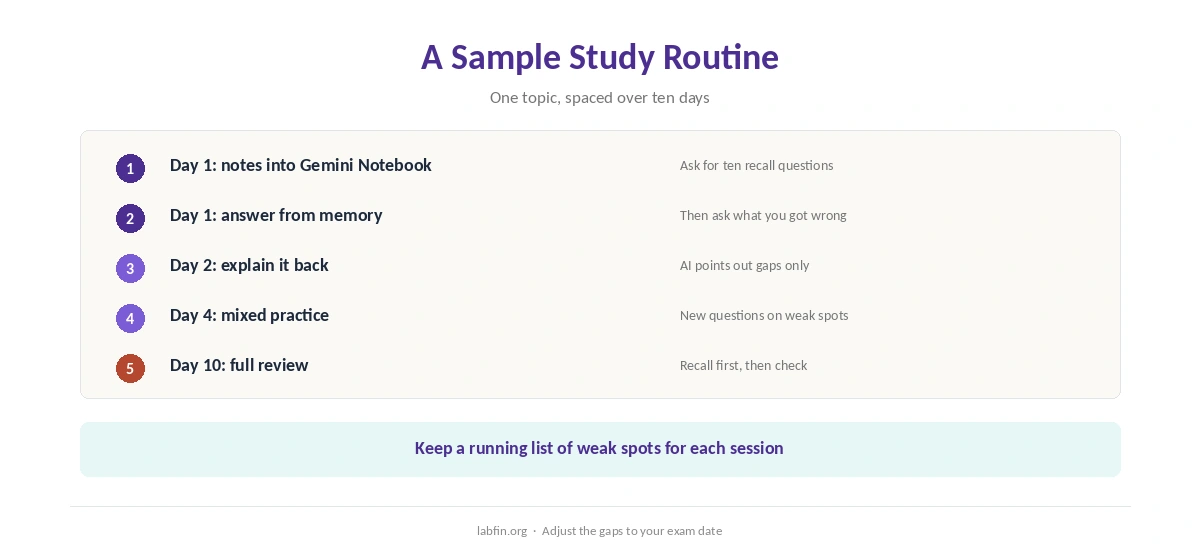
Upload your notes to Google’s Gemini Notebook, which answers from your sources, and ask for ten short questions. Answer without looking, then ask which answers were wrong and why, as our NotebookLM review describes.
Ask also for harder follow-up questions on what you missed. Our guide to writing better prompts covers phrasing.
2. Space Your Reviews
When you use AI for learning, ask it to build a review schedule: a day later, a few days later, then a week or two later. Each session, moreover, should start with recall questions, not rereading.
Keep a running list of weak spots, and paste it into each session. Our guide to free AI workflows covers a no-cost setup.
3. Explain It Back
Explain a concept to the AI in your own words, and ask it to point out gaps or errors without rewriting your explanation. As a result, you find what you do not yet understand.
Several assistants, in addition, offer study or tutoring modes that ask questions instead of giving answers; check whether yours does. Our guides to ChatGPT for research and Gemini for research cover two assistants.
4. Study Worked Examples
For maths, coding or science, ask for one worked example step by step, then a similar problem for you to solve alone. Ask the AI to check only your final answer first, then your steps.
Our list of the best AI for coding beginners covers learning to code.
5. Mix Topics
Once basics stick, ask for mixed practice sets that combine topics, so you learn to choose the right method. This is harder, however, and that difficulty is part of why it works.
Check What the AI Tells You
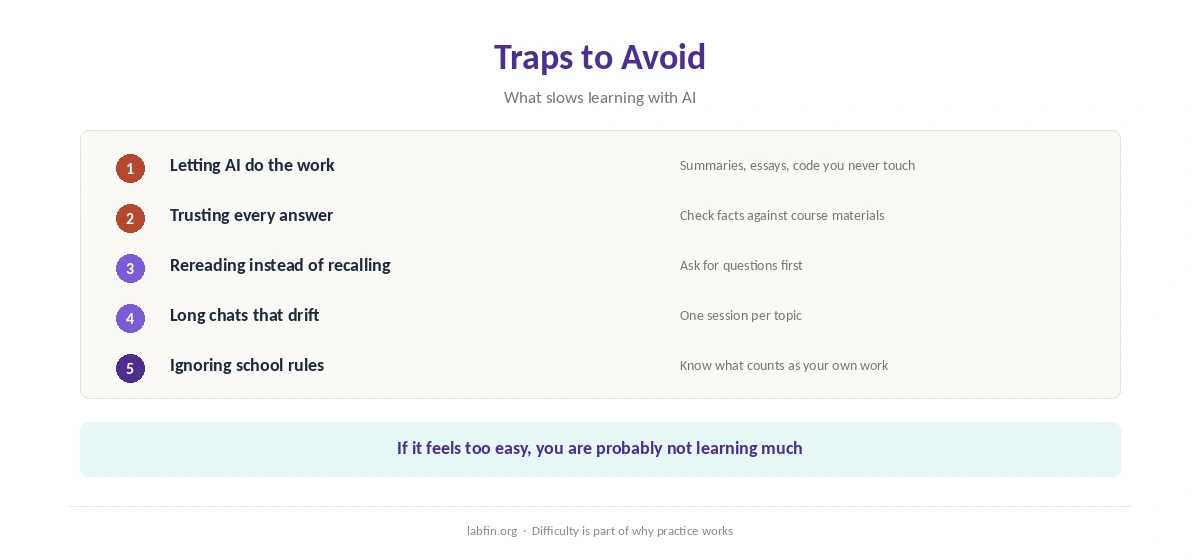
AI tutors can be wrong, especially on numbers, dates, citations and niche topics, as our guide to why AI gets facts wrong explains. So check key facts against your course materials or a trusted source.
For research claims, moreover, Consensus answers from peer-reviewed studies, as our Consensus review covers. Our guide to fact-checking AI output covers the routine.
Traps to Avoid
The biggest trap is letting the AI do the work: summaries you never test, essays you never write, code you never debug. Follow your school’s rules on AI use, too.
Another trap, finally, is long chats that drift; start a new session per topic. Our guide to using Claude for long documents covers working with long readings.
How We Research
This guide on how to use AI for learning draws on well-established learning research and on our reviews of each tool, read between August and October 2, 2026. One example source is the Wikipedia overview of spaced repetition.
We run no learning trials of our own. Our about page explains how we research, and our guide to Perplexity for students covers another tool.
How to Use AI for Learning Faster FAQ
Yes, if it quizzes you, spaces reviews and checks your explanations. Summaries alone help less.
Gemini Notebook quizzes you from your own notes for free; ChatGPT, Claude and Gemini work as tutors.
Studying with AI is usually fine; submitting AI work as your own may not be. Follow your school’s rules.
Check key facts against course materials, and use cited tools for research claims.
Recalling information from memory, for example by answering questions, instead of rereading it.
The Verdict
AI helps you learn faster when it makes you recall, explain and practice. It slows you down, however, when it does the thinking for you.
So ask for questions, not answers; space your reviews; and check what it says. That is how to use AI for learning that lasts.