
A neighborhood arts center receives emails asking for rehearsal rooms, volunteer orientations, and occasional evening events. Staff want a consistent classification column so the requests are easier to triage. Zapier Tables AI Fields can produce text based on other fields in a record, but a generated label is not the same as availability, permission or a booking. This hypothetical tutorial uses a venue request from a youth choir to show where an AI field fits and where it must stop. No real requests, connected accounts or automated confirmations are used here. The emphasis is on setting a narrow prompt, retaining source details and keeping a named human in charge of every reservation.
Design the intake table with separate truth and suggestion columns
Begin with straightforward fields: request ID, requester contact held in a restricted field, requested date, start and end time, room type, group size, accessibility needs, source message, and review status. Then add a distinct AI-generated category field. Never overwrite the original free-text request with an inferred summary. Categories such as rehearsal, meeting, class and unknown are useful for routing, but they cannot tell you whether a room is vacant or suitable. Make booking status a manually controlled field with explicit values such as unreviewed, checking, approved, declined and confirmed. This separation prevents a plausible AI classification from appearing to be an operational commitment.
Check plan access and secure the linked AI connection
Zapier’s official documentation says AI Fields are available on paid Professional, Team and Enterprise plans rather than the Free plan. An AI Field connects a Zapier table column to an OpenAI connection and can reference other cells in a prompt. Configure the connection only under an approved organization account with appropriate data policy and access controls. Avoid including names, telephone numbers or personal medical details in the prompt if a category can be inferred from a sanitized purpose and room type. Review usage or model costs separately from the plan requirement. AI Fields may be updated when referenced source cells change, so a generated value is not an immutable audit record.
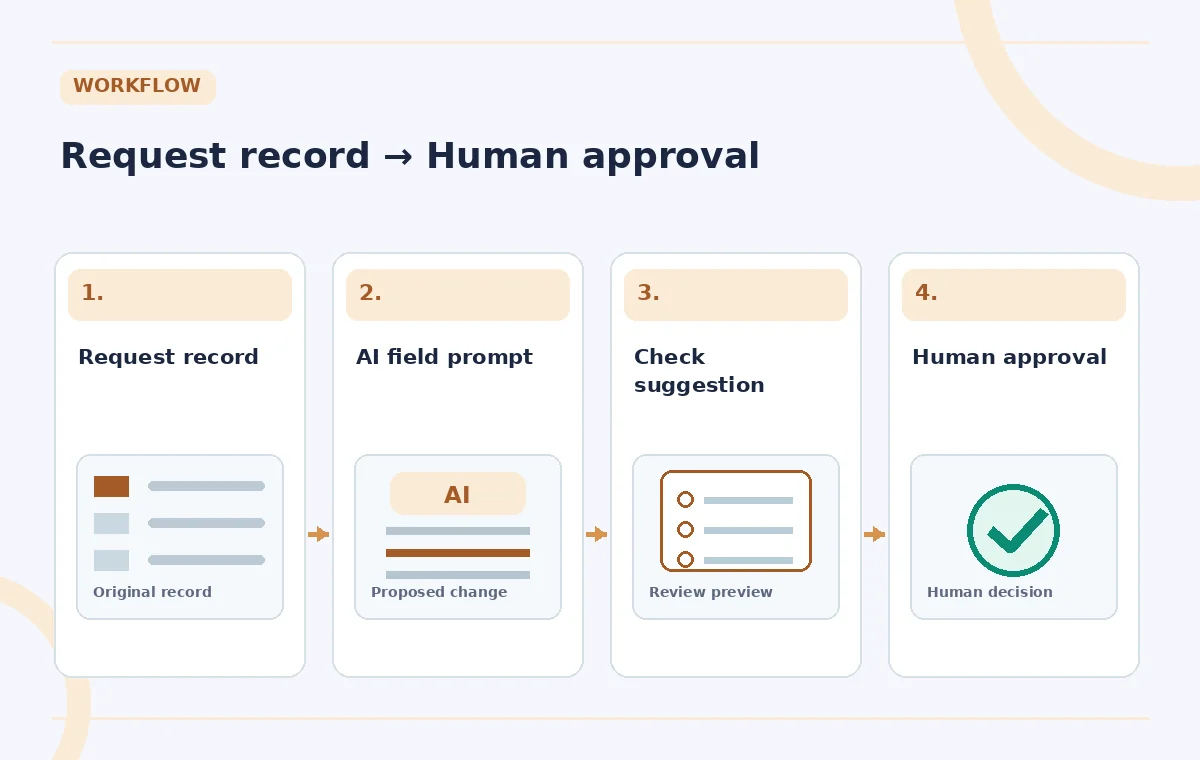
Write a prompt that admits uncertainty
Create an AI Field and use the Insert Data controls to reference the minimum useful fields. Ask it to output exactly one of the approved categories, plus a brief reason when the meaning is ambiguous. Instruct it to answer ‘needs review’ when the request is incomplete or blends multiple uses. Do not request ‘approve or reject this event’ because the category generator has no authority to interpret staffing, building rules, insurance or scheduling. During setup, Zapier offers a preview for a selected record and controls to regenerate the sample. Treat that preview as one example rather than a performance benchmark. Test records should include conflicting and underspecified language.
Compare the source request, label and decision as separate objects
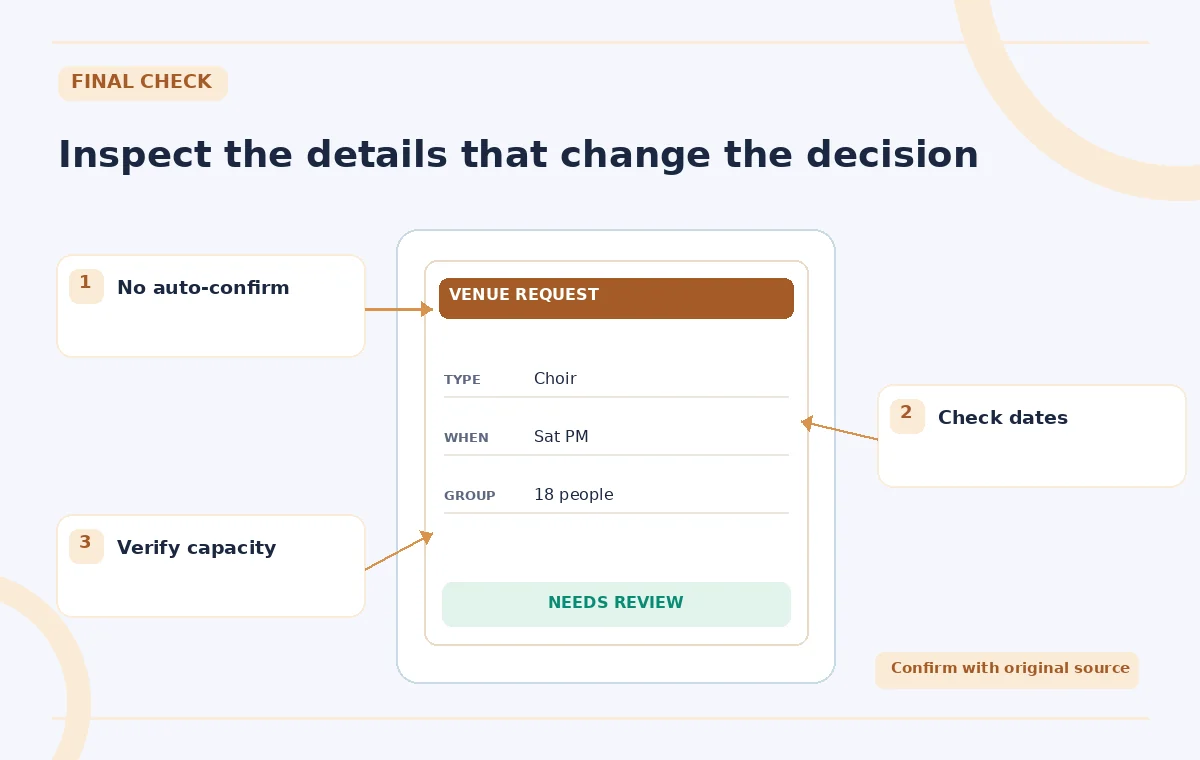
In the middle diagram, the mock record asks for a youth choir rehearsal on Saturday afternoon; an AI field suggests ‘rehearsal,’ while the operational status remains ‘unreviewed.’ That distinction is the lesson. The original request might mention amplified sound or an underage group, neither of which is solved by category selection. A category can be useful for choosing the correct reviewer without approving any facility use. The diagram is constructed for explanation and should not be mistaken for a captured Zapier result. If the generated reason invents a start time, treat it as an error and correct the source or prompt.

Evaluate mistakes with a small labeled sample
Assemble a fictional test set representing simple rehearsals, public performances, mixed-purpose events, unavailable dates, and requests missing times. Have a venue manager assign the expected category and compare it with the proposed AI field. Review both obvious category errors and overconfident labels on ambiguous requests. Record examples that need prompt revision; do not calculate an accuracy percentage from five handpicked examples and call it a product test. Confirm what happens when a source field is edited. Zapier states that changes to referenced fields can change AI Field results. This behavior is helpful for correcting an intake note but risky if another automation treats the previous label as final.
Keep downstream automations behind an approval gate
Zapier documentation allows linking a Zap to AI Field output, so the surrounding workflow matters more than the label alone. If routing is automated, send the request to a private review queue and avoid steps that write ‘confirmed’ to a booking calendar or send agreement language. Only an approved human review status should enable the confirmation step. To prevent accidental sends, use a test workspace and disabled outgoing actions until end-to-end checks are complete. Review conflicting reservations, room capacities, cleanup time, and local rules separately. A wrongly classified request is fixable; an automatically sent promise for a room the center cannot provide may be much harder to reverse.
Manage regeneration, edits and traceability
Zapier explains that AI Field results cannot be directly edited or deleted like ordinary text values; users can regenerate a particular record or the entire field. Store a reviewer-corrected category in an ordinary separate column, with reviewer name and check date, rather than expecting the AI output itself to become a permanent truth field. Regenerating all rows after a prompt change could alter many suggestions at once. Review the affected records before any rule depends on them. Retain the original message and record ID for auditability, but set sensible retention for private request details. A transparent correction path is more useful than a visually tidy column of uncertain labels.
Hand off the queue with an explicit release checklist
Before turning on an intake workflow, prove that a new record creates a proposed category without changing the booking calendar or sending a confirmation. Check the owner of the decision, the person authorized to approve room use, and the approved message template. Run one ambiguous example end to end with outgoing communications disabled. Revisit model and plan availability in Zapier’s live help if the UI changes. Explain to staff that AI categorization can accelerate sorting but does not replace capacity checks, access needs, policy decisions or contracts. The finished system should make the review queue faster to read and slower to make irreversible mistakes.
How We Research
We reviewed Zapier’s official AI Fields setup and limitations and Tables usage limits pages for paid-plan access, prompt previews, regeneration and referenced-field updates. The venue requests and review statuses shown are hypothetical. No paid Zapier account, linked OpenAI connection or booking automation was executed.
Frequently Asked Questions
No. They generate text from selected record fields. Reservation approval and communications must use a separate, controlled workflow.
Zapier lists AI Fields as a paid-plan feature on Professional, Team and Enterprise plans.
Zapier documents regeneration, not ordinary direct editing of the generated field. Use a separate human-reviewed category column.
Zapier says outputs can change when fields referenced in the prompt change; downstream rules therefore need careful gating.
Only when necessary and authorized. A venue classification usually requires purpose, timing and room needs rather than a full contact record.