
A neighborhood Repair Café is preparing an informational landing page for a fictional weekend drop-in. Volunteers will offer no-cost preliminary advice when capacity allows, but replacement parts may cost money and not every item can be fixed. A short, inviting headline is useful. A promise that every repair is free or guaranteed would be factually wrong and could create an unfair expectation for visitors.
Wix Studio documents an AI Text Creator that can generate titles or paragraphs from a business type, topic and instructions. Its help page says the feature is currently available in English. Text generation cannot verify actual event rules, volunteer staffing or prices. The example below is a hypothetical editorial procedure, not text scraped from a live Repair Café site or an output personally generated in Wix.
Write a verified information sheet first
Get a signed-off fact sheet from the organizers before drafting: address, confirmed date, time window, booking requirements, eligible appliance types, whether parts are supplied, and the limits of service. Keep unknown entries marked unknown instead of asking an AI system to fill them. Separate confirmed policies from wishes, such as the hope that another electrician will volunteer.
For this example the only approved promise is “volunteers offer free initial guidance when available.” Actual repairs depend on skill, capacity and part availability. Write that exact sentence in a short source document. The page also needs a concise safety note about when a damaged electrical item should be referred to a qualified professional rather than handled at a casual drop-in.

Choose a page structure that can be reviewed
Plan a clear hero, what to bring, what to expect, limitations, contact information and an accessibility section. Put the actual date and location in ordinary editable page elements, not inside decorative generated art. Make space for a prominent qualification that spare parts or external service can involve costs.
Decide who approves each factual section. The organizer can confirm event logistics, while a technical lead checks wording about safe repairs. A designer may approve typography but should not be the only reviewer of service promises. Draft the content locally before entering it in the site editor so nothing unintentionally appears on the live page.
Use the documented AI Text Creator carefully
In Wix Studio Editor, select or create a text box and choose Create AI Text. Wix describes fields for business type, optional name, text type, topic and details of what matters. Choose a paragraph or title for the relevant page section. Supply only the verified facts; do not invent a large event history or quote from volunteers who have not spoken.
Write a restrained instruction such as “Describe a volunteer-led repair advice session. Do not promise completed repairs, available parts or a free replacement.” The tool is an idea generator, not a fact-checking service. Inspect the generated copy before inserting it, and be prepared to rewrite it as ordinary text.
Compare the draft against the actual service policy
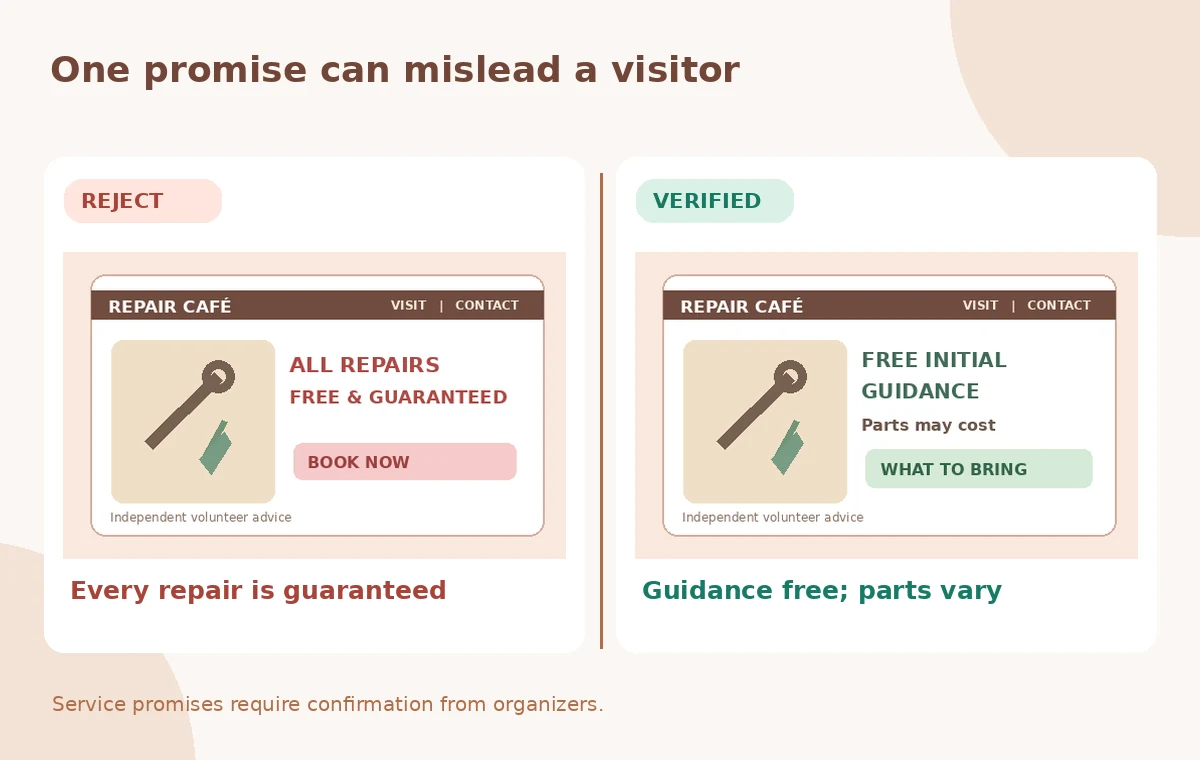
A conceptual rejected panel reads “Every repair is free and guaranteed.” The checked text says “Initial guidance is free; repairs and parts depend on availability.” That distinction is practical, not just stylistic. The examples are editorial mockups, not captured Wix outputs or evidence of how often an AI writes misleading offers.
Scan for absolute words such as always, everyone, guaranteed, fully insured, certified and available today. Every one of these needs a verified source. If there is no document that establishes the assertion, remove it. The same applies to invented testimonials, sponsors, accessibility features and capacity figures.
Ensure dates and location remain editable
Place approved time and location fields in prominent, independently editable elements. A generated sentence may spell a time correctly but still combine information from two draft schedules. Compare every logistical detail with the signed-off organizer sheet after any rewrite. Do not rely on search results for a different organization with the same or similar name.
Test the mobile layout with large text and the contact details visible. Make sure the location is described accurately for visitors using public transportation. If step-free access or parking has not been verified, publish no accessibility claim until a staff member has confirmed the route. A nice-looking map icon is not evidence of an accessible entrance.
Make the call to action truthful and proportionate
Use a CTA such as “Check what to bring” or “Ask about eligibility” instead of “Get your free repair now.” The former invites readers to learn the conditions; the latter implies guaranteed availability. If attendance is first-come, first-served, state that explicitly. If bookings are required, test the real form and its data-collection notices.
Do not create hidden pressure with an invented quantity such as “Only three places left.” If a waiting list exists, its count should come from a verified event system. The site should respect visitors who may be making decisions about transporting heavy or fragile items.
Run a final editorial gate before publishing
The control diagram highlights the limited free service, possible parts costs, confirmed schedule and accessibility language. Ask a reviewer to mark each statement as verified, conditional or unverified. Rewrite conditional promises so visitors can understand them without needing to inspect a lengthy disclaimer below the fold.
Check that translated versions of the page, if any, preserve the same limits. A second language should not transform “advice may be available” into “repairs are available.” Save the approved text in a shared document so later edits can be compared against the consented policy.

Publish only after the organization approves
Preview the Wix page on desktop and phone, test real links, and ask the event coordinator for a final pass on every date, location and condition. If the organization is still waiting for insurance or venue approval, keep the page as a draft. The ability to generate a polished title does not change the requirement for operational sign-off.
Keep the prompt, generated drafts, edited copy, dated policy sheet and approval record. A successful site helps readers decide whether to attend, understand what volunteers can offer and avoid surprises about parts or outcomes. AI Text Creator should speed writing, not manufacture guarantees.
How We Research
This article was prepared on November 4, 2026 from these named official vendor references: Wix Studio Editor: Using the AI Text Creator; Wix: About Wix Studio. We reviewed documented controls, availability caveats and stated workflow boundaries, and designed an independent hypothetical editorial check for the particular task described. We did not access a vendor account, upload live media or private records, generate candidate results, measure output quality, or claim that any illustrated failure occurred in a real tool. The WebP graphics are original teaching diagrams, not product screenshots. Plan restrictions, labels and capabilities can change. A responsible editor must still verify the underlying source, permissions, source data, accessibility, final exported artifact and sign-offs before public release.
Frequently Asked Questions
Wix documents generating titles and paragraphs using a business type, topic and additional instructions.
No. Those statements must come from the organizers and approved operational records.
The cited Wix Studio help page says the feature is currently available in English.
Invite visitors to check eligibility or what to bring, rather than promising a finished free repair.
No. They are conceptual examples of an unacceptable claim and an evidence-led alternative.