
A small museum is considering a canvas tote bearing a simple approved fern emblem. Before ordering samples, the team wants to see how that graphic might look beside the straps and seams. An AI mockup can communicate the idea quickly, but a beautiful image is not a printer’s technical proof: the printed emblem could be stretched, redrawn, or placed across a fold.
Recraft says its mockup generator can use uploaded designs or AI-generated artwork on apparel, packaging and other surfaces. The tote, logo dimensions and sample images in this article are hypothetical teaching examples. A visual mockup should help people review a concept without becoming evidence of actual stock, material or manufacturing quality.
Freeze the approved logo before generating a scene
Collect an original, authorized emblem file with a clear version number, preferred color, minimum size and a reference proof. For the hypothetical museum tote, the fern has five fronds and a deliberately open white center. That count is part of the approved artwork, not a creative suggestion.
Decide which print technique is being considered and note the available printable area, but do not invent exact vendor specifications. The same file should be used in every mockup variant. If the organization does not own the mark, obtain the rights holder’s permission before uploading it to a third-party design service.
Upload the supplied artwork into a mockup workflow
Recraft describes a single canvas for uploading or generating designs, placing them on mockup surfaces and exporting. Start from the approved logo rather than asking a prompt to redraw its shape from memory. Choose a tote or a generic bag surface and set the position visually.
Ask for a neutral fabric and uncomplicated background so viewers can judge the mark. The tool’s illustrations and example templates do not verify the exact bag model a print vendor will supply. Label the asset internally as a concept preview, and keep a copy of the original logo beside the candidate mockup.

Audit the shape, not just the overall impression
Zoom into the center of the mockup and count the fern fronds, inspect open spaces and compare the silhouette against the authorized artwork. A risky candidate may gain an extra leaf or thicken a narrow stem because the generated texture tries to blend it into fabric.
The acceptable direction shows the source silhouette without unexpected decoration. Check whether edges warp where the bag folds: some perspective distortion is physically plausible, while a reconstructed or altered logo is not an acceptable substitute for the original. Do not claim an AI mockup has independently verified dimensional accuracy.
Make straps, seams and print boundaries visible
Use a view that shows the handle attachments, top hem and the bottom of the proposed artwork. A logo positioned partly beneath a handle may look fine in a flat composition but fail on the sewn product.
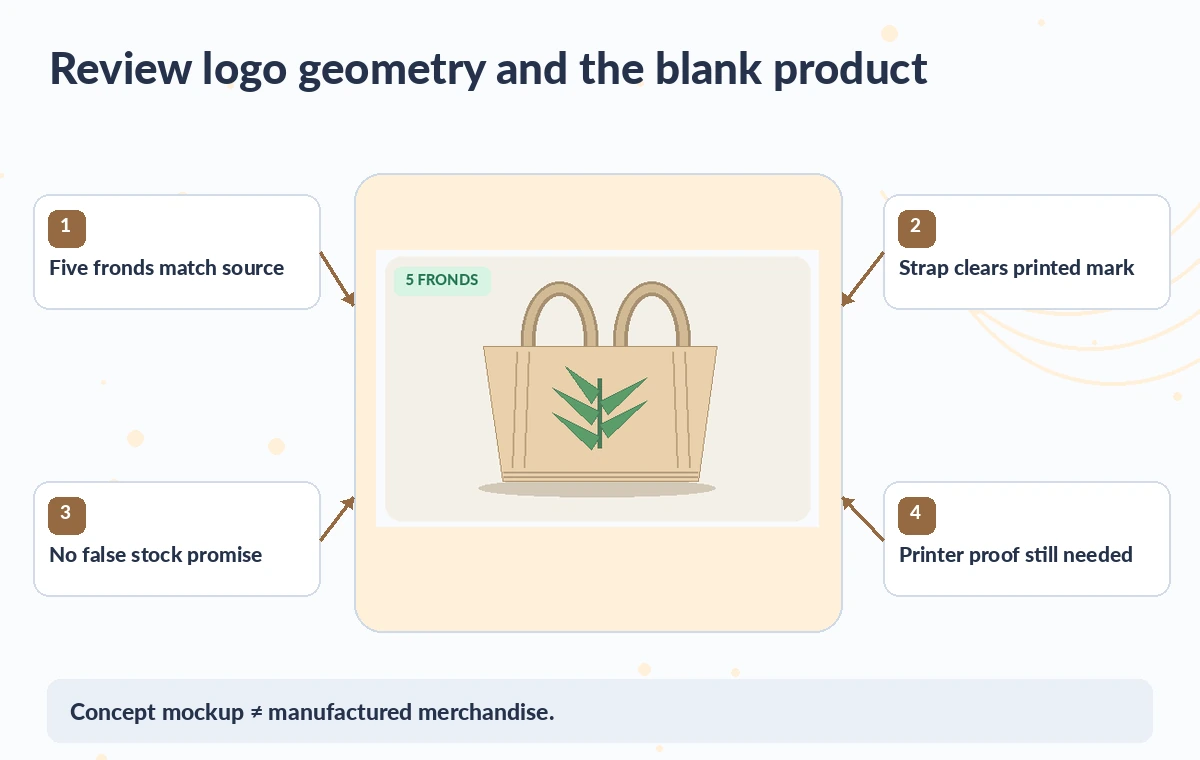
The illustrated inspection diagram calls out strap clearance, print margins, logo form and fabric texture. Ask the vendor for a blank-product template, print-safe bounding box and confirmation of any seams that cross the artwork area. Recraft’s generated canvas can be a discussion starter, but the production dimensions must come from the actual supplier and a physical sample.

Compare several realistic views without claiming a finished product
Create a front view and, if needed, a mild three-quarter view with the same emblem and size reference. Record that a generated image is a visualization, not a product photograph. Avoid text that implies the tote is already for sale, delivered, organic-certified, or available in a specific quantity unless those facts are established separately.
Keep lighting neutral enough to assess color and contrast; dramatic shadows can make a fine detail invisible. If a version alters a letter or leaf, reject it rather than assuming people will not notice at thumbnail size. Show two states side by side for efficient review.
Check account rights before commercial use
Recraft’s current mockup information distinguishes free-account non-commercial use from commercial rights on paid plans. Terms can change, and those terms do not replace rights to an uploaded logo or third-party photography. Confirm the subscription that generated the visual and the intended distribution: internal concept review, public fundraising campaign or merchandise advertisement. Do not use an image produced under an unsuitable license in commercial marketing. Document a rights check next to the proof, including the origin of the artwork and the decision about whether to make the generated mockup public.
Separate digital concept approval from print approval
Have the museum director or brand owner approve the graphic concept and have the printer independently approve dimensions, color mode and registration. Inspect a physical proof before committing to an order. The diagram’s “reviewed” side means a proposed direction has passed editorial checks, not that an actual tote has been printed. Store reference files, the supplier’s dieline or print specification and the final mockup together. If the supplier’s blank bag has a different seam or handle spacing than the generated image, change the design or use real product photography before external claims are made.
Export with an honest visual caption
Recraft documents exporting images at high resolution. Check that the exported file actually uses the expected ratio and contains the right version of the artwork. When circulating the mockup, caption it “concept mockup” rather than a photo of merchandise.
Check small-screen appearance and any alt text for accurate descriptions of the tote and emblem. Provide the technical placement proof separately instead of embedding measurement claims in AI imagery. A mockup is successful when it helps the team discover a logo-placement issue early; it must not obscure the distinction between generated preview and manufactured product.
How We Research
We prepared this guide on November 4, 2026 from named official product documentation: Recraft: AI Mockup Generator; Recraft: AI Image Generator and Studio. We checked the documented entry point, editing and export workflow, access requirements, and boundaries between tool features and human approval. We used original fictional scenarios and explanatory illustrations to demonstrate plausible editorial errors; we did not run these services, upload real client files, collect performance measurements, or make screenshots of their interfaces. Pricing, availability, integrations, permissions and model behavior can change, so recheck the developer sources and your account before any production use. A named editor should compare the outcome against original evidence, verify relevant rights and obtain approval before public distribution.
Frequently Asked Questions
Yes. Recraft says you can upload existing artwork and place it onto product mockup surfaces.
No. Use a manufacturer template and real proof to confirm printable area and position.
Reject that variant and compare with the original approved asset; do not treat generated geometry as new brand artwork.
Recraft currently describes the free plan as non-commercial; paid plans offer commercial rights subject to their terms.
Use an honest label such as concept mockup, not actual product photography or proof of available stock.