
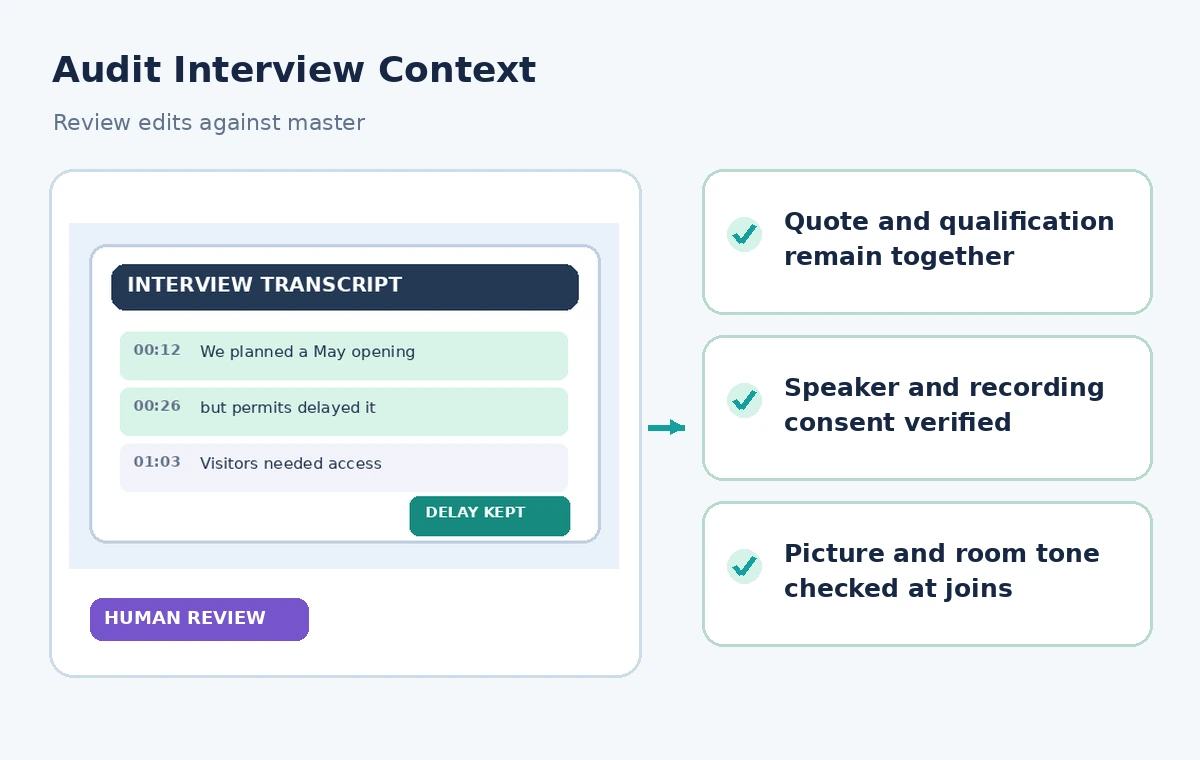
A volunteer historian has recorded an interview about a neighborhood library renovation. The speaker says the team planned to reopen on May 1, then explains that a permit delayed the opening. A short promotional edit that keeps only the first sentence would mislead viewers. Adobe Premiere’s Paper Edit, introduced in the September 2026 desktop release, can collect transcript selections and assemble a new sequence for a rough cut. This fictional example explains how to use that speed without changing the meaning of testimony. It does not report an actual Premiere session or claim that the illustrated cuts were produced by the software.
Establish an authorized source recording
Before editing, verify the interviewee’s recording and publication permissions, the producer’s custody of the original, and any restrictions on sensitive names or locations. Store a read-only copy of the master and a working edit in separate folders. Write down the recording date, the interviewee’s preferred attribution, and the version of the transcript used. Oral history is not interchangeable with marketing narration: hesitations and qualifications may reveal uncertainty that matters to the historical record. If a contributor asked to review a quote or restrict particular passages, mark those restrictions before anyone starts selecting lines. Do not treat the existence of a transcript as consent to republish it.
Check transcription before selecting sentences
Listen to the source while reading its transcript, especially numbers, proper names, negations and words around pauses. A speech recognizer might confuse ‘could’ with ‘couldn’t,’ or attach a sentence to the wrong person. Correct the transcript against the recording and keep an explicit note of uncertain phrases. Where a phrase remains genuinely inaudible, it should not become a confident on-screen quotation. Paper Edit works with transcript text, so textual errors can send an editor to the wrong passage even before the sequence is assembled. Keep time references or markers that make it possible to return to the uncut source at every decision.
Open the documented Paper Edit workflow
In a supported Adobe Premiere desktop version, open the Text panel and choose the Paper Edit icon. Adobe documents selecting whole sentences or portions of sentences, including passages from separate places in a transcript. In the hypothetical renovation interview, identify the speaker’s original statement about the opening plan and the later explanation of the delay. Select both, not just the more exciting first line. Confirm the panel’s count of selections and combined duration before proceeding. Paper Edit is for choosing and assembling a dialogue-driven rough cut; it is not an accuracy checker or an automatic guarantee that a quote stays fair after rearrangement.

Build a selection log with context
For each selected passage, record its source timecode, speaker, reason for inclusion, and adjoining sentence needed for comprehension. A useful row might say ‘planned date plus permit delay, must remain adjacent.’ A second row might preserve the resident’s explanation of how the delay affected access. This log is especially important when passages are selected from different points in a long interview, because the resulting story order can otherwise imply an event happened before another. If an editor creates a dramatic opening, label it as a narrative choice and review the chronology separately. Never invent connective words to make two unrelated quotations appear continuous.
Preview the assembled speech before creating a sequence
Adobe’s instructions describe reviewing the chosen text and total selected duration in Paper Edit, selecting Preview, and then choosing Create new sequence when satisfied. Use Preview as an opportunity to catch an omitted ‘not’, an abandoned qualification, or a jump from one speaker to another. If the proposed order turns an intention into a completed action, revise the selections instead of adding a deceptive subtitle. Do not assume that a shorter duration is better. A few extra seconds that preserve an essential explanation are editorially valuable. If the selected material remains ambiguous, go back to the original recording rather than trusting the condensed outline.
Audit the new rough-cut timeline
Once the new sequence has been created, inspect each clip’s video and audio boundaries in the timeline. Paper Edit accelerates selection, but cut points may land on breaths, moving hands, or overlapping room sounds. Listen across each transition with headphones, then review the adjacent picture at normal speed. Use ordinary editing techniques to smooth a cut without moving the meaning of the quote. If a splice creates the impression that one speaker responded to a question asked elsewhere, restore the exchange or add an honest editorial transition. The three-state illustration shows an invented possible failure, not an observed Premiere result.

Keep captions and speaker labels accurate
Regenerate or review captions against the finished rough cut rather than copying timecodes from the source interview. Correct the opening date, the permit reference and the names of the participants, including diacritics if the supplied record uses them. If the editor removed a nonessential aside, confirm that nearby pronouns still refer to the correct person. Avoid captions that clean up uncertainty into certainty. A speaker who says ‘I think we opened later that summer’ should not be captioned as giving an exact date. Speaker labels and chapter titles must not imply expertise or institutional authority that the interviewee did not claim.
Obtain historical and ethical review
Ask an editor familiar with the project to compare the cut with the original context, particularly for quoted facts that will appear in promotional captions. If the museum maintains a research file, link each factual claim to the relevant primary document instead of making the audio alone bear the weight of proof. Review requests for anonymity, sensitive recollections and any consent limitations. A reviewer should be able to say why a section was shortened, which qualification was retained, and whether the timeline suggests an incorrect sequence of events. Paper Edit makes rough-cut creation faster; the institution still owns the editorial decisions.
Archive both versions and the approval decision
Save the full source interview, corrected transcript, Paper Edit selection log, rough-cut project and approved export as separate versioned deliverables. Record which reviewer signed off on quotation accuracy and who handled captions. Maintain a pathway to correct the edit if a date is later clarified. When sharing an extract on social media, ensure the short caption still includes the crucial delay; an otherwise faithful long-form video can be misrepresented by a disconnected teaser. A good release package makes every narrative join traceable and lets a future archivist recover the full context without relying on the final highlight reel alone.
How We Research
Our research used the following named official vendor documentation: Adobe Premiere — Create a sequence with Paper Edit; Adobe Premiere — September 2026 release notes. We checked the existence and intended purpose of each named feature, documented availability or configuration requirements, and explicit limitations. The workflows were then written around a fictional example that exposes common editorial risks, not around an account we operated. No hands-on product benchmark, real output file, recorded participant, measured accuracy score or legal/compliance review is claimed. All diagrams are independently drawn explanatory illustrations; they are not screenshots. A real project must verify live settings, permissions, source documents, relevant policy and human approval before release.
Frequently Asked Questions
It assembles selected transcript passages into a new rough-cut sequence; editors still need to inspect the clips and finish the timeline.
Adobe describes multiple transcript selections. Keep source timecodes and review whether changing their order changes meaning.
No. Correct transcription errors and compare each final quote with the source recording and documentary evidence.
After reviewing your selections, Adobe documents the Create new sequence action for assembling the rough cut.
No. Hesitation and qualification sometimes affect meaning or the speaker’s character, especially in oral-history records.