
A volunteer planning committee has three versions of a neighborhood flood-preparedness packet: an older brochure, revised meeting notes and a current map legend. They disagree about where an assembly route begins. NotebookLM Mind Maps can display topics from uploaded documents as branches, making the set easier to explore. But a clear branch is not an authoritative instruction, and the map does not reconcile disputed safety information by itself. This article uses a fictional collection of nonoperational documents as an information-management example, not as actual evacuation advice or a test of NotebookLM accuracy.
Inventory documents and authority before upload
Give each source an owner, date, version number and publication status. Separate approved current instructions from draft notes, meeting speculation and superseded diagrams. If a document contains identifiable residents, private addresses or unpublished contact lists, remove or secure that information before importing it into any online workspace. Preserve a canonical copy outside the notebook, because the source of truth should not become an AI-generated visualization. For this example, label files “current map legend,” “retired brochure” and “draft committee minutes” rather than relying on ambiguous titles such as Final-v2. A source inventory makes later disagreement visible.
Understand what a Mind Map actually creates
Google’s current help describes Mind Maps in its Notebook product as visual summaries of uploaded source themes, organized into expandable branches. They can help a reader navigate a document collection; they do not promise comprehensive citation coverage for every visual node. The desktop browser workflow starts in an existing notebook, uses the Mind Map option in chat and places the result in Studio. The current help also warns that generation can be inaccurate and that mobile-app support is limited. Treat the map as a finding aid whose claims require source checking, not a replacement for a signed emergency document.

Generate one overview from a controlled set
Start with a small, relevant group of reviewed documents instead of adding an unrelated archive. Make a record of which versions were present when the map was created. Generate the Mind Map and inspect major branches: route maps, shelters, public notices, responsibilities and revision dates. Unexpected blank areas are investigation prompts; they do not prove a topic was absent from every source. Avoid inserting new real-world instructions from memory. If a branch combines two documents in one label, write down the exact wording and ask what original passages support it before distributing anything beyond the working team.
Use nodes to investigate, not to certify
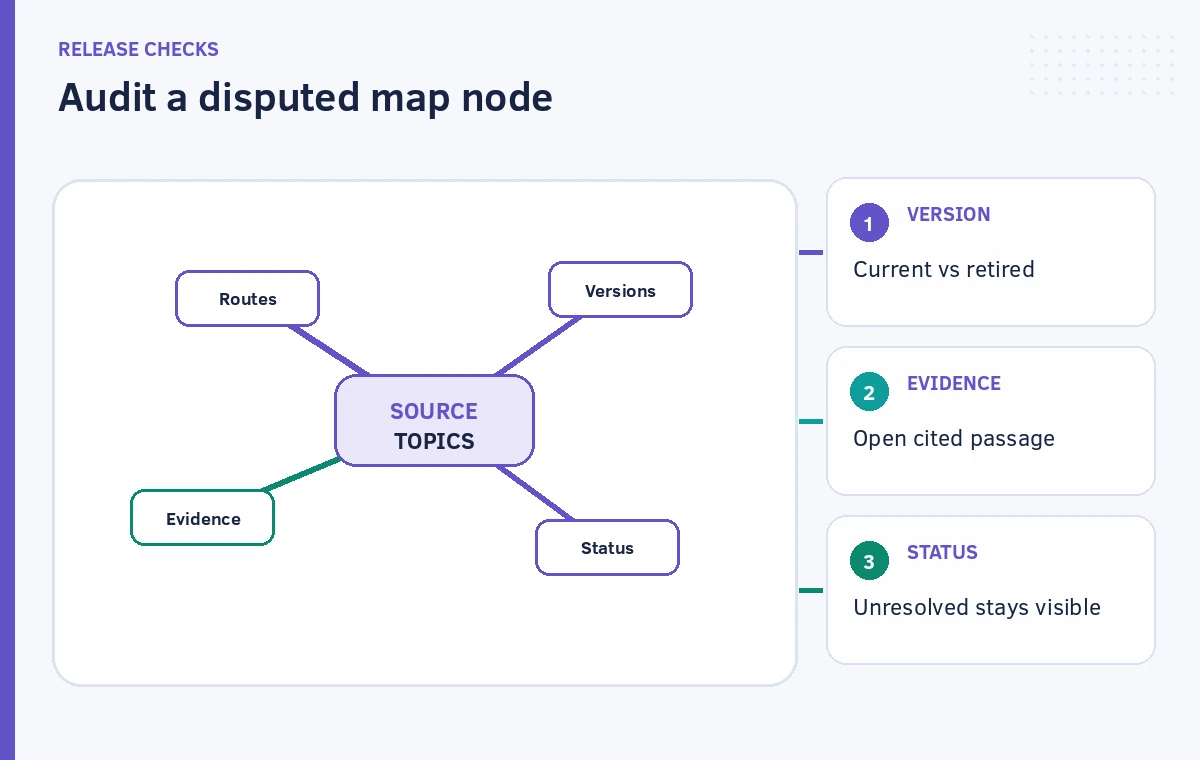
Google documents selecting a Mind Map node to ask a question in the notebook chat. Follow that path for a suspicious claim, such as a branch labeled “North access road.” Ask which imported document discusses the access road and whether any other source disagrees. Then open the cited passage, examine its date, neighboring text and any associated illustration. The chat citation can make verification easier, but the response can still be incomplete or wrong. A current route decision belongs to a responsible authority; the map only helps identify where the documentary conflict sits.

Make disagreement explicit in a comparison ledger
Build a separate ledger with columns for Claim, Source A, Source B, Authority, Date and Decision. For the hypothetical example, the retired brochure names one gathering point, while the revised meeting note proposes another without final approval. Mark that conflict Unresolved rather than merging both locations into a confident paragraph. Keep map nodes at the theme level while recording detailed disagreement in the ledger. Never turn this tutorial’s invented scenario into a public alert. If actual emergency information is at issue, follow official local communications and direct readers to the responsible agency.
Review missing branches and misleading hierarchy
A compact map may make a minor subtopic look as prominent as a binding instruction, or tuck an essential exception inside a collapsed branch. Zoom, expand and review sections deliberately. Ask a reviewer who did not upload the sources to identify an apparent rule, then check if the underlying document really states it. If they infer a rule from a branch that merely summarizes a question, rewrite the accompanying explanation. Evaluate what the map leaves out as well as what it includes. A diagram’s visual neatness is not evidence of coverage, currency or official approval.
Share the map without losing source context
Notebook guidance permits sharing a notebook with collaborators or downloading the Mind Map, subject to source and publishing restrictions. Sharing a screenshot alone strips away the verification path and may make unresolved branches seem approved. Accompany any map with a source list, collection date, status caveat and a clearly identified person who owns unresolved questions. Check collaborator permissions and the sensitivity of all imported source documents. Download restrictions can apply to certain protected book sources, so do not promise that every notebook exports the same way. A safe internal handoff makes the original sources easy to inspect.
Maintain a clean revision history
When a new authoritative document replaces an old one, record the change and revisit conclusions derived from that source. Google documents a delete-and-regenerate route for Mind Maps, rather than promising automatic continuous correction. Preserve the prior comparison ledger so editors can explain what changed, which discrepancy closed and which claims remain open. If the new map moves or renames a branch, do not interpret that layout change as an official policy change. The acceptable final result is a navigable evidence overview with explicit unresolved claims, not a tidy map that hides uncertainty.
How We Research
We consulted Google’s official Use Mind Maps in Gemini Notebook documentation and Use chat in Gemini Notebook for source-aware questions and citations. Google’s support pages now use Gemini Notebook terminology for this NotebookLM-related capability, so interface labels may vary. Our scenario consists of invented, nonoperational planning documents. We did not upload files, generate a map, verify an actual evacuation route or perform a live accuracy study. Diagrams show illustrative branch logic, not a product screenshot.
Frequently Asked Questions
No. It summarizes uploaded source themes. Any real route instruction must come from current, authorized emergency communications.
Google documents selecting nodes to ask follow-up questions in notebook chat; inspect the linked source passages yourself.
Google’s help currently warns that the Gemini Notebook mobile app does not support Mind Maps, so use a supported browser workflow.
Update your curated source collection and use the documented delete-and-regenerate workflow, then review the new map and ledger.
You can share a visual export where allowed, but include source identification, dates and unresolved caveats so readers do not mistake it for approved guidance.