
A small local-history museum is preparing a display about when its neighborhood reading room first opened. The surviving ledger says 1931, but a later tourism roundup mentions 1937 without a citation. Gemini Notebook’s source discovery and Fast Research tools can surface additional web pages, yet a search recommendation is not historical evidence by itself. This hypothetical tutorial creates a traceable source list, rejects a misleading date, and shows how to leave an exhibit claim unresolved rather than invent certainty. The dates and institution are fictional instructional examples; no live notebook or archive was tested.
Write a research question with a clear evidence threshold
Start with a narrow question: ‘Which contemporary document establishes the opening date of the neighborhood reading room?’ Write down what counts as primary evidence, such as a dated board minute, newspaper issue, city record, or signed ledger. A modern blog that repeats a date can be a lead but not a substitute for a dated record. Specify the location and relevant decade, because similarly named institutions can produce persuasive but irrelevant matches. Create two columns in a working source log: ‘claim being tested’ and ‘document capable of supporting it.’ This prevents a convenient summary from silently becoming the authority for an exhibit label.
Check the current Gemini Notebook entry point and limits
Google’s current help describes Gemini Notebook sources search as Fast Research, with Web or Drive as search locations; older announcements used the Discover Sources name. On a computer, open a notebook, choose Add sources, and enter a research question in the source-search field. Choose Web for publicly available leads. Mobile may not offer all the same controls. Confirm your account’s source limit and avoid adding material that you do not have permission to use. If a version of the interface offers an additional Deep Research choice, leave it off for this quick discovery exercise; it is a separate and more extensive research workflow.
Review the source recommendations before importing
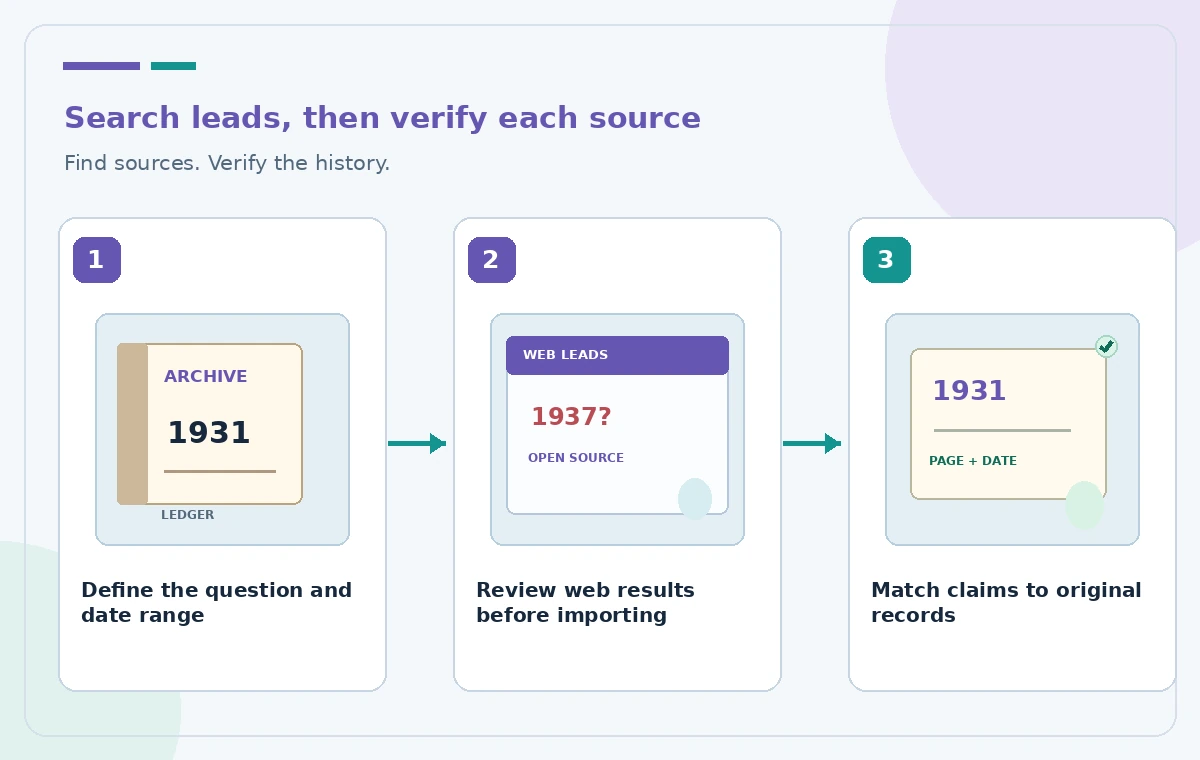
Inspect each recommendation’s title, description, and link to the underlying page. Open the original website and ask who published it, when it was written, whether it is reporting first-hand evidence, and whether the relevant passage is actually present. A result about the wrong reading room should be discarded even if it shares the same city name. A museum page may be reliable about its own collection but still cite a secondary timeline for the founding date. Select only relevant results to import. Do not infer that every suggested URL has been read or endorsed merely because Gemini Notebook surfaced it.
Separate public websites from controlled archive records
Keep the reading-room ledger in an approved institutional archive and the notebook’s web discoveries in a clearly labeled secondary-source group. Google’s help says notebook sources can be copied or synced representations of supplied documents, and Drive behavior differs from a one-time web import. Store the exact archival identifier, page number, scan date, and custodian for a local record. Do not upload donor correspondence or restricted collection files to a research workspace without authorization. When access rules prevent importing the original, use a permitted public catalog citation instead and flag that the underlying page still needs in-person verification.
Build a three-way date comparison rather than one answer
Imagine the ledger has a legible 1931 entry, a tourism article says ‘1937,’ and a municipal index merely lists the organization without a date. Put these three propositions next to their exact sources. The ledger is potentially strongest for its own date, but check that its entry refers to the opening rather than a renovation or reopening. The tourism article may be describing the first permanent building. The municipal index cannot resolve either question unless it includes date-specific evidence. An AI-generated consensus is not a fourth historical source. The illustrated comparison uses invented data solely to teach that distinction.

Verify every quoted fact at the document level
Open the source viewer and follow any citation back to the actual paragraph, table, scan, or public page. Read the lines before and after the cited date, especially words such as ‘proposed,’ ‘funded,’ ‘opened,’ and ‘relocated.’ Record the document’s author and publication date rather than relying on an AI-written blurb. If a web result disappears or the source content changes, preserve an authorized citation and the date you checked it. For scanned documents with imperfect recognition, compare against the original page image when the archive permits. Do not quote a transcription error as definitive evidence about a historical person or building.
Avoid merging places, events, and dates
Create a simple chronology separating the organization, its rented first room, any later permanent site, and public ceremonies. AI tools may collapse these into one dramatic opening story. An entry for a 1937 dedication might be perfectly correct while irrelevant to a 1931 founding. Look for clear place names, street addresses, and organizational aliases before interpreting the result. If names changed over time, include the change in the evidence log. Never infer an exact address, founding official, or guest list just because a model supplies one. Mark unresolved distinctions for a curator or local historian to investigate.
Draft a label with a visible uncertainty boundary
Prepare a short exhibit caption only after the source log has been reviewed. For instance, ‘The ledger records activity in 1931; the precise public opening date requires further confirmation’ is preferable to presenting 1931 as a fully verified inauguration date. Keep interpretive prose separate from quoted wording. Link the draft label to the approved catalog entry and record whether a curator has signed off on the terminology. If an exhibit uses interactive screens, provide an accessible text alternative for citations and source credits. The illustration’s green check means ‘document was opened and compared,’ not ‘the model discovered an incontrovertible fact.’

Keep an audit trail for future exhibit updates
Save the source log, rejected leads, unresolved questions, reviewer initials, and next review date with the exhibit’s editorial documents. If a new archive scan appears, revisit the claim rather than overwriting the old evidence silently. Re-run source discovery only when the research question changes or new sources are likely to exist; fresh search results are not automatically more accurate. The finished workflow is a research triage method, not a provenance guarantee. No historical claim, private collection, search ranking, or output measurement was actually tested to produce this guide. The final decision should belong to the museum’s qualified reviewer.
How We Research
We reviewed these named official developer resources: Google Help — Add or discover new sources for your notebook; Google Blog — Discover sources in NotebookLM; Google Workspace — Updates to NotebookLM sources. We checked the documented feature entry points, eligible platforms, administrator or licensing controls, and known sharing or source limitations against the tutorial steps. Editorial examples were designed as hypothetical failure-mode checks, not reports of hands-on testing. We did not have a live account, source files from a museum or nonprofit, user interviews, access to private records, or measured model outputs. Every illustration is original explanatory artwork rather than a vendor screenshot or measured before/after result. Features and entitlements can change. A responsible editor should confirm current product documentation, applicable organizational policy, and the original evidence before putting the workflow into consequential use.
Frequently Asked Questions
Google now documents a sources-panel search with Fast Research and Web or Drive options. Older Discover Sources instructions describe the predecessor experience. Follow the controls visible in your current account.
No. It can surface candidate sources and organize questions. A curator still needs to read and evaluate the original document, its context, and provenance.
Only when your institution permits that use and the service satisfies its data policies. Otherwise keep restricted documents in approved systems and record permitted citations.
Keep the competing claims separate, compare what each date refers to, and prefer appropriately verified primary records. If uncertainty remains, write it into the exhibit label.
No. Review both the source content and any previously generated handout or summary after changes. Do not assume downstream outputs revise themselves.