
A seed library is preparing three visual directions for a packet of locally grown basil seeds. Each version needs a different background illustration, but the packet’s actual planting depth, lot code, and source instructions must stay identical. A generator that produces lovely botanical art can also hallucinate a neat-looking label or misprint “¼ inch” as “4 inches.” A reusable workflow should separate creative variation from product facts.
Krea Nodes provides a visual graph for chaining generation tools, running branches, and reusing creative pipelines. The official Krea guidance also describes a prompt-to-workflow builder and live multi-editor workflows. This article shows a conceptual production design rather than a Krea session we executed or an actual packet verified for sale.
Split the art brief from the factual label
Prepare an approved data sheet with species, variety, growing conditions, planting depth, responsible organization, and lot information. Decide which elements may be generated and which must be placed from authoritative source text. In the proposed packet, floral background, color palette, and decorative borders may vary. Planting depth and seed lot are fixed and should be composed later from a controlled template.
Do not enter a seed packet photograph containing real customer addresses or unreleased supplier details merely to create a mood reference. Use original artwork or properly licensed reference assets. If the project is educational rather than retail, make that visible in the workflow documentation. The model is an illustrator for the concept stage, not a source for agronomic claims.
Sketch a simple Nodes graph first
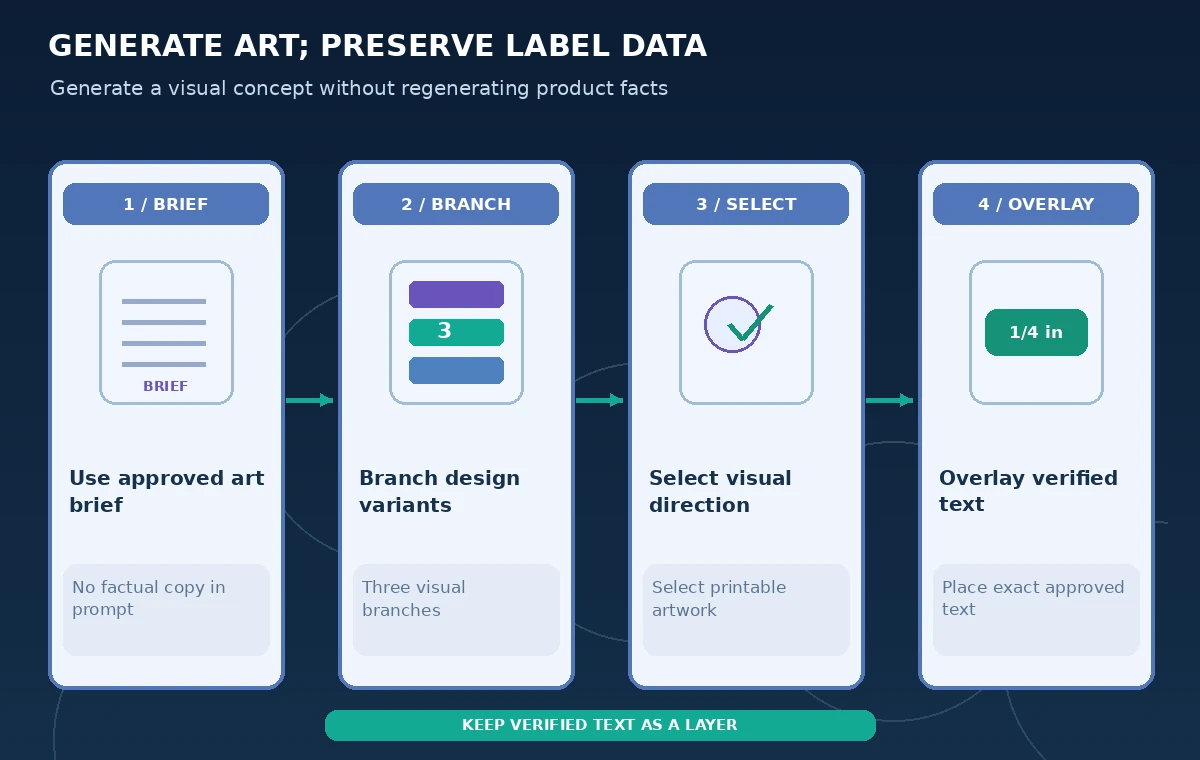
Krea describes Nodes as a connected graph where outputs from one operation feed the next. A straightforward pattern is source art brief to three image branches, then reviewer selection and an export stage. Add a separate, non-generative approved-label component in your actual design application; do not assume Krea automatically preserves typography or the exact planting instructions.
Keep the graph legible with explicit names such as Source art, Style A, Style B, Style C, and Selected image. Avoid sending the same unreviewed text into each image-generation branch as a request to render packaging facts. That would create three independent opportunities for a wrong numeral. The process illustration maps these stages in a schematic, not a screenshot of Krea.
Use prompt-to-workflow as a starting draft, not a final plan
Krea says its prompt-to-workflow capability can translate a description into connected nodes that can be edited. A useful prompt specifies the desired creative branches and asks for outputs suitable for later label composition. After generation, inspect node types, model assignments, and connections before running them; a proposed graph may introduce more stages or use different tools than the team intended.
If the graph connects a generated text label directly to final packaging, break that edge. Keep an independently managed text overlay step in a verified layout file. A workflow that produces three good-looking variations is not proof they meet printer requirements, color standards, or labeling regulations.
Compare visual variants on the same criteria
For each branch, assess whether the basil leaves are legible at physical packet size, whether the contrast supports an overlay, and whether details interfere with required legal or instructional copy. Use the same aspect ratio, crop, and print mockup when comparing directions. Favor compositions with space for text over elaborate images that cover the approved instruction panel.
Treat generated leaves as decorative interpretations. Do not publish them as an identification reference for edible or poisonous plants without expert botanical verification. Where an illustration implies scientific accuracy, a qualified reviewer should confirm morphology or label the art as stylized. Record the selected direction and why it was chosen, rather than assuming a model rank predicts usability.
Preserve the planting depth outside generated text
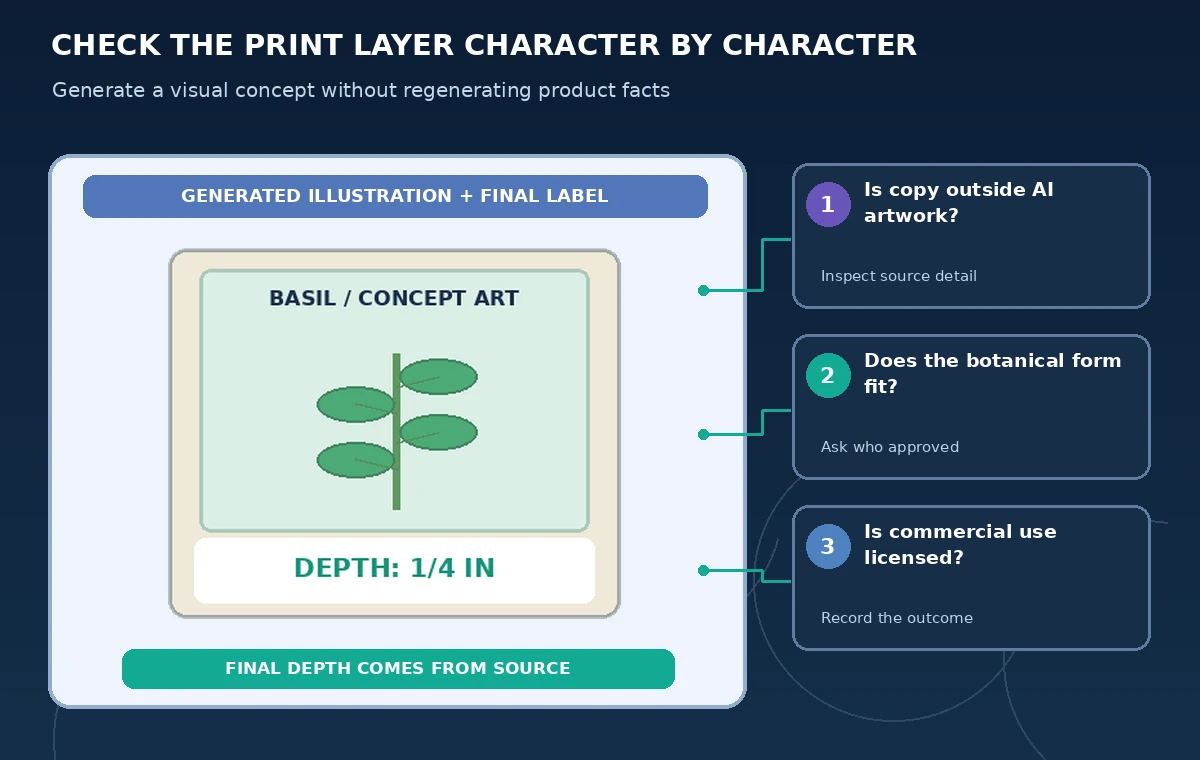
The key example contrasts a flawed generated label reading “4 in” with a later approved layout that inserts “1/4 in” from the verified seed instructions. The numbers are fictional for the diagram; the point is the magnitude of a single-character error. The remedy is not merely another prompt asking for better numerals but a controlled text layer that a reviewer can compare character for character.
For the actual product, get instructions from the supplier’s current lot documentation and relevant local rules, not from this illustrative number. Keep barcode, lot code, dates, safety warnings, and contact information in normal editable design elements. Export with a proof checklist that includes physical dimension, color space, trimming, and legibility.

Control shared edits in Multiplayer Nodes
Krea’s October 2026 description of Multiplayer Nodes allows people to change graph connections, prompts, and model settings on the same canvas. Set a convention for who can edit a source image or branch and who approves the chosen output. Real-time co-editing speeds exploration but also makes it easier for a teammate to alter the intended graphic without noticing.
During review, compare the final node graph to the accepted design specification. Record any model switch that could materially change licensing or output behavior. Have one person freeze the art direction while another checks the factual label in the downstream publishing file. A shared green cursor is not evidence of production approval.
Check account rights before commercial printing
Krea pricing distinguishes different plans and commercial licensing terms. Recheck the current account’s entitlements, any reference-image licenses, and the rules of the specific generation model before printing packets to sell. A free test workflow is not a blanket grant of commercial rights for every asset in the graph.
Maintain provenance for external images, artwork, and any brand marks. If the design resembles a real competitor’s label too closely, ask for independent design review instead of treating model-generated uniqueness as guaranteed. Avoid quoting cost per image because availability and credit consumption can change by model, settings, and subscription.
Approve the print master independently from the graph
Create a separate proof showing chosen illustration plus the locked label template. Compare every printed number and field with the current master data sheet, inspect the final PDF or image after export, and run a small physical-size review before release. The original graph is useful for producing new seasons or variants, but the art node should never overwrite approved facts in the production file.
Archive the approved final design, source instructions, template version, selected graph, and reviewer sign-off. If next year’s lot changes, edit the controlled data layer deliberately rather than asking the generator to update the previous packet from memory. Successful creative automation means reproducible concepts and a human-verifiable publication process.
How We Research
For our November 5, 2026 documentation review we consulted these named official sources: Krea: Nodes creative workflows; Krea: Prompt-to-Workflow; Krea: Multiplayer Nodes; Krea: Pricing and commercial terms. We mapped documented access requirements and controls to a narrowly defined hypothetical workflow, then wrote independent checkpoints that an editor or operator could verify. We did not purchase a subscription, use customer records, operate equipment, execute production code, or measure tool accuracy for this article. The diagrams are original instructional artwork, not screenshots or proof of vendor output. Plans, availability, legal rules, and organizational procedures may change; confirm current documentation and authorized source materials before acting.
Frequently Asked Questions
Yes. Krea documents a visual node graph where tools and models can be chained and outputs reused.
Krea describes a prompt-to-workflow feature that builds a draft graph which should then be inspected and edited.
Do not rely on that. Place regulated and factual text in a separate controlled layout and proof it.
No blanket assumption is appropriate; check the plan and the licenses of source assets and applicable models.
No. They illustrate an error class, not cultivation recommendations for a particular seed lot.