
An oral-history archive has recordings in which residents refer to a village with a spelling that differs from the raw speech recognizer output. Publishing a consistent index can help listeners search, but an automatic replacement can also erase how a speaker actually pronounced a name or confuse two different locations. Google Cloud Speech-to-Text V2 offers transcript normalization entries that replace selected text strings in recognition output. This hypothetical workflow treats those entries as editorial suggestions that require source listening, not historical corrections made by the cloud service.
Keep the spoken evidence distinct from display spelling
Save the original audio and a version of the transcript without normalization before making replacement rules. Assign an interview ID, recording checksum and timecode for each known place-name variation. An approved display spelling may be appropriate in an index, while a verbatim quotation should still preserve an accurate account of what was said.
A policy should distinguish a mistaken recognizer spelling from a genuine dialect variant and from two similarly named places. Ask archival staff which fields are meant to be normalized: a searchable title, a caption track, a catalog keyword or a direct quote. Apply stricter review whenever a change could affect attribution, migration history or land records.
Know what transcript normalization changes
Google documents TranscriptNormalization in V2 RecognitionConfig, with entries containing search, replace and case_sensitive. The feature performs string replacement in the transcript; it does not make a recognizer more likely to hear a word correctly. Speech adaptation is a separate mechanism for weighting recognition candidates. Conflating them can lead to overly confident descriptions of the result.
The API documentation allows up to 100 entries and specifies a maximum length for individual search and replacement strings. Check current model support and configuration at implementation time. A well-formed rule can still be historically inappropriate: turning a similar-sounding word into a town name may make a transcript look authoritative while decreasing its faithfulness to the speaker.
Build narrow, approved replacement entries
Collect a short list of names whose display form has been verified against an authoritative gazetteer or a locally approved archive catalog. For each entry, record the observed ASR phrase, the proposed replacement, case behavior, evidence source and reviewer. Avoid general transformations such as replacing every occurrence of “spring” with a village name when spring also appears as an ordinary word.
Use a test set with both positive and negative examples. A rule for a historical neighborhood must not affect a person with the same surname or an unrelated street. If reviewers cannot identify a reliable boundary from text alone, leave the phrase for manual correction. The rules should minimize editorial changes, not maximize the number of replacements.
Account for replacement order
Google states that normalization entries are processed one at a time in order. Its documentation illustrates how an early replacement can prevent a later phrase from matching. Test overlapping rules deliberately: a short search string may replace part of a longer proper name before the longer entry has a chance to apply.
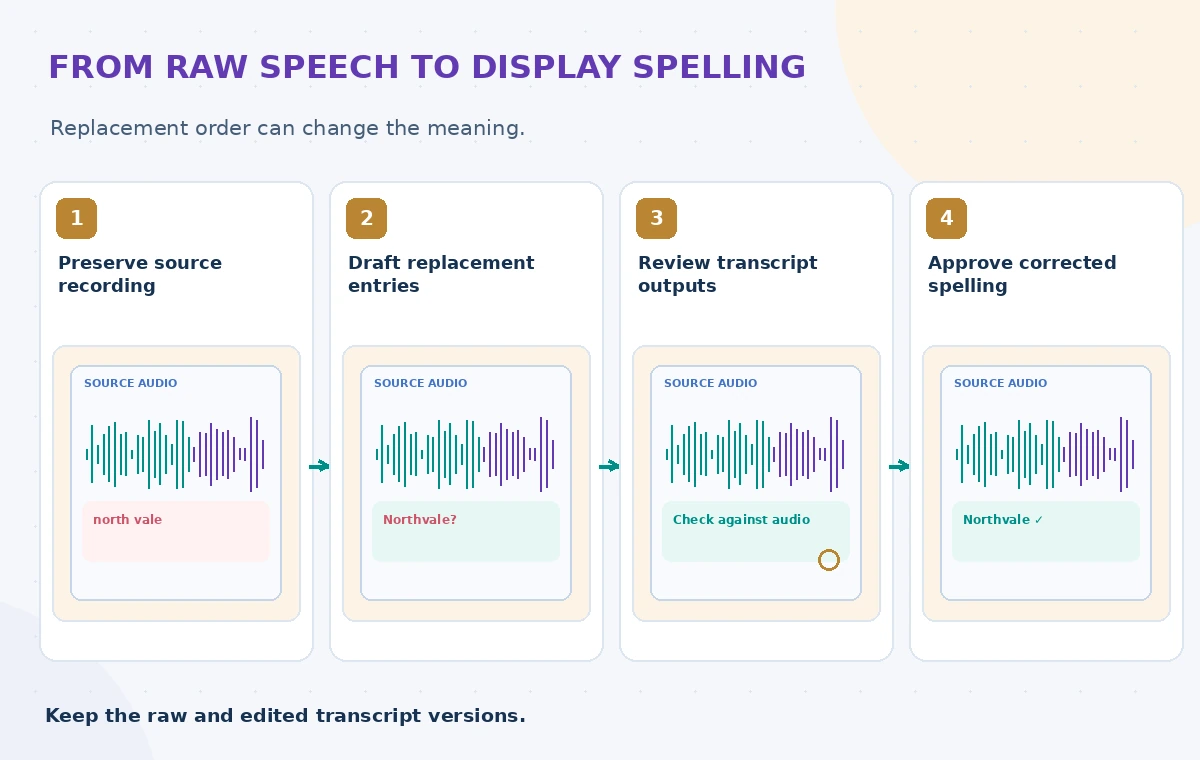
In the accompanying diagram, the raw phrase, proposed normalized name and source-checked spelling are three different editorial states. They are not actual model output from an archive. Record the order of replacement entries with the versioned transcription configuration, and compare both the intended correction and nearby unchanged words for unwanted edits.
Handle streaming partial results carefully
For StreamingRecognize, Google documents that normalization applies to stable partial transcripts with stability above 0.8 and to final transcripts. A live caption surface may therefore show evolving wording before a result becomes stable. Do not announce an intermediate spelling as verified merely because it appears once during streaming.

If a museum kiosk uses live captions, distinguish provisional text from the final transcript in its display and retention logic. Normalize only where the feature is supported by the selected recognizer, model and language. Preserve timecodes and review final output after the session, particularly for short proper nouns that may occur near interruptions or background speech.
Separate normalization from translation and identity
Replacing a display name is not translation, speaker identification or factual validation. A phrase in a transcript could refer to a former town, a modern district or a family nickname. Do not use an automatic rule to decide among those meanings. Preserve metadata about language and source context even when the public-facing catalog uses a consistent spelling.
For a bilingual interview, a replacement approved for one language may be wrong in another. Scope entries to appropriate recordings and recheck cases with accented or non-Latin scripts. Keep names of living people and private locations subject to the archive’s access policy. Correct spelling does not create permission to reveal a place mentioned in a restricted interview.
Run a small reversible quality check
Compare an unnormalized transcript, a normalized output and a human-checked reference for a handful of consented or synthetic clips. Log every changed span, including unchanged surrounding phrases. Review false positives and false negatives separately. If a proposed rule creates one consequential wrong place name, consider removing the rule instead of averaging the error away.

Make the original playback reachable to the authorized reviewer at each contested timecode. A test should include similarly spelled places, ordinary words and phrases with interruptions. Do not report accuracy, latency or time savings unless the archive performed a documented real-world assessment under a known configuration.
Publish a transparent, versioned derivative
Label the normalized text as an edited derivative when it is used publicly, and keep the source transcript and audio protected. Maintain a rule-version field so researchers know whether two search results came from the same normalization policy. Give readers a correction channel if a community member identifies a naming error.
After changing a rule, inspect all affected citations, captions and search records before replacing an approved transcript. An attractive spelling may improve discoverability but erase evidence if used carelessly. The authoritative evidence remains the recording, its permissions and the archivist’s explanation of each consequential change.
How We Research
For this November 2026 article, we reviewed vendor documentation: Google: Cloud Speech V2 RecognitionConfig; Google: TranscriptNormalization Python reference; Google: Speech V2 recognizers REST reference. We compared the documented inputs, outputs, workflow boundaries and limitations with a clearly hypothetical community-service use case. No private records were processed, paid API calls performed, real system benchmark measured, or permission granted on behalf of an organization. Every illustration is original explanatory artwork, not a vendor screenshot or experimental result. Before deployment, confirm the current API, feature eligibility, regional availability, security rules, source permissions and local operating requirements.
Frequently Asked Questions
No. Normalization replaces recognized text strings; adaptation influences the recognizer’s word predictions.
No. Google documents sequential processing, so entry order can affect overlapping replacements.
No. The documented streaming behavior applies to stable partial transcripts above 0.8 stability and final results.
No. Verify the identity and spelling from external records and source audio before accepting a replacement.
No. Keep the unnormalized derivative and audio so editorial replacements remain reversible and auditable.