
A community tool library receives handwritten and printed equipment-loan forms. Staff want to capture the borrower reference, requested equipment, return date, and a checkbox acknowledging the loan rules. The difficult part is not getting data into a table; it is avoiding a false claim that a blank or poorly scanned box was checked. Google Document AI Form Parser can identify key-value pairs, simple tables, generic entities, and selection marks. This is a hypothetical workflow with invented form details, not a scan we processed.
Create a field map that preserves unknown values
List the fields the desk actually uses: form revision, member reference, item code, pickup date, expected return date, checked rules box, and staff approval. For every field define an unknown state that is different from false, blank, or zero. A missing mark could mean the image is poor or the detection is uncertain; it does not prove that the borrower declined. Keep the paper or the approved image as the authoritative original and link it by internal record ID.
Do not use a generic entity labeled date_time as evidence that the date refers to a return deadline. A form might carry a birth date, submission timestamp, training date, and return date. The key or nearby context matters. Decide in advance which fields need staff confirmation before a loan is issued and which can be imported as provisional metadata. An unchecked agreement box should block automatic approval pending direct form review.
Choose Form Parser for conventional labeled forms
The pre-trained Form Parser extracts labeled key-value pairs, tables, checkboxes, text, and 11 generic entity types. It is intended for conventional forms with fields resembling ‘Name: value’ and simple tables that do not rely on complex merged cells. It cannot be up-trained as a custom model. When the library has a specialized layout needing trained extraction, the vendor identifies custom extraction as a different product path. Do not promise custom training in the Form Parser configuration.
Confirm the processor version, supported region, language, image format, quotas, and data handling before submitting real membership forms. Use synthetic sample forms for an initial integration test. If a sheet has privacy-sensitive information outside the needed loan fields, minimize collection upstream. A mobile snapshot with shadowed edges may be a reasonable failure test, but that does not establish measured accuracy. Capture image quality concerns in the queue rather than laundering them into confident values.
Connect labels and values, not just detected text
A key-value pair ties a form label to an associated extracted value, while generic entities identify common types such as phone, date_time, or id without proving their business meaning. Normalize known label variants into library field names, and reject mappings that match more than one destination. A label like ‘Due’ might refer to a fee on one revision and a date on another. Include the form revision in each mapping rule to avoid quietly moving data into the wrong column.
For multirow equipment requests, use the detected table as a candidate grid and compare its columns against the original. Check whether a wrapped description changes row boundaries, whether a quantity belongs to the correct item, and whether footnotes sit beneath the table. If the image includes a printed ‘example’ table as instructions, do not import it as a borrower’s actual selections. Humans should inspect ambiguous labels and unreadable handwriting.
Interpret selection marks with their neighbors
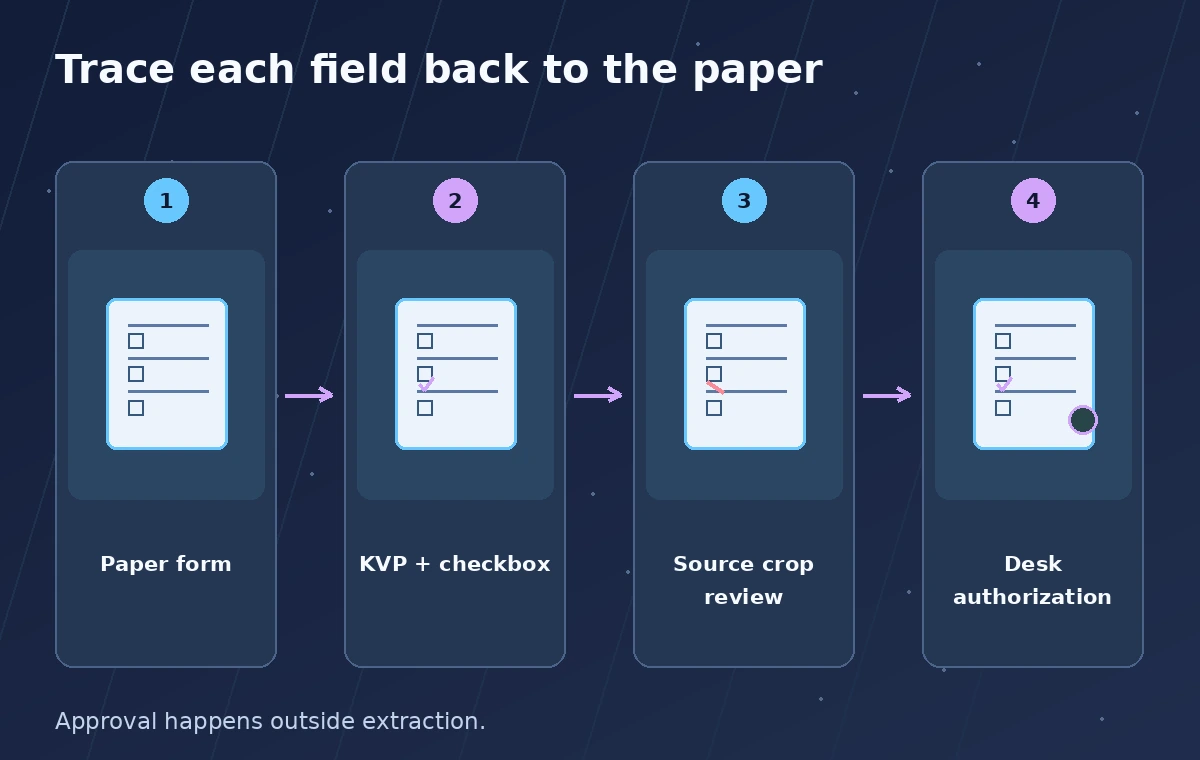
Form Parser can return checkbox information as a key-value pair, using text near the mark and a valueType to express filled versus unfilled. It does not guarantee the checkbox is attached to the legally relevant sentence. A box by ‘I agree to conditions’ differs from one beside ‘I need instruction before borrowing.’ Keep the exact label, its detected state, and a crop of the source region together for review. Never relabel a generic tick as consent without context.
Google’s limitations state that the checkbox model does not parse radio buttons and that some detected checkboxes may lack corresponding keys. Blank form fields may also be unreliable. For any unsupported or unlabeled mark, present ‘needs review’ rather than silently guessing which option was selected. The comparison diagram intentionally contrasts a visible empty box, a genuinely filled box, and an unclear ink mark; none is an actual processor screenshot.

Prevent a successful extraction from becoming approval
Set two separate status fields: data captured and equipment release authorized. The first records the best interpreted values plus unresolved fields. The second is a decision made by authorized staff after verifying ID requirements, equipment condition, training, and the signed agreement as the local rules require. A machine-detected check cannot sign an agreement or authenticate a borrower. Even a correctly read date may have been amended by a staff note not represented in a simple table.
Display a small side-by-side review area with form crop, interpreted key and value, source revision, and staff action. The reviewer can correct a field, leave it blank, or hold the form. Store corrections and the original machine result separately to detect recurring problems. If two fields disagree, such as ‘return 12/10′ in a table and ’12/12’ by a note, record the conflict rather than using whichever value looks cleanest.
Test damaged images, mixed marks, and old revisions
Make a synthetic packet with a sharp printed form, a skewed phone photo, a partially erased check, a handwritten return date, and an obsolete form layout. Add a case with one unchecked box next to another checked box to test label attachment. Review each detected field against the source and classify errors as missing, wrong value, wrong label, or unsupported structure. The exercise should document your own future tests, not imply that Document AI achieved a claimed success rate.
Use an import hold when the processor version changes, a new language is introduced, or a form revision changes label order. Keep a small sampling plan for routine manual audits because extraction may look plausible even when wrong. Any handwritten alteration that affects a loan’s terms should be inspected. Reconcile imported rows back to original IDs so staff can trace a changed or disputed return date without relying on an AI-generated summary.
Finish with an auditable staff desk workflow
Design a desk interface where the borrower reference is displayed only to staff who need it. Show clear badges for verified, corrected, missing, and requires manual review, but do not expose a confidence number as if it were authorization. A staff reviewer should be able to click a field, see the corresponding form area, and sign off on the equipment issue separately. The paper or PDF stays available according to the retention policy.
Before deployment, check official processor availability, quotas, and privacy obligations in the project’s region. Revisit the Form Parser limitations on radio buttons, empty fields, and table complexity. Confirm that the library’s workflow still works if the service is unavailable: a person must be able to inspect the form and record a lawful loan. The outcome to optimize is fewer incorrect field transfers while preserving an unmistakable human authorization step.

How We Research
For this November 2026 source review, we read these named official references: Google Cloud Document AI: Form Parser; Google Cloud Document AI: Processor list. We compared documented inputs, outputs, limitations, supported formats, and workflow prerequisites against the specific scenario. The images and examples are original conceptual illustrations, not screenshots, measurements, or real outputs. We did not create a vendor account, submit actual community artwork, member forms, seed catalogs, recordings, or restricted archives, or run a live API performance test. We do not claim accuracy rates, latency, tested prices, legal consent, or verified translation, and we do not infer those from the drawings. Before operational use, confirm current feature availability, rate limits, regional and data-handling requirements, pricing, and organization policy. Where permissions, linguistic accuracy, historical quotations, or authorizations matter, a qualified person must review the original evidence.
Frequently Asked Questions
No. Google describes Form Parser as pre-trained and not up-trainable; a custom extractor is a separate choice for trained specialized extraction.
Yes. It can detect selection marks and associate them with nearby text as key-value output, but the association still needs review.
No. The official limitations state that the checkbox model does not support parsing radio buttons.
No. Detection of a mark is not identity verification, a legally valid signature, or proof of authorization.
Keep a missing or needs-review value and let staff inspect the source. Do not invent a date or checked status.