
A fictional community workshop receives a scanned packet containing an application, a safety briefing, and a waiver. Someone wants AI to separate the pages so staff can find the right form quickly. Azure Document Intelligence custom classification can identify trained document types and their page ranges, but it does not turn an empty signature field into valid consent. The practical challenge is organizing the bundle without treating document routing as legal approval.
Map document classes to real workflow decisions
Define the classes that matter before uploading any files: application, workshop briefing, waiver, and perhaps a deliberate ‘other’ category. These are navigation labels, not statements that their contents are true. In the example, a page that resembles the waiver template should be labeled as a waiver even when its signature box is blank. The approval system must keep a separate signed/unsigned status determined from the actual source.
Ask staff how mixed packets arrive. Does one PDF contain three different documents? Can a two-page waiver be split across adjacent scans? Are there duplicate forms from an earlier session? Create a representative sample and label page ranges manually. The classifier should be evaluated against this reference rather than judged by whether the output looks orderly on a screen.
Train a classifier on representative examples
Microsoft documentation describes at least two distinct classes and five sample documents per class to begin training a custom classifier. Five is a minimum, not a promise of adequate performance. Include realistic variation in scan rotation, paper texture, and form versions when the privacy policy allows it. Keep separate evaluation documents that were not part of training, so a favorable result is not simply recognition of a memorized sample.
Document Intelligence Studio can organize the labeled files and supporting Layout output. If a team uses the API directly, its preparation requirements may differ from clicking through Studio. Preserve version information for the Azure API and classifier; do not combine examples from incompatible versions without checking the vendor’s guidance. Strip unnecessary personal identifiers from test samples and use synthetic forms where possible.

Choose a split mode deliberately
The v4.0 Document Intelligence documentation states that splitMode defaults to none. For a multi-document PDF, explicitly choose auto if the intention is to identify document boundaries and corresponding page ranges. perPage has different semantics: it treats each page as an individual document candidate. Neither setting promises that a two-page form will always remain intact, so compare each predicted span with its original pages.
Keep a page map such as ‘source packet A, pages 3–4, predicted waiver’ and preserve the untouched original. Do not rename each classified page ‘approved waiver’ just because it has a high class score. If an attachment lies between two related forms, a split may be logically wrong even when all individual labels look plausible. The review screen should allow staff to rejoin pages without overwriting source evidence.
Separate document classification from consent verification
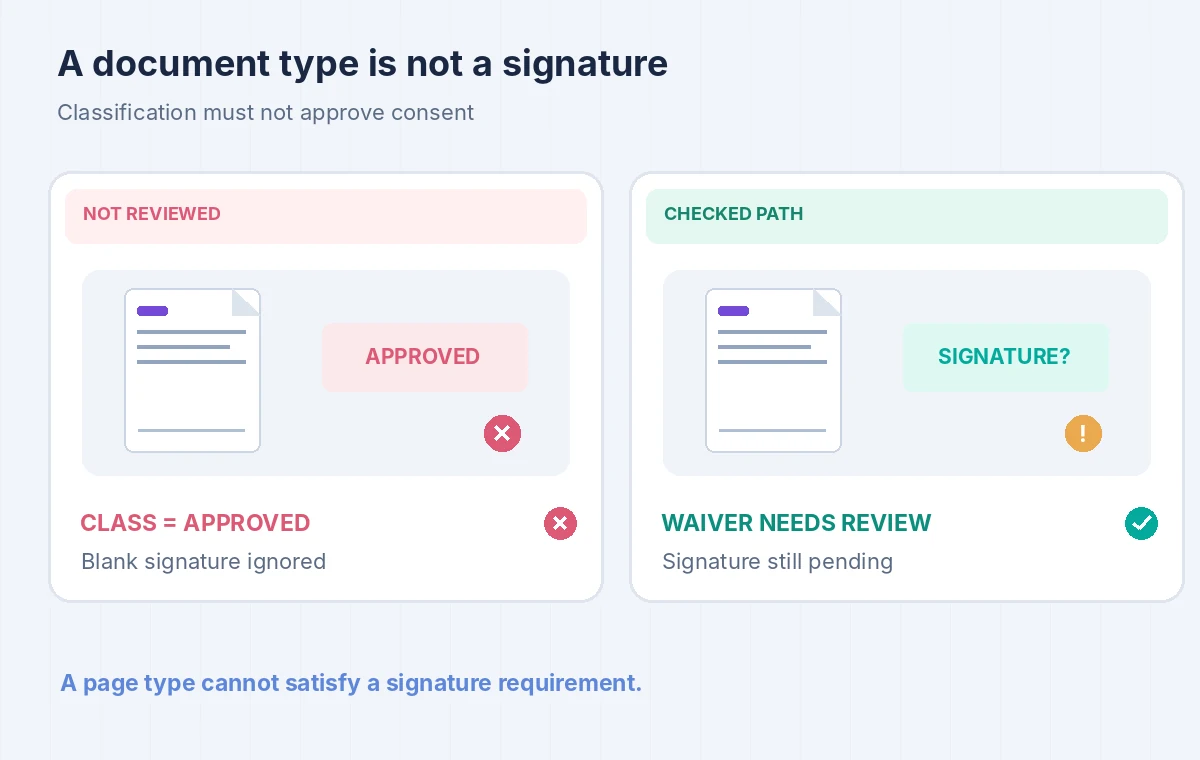
A custom classifier predicts document type. It is not a signature-verification tool or a consent determination. The wrong workflow sees a waiver-shaped page and routes the person into an approved volunteer list. The correct workflow labels the page as ‘waiver — signature pending’ until an authorized reviewer checks the actual form, required fields, date, and governing workshop policy.
The comparison illustration uses two versions of the same hypothetical packet: one route silently merges type and consent, while the other shows a separate blank-signature flag. This is a conceptual example, not an Azure service result. Reviewers should open the source crop at legible resolution and record the reason for any manual correction. Never infer a missing signature from handwriting recognized elsewhere in the bundle.
Use confidence scores as review signals, not verdicts
A classification confidence score helps prioritize human checks, but a high score concerns a trained label and is not proof that a document is complete. A low score can arise when a document is unfamiliar or poorly scanned. Create an escalation category for unknown templates and ambiguous boundaries. Rather than forcing the model to pick between waiver and application, preserve ‘needs classification review’ for unusual pages.
Track errors separately: wrong document type, incorrect start page, incorrect end page, missing page, and consent status misread by a later process. Those are different operational failures requiring different fixes. A model that classifies individual pages accurately may still produce unsafe packets if boundaries are wrong. Report metrics only after testing against real labeled samples; this article does not claim any accuracy figure.
Protect intake files and retention settings
Volunteer packets may contain names, signatures, emergency contacts, and accommodation requests. Identify the lawful purpose and limit who can submit them to a cloud service. Use an approved storage location and retention schedule, remove unneeded duplicates, and avoid placing personal details in diagnostic logs. The example uses invented forms; do not upload real waivers as a convenience test without institutional permission and a documented handling policy.
Review who can access the original bundle, the individual page images, extracted metadata, and any corrected output. A preview widget that displays a signature may need tighter access than one showing only a document class. Preserve an audit trail when a reviewer changes the detected boundary or resolves a missing signature. That trail must record the action without exposing more personal information than the job requires.
Build a release review for page spans
Before assigning volunteers to a workshop, verify the beginning and end of each predicted document against the source PDF. Confirm that an application was not joined to the next person’s waiver, that a two-page waiver did not lose its second page, and that unsigned forms are not shown as approved. The three points in the final diagram target class, range, and consent separately.
Have two examples in the acceptance set: one complete packet and one deliberately unsigned packet. The correct outcome is different even if both are classified identically as waivers. Save the class prediction, reviewer decision, and original page number together. If staff cannot reconstruct why the record was approved, classification automation has damaged the process rather than improved it.

Decide whether a custom model is justified
A custom classifier requires a labeled corpus, maintenance, versioning, and evaluation. A small workshop that receives one standardized form type may be better served by a deterministic file naming process or manual checklist. The classifier becomes attractive when document types vary and packet volume creates meaningful sorting work, but it should still hand legal and eligibility conclusions to the appropriate staff role.
Revisit the model when template designs change or a new class becomes common. Test its boundary choices again after an API upgrade. Keep the original file as a durable source and make every extracted page traceable. The safe measure of success is fewer misplaced forms without a single unsupported claim that a person consented.
How We Research
For this November 2026 article, we studied vendor-maintained primary documentation: Microsoft Learn: Custom classification model, Microsoft Learn: Build and train a custom classifier. We translated the documented workflow and caveats into the fictional, limited-scope example above. We did not execute a paid cloud request, inspect private records, measure model accuracy, interview customers, or reproduce the provider UI. Any values shown in the diagrams are invented teaching labels, not benchmark results. Review release notes, account permissions, regional availability, processing terms, and pricing before using this process on production data.
Frequently Asked Questions
No. It identifies a trained document class and page ranges. A person must verify the waiver content, required signature, and organizational consent rules.
Microsoft documents at least five training samples for each of at least two document classes. More diverse samples are normally needed to evaluate real scan variation.
It asks the classifier to identify separate documents and their page ranges inside a file. Version 4.0 defaults to none, so mixed packets need an explicit choice.
Use perPage only when that behavior fits the source. A multi-page waiver may need its pages kept together, which requires page-boundary review.
No. Confidence is about class prediction, not completeness or authorization. Check boundaries, signature state, and supporting evidence before changing eligibility status.