
A missing photograph is not always an erased photograph
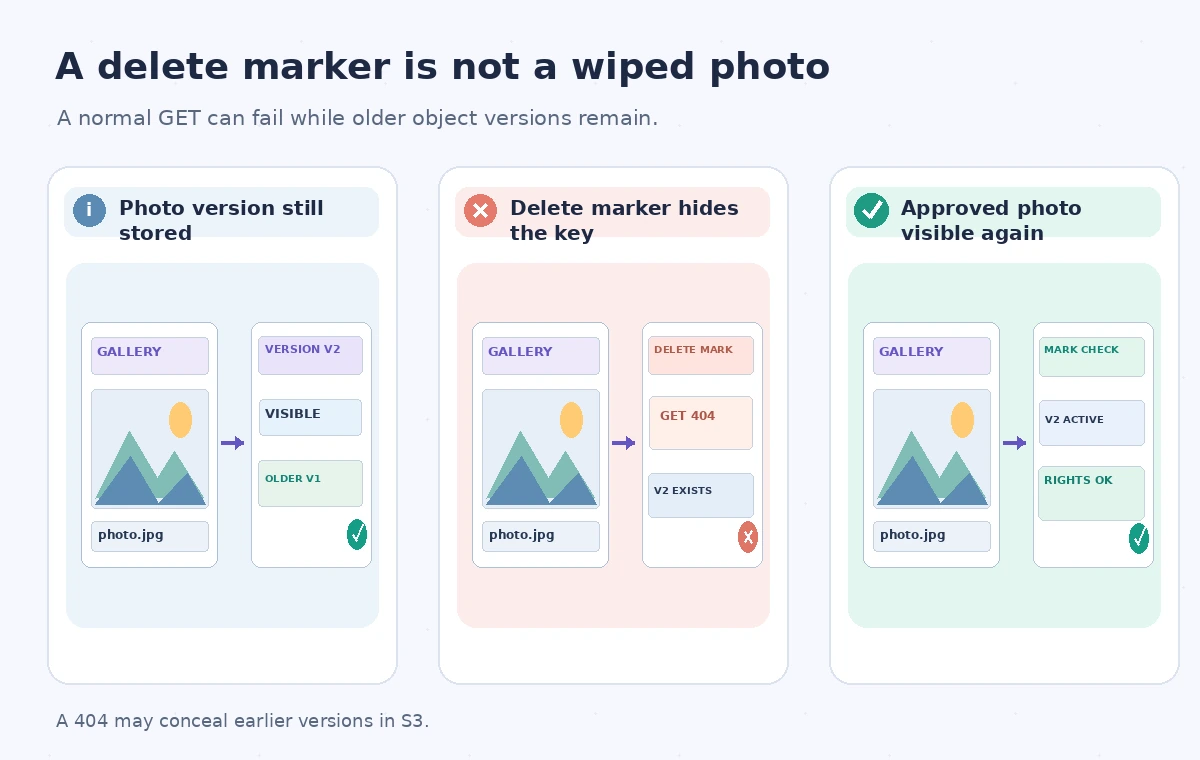
A museum website displays a broken image for a historic theater photograph after a content cleanup. The S3 object key once pointed to the public derivative, and the catalog still holds its caption and approved rights statement. Staff suspect that a script deleted the file. If bucket versioning was enabled when the object was changed, a simple DELETE might have inserted a delete marker while leaving older versions in storage. The normal GET for the key may now return 404 even though an earlier version exists. The recovery problem is not solved by uploading any photo with the same filename. Staff must identify the exact key, bucket, version history and approved derivative before making it visible again.
Understand what a delete marker does
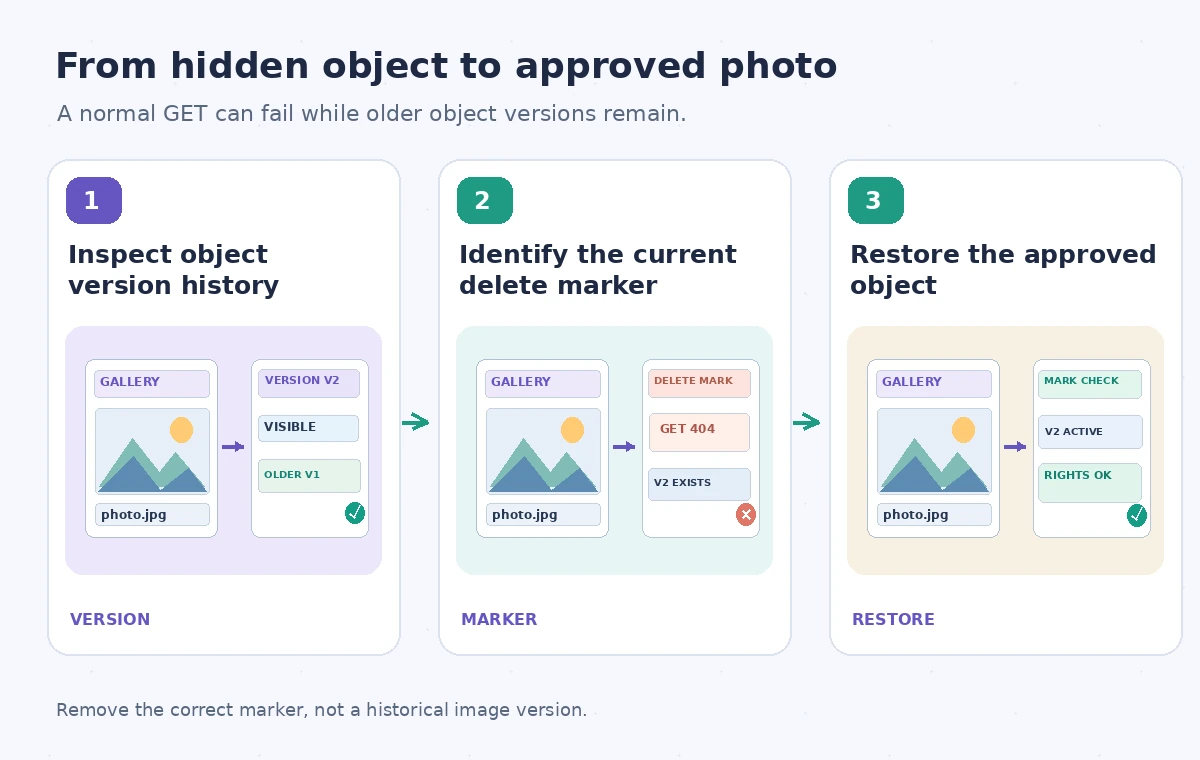
Amazon S3 documentation explains that deleting a key in a versioning-enabled bucket without specifying a version ID places a delete marker as the current version. A request for that key without an explicit older version can behave as if the object is absent. Existing object versions are not erased merely by this operation. Deleting a particular object version by its version ID, however, is a permanent removal of that version; confusing the two operations is an avoidable archive risk. This guide focuses on buckets where versioning is enabled and actual versions exist. Suspended versioning and null-version cases need separate attention, so do not infer the outcome from a generic 404 or the presence of a filename alone.
Collect the key, version IDs and rights record first
Begin with the catalog entry’s canonical object key and bucket, plus the expected object checksum or controlled derivative identifier if available. Check the versioning configuration and list the object’s versions and delete markers using a sufficiently privileged, logged account. Record which entry is current and whether its IsLatest state identifies a marker. Compare previous versions by creation time, content type and rights metadata; older does not always mean approved. If a later version was intentionally withdrawn for privacy or copyright reasons, automatically revealing an earlier copy may be an unauthorized disclosure. Require the registrar or rights editor to approve the actual version that should become publicly retrievable.
Pick the recovery operation deliberately
Amazon’s guidance says that deleting the current delete marker using its version ID can make an older version current again. That is very different from repeating an ordinary DeleteObject request without a version ID: when a delete marker is current, a second ordinary DELETE can create yet another marker. Before applying any change, check that no later edit or withdrawal has superseded the approved version. In sensitive workflows an alternative is to copy the reviewed older version into a new controlled public derivative key, retaining a record of why the copy was made. Choose based on rights, retention and application expectations. Never permanently delete a real historical image version as a shortcut for resolving a missing thumbnail.
Draw the hidden object and recovery states accurately
The comparison uses three states: an existing stored image version, a current delete marker hiding the key from ordinary reads, and a deliberately restored approved derivative. The middle panel is not labeled as destroyed media. In the final panel, the visible photo is tied to a version check and rights approval; simply removing the marker does not automatically provide either. An instructional illustration may represent a gallery image with a photo-frame icon, but it is not a console screenshot or a real production audit. The diagram also shows a separate warning for permanent version deletion, because removing an actual version ID can be irreversible while removing a delete marker changes which version becomes current.
Test the restored object, not just the API response
After an authorized recovery, request the canonical key and inspect the returned content type, image dimensions, controlled hash and current version ID where accessible. Confirm that the CMS record, caption and alt text still describe the restored image. If a CDN is involved, stale negative caching can keep a broken image on the public site even after S3 returns the object, so verify both origin behavior and the published page. Do not assert that invalidating a cache is necessary in every setup. Also test with the site’s normal read identity rather than an administrator account: successful privileged access does not prove that an approved public derivative is available to the visitor application.
Separate undelete from permanent retention policy
Versioning allows recovery options but is not itself a complete preservation program. Lifecycle rules can expire versions or certain delete markers; storage classes, Object Lock and legal holds may impose other constraints. A marker may also be deliberately placed to remove sensitive media from the visitor experience while keeping evidence internally. Document which bucket policies govern archival masters and which govern disposable derivatives. Recovery should not silently bypass a takedown decision or defeat an approved retention schedule. If object versions have already been permanently removed, this article’s marker workflow will not magically restore them; use the institution’s authorized backups and incident procedures instead. An inventory of versions is a starting point, not a guarantee of recoverability.
Practice a controlled recovery with test media
In a staging, versioning-enabled bucket, upload an innocuous test image, create a new version, then perform an ordinary DELETE without a version ID. Verify that the current key is hidden while prior versions remain listed. Record the delete marker’s version ID, remove only that marker and check which version is returned by a normal GET. Test also the case of two markers so that the team does not assume one removal will always expose the desired image. This is a suggested drill, not a test the article author performed against a real museum account. Restrict permanent delete permissions in the exercise and keep the resulting version-history log with the recovery runbook.

Sign off with a version-aware audit trail
The incident record should identify the affected public page, bucket, exact key, marker version ID, chosen approved image version and person authorizing recovery. Include the post-change GET result, public-page check and rights review. Keep private audit artifacts out of the public image bucket. If staff cannot establish which historical version is legally and editorially current, leave the public record in a clearly unavailable state and escalate rather than exposing arbitrary media. When recovery succeeds, update monitoring so a future 404 prompts a version-history check instead of immediate re-upload. This preserves provenance and prevents an operational missing-image problem from becoming permanent loss or accidental publication.
How We Research
For this guide we consulted the official documentation: Amazon S3 managing delete markers; Deleting object versions in S3. We compared named fields, supported behaviors and stated limitations, then developed an instructional museum scenario with explicit failure states. We did not run a live vendor API benchmark, inspect a production museum system, or measure vendor performance. The workflow and illustrations are proposed review steps; verify API-version support and your organization’s current policy before applying them.
Frequently Asked Questions
Not necessarily. In a versioning-enabled bucket, a marker can hide existing earlier versions from ordinary reads.
After approval, delete the correct marker by its specific version ID or use a controlled copy of an approved version.
When a delete marker is current, a further ordinary DELETE can create another marker rather than removing the current one.
A delete targeting an actual object version ID permanently removes that version; treat it as a high-risk action requiring separate authorization.
No. Confirm the exact version, rights approval, CMS record, public access path and page rendering.