
The missing warning that a rank number cannot explain
A museum help desk searches a blended index for instructions on cleaning a historic display panel. The interface shows popular maintenance guides above a small safety warning from a conservation manual. An engineer sees the final ranking score but cannot tell whether keyword matching, vector similarity, or a semantic reranker drove the placement. Azure AI Search query-time debug information offers a way to inspect component contributions. It is not the Azure indexer debug-session feature, nor is it a truth detector. In this hypothetical example, the requirement is to make a warning discoverable and traceable to an approved source, not to manufacture a higher score that looks reassuring on a dashboard.
How reciprocal rank fusion affects hybrid search
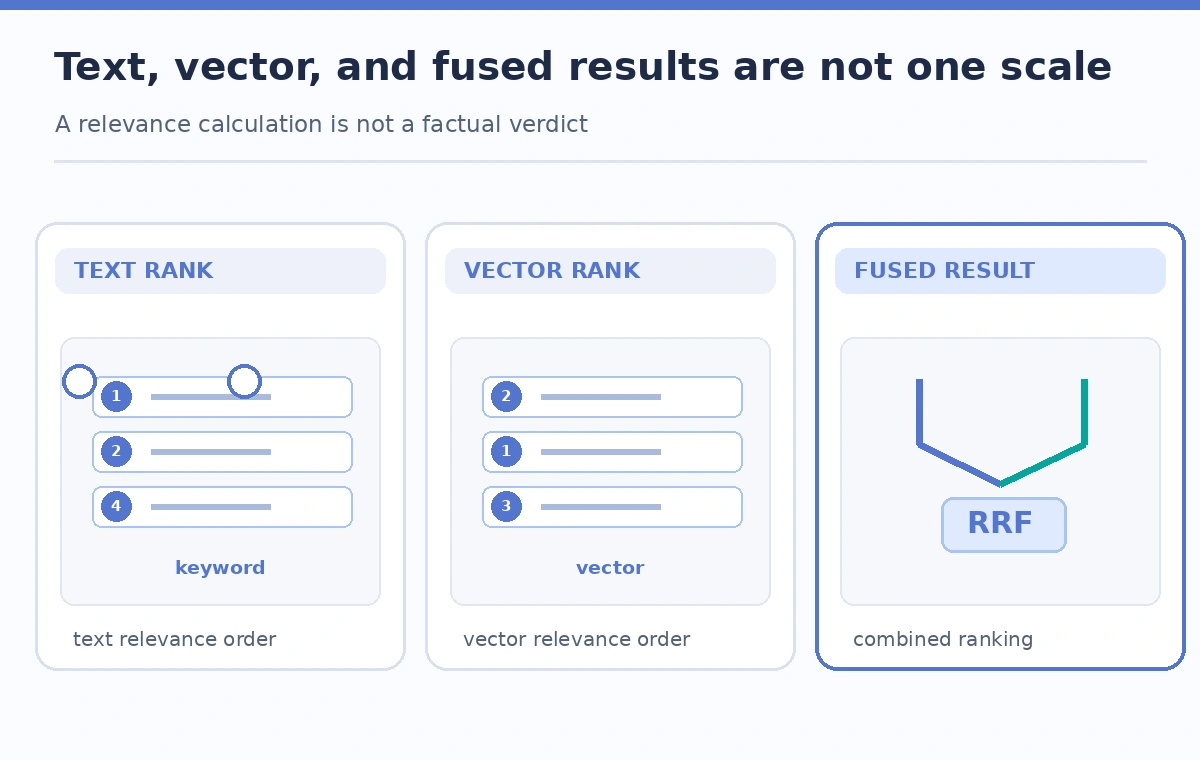
Azure AI Search can combine keyword and vector result sets by reciprocal rank fusion, or RRF. A document found near the top of one result list may receive a different fused position when other queries contribute. Microsoft documents `@search.score` in the search response and explains that RRF scores are not on the same interpretation scale as standalone vector similarity scores. A semantic reranker can add a separate `@search.rerankerScore`, rather than replacing factual verification. Changes in the number or mix of contributing queries also affect RRF values. Comparing raw scores across unrelated query configurations without noting the inputs creates a misleading diagnostic.
Use the documented debug selector in a test query
Microsoft’s hybrid-ranking documentation describes a `debug` query parameter with values such as `vector`, `semantic` when semantic ranking is used, and `all`. The returned debug detail can expose component scoring information useful for understanding a particular result. Confirm the current REST API version or SDK supports the selector in your environment before copying an example; response layouts may differ among clients. Limit the test to approved public or synthetic catalog records. Query debug responses can contain additional ranking information, so avoid posting them unreviewed in a public ticket. A production visitor interface rarely needs to show diagnostic subscores.

Freeze the query conditions for a meaningful comparison
Record the exact search text, active filters, vector query configuration, selected fields, result count, semantic options, API version, and index generation. Save the retrieved document keys as well as the scores. Then run the same request with the debug option enabled, changing as little else as possible. If the team changes vector weights, query wording, source index, and debug mode simultaneously, it cannot tell which condition caused the warning to move. Preserve the consent and rights filters throughout diagnostics; removing restrictions to see more hits is not a valid production relevance test. Use a controlled fixture or an authorized test role.
Read subscore contributions without inventing certainty
Inspect the ranking explanation for the exact document that should have surfaced, comparing its vector and text contributions to nearby results. The most useful question is often which component retrieved the document at all, not whether a number looks high. Where semantic ranking is enabled, treat its separate reranker score as an additional relevance signal. A high relevance score means the system judged a text or vector match valuable under that configuration; it does not prove the instructions are current, safe, or legally shareable. Scores can change when fields, analyzers, vector embeddings, or candidate retrieval sets change. Document those boundaries in the investigation.
Design a small failure-focused evaluation set
Build a query set that contains ordinary visitor phrasing, uncommon historical materials, accession IDs, abbreviations, and warning conditions. Each test should name an approved document key and an expected reason for retrieval, such as a cautioned solvent name or a handling restriction. Have a subject-matter reviewer mark whether the answer actually needs that document. Do not report a success percentage unless the sample, grading rules, and actual runs are recorded. When the required document is missing, check indexing completeness, filter scope, and recall parameters before assuming the ranking model alone is at fault. Debugging a document that never entered the candidate set solves the wrong problem.
Tune one retrieval lever at a time
After identifying the weak contribution, decide whether a text field, analyzer, vector weight, synonym map, or retrieval-candidate setting could be responsible. Make one change in staging and rerun the fixed query set. A higher score for one reference example may suppress other necessary results, especially rare warnings with unusual wording. Keep semantic options and access filters constant while assessing an individual change. If you tune vector weights, inspect effects on both ordinary and safety-sensitive queries. Record the new configuration version and comparison summary for rollback. The goal is sufficient source coverage and traceability, not maximizing a single number for a convenient showcase query.
Publish source provenance, not debug numbers
The visitor-facing result should identify the original manual or catalog entry, relevant document revision, and access-approved excerpt, with a link when available. Keep debug traces in internal QA notes where engineers can interpret them. A rank explanation does not replace opening the source, checking effective dates, or confirming that a conservation specialist approves the public guidance. If the index stores mixed revisions, fix provenance first; reranking stale content is not a safe workaround. Treat candidate-set gaps, access-policy violations, and unsupported advice as distinct release blockers. A useful troubleshooting report says which gate failed and what evidence resolved it.

Common misreadings of hybrid score diagnostics
One mistake is treating RRF scores as probabilities that an answer is factually correct. Another is comparing `@search.score` for a standalone vector query against the fused score of a multi-query hybrid request, as if both were the same measurement. Teams may also rely on `@search.rerankerScore` alone while ignoring that a missing record was never included in the reranker inputs. Finally, a debug result can tempt operators to remove filters to make a warning appear. Keep query conditions stable, diagnose candidate coverage before ranking, and have a human inspect authoritative source text. A score explanation is only one layer of a retrieval audit.
How We Research
We consulted Microsoft’s hybrid search ranking guide for RRF and the debug selector, its vector ranking explanation, and the semantic ranking overview. The museum warning example and visual comparisons are conceptual, not logs from a tested search index. We did not execute hybrid queries or claim improvements in measured recall. Check the API version, SDK surface, index permissions, and your own evaluation set before acting on the workflow.
Frequently Asked Questions
The debug setting requests diagnostic scoring information. Hold other query parameters fixed when investigating whether enabling diagnostics changes response details.
No. It is a relevance score under a specific retrieval configuration and should not be interpreted as a factual confidence percentage.
Not as equivalent quantities. Microsoft documents different scoring methods and ranges; compare results under controlled, like-for-like settings.
Check indexing completeness, filter scope, text/vector coverage and retrieval settings before trying to tune ranking weights.
Usually no. Show traceable approved sources to visitors and keep detailed scoring diagnostics under internal review and access controls.