
A Proofreading Job Should Not Be a Publisher
A small museum maintains English and Spanish visitor notices in a GitHub repository. Pull requests trigger a translation checker that scans for missing headings, untranslated warning lines and invalid Markdown links. The job needs to read repository files, not publish a website or approve a pull request. GitHub Actions supports the permissions key at workflow and job level to control the automatically issued GITHUB_TOKEN. Separating a read-only quality check from any release job reduces the impact of buggy code, compromised dependencies and accidental commands. It does not remove every workflow security risk, so a wider review of triggers, secrets and third-party actions remains necessary.
Understand the Job-Scoped Token
GitHub explains that a unique GITHUB_TOKEN is generated for each job and normally expires when the job ends or at its effective lifetime limit. Its permissions can be governed by repository and organization defaults plus workflow and job-specific declarations. Do not assume that one repository’s defaults apply elsewhere. A job with permissions: contents: read can generally check out the relevant repository content without receiving broad write privileges. A release job may need different scopes, but those should be justified individually. Inspect the effective token permissions recorded in Actions diagnostics rather than inferring them from a successful checkout alone.

Specify Minimal Access in YAML
A simple starting pattern is a workflow-level permissions: {} followed by a translation-QA job with permissions: contents: read. GitHub’s workflow syntax states that once individual permissions are specified, unspecified permissions are set to none. That prevents accidental inheritance of unrelated rights in a job that merely parses text. The exact YAML indentation matters, and the repository may impose additional restrictions. Some actions or APIs may fail without a particular read scope; add a narrowly justified right only after checking the task. Do not solve a failing check by switching the entire workflow to write-all. That turns a small QA problem into a broad credential exposure.
Split Review, Packaging and Deployment
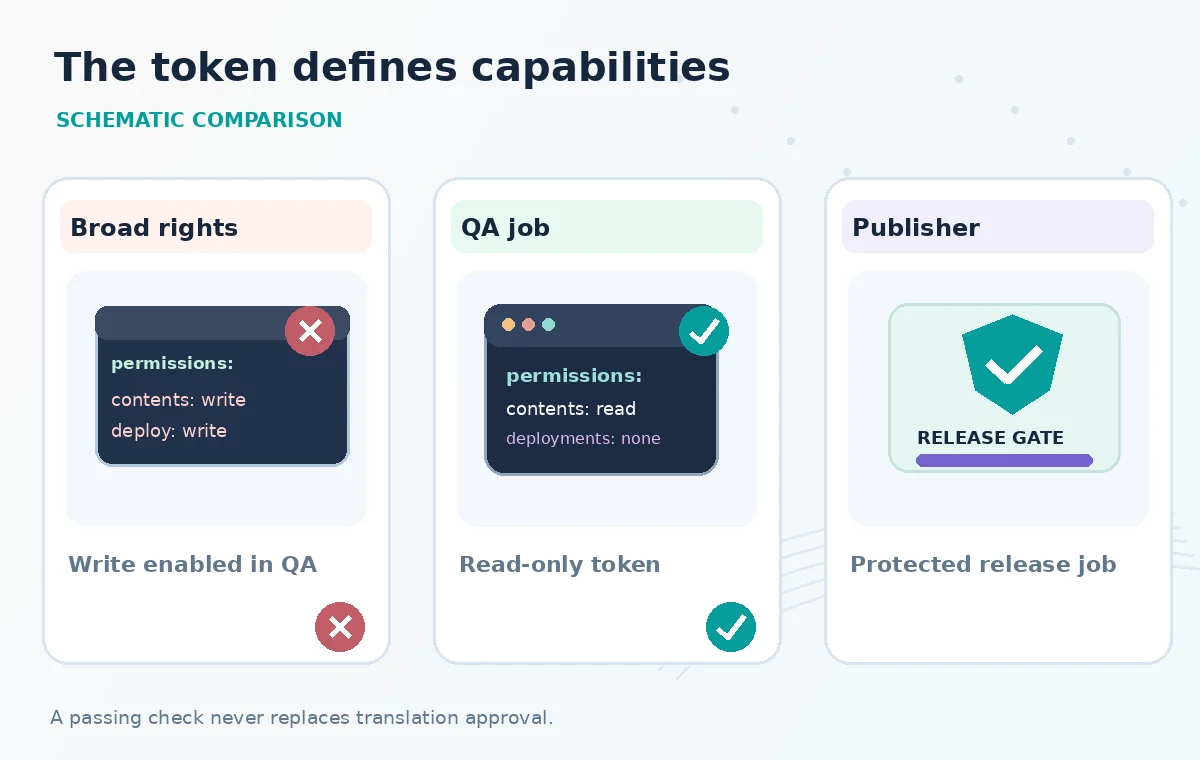
Design three jobs with different privileges. The first reads and tests translations, generating a local report. The second builds a deployable artifact only after required checks pass and, ideally, runs with no repository write access. The final publication job belongs behind protected branch or environment rules and receives only the permissions necessary for that target. Avoid passing a sensitive secret into the proofreading job just because the release job needs it. Keep deployment credentials under a separate trust boundary and limit which events can invoke the publisher. This split makes it obvious which job may change production and why.
Inspect the Difference Between Read and Write
The conceptual illustration shows the same translation QA script running with two token configurations. In the risky case the job has broad write rights, and an unexpected command could try to modify a release or annotate repository content. In the safer case it reads files and reports quality findings without mutation rights. These are examples of capability boundaries, not evidence that an attack was run. A correct setup should fail safely if a check attempts a write operation that it was never meant to perform. An HTTP permission error in that negative test is a sign the boundary worked, not necessarily a problem to bypass.
Handle Forks and Pull Request Events Deliberately
External contributions are an especially important place to verify permissions. GitHub’s documented token behavior varies with event type, repository settings and administrative policies. Forked pull_request workflows typically have constrained write access, while pull_request_target has a more privileged execution context and requires careful treatment of untrusted code. Do not check out and run arbitrary contributor scripts in a privileged context with repository secrets. Translation QA can usually operate as an ordinary pull request check with read-only access. If maintainers need an automatic comment or label, use a tightly scoped separate job or trusted workflow rather than granting the analysis step blanket write permissions.
Audit Third-Party Actions and Hidden Credentials
The GITHUB_TOKEN can be accessible through the github.token context even if a workflow does not explicitly pass it into every step. Review action dependencies, permissions and any script that reads environment variables. Prefer pinned, reviewed actions and avoid running downloaded shell commands that can change without notice. Repository or environment secrets, personal access tokens and cloud credentials are separate from job permission declarations; contents: read does not neutralize an unrelated powerful secret exposed to the same job. Check whether checkout persists credentials and whether later steps need them. A true least-privilege design minimizes every credential path, not just one YAML setting.
Create a Release QA Matrix
Before enabling automatic publication, run the translation workflow with a clean pull request, a deliberately broken Spanish warning line and a test action that tries a forbidden repository write. Confirm that checks accurately identify missing text and that the third case is denied. Then test the separate deployment job from an approved branch while recording the protected environment and reviewer decision. Store failure logs without leaking text from private draft notices. If an API call requires extra permission, record its purpose and narrow the scope accordingly. None of these test outcomes is claimed as observed; the matrix describes how a team should verify its own repository.

Keep Approval a Human Boundary
A green lint check does not prove that a safety sentence is idiomatic, legally correct or approved by a translator. Require a human review of critical multilingual visitor notices, and do not allow QA success alone to trigger public release of draft copy. Document who approved the translation and which source revision was reviewed. Job-level permissions then reinforce the editorial workflow: ordinary checks can read and report, while release authority is confined to an intentional and reviewable step. GitHub’s permission model is a useful building block, not a substitute for protected branches, monitored actions, careful event selection and a trustworthy translation process.
How We Research
We reviewed the named official primary sources on November 8, 2026: GitHub: Workflow syntax and permissions, GitHub: GITHUB_TOKEN security concept, GitHub: Secure use reference. We compared documented parameter scope, practical boundary cases and implementation risks with the review workflow in this article. We checked the topic and slug against the WordPress title inventory supplied by LabFin and previous B0267–B0271 batches. We did not authenticate to a vendor account, run a live API request, conduct a performance benchmark, review real confidential archive material or verify deployment outcomes. All documents, sample states and diagrams are hypothetical teaching illustrations; product UI is not reproduced.
Frequently Asked Questions
GitHub supports permissions at workflow level and on individual jobs. Job-level declarations allow distinct rights for QA and release tasks.
GitHub documents that the other available permissions are set to none when you specify individual rights.
No. It is a repository-content read scope; publishing operations require separately justified permissions or credentials.
No. Untrusted scripts, third-party actions, secrets and event behavior need separate controls.
It carries a different security context. Review GitHub guidance carefully and avoid running untrusted PR code with privileged credentials.